QR codes for hotels work best as a set of single-purpose codes placed at specific moments of a stay, not one code that guests are supposed to scan for everything. Put a code where it earns its place: pre-arrival confirmation, check-in and key collection, the in-room directory, wifi, service requests, the spa or restaurant cross-sell, and the review request at departure. Each one has to be dynamic, meaning it encodes an editable short link rather than a fixed address, because almost nothing in a hotel stays the same for a full year, let alone a property's full lifecycle.
That one decision, dynamic over static, turns a hotel check-in QR code from a one-time print job into something a guest-experience team can actually run. A digital guest directory that can't be edited without a reprint is barely better than the laminated folder it replaced.
If you need the basics of how a QR code works before going further, what is a QR code covers the scan mechanics; this post goes straight into the hospitality specifics.
Where a Hotel QR Code Belongs in the Guest Journey
A QR code for hotel rooms is really seven codes doing seven jobs, each with its own destination, its own reason to be dynamic, and its own signal.
- Pre-arrival confirmation. Opens mobile check-in from the booking email. Dynamic because the kiosk vendor or the upsell offer can change before the stay date. Signal: an early scan is a self-service adopter; no scan means this guest will queue at the desk.
- Check-in and key collection. Opens the digital key or kiosk step in the lobby. Dynamic so the property can reroute to a staffed desk the moment a kiosk goes down. Signal: how long after arrival the scan happens tells you whether the front desk is a bottleneck.
- The in-room directory that replaces the printed folder. Opens hours, amenities, and local recommendations. Dynamic because prices and schedules shift constantly, and reprinting a folder in every room for every change is not realistic.
- Wifi. Connects the guest instantly, without typing anything.
- Room service and late checkout requests. Opens an ordering or request page. Dynamic lets the menu, cutoff time, or fulfillment team change without new signage. Signal: request volume by hour, a staffing input as much as a comfort one.
- The spa or restaurant cross-sell. Opens a booking page, carrying a seasonal promotion when dynamic. Signal: which placement, room card or elevator sign, actually converts to a booking.
- The review request at departure. Opens the Google review link directly. Signal: what share of checked-out guests scan at all, a leading read on satisfaction before any survey comes back.
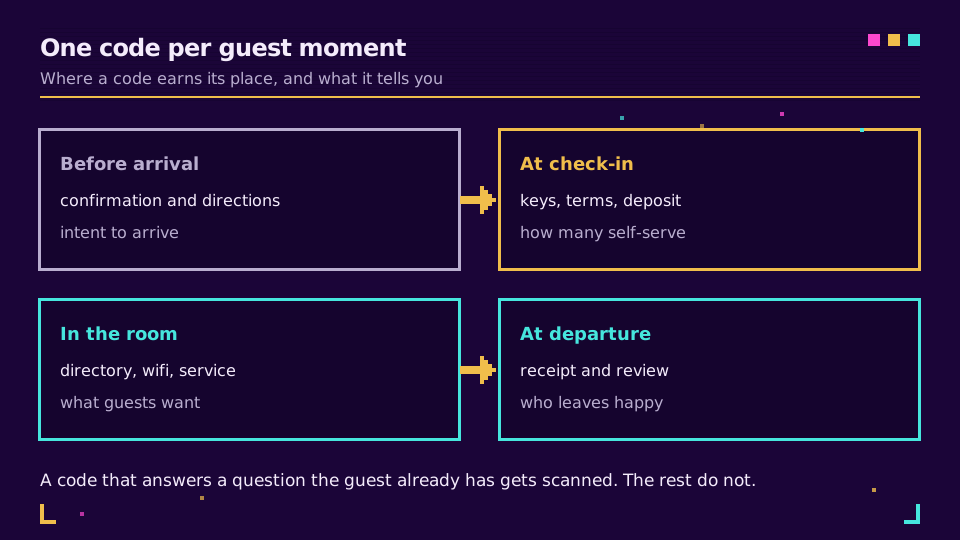
Seven moments, seven codes, one rule connecting them: dynamic, and each scan tells you something different about how the stay is actually going.
Why Every One of These Codes Has to Be Dynamic
A property's information does not sit still. Rates move, a supplier swaps the breakfast menu, a spa manager launches a seasonal package, a wing closes for renovation. A static QR code bakes its destination into the printed pattern, so the moment any of that happens, the card in the room is not just outdated. It is wrong.
For a single restaurant table, a few static codes are tolerable. For a hotel with hundreds of rooms, each needing its own directory card or door hanger, a static approach means a full reprint run every time anything changes, multiplied by every language you support. A dynamic code moves that cost from a print order to a two-minute edit in a dashboard, and the edit propagates to every physical card carrying that placement's code at once.
I have gone through this list touchpoint by touchpoint and have not found one where a static code is the right call, not even wifi, which looks like the safest exception. If the guest network password rotates on any schedule, printing a fresh static code every time is the maintenance burden a hotel does not want. Point the card at a short link to a page showing the current password instead, and updating it becomes a two-minute task, not a reprint order.
What Each Scan Actually Teaches You
Because every one of these codes runs through a redirect, every scan is a logged event: a timestamp, an approximate location, a device type. Tag each placement with its own short link and the picture gets sharp fast. You can see the lunch-to-dinner shape of room-service demand, which door-hanger placements never get touched, and whether the spa promo works better on the elevator sign or the room card. How to track QR code scans covers reading that data, and Elido's analytics record each scan as an individual event with no sampling, so even a quiet placement's numbers are exact.
A short note on privacy, since this is guest data, not anonymous foot traffic. Scan analytics can run entirely on aggregates: a count, a rough location, a device category, none of it tied to a name or a room number. The moment you join a scan to a folio or a loyalty ID, you have built a guest profile, which is a different kind of processing with its own rules around consent and retention. Keep the two separate on purpose. QR codes and GDPR covers exactly where that line sits.
One Code Per Placement, Not One Code Per Property
The shortcut every property is tempted by is a single QR code, one URL, printed everywhere: lobby, room, spa, elevator. It is simpler to manage, and it is the wrong call, because it collapses every placement's scans into one bucket and destroys the signal a hotel actually needs.
Give each placement its own short link instead, even when several point at the same page today. The front desk kiosk, the room 214 nightstand card, the spa reception sign, and the elevator poster become four separate rows in your analytics rather than one blended number. Generating a batch of codes that all resolve to the same destination takes minutes; the payoff is a placement-level breakdown showing that the elevator code gets five times the scans of the room card, the kind of finding that changes where you invest in signage.
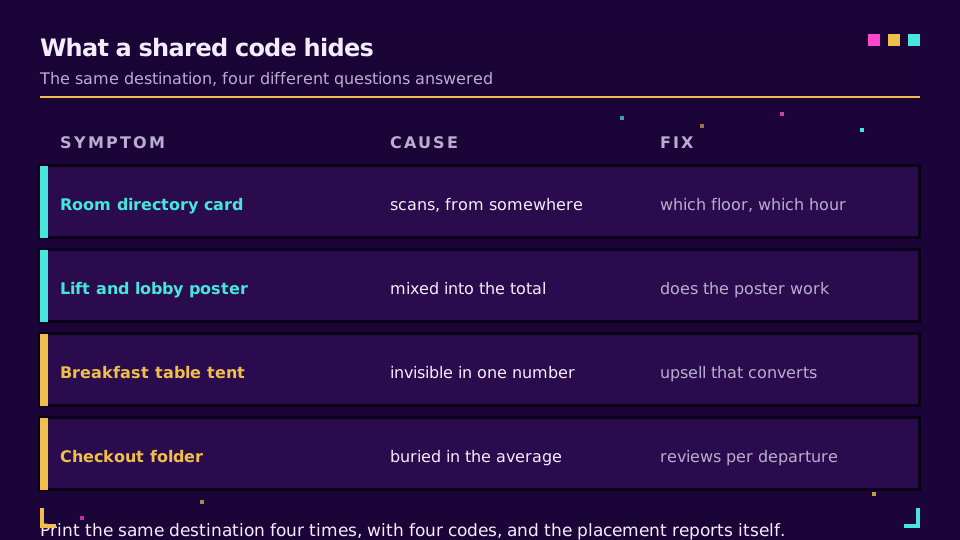
If you are about to print codes for a full guest journey across every room type, set it up so each placement is trackable from day one: Elido's QR codes let you generate and organize a batch by placement, so the front desk, the room, and the spa never share one lookup.
Printing and Placement Rules Inside a Room
A hotel room is forgiving and unforgiving at once. Forgiving because a nightstand card sits at reading distance, so it never needs the size a yard sign does. Unforgiving because the same card gets moved, stacked, and lit by whatever bedside lamp the property chose.
Contrast still wins over everything. Black on plain white scans reliably under any lighting a room throws at it; a pale code on branded cream stock is the first thing to fail once the lamp is dim. Size follows distance, and how big a QR code should be applies the same ratio logic at nightstand scale as it does on a sign. Keep the quiet zone, the clear margin, intact even on a small card, and raise the error correction level on anything handled daily, since a scratched card is the norm by month three. Matte lamination beats gloss for the same reason it does on a restaurant table tent: light bouncing off a lacquered nightstand defeats a scan before contrast ever becomes the issue.
Multi-Language Landing Pages for International Guests
A hotel serves guests who do not share a language, and a printed folder in two or three languages was never going to cover them all. A dynamic hospitality QR code solves this without a second card: the redirect behind it reads the phone's language setting and sends the guest to the matching version of the directory or the request form, falling back to a sensible default when nothing matches.
One printed card in the room now serves every nationality that walks through the door, without a laminated insert per language that goes stale the moment a menu changes. Keep the routing simple. A language branch and a default is enough for almost every property; a code with six nested rules for every market segment is a thing that breaks quietly on a busy weekend, right when you can least afford to debug it.
What Not to QR-Code
Two categories of information should never live only behind a scan.
The first is anything a guest needs when the wifi is down or the signal is dead, which in a basement, stairwell, or older wing is not rare. Fire exit instructions, the front desk phone number, and the room number itself belong in plain print, because a code that requires a network connection to resolve is useless exactly when a guest most needs what's behind it. The wifi network name and password belong in print for the same reason: the one moment a guest cannot get online is the moment a code pointing at "how to connect" fails them.
The second is anything that asks a guest to type a card number into a page reached from a scan. This is precisely the pattern behind quishing, where a scammer prints a fake code and sticks it directly over a legitimate one on lobby signage, and the guest lands on a spoofed page built to collect card details. The FBI's advisory on fraudulent QR codes describes this exact scam, and hospitality properties are a named target because guests assume any code on the premises is legitimate. If a payment step is genuinely needed, an incidental deposit or a folio settlement, route the guest through a known, bookmarked property system or the front desk, not a first-touch scan in public. Card data handling carries its own compliance bar, laid out in the PCI Security Standards Council's guidance, and a scanned lobby code is not where that bar gets met.
Everything else here, the directory, the wifi page, the request form, the review link, is a fair use of a scan. Payment entry and safety-critical information are not.
Related on the Blog
Frequently asked questions
How do hotels use QR codes?
Hotels place a separate QR code at each moment of the stay rather than one code that tries to do everything: a pre-arrival code for online check-in, a lobby code for key collection, an in-room code for the digital guest directory and room service, and a departure code for a review request. Each one points at a purpose-built page, and because the codes are dynamic, the hotel can update what they link to without reprinting a single card.
Is it safe to scan QR codes in a hotel room?
Usually yes, but treat any code on a shared or public surface with the same caution as an unfamiliar link. Criminals sometimes stick a fake code over a legitimate one in lobbies and elevators, a scam known as quishing, and the fake page typically asks for a card number. A code from your own room's printed directory is low risk; a loose sticker on a payment sign in a public area is not.
Can a QR code replace the printed guest directory in a hotel room?
Mostly, yes. A dynamic QR code can open a digital guest directory covering hours, amenities, room service, and local recommendations, and the hotel can edit that content whenever a price or a schedule changes, without reprinting anything. Keep a few essentials in print regardless: the room number, the fire exit plan, and the wifi network name, because those are the things a guest needs exactly when a scan will not work.
Do hotel QR codes work for international guests?
Yes, when the code is dynamic. The redirect behind the code can read the phone's language setting and send an English-set phone to the English page and a German-set phone to the German page, all from one printed code. A static code that encodes one page directly cannot do this; it shows the same page to everyone regardless of language.
Should a hotel use one QR code for the whole property or a separate code for each placement?
A separate code for each placement. One shared code for the lobby, the room, and the spa collapses every scan into a single count and hides which placement actually gets used. A dedicated code per placement, even when several point at the same page today, breaks the data down by location, so a hotel can see that the elevator sign outperforms the room card and act on it.
Can a hotel QR code be updated after it's printed, or does it need reprinting?
Only a dynamic QR code can be updated after printing. It encodes a short link, and the link's destination is editable from a dashboard, so the printed card in the room stays the same while the page behind it changes. A static code bakes the destination into the pattern itself, so any change, a new breakfast time or a seasonal spa menu, means reprinting every copy of that card across every room.
Try Elido
Paste a URL, get a working short link
No signup. Link lives for 30 days. Sign up to keep it forever.
Free, no signup required · 2 per day