A QR code menu for restaurants works for years if the code encodes a short link you control, not the menu's address itself. Print that dynamic code once on your table tents, then edit the destination whenever prices, dishes or seasons change. The printed side never needs touching again.
Most failed QR menus fail for dull reasons: a static code pointing to a PDF that was deleted, a code too small to scan in candlelight, no paper menu for the guest who wants one. This guide covers the setup that avoids those, from the code through the menu page to tracking each table. If you have never made a code before, how to create a QR code covers the mechanics first.
Use a Dynamic Code So the Menu Can Change
A dynamic QR code encodes a short link, and the short link redirects to your menu. Change where the link points and every printed code follows. That's it. A static code encodes the final address directly, so replacing the menu means reprinting every tent. Dynamic vs static QR codes compares the two in depth; for a restaurant the choice is easy, because menus change constantly.
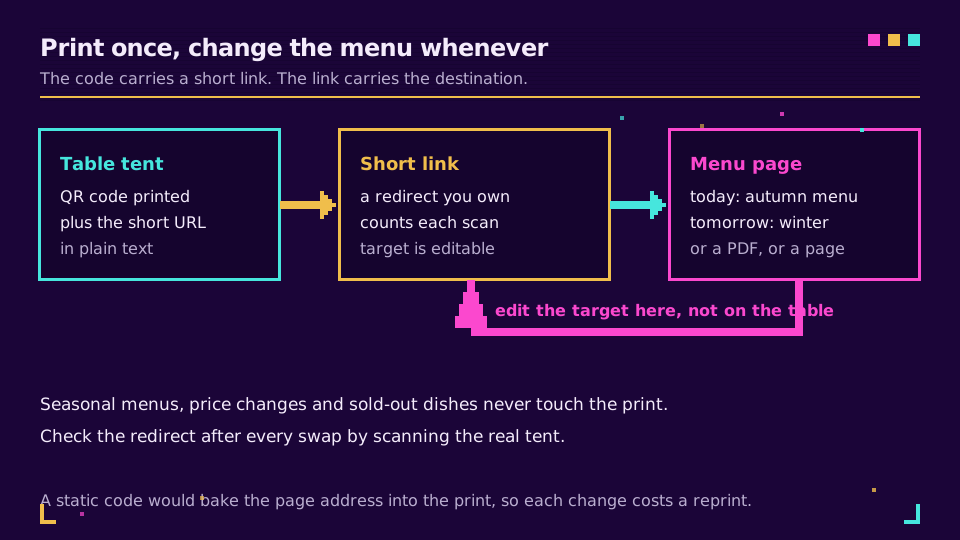
What changes in a normal year? Seasonal dishes, a supplier price jump, a sold-out special, a new allergen note, a switch from a PDF to a proper page. With a static code each one is a reprint run. With a dynamic code each one is a two-minute edit.
No reprint run.
I would also write the short URL in plain text under the code. Guests get a fallback. You get a way to recover when a code is scuffed. It also makes the link part of your brand when you use a branded domain such as a short address on your own restaurant's domain.
Choose a Mobile Page or a PDF for the Menu
A mobile web page beats a PDF. Text reflows to the screen, images stay small, and you can change one dish without re-exporting a whole file. A PDF is acceptable. Keep it to one light file, a few hundred kilobytes, in type that stays readable at phone width.
The usual PDF mistake is exporting the print menu as is. Tiny type. Sideways scrolling. A guest pinching the screen with one hand on a glass. If you only have a PDF today, build a one-column version for phones and keep the print layout for the wall.
A menu page does not have to be fancy. A plain list grouped by section, prices beside dishes, allergen notes next to the dish they apply to, and nothing that needs a login or an app download. Elido does not host or build menus; it provides the code and the redirect, so the page itself lives wherever your website or menu tool does. Elido's bio pages can serve as a simple landing page, but they are a link page, not a menu builder.
Size, Material and Placement on the Table
Make the code at least 2 x 2 cm and leave a clear margin of four modules around it; for a table tent read at arm's length, 3 to 4 cm is kinder to older phones. How big should a QR code be explains the 10:1 distance rule behind these numbers.
Material matters more than people expect. Glossy lamination throws back candles and spotlights. Use matte. Keep strong contrast, dark code on a light background, as the QR code standard's own guidance from its inventor recommends. Put the code where a hand naturally reaches: upright on the table, not flat under a wet glass, and not under a candle shade.
For anything that fails in the room, QR code not scanning walks through the causes in order. Test with one older, cheap phone. Dim light, standing up. That is the guest you will actually have.
Keep a Paper Menu for Guests Who Cannot or Will Not Scan
Offer paper on request, always. Some guests have no data. Others have an old phone, a dead battery or low vision. Others just prefer paper. A short line on the tent, "Paper menu available, just ask", costs nothing.
The accessibility side is worth reading properly. A printed code has no text alternative, so the URL in readable type is the alternative. QR code accessibility covers that, and the contrast rules in WCAG's minimum contrast criterion are a good bar for the menu page itself: readable body text, not light grey on white.
Also check what your country says about allergen information. Rules differ, and I won't state yours here, but a menu that only exists behind a scan is a risk if the guest cannot scan. Keeping a paper copy answers that.
Track Scans Per Table Without Tracking Guests
Give each table, or each zone, its own short link and code, then compare scan counts. You learn which area of the room uses the menu, whether the terrace code is being scanned at all, and whether the new printed tents beat the old ones. Elido's analytics log each scan as a click with its time and device; how to track QR code scans shows how to read that data.
Two honest limits. First, a scan is a click, so one guest opening the menu three times counts three times. Treat the numbers as usage, not headcount. Second, one link per table uses up your link allowance fast: Elido's Free plan includes 25 links in total, so a 25-table room would spend all of it on tables, and bulk import and larger allowances are on paid plans (see pricing). A zone per link (terrace, bar, window, main room) fits in the Free plan with room to spare.
Use tags or folders to group the links, and name each one by table or zone so the report is readable without a lookup sheet. If you want to start small, create a dynamic code on Elido for one zone, print it for a week, and read the scans before you commit to a full rollout.
GDPR: Keep the Menu Page Clean
The printed code collects nothing. The redirect receives an IP address, a user agent and a timestamp, which is personal data under the GDPR, and the menu page then has its own obligations. QR codes and GDPR breaks down what each scan generates, and the European Commission's overview of what counts as personal data is the plain-language starting point.
For a menu the rule of thumb is simple. Put no tracking pixels, advertising cookies or embedded social widgets on the menu page. A guest who scans a menu is not agreeing to be profiled. Elido has a retargeting pixels feature on paid plans, but you should leave it off for menu links. Keep scan analytics to counts, and keep raw click records for a short time: Elido's analytics retention is 90 days on Free, one year on Pro and two years on Business, and the GDPR for URL shorteners post explains how to choose a shorter window. Mention the menu scan and the redirect in your privacy notice, and keep an eye on cookie consent for short links if your menu page ever sets a cookie.
Common Failures and How to Prevent Them
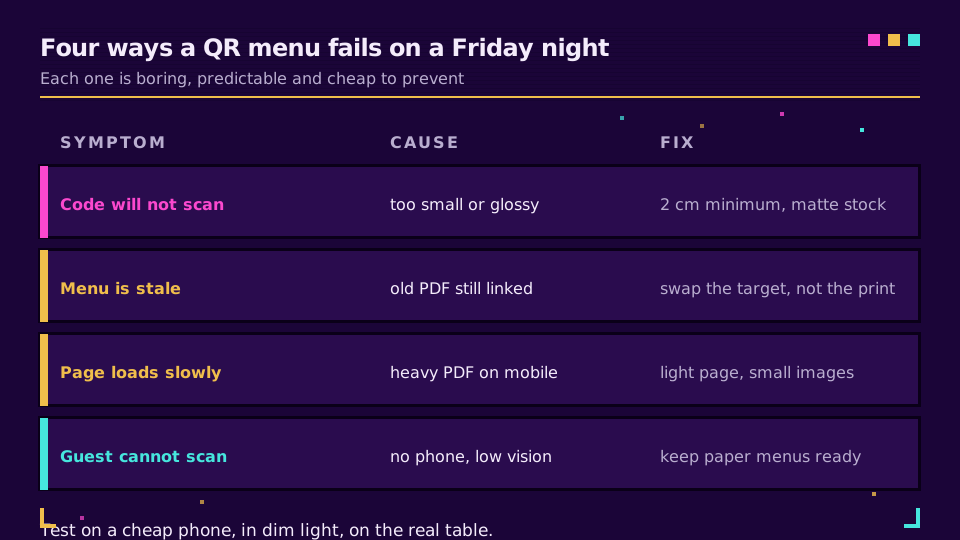
Most problems are one of the four above. A code that will not scan is nearly always too small, too glossy or cropped of its margin. A stale menu is a printed code linked to an old file. Swap the target and it's gone. A slow page is a heavy PDF, or full-size photos, on patchy restaurant Wi-Fi. A guest who cannot scan is a service failure. Paper solves it.
A few more to check before opening night: the short link is still active, the destination uses HTTPS, the menu opens without an app or login, and the redirect has been tested after every swap by scanning the real tent, not a screenshot. Treat scanning the tent as a pre-service check, like testing the card machine.
Five seconds, every shift.
Related on the Blog
Frequently asked questions
How do I make a QR code menu for my restaurant?
Put your menu online as a mobile-friendly page or a light PDF, create a short link that points to it, and turn that link into a dynamic QR code. Print the code on table tents with the short URL written underneath. Because the code encodes the short link, you can change the menu later without reprinting anything.
Should a QR code menu be a PDF or a web page?
A mobile web page is the better default: text reflows to the screen, loads faster and can be edited in minutes. A PDF is fine when it is a single light file of a few hundred kilobytes and you have no web page. Avoid scanned or print-sized PDFs that force guests to pinch and zoom on a phone.
What size should a QR code be on a restaurant table?
At least 2 x 2 cm for printed material, with a blank margin of four modules around it. For a table tent read at about 30 cm, 3 to 4 cm is more comfortable. Use dark code on a light matte background, because glossy lamination throws back candle and ceiling light.
Can a QR code menu work without internet?
No. Scanning decodes the code offline, but opening the menu needs a mobile or Wi-Fi connection. In a basement dining room or a venue with poor signal, offer guest Wi-Fi or keep paper menus on hand, because a guest with no signal sees nothing.
How do I track which table scans the menu most?
Give each table its own short link and QR code, then compare scan counts per link. Name the links by table or zone so the report is readable. Each scan is logged as a click, so counts show how often a code was opened, not how many different guests.
Is a QR code menu GDPR compliant?
The printed code collects nothing. The redirect and the menu page process data when opened, so the menu page should carry no tracking pixels or advertising cookies, and any scan analytics should be counts with a short retention period. Name the processing in your privacy notice.
Try Elido
Paste a URL, get a working short link
No signup. Link lives for 30 days. Sign up to keep it forever.
Free account required. The free plan includes 25 links in total. Already have an account? Log in