A QR code that will not scan is almost never a scanner problem. It is one of four physical causes: the code is printed too small for the distance people read it from, the white margin around it has been cropped, the contrast is too low, or the URL inside it is long enough to make the grid too fine to resolve.
Those four account for nearly every failure, and they are worth testing in that order because the first two are the most common and the cheapest to fix. This is the print-side companion to how to create a QR code; if your problem is that scans are not being counted rather than that the code will not read, how to track QR code scans is the one you want.
Cause One: It Is Printed Too Small
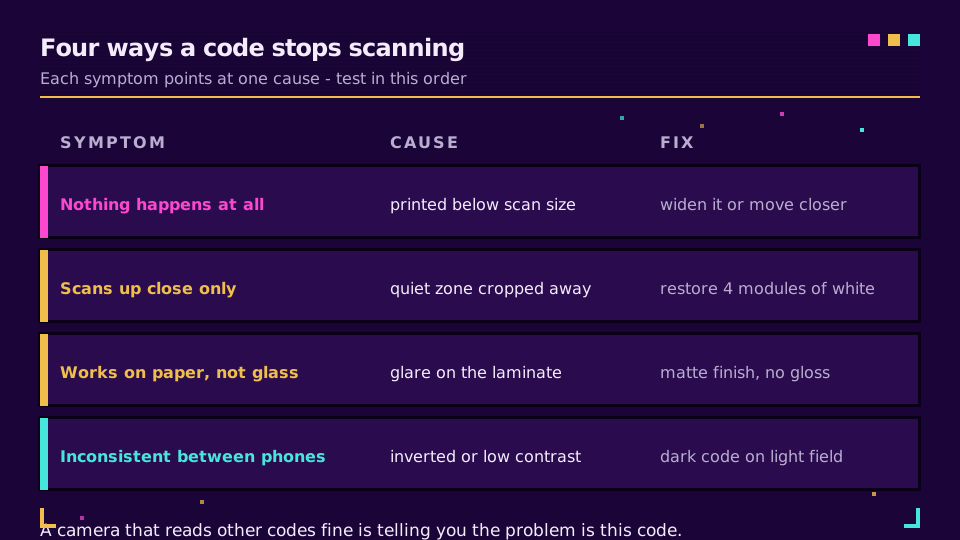
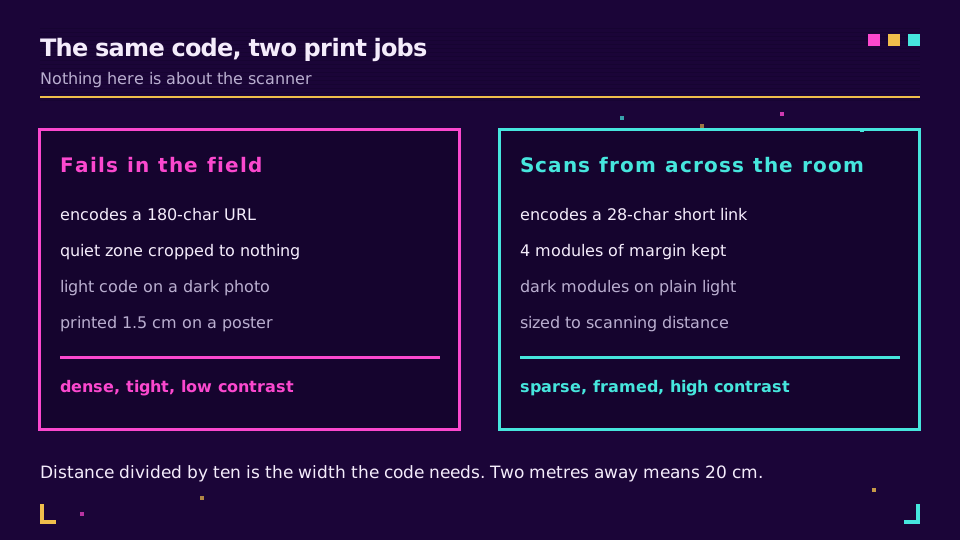
The rule of thumb is distance divided by ten. A code read from two metres needs to be about 20 cm across. A code on a table tent read from 40 cm can be 4 cm. A code on a billboard is a different exercise entirely, because the readable distance is set by how close a phone camera can focus and still resolve individual modules.
Designers shrink codes because they look like a blemish on the layout. The scan rate falls off a cliff below about 2 cm on older phones, and the people with older phones are exactly the ones least likely to try twice.
How big should a QR code be has the full sizing table, including the awkward cases like curved packaging and vehicle livery.
Cause Two: The Quiet Zone Was Cropped
The blank margin around a code is part of the code. Scanners use it to work out where the grid starts, so removing it can stop a technically perfect code from being found at all.
Four modules is the specified minimum, which on a typical printed code is a border roughly the width of one of the corner squares. Design software will happily let you crop it, place the code flush against a coloured block, or run text right up to the edge, and every one of those is the same defect.
This one is worth checking first when a code scans on screen but fails in print, because the on-screen version usually has the browser's white page acting as an accidental quiet zone.
Cause Three: Contrast and Glare
Scanners need to tell dark modules from a light field. Three things break that.
Low contrast is the obvious one: a mid-grey code on a pale grey background looks tasteful and reads badly. Inverted codes, light modules on a dark field, are decodable by many scanners and not all of them, so an inverted design needs testing on real phones rather than one.
Glare is the sneaky one. A glossy laminate or a code printed behind glass throws the shop's ceiling lights straight back into the camera, and the code that scanned perfectly on the proof fails on the shelf. Matte finish, or moving the code away from the reflection, fixes it.
Cause Four: The Payload Is Too Long
This is the cause people never suspect, because the code looks fine on screen.
The amount of data decides the version of the code, and the version decides how many modules it contains. Denso Wave, which invented the format, publishes the version and capacity table. A 30-character short link produces a sparse grid with chunky modules. A 180-character URL with five UTM parameters produces a dense one, and at the same printed size those modules are physically smaller and harder to resolve.
So the cheapest fix available is upstream of the print: encode a short link rather than the full tagged destination. The campaign tags live on the destination, the code stays sparse, and you get click data as a bonus. Bulk QR code generation covers doing that across a whole product catalogue.
Error correction pushes in the opposite direction. Level H sounds safer and adds redundancy that makes the code denser, so it is the wrong default: level M recovers from about 15 percent damage and keeps the grid readable. Go higher only when a logo covers the middle.
Want to test the theory quickly? Create a short link on the free plan, encode that instead of the long URL, and print both at the same size for comparison.
Testing It Properly Before the Print Run
Screen tests prove almost nothing. The failures above are all physical.
Print the code at final size, put it where it will actually live, and scan it from where a person will actually stand. Do that on at least two phones, one of them not new, and once under the lighting the code will live in. Ten minutes of that catches every cause on this page.
For a run of thousands, sample five. Codes are generated in a loop, so a defect is almost never in one code; it is in the template, and five samples will find it while the fix is still free.
When the Code Is Fine and the Link Is Not
Sometimes the scan works and nothing happens, or the phone opens a page that errors. That is no longer a QR problem: the code decoded correctly and handed a URL to the browser.
If the destination 404s, the certificate is not valid, or the link opens in one app and not another, the causes are entirely different and short link not working walks them. Worth knowing which side of the line you are on before reprinting anything, because a reprint fixes nothing when the link behind the code is the broken part.
That is the strongest argument for a dynamic code on anything printed: when the destination turns out to be wrong, you repoint the link instead of pulping the run.
Read the Cornerstone Series
This sits in the tutorials cluster. Start with how to create a QR code for the basics, then how big should a QR code be for sizing and branded QR code design for keeping a code scannable while it carries a logo.
Related on the Blog
Frequently asked questions
Why is my QR code not scanning?
Almost always one of four things: it is printed smaller than the scanning distance allows, the white margin around it was cropped, the contrast between the code and its background is too low, or the URL inside it is long enough to make the grid too dense for the camera. Test them in that order.
How big does a QR code need to be to scan?
Divide the scanning distance by ten. Someone standing two metres from a poster needs a code about 20 cm wide; a code on a business card read at 30 cm can be 3 cm. Anything below about 2 cm is unreliable on older phone cameras regardless of how good the print is.
What is the quiet zone and why does cropping it break the scan?
The quiet zone is the blank margin around the code, and it is part of the specification rather than decoration. Scanners use it to find where the code starts and ends, so a design that crops the border to save space can stop a technically perfect code from being recognised at all. Four modules is the minimum.
Can a QR code be light on a dark background?
It can, but many scanners expect dark modules on a light field and will fail on an inverted code. If the design needs an inverted look, test it on several phones before printing, and keep the contrast ratio high. A photo behind the code is the version that reliably fails.
Does a longer URL make a QR code harder to scan?
Yes. More characters means a higher version of the code, which means more and smaller modules at the same printed size. Encoding a short link instead of a long tagged URL is the cheapest single fix, because it cuts the module count before anything is printed.
My QR code scans on my phone but not on my customer's. What now?
That points at contrast, glare, or size rather than the code itself, because the data is either decodable or it is not. Test on an older phone, in the actual lighting, at the actual distance. Glossy lamination under shop lights is a common culprit that never shows up on a desk.
Try Elido
Paste a URL, get a working short link
No signup. Link lives for 30 days. Sign up to keep it forever.
Free, no signup required · 2 per day