A WhatsApp QR code is a normal QR code that encodes a WhatsApp link. For a one-to-one chat the link is https://wa.me/ plus your phone number in international format, optionally followed by ?text= and a prefilled message. Scan it. WhatsApp opens. A draft message is waiting. Business accounts and groups have their own built-in codes as well, and each one suits a different job.
Most people stop there and print it. The part that costs money later is what sits behind the QR: a raw wa.me link can't be edited and can't be counted. This guide shows the three ways to make a WhatsApp QR code, then how to put a short link in front so you can see which poster, flyer or shop window actually produced the chats.
If you want the QR basics first, how to create a QR code covers the static versus dynamic choice, and the older WhatsApp click-to-chat guide goes deeper on attribution for ad campaigns.
Three Kinds of WhatsApp QR Code
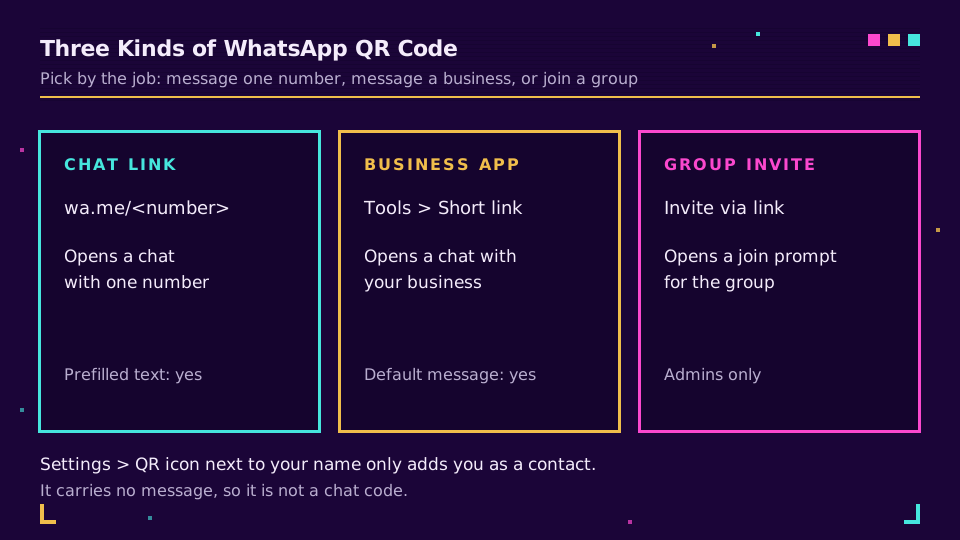
There isn't one WhatsApp QR code. There are three, and picking the wrong one is the most common reason a code does something unexpected.
- A click-to-chat link (
wa.me/<number>) opens a chat with one number. Works for personal and Business numbers, supports a prefilled message, and you can encode it in any QR generator. - The WhatsApp Business app's QR code and short link, made inside the app. Customers who scan can send you a default message you wrote, and the short link hides your number.
- A group invite QR code, made by a group admin. It opens a join prompt for that group, not a chat with you.
The code you find under Settings next to your name in a personal account is different again: it exists so someone can add you as a contact. It doesn't carry a message. If you want people to message you from a poster, use one of the three above.
Make a WhatsApp QR Code With a wa.me Link
This is the method that works for any number, with any generator, and it's the one you can later put behind a short link.
- Write the number in full international format: country code first, then the number. No plus sign, no leading zeros, no spaces, no dashes or brackets. A UK mobile written 07911 123456 locally becomes
447911123456. - Put it after the domain:
https://wa.me/447911123456. - Optional: add the message.
?text=Hi%20Acme%2C%20I%20saw%20your%20posterpre-fills the draft. - Paste the finished link into a QR generator and download an SVG for print.
- Scan it with a phone before you print anything.
The format comes from WhatsApp's own click-to-chat help page, which describes the link as a way to start a chat without saving the number first. The scanner sees your draft, taps send, and the conversation starts. They can edit the draft first, which is worth remembering when you write it.
I'd keep the prefilled text to one short line. It reads better and survives odd keyboards. It also leaves no doubt about where the chat came from. Something like "Hi, scanned your shop window QR" does the work an agent needs and gives you a free hint about placement.
Where wa.me Links and QR Codes Fail
Almost every dead WhatsApp QR comes from one of three mistakes, all visible before printing.
The phone number format
wa.me/+447911123456 is wrong because of the plus. wa.me/07911123456 is wrong because there's no country code, and wa.me/00447911123456 is wrong because of the leading zeros. A national format number works for a tester in the same country and fails for everyone else, a bug that only surfaces after the code is in the wild. QR code for a phone number explains why E.164 is the safe habit, and the format is defined by the ITU E.164 recommendation.
Encoding the prefilled text
Everything after ?text= is a query string value, so the usual URL rules apply. A space is %20. A comma is %2C. An ampersand has to be %26, otherwise the message gets cut where the ampersand sits because it starts a new parameter. A hash sign (%23) has the same problem, and emoji or accented letters are percent-encoded as UTF-8 bytes. URL encoding explained lists which characters need it, and RFC 3986 is the reference if you want to check the rules yourself. Let a generator do the encoding, then test. A half-cut message is easy to miss.
Message length
On the Business Platform, WhatsApp's QR code documentation caps the prefilled message of a QR scan at 140 characters. I haven't seen a published limit for plain wa.me links, so treat 140 as a sensible ceiling for every WhatsApp QR you make. Longer text also makes the QR denser and harder to scan at small sizes; how big should a QR code be has the distance maths.
The Business App's Own QR Code and Short Link
If you use the WhatsApp Business app, you don't need to build the link by hand. From the Tools tab, open Short link, then choose QR code and share it, or share the link itself. Customers who scan get the option to send you a default message, and you decide what that message says. WhatsApp documents the steps in how to share your WhatsApp Business QR code.
The upside: nobody sees your number, since the short link takes its place. The downside is that you can't style the code, and WhatsApp's Business Platform documentation says analytics are not available for its QR codes and short links. You can deactivate one by resetting it, which means every printed copy stops working at once.
That's a good reason to treat the built-in code as a starting point and put your own short link in front of it, which the next section covers.
Make a WhatsApp Group QR Code
A group's QR code is for joining, not for messaging you. You must be an admin. Open the group, tap its name, and choose Invite via link. On iPhone, tap QR code there; on Android, use More options and then Print group QR code. WhatsApp walks through both in how to create and invite into a group.
Two cautions. First, anyone who scans the code can reach the join prompt, so a code taped to a public noticeboard is an open door. Admin approval for new members exists; see group join requests and switch it on if you want a gate. Second, resetting the invite link makes the printed code stop working.
The reset problem is solvable. Don't encode the group's chat.whatsapp.com link directly. Encode a short link that redirects to it. When you reset the group link, change the short link's destination once, and every poster still works. It's the same trick that makes a dynamic QR code worth having.
Track WhatsApp QR Code Scans With a Short Link
A chat arrives in your inbox, but nothing says which QR code sent it. To close that gap, put a short link between the QR and WhatsApp: the QR encodes s.elido.me/chat-window, the short link redirects to wa.me/447911123456?text=..., and the redirect is where the scan gets recorded.
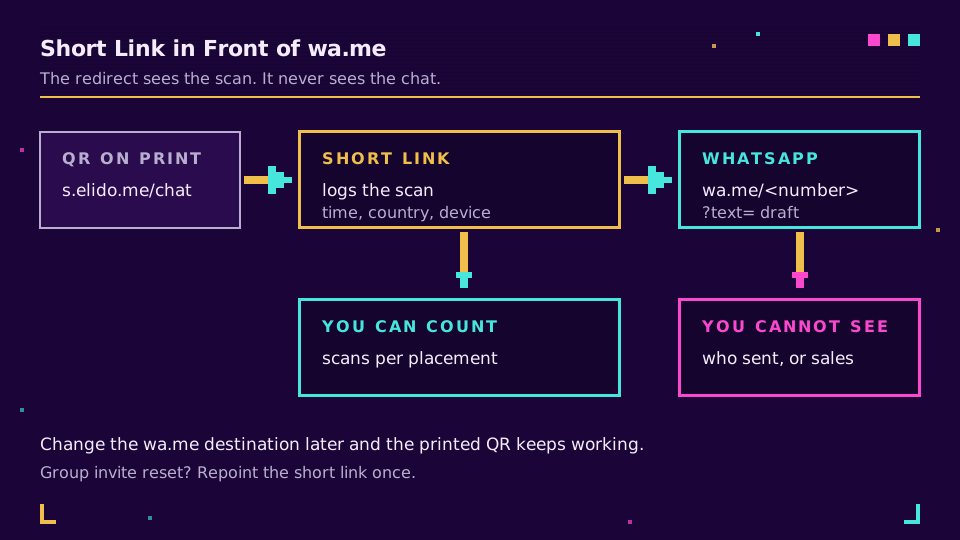
In Elido, create the short link, open its row menu, choose QR code, and download the SVG. A QR made from a short link is dynamic, so changing the destination later changes where the print goes. Each scan lands in analytics with its time, country and device, and if you add UTM tags to the short link they're captured at the redirect, as covered in tracking UTM end to end. Give each placement its own link (window, receipt, flyer) and the dashboard becomes a placement comparison. How to track QR code scans covers the reading side.
The same layer lets you swap the phone number or the greeting without reprinting. If your support team moves to a new number in March, you edit one destination. A single link can also route by country or device through smart links, which helps when the number differs per market.
If you're printing for a shop, make your first short link before you send artwork to the printer, because the QR is made from it.
What You Cannot Track Inside WhatsApp
Be upfront about the limit. The redirect sees the scan. It doesn't see the chat. You won't know whether the person pressed send, who they are, or whether the chat turned into a sale, because no signal comes back to the link.
What you can do is match chats to scans yourself. The prefilled text is a message that lands in your inbox, so a tag in it (a placement name or a short code) tells an agent where the chat came from. Compare weekly counts of chats per tag against scans per link. The two lines should move together, and when they don't, you've found a placement that gets scans but no messages, usually because the draft or the offer doesn't match the poster. WhatsApp click-to-chat links with tracking goes through the heavier options for server-side conversion forwarding. If you want a channel that returns a source parameter on its own, click-to-Messenger links do.
Test Before You Print
Scan the final artwork with the stock camera on an iPhone and an Android phone, then ask somebody in another country to scan it too. That last check is the one that catches number-format mistakes. Open the chat. Confirm the draft arrived intact and isn't cut at an ampersand. Then print a proof at final size and scan it from the distance a real person will stand.
If something still misbehaves, QR code not scanning walks through the physical causes. For the whole build from planning to measurement, see a QR code campaign from scratch, the cornerstone of the tutorials cluster.
Related on the Blog
- WhatsApp click-to-chat links: wa.me short links with tracking
- QR code for a phone number, SMS and email address
- URL encoding explained: which characters to escape
- Click to Messenger links with tracking
- How to track QR code scans and read the analytics
- Dynamic vs static QR codes: which one breaks first
Frequently asked questions
How do I create a QR code for WhatsApp?
Build a link in the form https://wa.me/ followed by your full phone number, then turn that link into a QR code with any generator. The number goes in international format with no plus sign, no leading zeros, no spaces and no dashes. Scanning the code opens a chat with you in WhatsApp. If you run the WhatsApp Business app, it also makes a QR code for you under Tools, Short link.
Can I add a prefilled message to a WhatsApp QR code?
Yes. Add ?text= to the wa.me link and put the URL-encoded message after it, so a space becomes %20. The text appears as a draft in the chat and the person still has to press send. On the Business Platform, a QR code scan can carry a prefilled message of up to 140 characters, so keep drafts short either way.
How do I make a WhatsApp QR code for a group?
You need to be a group admin. Open the group, tap its name, choose Invite via link, then pick the QR code option, or on Android use More options and Print group QR code. Anyone who scans it can join, so if the group is not meant to be open, turn on admin approval of join requests first.
How do I reset a WhatsApp QR code?
Resetting is done inside WhatsApp, and it kills the old code: anything already printed stops working. The Business app has a reset option for its QR code, and a group has a reset link option under Invite via link. If you printed a QR that points at a short link you own, you can repoint the short link to the fresh invite instead and the print survives.
Can I track who scans my WhatsApp QR code?
You can count scans, but not identify people. WhatsApp's own docs say no analytics are available for its QR codes and short links, to limit the data it logs for privacy. A short link in front of wa.me records the scan with time, country and device before handing over to WhatsApp. What happens inside the chat stays invisible to you.
Does a WhatsApp QR code work for people who do not have my number saved?
Yes, that is the point of the click-to-chat link. WhatsApp describes it as a way to start a conversation without saving the number in your phone's address book first. The scanner lands in a chat with you. A wa.me link contains your number in plain sight, so if you would rather not publish it, use the Business app's short link, which replaces the number with a random code.
Try Elido
Paste a URL, get a working short link
No signup. Link lives for 30 days. Sign up to keep it forever.
Free, no signup required · 2 per day