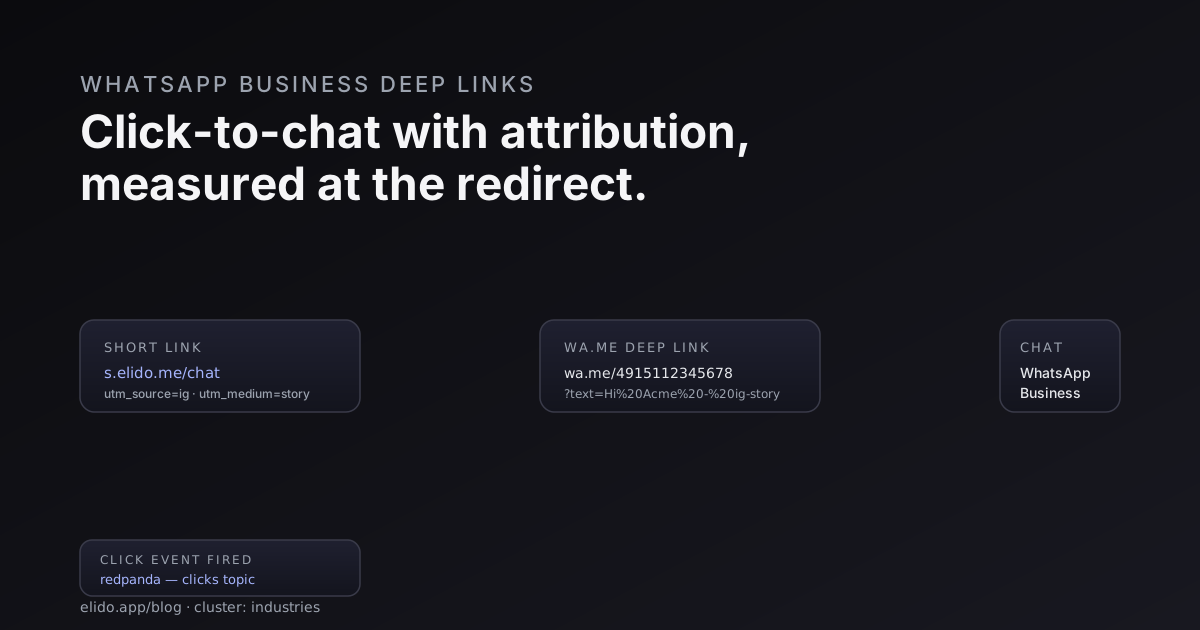
WhatsApp moved from a chat app to a sales channel slower than the industry narrative suggested, but the shift is real. In Brazil, India, Mexico, parts of Southern Europe and most of the Gulf, "message us on WhatsApp" outperforms web forms for inbound leads by a wide margin. The mechanism that drives the conversation is one URL: https://wa.me/<phone>?text=<message>. Tap it, the device opens WhatsApp at a draft message to the business, the customer sends, the conversation starts.
The problem is that wa.me is a Meta-hosted redirect and Meta does not ping you back. There is no Referer header that survives the click. There is no conversion pixel. You will see the conversation arrive in your WhatsApp Business inbox, but you will not know which Instagram story, which paid ad, which print QR drove it - unless you put a redirect of your own in front of wa.me and fire the attribution event there.
This post is about that redirect.
The wa.me URL pattern
Meta's wa.me is documented at faq.whatsapp.com/5913398998672934 (accessed 2026-05-22). The shape is https://wa.me/<phone> where the phone number is in E.164 without the leading +, no spaces, no dashes. So +49 151 1234 5678 becomes https://wa.me/4915112345678. Append ?text=<urlencoded message> to pre-fill the draft.
A working URL:
https://wa.me/4915112345678?text=Hi%20Acme%20-%20saw%20you%20on%20Instagram%2C%20interested%20in%20the%20coaching%20package
The browser opens this in the WhatsApp app if installed (via the OS-native deep-link routing - Universal Links on iOS, App Links on Android, the same mechanism described in deep links for mobile apps without an SDK). If WhatsApp is not installed, the link falls through to a web-based version at web.whatsapp.com. The customer's phone number is not pre-filled - only the message. The phone number in the URL is yours, the business.
For accounts on the WhatsApp Business Platform (formerly the Cloud API), a richer flow is available through reference-message linking and conversation context APIs, documented at developers.facebook.com/docs/whatsapp/cloud-api (accessed 2026-05-22). For most independent businesses and mid-market sellers, the wa.me link is the practical entry point and what this post focuses on.
Why the pre-filled message matters
The ?text= parameter does two jobs. The obvious one is removing friction: the customer arrives at the chat with a draft typed, taps send, no "what do I say" pause. Conversion from "tap chat" to "send first message" climbs roughly 30-50% when the message is pre-filled - the exact number varies by audience and product but the direction is consistent across our test workspaces.
The non-obvious job is attribution. The pre-filled text is a message your business receives. Whatever lands in ?text= arrives in your inbox verbatim as the customer's first message. This is how the industry has historically tagged WhatsApp campaigns without a paid integration - append a campaign tag:
?text=Hi%20-%20IG-story-may22%20-%20want%20to%20chat%20about%20coaching
Your inbox receives Hi - IG-story-may22 - want to chat about coaching. Crude but it works.
The tag-in-message approach scales badly. With three campaigns you can read the tags; with thirty the inbox becomes unmanageable, agents start trimming the tag, the conversations get reassigned and the original message is buried. A redirect layer with proper UTM tracking is the next step.
The redirect layer
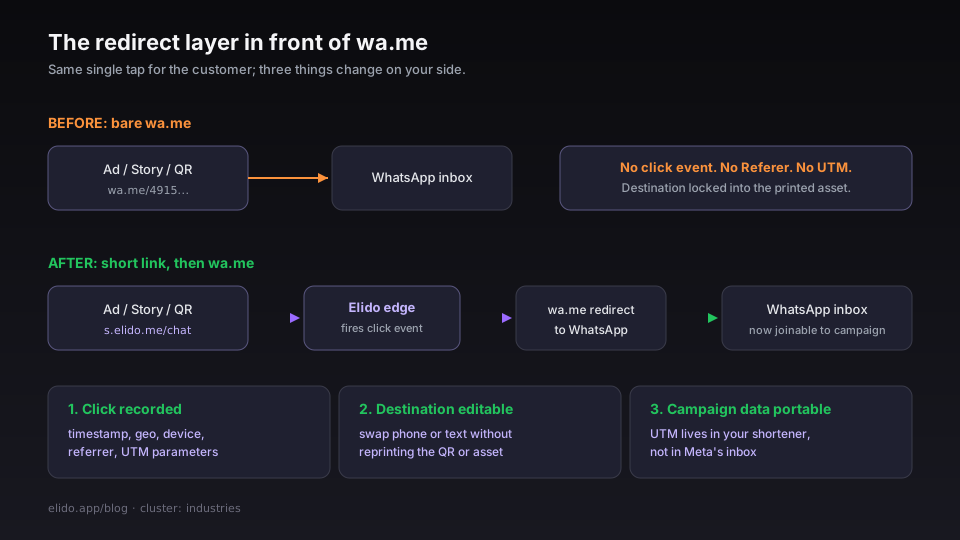
Put a short link in front of every wa.me URL. The customer taps s.elido.me/chat, your edge issues the redirect to https://wa.me/4915112345678?text=..., and WhatsApp opens. From the customer's perspective the flow is identical to tapping wa.me directly - same single tap, same draft message.
From your side, three things changed:
- The click is recorded. The edge fires a click event with timestamp, geo, device type, referrer, and the UTM parameters that arrived on the short link. The conversation that lands in your inbox is now joinable to the campaign that drove it.
- The destination is editable. You can change the phone number, the pre-filled text, or the entire destination without changing the printed QR, the social post, or the campaign asset. If the sales rep that handles French inbound changes their number, you update the destination once.
- The campaign data is portable. UTM tags on
s.elido.me/chat?utm_source=ig&utm_medium=story&utm_campaign=may22are captured at the redirect even thoughwa.medoes not honour them. The attribution lives in your shortener, not in Meta's inbox.
This is the same pattern documented in tracking UTM end to end with short links - the redirect layer captures the campaign data before the destination strips it. WhatsApp is just a destination that happens to strip everything.
A practical setup
Three short links cover most independent businesses' WhatsApp flow:
- General chat link:
s.elido.me/chat→wa.me/<phone>?text=Hi%20Acme. Used on the website footer, the Instagram bio, the email signature. Catches generic inbound. - Campaign chat link: one per active campaign -
s.elido.me/chat-may22-ig- samewa.meURL with campaign-specific pre-filled text. Used in the specific ad creative or story. - QR-printed chat link:
s.elido.me/chat-shopfor physical placements (window QR, business card, packaging insert). Thetextidentifies the placement:Hi%20-%20scanned%20shop%20QR.
Each link maps to a UTM template. The campaign chat link arrives with utm_source=ig, utm_medium=story, utm_campaign=may22-coaching, utm_content=story-3-cta. Those tags get recorded on the click event. The conversation that lands in WhatsApp is now associated, at the click-event level, with the May 22 Instagram story creative.
Configure these at /links with descriptive labels - surface:ig-story · channel:whatsapp · campaign:may22 - and the labels populate filters in the analytics dashboard. Filter by channel:whatsapp to see all chat-driven traffic across campaigns.
Measuring conversion when WhatsApp does not ping back
The hard part of WhatsApp attribution is the conversion side. The redirect tells you the click happened. WhatsApp does not tell you the conversation continued, the lead qualified, or the sale closed. You have to bridge that gap. Messenger is easier here: its ref parameter is returned to your webhook, so the source signal WhatsApp withholds arrives on its own.
Three layers of bridging, in increasing order of effort:
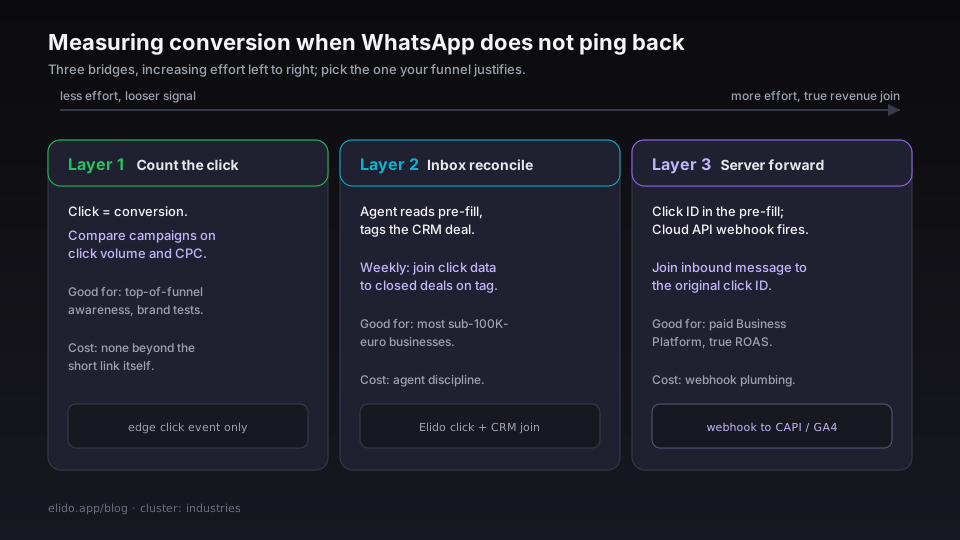
Layer 1 - count the click as the conversion. For top-of-funnel awareness campaigns, "tapped through to WhatsApp" is a meaningful enough proxy. The click event is captured; you compare campaigns on click volume and cost-per-click. Sufficient for a brand campaign or a content test where reach matters more than direct revenue. The conversion tracking feature treats the click itself as the conversion when no further signal is wired.
Layer 2 - manual reconciliation in the inbox. When the conversation arrives, the agent reads the pre-filled text, identifies the campaign, and tags the conversation in the CRM. End of the week, you join click-event data (Elido) with closed-deal data (CRM) on the campaign tag. Crude but accurate. Most sub-€100K businesses operate here; the cost is agent discipline, the upside is no integration work.
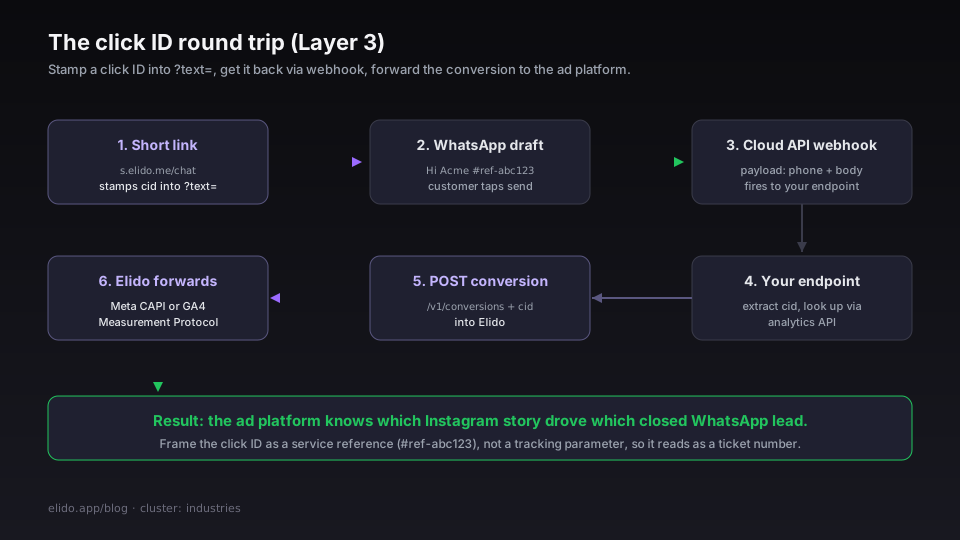
Layer 3 - server-side conversion forwarding. The WhatsApp Business Platform fires a webhook when a message is sent or received, documented at developers.facebook.com/docs/whatsapp/cloud-api/webhooks (accessed 2026-05-22). The payload includes the customer's phone number and message body. If the pre-filled text included a click ID - Elido stamps one into the ?text= automatically when configured - you can join the inbound WhatsApp message to the original click.
The plumbing: the short link redirects to wa.me/<phone>?text=Hi%20-%20cid-<clickid>%20-%20about%20coaching. The customer sends. The webhook fires to your endpoint. Your endpoint extracts the click ID, looks it up via the analytics API, and posts a conversion back to Elido's /v1/conversions with the click ID. Elido forwards to Meta CAPI or GA4 Measurement Protocol. Your ad platform now knows which Instagram story drove which closed WhatsApp lead.
The friction: the customer sees cid-abc123 in their first message, which looks weird. The cleanest solution is to frame it as a customer-service reference - Hi Acme #ref-abc123 reads as a ticket number, not a tracking parameter. The conversion-forwarding API and join logic are documented on the conversion tracking guide.
What the WhatsApp Business Platform offers on top
For businesses on the paid Business Platform, two extras matter beyond the inbound webhook. The Cloud API exposes a context.id on inbound messages when the customer is replying to a specific outbound message - useful for re-engagement campaigns where the inbound is a reply rather than a fresh conversation. And Meta classifies conversations as marketing, utility, authentication, or service, with prices per category; click-to-chat conversations from wa.me start as service (customer-initiated), which is the cheapest. Worth knowing when sizing the WhatsApp Business budget.
If you are running Meta ads with "Send WhatsApp message" as the call-to-action, the ad platform passes a click ID through to the conversation - that attribution lives in Ads Manager. For organic Instagram, email, and print-QR traffic, the short-link-plus-redirect approach is the only way to get equivalent attribution.
QR code surfaces
A meaningful share of WhatsApp click-to-chat traffic comes from QR codes, not web taps. The customer is in a physical context - restaurant, retail store, clinic, service appointment - and scans a QR that opens WhatsApp directly. Print-to-conversation is one of the strongest applications of the short-link-then-wa.me pattern: the QR prints once, the destination updates as the business needs evolve.
Three rules:
- The QR encodes
s.elido.me/<slug>, neverwa.me/...directly. Encodingwa.melocks the destination, kills analytics, and wastes the print run when the phone number changes. - The pre-filled text identifies the placement.
text=Hi%20-%20scanned%20receipt-QR%20-%20about%20refundarrives in the inbox already explaining where it came from. Agents read it once at the start of the conversation. - Each placement maps to a distinct short link. Window QR, receipt QR, business card QR, shelf QR - each is a row in the analytics dashboard. The placement that does not generate scans gets retired; the one that does gets reprinted larger.
For the step-by-step build, including the Business app's own code and group invites, see how to make a WhatsApp QR code. QR design considerations - quiet zone, error correction, contrast - are the same as for any QR placement; the dynamic vs static QR codes post covers them.
RCS as the medium-term alternative
WhatsApp's dominance is regional and not universal. In Eastern Europe, Central Asia, and crypto-heavy audiences, Telegram deep links fill the same click-to-chat role, with the twist that a Telegram bot receives its start parameter server-side where wa.me reports nothing back. In the US the equivalent channel is increasingly RCS - Rich Communication Services, the carrier-led iMessage-style protocol that Apple finally adopted in iOS 18. The GSMA maintains the RCS Universal Profile spec (accessed 2026-05-22); Google's Business Messages is the practical implementation.
For now, RCS Business Messaging has nothing equivalent to wa.me - the click-to-chat URL pattern. The carrier identity model makes a stable deep link to a business hard to express. For European and Latin American audiences, WhatsApp remains the default. For US-only audiences, the equivalent flow is currently iMessage Business Chat, which has different mechanics but a similar redirect-then-deep-link pattern. Same short-link layer; different destination URL shape.
If your audience is split across regions, smart routing handles the multi-platform case - see smart links explained for the routing-by-country mechanism. One short link, three destinations: wa.me for the WhatsApp regions, Business Chat for iOS-heavy US traffic, a web form fallback for everyone else.
What does not work
Three patterns that look reasonable and fall over:
Encoding the wa.me URL directly in the QR. No analytics, no destination control, no attribution. If the business phone number changes, the QR is wasted. Always print the short link, never the wa.me.
Long pre-filled messages. WhatsApp truncates ?text= payloads past a few hundred characters silently. Two-line message draft works; four paragraphs do not. Keep the pre-filled text short and let the conversation flow naturally after the customer hits send.
Relying on WhatsApp Web for desktop traffic. When the customer is on a desktop without WhatsApp installed, the wa.me link falls through to WhatsApp Web, which requires QR-code-pairing with the phone. The first-time conversion rate on this path is poor. For desktop-heavy audiences, route to a web chat widget (Crisp, Intercom) as the fallback rather than wa.me. The smart-routing engine handles the device-conditional destination cleanly.
Pricing realities
The short-link layer for a click-to-chat setup runs comfortably on Pro (€3.50/month) for businesses under tens of thousands of monthly clicks. The cost variable is the WhatsApp Business Platform itself - Meta's conversation pricing scales with conversation volume, not click volume. A business doing 500 click-to-chat conversations per month typically spends more on Meta's per-conversation fees than on the shortener. The pricing page has the full breakdown; the marketers solution page covers the broader campaign-attribution use case.
Related reading
- URL shorteners for ecommerce: the data plane behind the funnel - the cornerstone for the industries cluster.
- Deep links for mobile apps without an SDK - the OS-native primitives that make
wa.meroute to the app at all. - Tracking UTM end to end with short links - the attribution mechanics that survive the WhatsApp hop.
- Dynamic vs static QR codes: which one breaks first - the QR layer for print-to-WhatsApp surfaces.
- Telegram deep links: track t.me and bot start links - the same redirect layer for Telegram, plus a bot payload that reports back.
- WhatsApp QR code: make one for chat, group or business - the QR-first walkthrough of the same wa.me link.
- Click to Messenger links with tracking - the m.me channel, where the ref parameter comes back on its own.
- Smart links explained - multi-region routing across WhatsApp, iMessage Business Chat, and web fallback.
- Product surface:
/features/deep-links,/features/conversion-tracking, and/solutions/marketers. - External: Meta wa.me FAQ, WhatsApp Cloud API docs, and the GSMA RCS spec.
Try Elido
Paste a URL, get a working short link
No signup. Link lives for 30 days. Sign up to keep it forever.
Free, no signup required · 2 per day