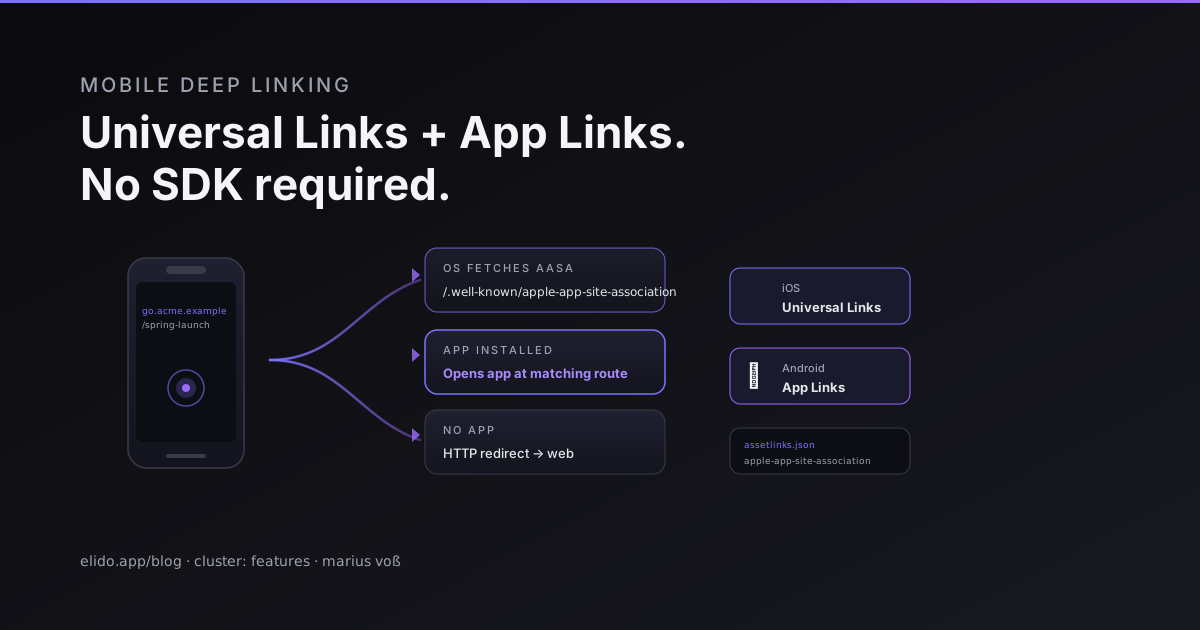
A deep link is just a URL that the operating system hands to an app instead of a browser. Tap the link on a device that has the app installed, the app opens at the right screen. Tap it on a device without the app, the browser follows the redirect to the web fallback. One URL, two outcomes, no JavaScript shim, no third-party SDK required on most setups.
Teams overbuy here routinely. Branch.io, Adjust, AppsFlyer — their marketing materials lead with deferred deep linking: you tap the link before installing the app, install, and the app opens to the exact content you tapped through to. That feature is genuinely complex and requires a server-side fingerprinting or clipboard-matching trick, because the OS link routing is dormant until the app is installed. But deferred deep linking is one slice of the problem. The more common case, "link opens in the already-installed app," is solved entirely by OS-native primitives that Apple and Google shipped in 2015 and 2015–16 respectively, and that work with nothing beyond a domain you control and two JSON files.
This post is about those two JSON files.
TL;DR#
- Apple Universal Links (iOS 9+) and Android App Links (Android 6.0+) handle the "open in app if installed, web fallback if not" flow with no third-party SDK.
- Both require a domain you control, served over HTTPS, with a validated association file at
/.well-known/. The OS fetches and caches the file on app install, not on every tap. - A URL shortener with a custom domain like
go.acme.exampleserves both files and becomes the link that triggers the app routing — the short link is the deep link. - What the SDK adds that the OS primitives don't: deferred deep linking, probabilistic install attribution, and cross-platform identity stitching. If you need those, the SDK earns its cost. If you don't, you are paying for features you are not using.
The OS-native primitives#
Apple introduced Universal Links in iOS 9 (2015). Android shipped App Links in Android 6.0 Marshmallow (also 2015, released to devices through 2016). Both follow the same conceptual model: the OS asserts a verified relationship between a domain and an app, and when a URL on that domain is tapped, the OS routes it to the app rather than the browser.
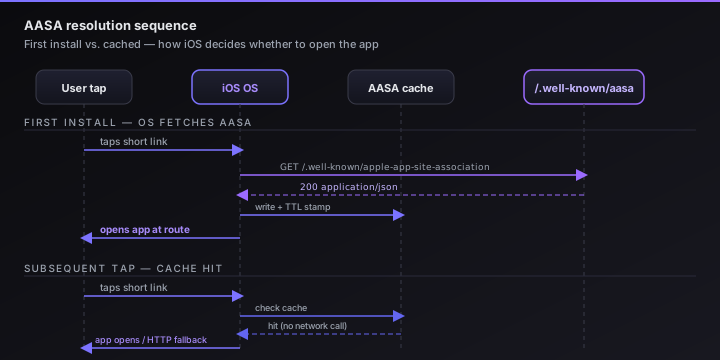
The verification is mutual and offline-first. On app install, the OS fetches an association file from your domain and caches it. Apple's fetcher is documented at developer.apple.com/ios/universal-links/ (accessed 2026-05-12); Google's equivalent is at developer.android.com/training/app-links (accessed 2026-05-12). Neither fetch happens at tap time on a warm device — the cache means the routing decision costs zero network round trips.
The redirect itself is a standard HTTP 302. The OS intercepts it before the browser loads, checks its local cache, and hands the URL to the app if a match is found. Once the cache is warm, the entire decision is local. The edge serving the short link issues the redirect and the OS takes over.
The two files#
apple-app-site-association#
The AASA file must be served at https://yourdomain.example/.well-known/apple-app-site-association (Apple also checks the apex path https://yourdomain.example/apple-app-site-association for legacy compatibility, but the .well-known path is the current standard). It must be served over HTTPS with a valid certificate chain and with a Content-Type: application/json header. Apple's CDN fetcher rejects files served with the wrong Content-Type — this is one of the more common misconfiguration errors in production.
The full format reference is at developer.apple.com/documentation/xcode/supporting-associated-domains.
A minimal AASA shape:
{
  "applinks": {
    "details": [
      {
        "appIDs": ["ABCDE12345.com.example.acme"],
        "components": [
          {
            "/": "/spring-*",
            "comment": "Match any path starting with /spring-"
          },
          {
            "/": "/campaigns/*"
          }
        ]
      }
    ]
  }
}
appIDs is the concatenation of your Apple Team ID and your app's bundle identifier, separated by a dot. The components array controls which paths trigger app routing; anything that doesn't match a component falls through to the browser. You can register multiple apps in the details array — useful if you have a consumer and an enterprise variant of the same product on the same domain.
One detail worth stating plainly: "/" with a wildcard pattern like /spring-* is a path prefix match. Apple's AASA parser supports pattern syntax defined in the Xcode documentation, including * (any substring), ? (any single character), and exclusion objects. If you want to match every path on the domain, use "/" : "/*". If you want to exclude a specific path from app routing — say, your /account/delete page should always open in the browser — add an exclusion object before the wildcard:
{
  "/": "/account/delete",
  "exclude": true
}
Rules are evaluated first-to-last. Put exclusions before wildcards.
assetlinks.json#
Android's Digital Asset Links file lives at https://yourdomain.example/.well-known/assetlinks.json. The specification is maintained by Google at developers.google.com/digital-asset-links/v1/getting-started.
[
  {
    "relation": ["delegate_permission/common.handle_all_urls"],
    "target": {
      "namespace": "android_app",
      "package_name": "com.example.acme",
      "sha256_cert_fingerprints": [
        "AA:BB:CC:DD:EE:FF:00:11:22:33:44:55:66:77:88:99:AA:BB:CC:DD:EE:FF:00:11:22:33:44:55:66:77:88:99"
      ]
    }
  }
]
package_name is your app's application ID in the Play Store. sha256_cert_fingerprints is the SHA-256 fingerprint of the certificate used to sign the APK — not the SHA-1, not the MD5. You can find the fingerprint in the Play Console under App Integrity, or by running keytool -list -v -keystore your.keystore. If you release both a debug and a production build, include both fingerprints in the array.
Unlike the AASA file, Android's association file does not support path filtering at the file level. Path matching for App Links is done in the AndroidManifest.xml via <intent-filter> with android:pathPrefix, android:pathPattern, or the newer android:pathAdvancedPattern (available from Android 12). The assetlinks.json file asserts domain ownership; the manifest declares which paths the app handles.
How a URL shortener fits#
A short link like go.acme.example/spring-launch is just a URL on a domain. From the OS's perspective, if go.acme.example has a valid AASA or assetlinks.json file, any tap on a link under that domain is eligible for app routing.
This is the configuration we support directly on custom domains with Elido. When you register go.acme.example as a custom domain in your workspace, Elido serves the HTTPS redirect for every slug under that domain. You serve the two association files from the same domain — either on your own origin behind a path proxy, or via the domain's own HTTPS server. The edge redirect fires; the OS intercepts it before the browser loads, consults its AASA/App Links cache, and opens the app if a match is found.
The architecture is described in more detail on the custom-domains-for-short-links post — the TLS issuance and CNAME setup apply here exactly as described there. The deep-link layer is additive: same domain, same redirect, two JSON files on top.
For product teams using short links for mobile onboarding — referral codes, invite links, "share a recipe" flows — this pattern covers almost everything without adding SDK dependencies to the app binary.
What the SDK adds#
Three capabilities that OS-native primitives don't provide:
Deferred deep linking. A user taps your link before installing the app. On first launch after install, the app opens to the exact content they tapped through to. iOS Universal Links and Android App Links are silent when the app isn't installed — the URL goes to the browser, the intent is lost. Recovering it requires a server-side fingerprint match (IP + User-Agent + timestamp, probabilistic) or the iOS clipboard trick. Branch, Adjust, and AppsFlyer both implement these; the edge cases around App Tracking Transparency prompts and Safari behavior make doing it yourself non-trivial.
Install attribution at scale. The OS-native route gives you the app open with the URL path, but if the app wasn't installed at first tap, the attribution chain is broken. Reconciling clicks against installs via SKAN on iOS and Play Install Referrer on Android is doable without a paid SDK but requires integration work the attribution vendors have already done.
Cross-platform identity stitching. Linking a tap to an email address, CRM contact, or web session. The OS-native path is anonymous from the link service's perspective. SDK vendors maintain a persistent device graph. Building that yourself is a substantial data infrastructure project.
If none of those three apply, the OS primitives cover you. If one matters, scope it precisely — you might only need deferred deep links, one API surface, not the full SDK.
Configuration cookbook#
DNS and HTTPS requirements#
Both files must be served over HTTPS from the domain whose links you want to deep-link. The certificate must chain to a public root CA; self-signed certs cause both Apple's and Google's validation fetchers to fail silently. Let's Encrypt certificates work fine.
The domain's TLS must also not redirect the /.well-known/ path before serving the file. If your server issues a www. redirect before the Apple fetcher can reach https://yourdomain.example/.well-known/apple-app-site-association, the fetch fails. Apple's fetcher follows up to one redirect but Google's assetlinks fetcher does not follow redirects at all — the file must be at the exact path, no redirect.
iOS: Associated Domains entitlement#
In Xcode, under your target's Signing & Capabilities, add the Associated Domains entitlement with the value applinks:go.acme.example. If you are testing on a development build (not distributed via TestFlight or the App Store), add ?mode=developer to the entitlement value: applinks:go.acme.example?mode=developer. This tells the OS to re-fetch the AASA on every launch rather than using the install-time cache — useful for iterating on your path patterns without reinstalling from the Store each time.
The Apple CDN that fetches your AASA file is Apple's own infrastructure, not the device itself. Apple pre-fetches and caches AASA files from your domain and serves them to devices during app install, which means the file needs to be reachable by Apple's crawlers, not just by the end user's device. This also means there's a propagation delay — changes to your AASA file may take hours to reach all devices via Apple's cache. For developers who need fast iteration on path patterns, the ?mode=developer entitlement bypasses Apple's CDN and fetches directly from your server.
Android: App Links in the manifest#
In AndroidManifest.xml, inside the activity that should handle deep links:
<intent-filter android:autoVerify="true">
  <action android:name="android.intent.action.VIEW" />
  <category android:name="android.intent.category.DEFAULT" />
  <category android:name="android.intent.category.BROWSABLE" />
  <data
    android:scheme="https"
    android:host="go.acme.example"
    android:pathPrefix="/campaigns/" />
</intent-filter>
android:autoVerify="true" tells Android to attempt verification of the domain against assetlinks.json. Without it, the user sees a disambiguation sheet on every tap rather than a direct-to-app open. Verification happens on install; the device reaches out to https://go.acme.example/.well-known/assetlinks.json and checks that the installed app's certificate fingerprint is listed.
Validators and common errors#
Apple provides a validator at search.developer.apple.com/appsearch-validation-tool/ that checks whether Apple's CDN can fetch and parse your AASA file. Enter your domain and it returns either a valid parse result or a specific error. Common failures:
- Wrong Content-Type. If your server returns
text/plainorapplication/octet-stream, the validator reports the file as unreadable even if the JSON is valid. SetContent-Type: application/jsonexplicitly. - Missing or mismatched
appIDs. The Team ID prefix inappIDsmust match the Team ID in your Apple Developer account exactly, including case. A single character wrong fails silently at tap time. - Certificate chain issue. If your domain serves a certificate that doesn't chain to a public root (common in staging environments with local CA roots), Apple's fetcher rejects the file.
Google's validator is the Digital Asset Links API: https://digitalassetlinks.googleapis.com/v1/statements:list?source.web.site=https://go.acme.example&relation=delegate_permission/common.handle_all_urls. The JSON response lists all statements Google has verified for your domain. If the response is empty or missing your package name, Android won't auto-verify the app on install. Common failures:
- Redirect on the assetlinks path. As noted: Google's fetcher doesn't follow redirects.
- Wrong certificate fingerprint. The debug APK and the release APK are signed with different keys. If you've only listed the release fingerprint, debug builds won't verify. List both.
- File served with CORS but wrong header for the verification request. The fetcher doesn't care about CORS, but some CDN configurations return 403 on
GETfrom a Google IP range if the path isn't in the cache-allowlist. Verify that/.well-known/assetlinks.jsonreturns 200 from an external HTTP client, not just from your browser.
The trade-off stated plainly#
Removing the deep-link SDK saves roughly 150–250KB of compressed binary size and eliminates a per-install API call to the attribution vendor's servers. That removes a data-sharing relationship from your privacy policy and can simplify GDPR data processing records. Real wins, but modest.
The cost is that install-time attribution becomes approximate or absent. If a user taps your link before installing the app, you'll see the install in App Store Connect or Play Console but won't tie it to the specific link tap. You can still run smart link experiments to compare which campaigns drive more installs — relative signals survive — but per-device, per-click attribution requires the SDK fingerprinting layer.
For teams at early scale where per-channel CPI isn't yet driving budget decisions, starting with OS primitives is the sensible path. Add an attribution SDK later, when the data is actually actionable.
For the developer-facing setup guide on Elido's deep link configuration, the full schema for the domain verification flow, AASA proxy configuration, and the assetlinks.json serving options are documented there. The solutions page for product teams covers the broader smart link and mobile linking use cases.
Marius Voß is DevRel + edge infra at Elido. He owns the edge-redirect and domain-manager services.