
Most URL shortener dashboards open on one big number: total clicks since the link was created. It's easy to produce. It's satisfying to screenshot. It almost never tells you what to do next. The metrics worth your time are bounded by a time window, split by a meaningful dimension, and tied to an outcome.
This post covers those metrics, the ones to ignore, and a 15-minute weekly review. I wrote it against how Elido's analytics work today, limits included. Map it to whatever tool you use.
Vanity numbers versus numbers you can act on
"Total clicks: 48,230" tells you a link exists and people followed it. It doesn't say when those clicks happened. It doesn't say whether they were people or crawlers, or whether anyone bought anything.
"Unique visitors from search in Germany over the last 30 days, and how many came back" is a different kind of question. The answer can change your next decision. Starting from zero? How to track link clicks covers what a tracking link records.

Metrics worth tracking
Each metric below comes with what it answers and where it misleads.
Clicks versus unique visitors
Every redirect that passes the bot filter is recorded with a daily visitor key built from the truncated IP and the user agent. Elido's unique visitor figure is a distinct count of those keys. Its summary view also reports returning visitors (keys with more than one click in the window), average clicks per visitor, and a bounce-style share of single-visit keys.
Compare clicks to uniques. A link with 1,000 clicks and 950 uniques has almost no repeat traffic. One with 1,000 clicks and 300 uniques is being revisited. Good for a bookmarked resource. A warning sign for an onboarding link.
The limit is real. Two colleagues on one office network count as one visitor. One person on mobile data and then home Wi-Fi counts as two. Good enough to compare campaigns. Not identity resolution. I wouldn't use it to claim a precise audience size.
Referrer and UTM attribution
The referrer breakdown groups clicks by the host in the Referer header. It shows which sites and apps are really sending traffic, not which campaign you meant to run. "Direct" is usually the largest bucket and the least informative, because email clients, messaging apps and many native apps send no referrer.
UTM tags live on the destination URL. The redirect passes them through. Your analytics platform reads them on the landing page. The shortener confirms a click happened; the UTMs say which campaign claimed it. If clicks arrive but no tagged sessions show up in GA4, the landing page is probably losing the tags, as UTM parameters not showing in GA4 explains. Google's GA4 campaign tagging page (accessed 2026-10-25) notes that missing parameters appear as (not set) in reports.
Geo and device
Geography comes from the IP address at redirect time, at country, region or city level, while device and browser come from the User-Agent. They answer one question: does the audience match the one you targeted?
A Germany-only email with 80% of clicks from elsewhere got forwarded. If a QR code printed on packaging shows heavy desktop traffic, people are meeting it on a screen, not scanning it. QR campaign from scratch shows how to read that split. City data is approximate, so treat it as a direction, not an address.
Time of day and day of week
The heatmap buckets clicks by hour and weekday, and the timeseries view supports hourly and daily buckets in your time zone. Use it for scheduling. If your list reads on Tuesday morning, that's when the newsletter link should land, and the heatmap shows you after two or three sends.
A link can also target by time window, with a start, an end and a time zone. The heatmap shows the peak. The rule lets you act on it without resending. The heatmap is on Pro and above.
Bot-filtered versus raw counts
Before a click is recorded, the redirect checks the User-Agent against a list of crawler, link-preview and uptime-monitor strings, plus command-line tools and requests with no User-Agent. A match isn't counted as a click, but the redirect still works, so Slack and iMessage previews load.
This is a substring list, not behavioral detection. A scraper that sends a normal browser User-Agent gets counted. Elido also scores clicks with simple heuristics, such as missing headers and bursts from one IP, and flags them as suspicious. The traffic quality view reports how many were flagged. A spike there means look closer before you celebrate.
Click count and GA4 sessions disagree? Clicks versus GA4 sessions works through the causes.
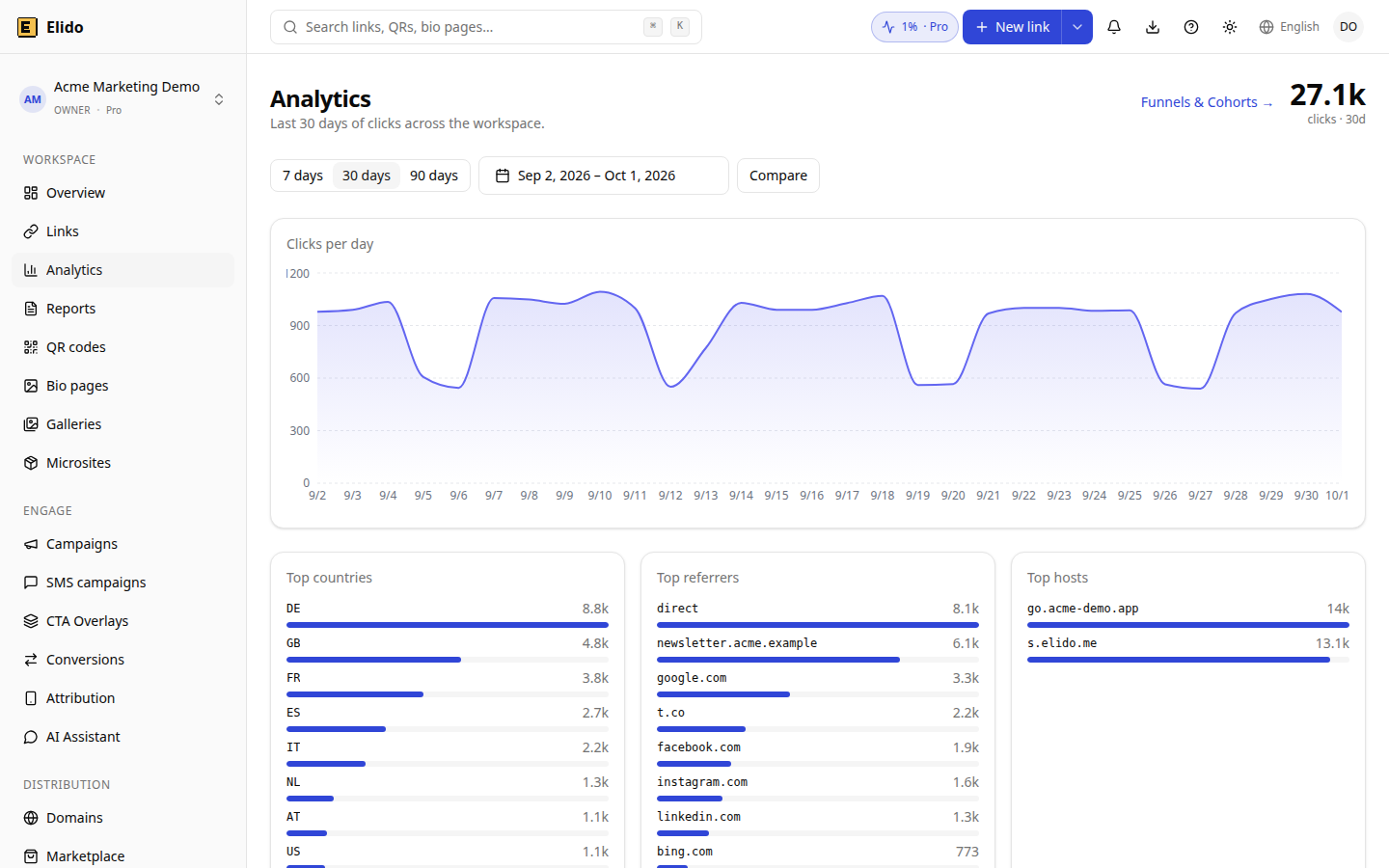
Demo workspace with synthetic example data, not customer results.
Conversions and revenue
Clicks lead; conversions matter. A link with few clicks and a 40% conversion rate beats one with many clicks and 2%.
Here's what exists. Revenue from Stripe and Shopify webhooks is attributed to the link that drove it, and the Conversions page breaks it down per link, per campaign, per day and per platform. Beyond revenue, click events can also be forwarded to GA4 or Mixpanel, and to Klaviyo, Brevo or Datadog. What doesn't exist yet is a public API for sending your own conversion events, and server-side Meta conversion calls aren't active. If your conversions happen elsewhere, measure them in your analytics platform on the destination page. Compare conversion rate per referrer there. If 8% of newsletter visitors convert and 1.2% of social visitors do, that's a budget decision.
Variants and decay
A link with several destinations gets one picked per click, by weight or in rotation. The destination breakdown shows how many clicks each got. On a 50/50 split, big skew is a hint about bot traffic against one variant, not a winner.
The decay curve, clicks per day since creation, has a typical shape per source. Email spikes on send day and falls within a few days. Social posts keep a tail for a few days. Printed codes stay low and persistent. Knowing the expected shape for each source makes anomalies visible, because a curve that deviates from it is the thing worth investigating: a second email spike ten days later means forwarding or a mention somewhere. Use daily buckets over 90 days for the curve, and hourly for the first 72 hours of a send.
What to ignore
All-time cumulative totals mix every old campaign, test link and forgotten experiment into one number that only ever goes up, which is why it looks great on a slide and tells you almost nothing about this month. Narrow to 30 days and the number becomes a campaign-cycle metric.
Unfiltered raw counts measure how much automated traffic touched you. Use filtered numbers for decisions.
A single top country with no time context is data, not signal. "US share grew from 28% to 41% in two weeks" is signal.
Proprietary engagement or health scores combine signals nobody can audit. Skip them. Look at the underlying click rate, then uniques, then referrers.
What gets stored, plainly
Every metric above needs the visitor's IP at redirect time. Elido derives country, region, city and approximate coordinates from it first, then truncates the address at the edge (IPv4 to /24, IPv6 to /48) before the click is stored, and keeps the full user agent. For GDPR, treat IP addresses as personal data: you need a lawful basis, a processor agreement and a retention plan.
Elido's primary data store is in the EU. Redirect nodes in the US and Singapore still process visitor requests, including IPs. A data processing agreement is available on request on every plan, and the list has 13 sub-processors. Elido isn't ISO 27001 certified. SOC 2 is in preparation, with no report yet. GDPR-friendly URL shorteners covers what to ask any vendor.
A 15-minute weekly review
Three questions, in order.
- Is traffic trending the right way? Open the timeseries at 90 days. Flat, growing or falling? Trace any spike you can't explain to specific links via the top-links view.
- Are the sources what you expected? Check referrers and countries for the same window. An unexpected referrer, such as a forum or an aggregator, is worth knowing about.
- Did tracked links convert? For links with revenue attribution, compare the current window to the previous one. A drop usually means the page changed, the source mix changed, or fulfilment broke.
Most weeks everything is fine and the review takes ten minutes, but the week something is off, you find out on a Monday while there's still time to fix the campaign, instead of reading about it in a post-mortem a month after the money has been spent. If you'd rather not redo this by hand, a Looker Studio link analytics dashboard puts the same tiles in one place.
Click events are kept for 90 days on Free, one year on Pro and two years on Business, per the pricing matrix. Funnels and cohorts are Business-only. The heatmap and conversion tracking start at Pro. Confirm on the pricing page. The analytics feature page shows each view.
Related on the Blog
Frequently asked questions
What short link metrics actually matter?
Clicks in a fixed time window, unique visitors, the referrer and country mix, and a conversion or revenue figure tied to the link. Each answers a decision: is this link still alive, who is sending traffic, and did it pay off. All-time totals and unfiltered counts rarely change what you do next, so keep them off your weekly review.
What is the difference between a click and a unique visitor?
A click is one redirect. A unique visitor is a distinct visitor key among those clicks. Elido builds that key from the truncated IP and the user agent, per workspace and per UTC day, so two people on one office connection with the same browser count as one visitor, one person on phone and laptop counts as two, and someone who comes back the next day counts again. That is fine for campaign comparison and wrong for identifying individuals.
Does the dashboard filter out bots?
Partly. The redirect matches the User-Agent against a list of known crawler, preview and monitoring strings, and a match is not recorded as a click, though the redirect still works so link previews load. It is a substring list, so a bot that pretends to be a browser gets counted. Separate heuristics flag suspicious clicks, which a traffic quality view reports.
Why do my link clicks and GA4 sessions not match?
They count different things. A click is a redirect the shortener served. A GA4 session starts only when the analytics script loads on your page, so blockers, slow pages, consent banners and people who close the tab early all drop out. A gap of some size is normal. A sudden change in the gap is the useful signal.
Can I track conversions from a short link?
Partly. Elido can attribute revenue from Stripe and Shopify webhooks to the link that drove it, and it can forward click events to tools such as GA4 and Mixpanel. There is no public conversions API for sending your own events yet, so purchases outside those two sources need your analytics platform on the destination page.
How long is link click history kept?
According to the pricing matrix, click event retention is 90 days on Free, one year on Pro and two years on Business. Confirm on the pricing page before you rely on a long-range comparison, because plan allowances change. Export anything you need to keep beyond your plan's window.
Try Elido
Paste a URL, get a working short link
No signup. Link lives for 30 days. Sign up to keep it forever.
No signup needed. Sign up free for 50 links a month.