A QR code is not a tactic - it is a bridge between a physical surface and a measurable digital event. Done right, a QR campaign gives you something rare in offline marketing: a direct click record, timestamped and geo-attributed, for every person who picks up your flyer, scans your packaging, or stops at your poster. Done wrong, it gives you a permanent, uneditable artifact pointing at a dead URL.
This guide walks through the full lifecycle: from defining what you want the campaign to accomplish, through URL planning, QR generation, design, print, and analytics, to iterating on landing pages after the materials are already in circulation. The focus is operational rather than strategic - each step has a concrete output that feeds the next.
Why QR campaigns warrant a specific workflow in 2026
Phone cameras scan QR codes natively. There is no app download friction, no SMS shortcode to remember, no URL to type. The camera points, the code reads, the browser opens. That zero-friction path from physical surface to URL is why QR usage in marketing contexts has stabilised after the post-pandemic spike: the mechanism is now part of how people expect to interact with physical media.
Three things make QR campaigns specifically valuable for attribution:
Offline-to-digital signal. A person reading a print ad, holding a product, or standing at a point-of-sale display is in a different intent state than someone clicking a banner on their phone. QR scans are intentional - the person picked up the camera deliberately. That intention signal is worth recording. Most digital attribution tools have no reliable way to credit a print placement; a QR code with click analytics fills that gap.
Channel isolation. A QR code on a specific poster, a specific piece of packaging, or a specific business card can have its own unique short link. You know exactly which physical placement drove which scans, with the same precision you'd have for a URL parameter in a digital campaign.
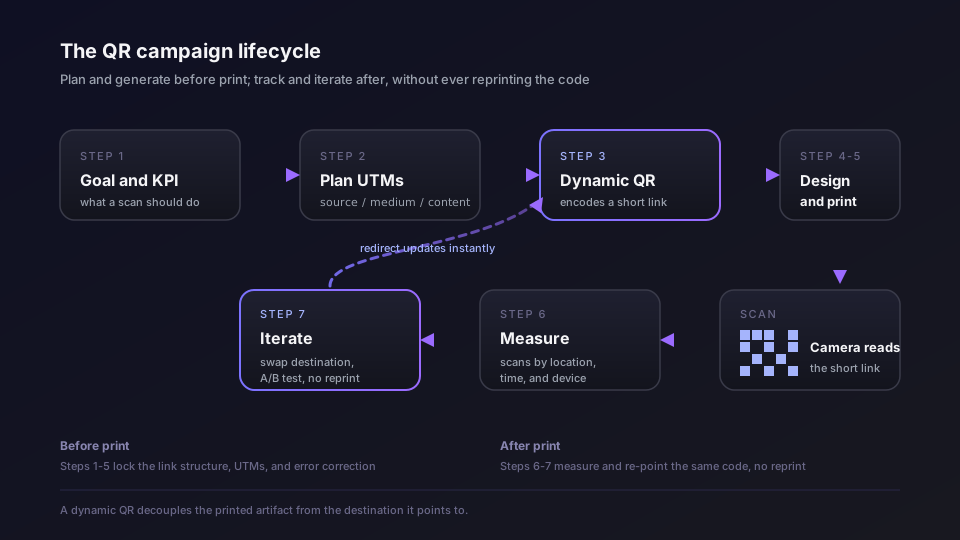
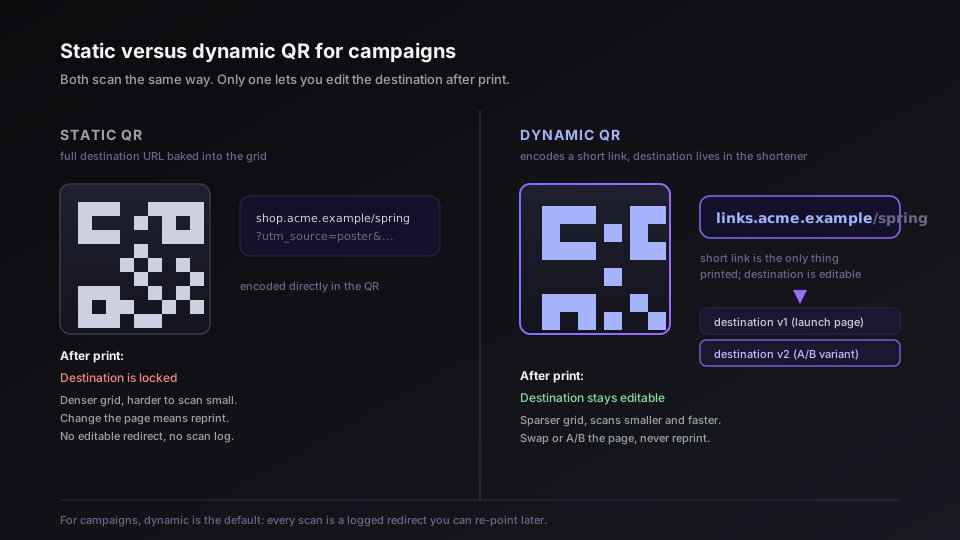
Post-print editing. Dynamic QR codes encode a short link, not the destination URL. The destination lives in your shortener and can be updated after the code is printed. If the landing page changes - or if you want to A/B test two versions - you change the redirect, not the materials. The dynamic vs static QR breakdown covers the technical reason this works in detail; the short version is that the code encodes links.acme.example/spring26, not the full destination URL, so updating the destination at the shortener layer propagates instantly to every printed code in circulation.
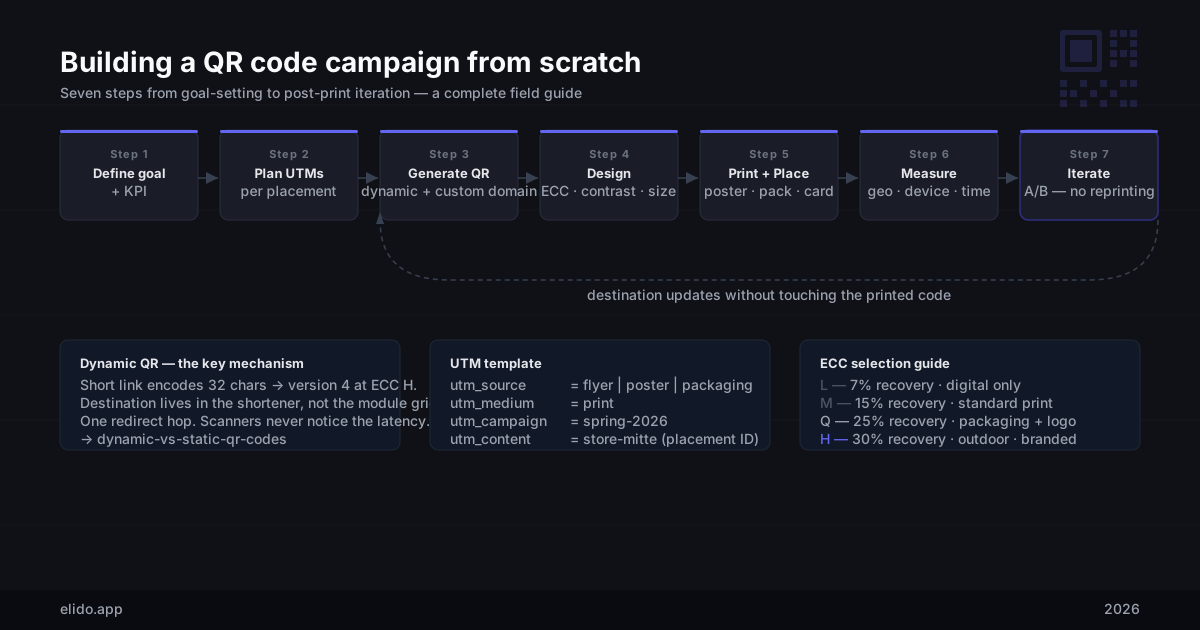
Step 1: Define the campaign goal and KPI
The goal determines the URL structure, the landing page, the analytics setup, and what counts as success. Before you touch a QR generator, write down one sentence: what does a successful scan look like?
Some examples:
- "Drive product registration completions from in-box inserts." Success KPI: registration form submissions tracked via postback to the link record.
- "Measure foot traffic attribution for a poster campaign across five store locations." Success KPI: scan count per location, broken down by day and time of day.
- "Convert flyer handouts at an event into email signups." Success KPI: email captures on a dedicated landing page, with source attribution to the event.
The goal tells you what you need from the analytics. Scan count alone is not attribution - it is a leading indicator. The full conversion requires either a postback event (form submit, purchase, app install) or, at minimum, a dedicated landing page that is only reachable via the QR scan so you can use landing page visits as a proxy for conversion intent.
Write down the KPI before you set up the links. The UTM parameters in the next step flow directly from it.
Step 2: Plan URLs with UTMs
UTMs - utm_source, utm_medium, utm_campaign, utm_content, and utm_term - are query parameters appended to the destination URL that tell your analytics platform where the traffic came from. They survive the redirect: a dynamic QR redirects to https://shop.acme.example/spring?utm_source=flyer&utm_medium=print&utm_campaign=spring-2026, and GA4 or Plausible or your analytics stack of choice records the UTM values from that final URL.
The most common mistake in QR campaigns is embedding the UTM-tagged URL directly in the QR code without a short link in between. This produces a long, dense QR grid that is harder to scan at small print sizes and that locks the UTM values permanently into the printed material. Use a short link as the QR's payload; put the UTMs in the destination URL behind the short link.
A practical UTM template for print QR campaigns:
utm_source      = physical channel identifier
                  (flyer | poster | packaging | businesscard | sticker | menu)

utm_medium      = print

utm_campaign    = campaign name in slug form
                  (spring-2026 | product-launch-q3 | event-berlin-2026)

utm_content     = placement identifier - the specific piece
                  (storefront-a3 | in-box-insert | checkout-counter | badge-front)

utm_term        = (optional) variant or audience note
                  (variant-a | audience-smb | size-a4)
The utm_content field is the most important one to get right for offline attribution: it is your placement identifier. If you have ten different poster locations in a campaign, each poster gets a different utm_content value - and its own unique short link, which means its own QR code. This is how you tell which location drove the most scans.
Example destination URLs for a multi-location poster campaign:
https://shop.acme.example/spring?utm_source=poster&utm_medium=print&utm_campaign=spring-2026&utm_content=store-mitte
https://shop.acme.example/spring?utm_source=poster&utm_medium=print&utm_campaign=spring-2026&utm_content=store-kreuzberg
https://shop.acme.example/spring?utm_source=poster&utm_medium=print&utm_campaign=spring-2026&utm_content=store-prenzlauer
Three destination URLs, three short links, three QR codes, one campaign. The QR codes are visually identical; the underlying links are distinct.
Step 3: Generate dynamic QR codes in Elido
With your UTM-tagged destination URLs ready, create one short link per placement. In the Elido mobile app, the Create tab has a dedicated QR path - tap "Create QR", enter the destination URL (your UTM-tagged link), and choose a custom slug if you want one. The app generates the short link and the QR code in the same flow.
For teams managing campaigns from the web dashboard, the QR Studio is the production surface: it handles bulk QR generation, lets you set error correction level, and exports vector SVGs ready for design handoff.
A few things to set at creation time:
Custom domain. If your plan supports custom domains, use your own domain for the short link (links.acme.example/spring-mitte rather than s.elido.me/abc123). This matters for two reasons: the QR code stays valid if you ever migrate shorteners, because the domain is yours; and a shorter, branded domain produces a smaller QR grid, which means better scannability at smaller print sizes.
Error correction level. Set this to Q or H if the QR code will carry a logo overlay, if it will be printed on a surface that might get dirty or damaged (packaging, outdoor signage), or if print quality is uncertain. See Step 4 for the design tradeoff.
Slug. A human-readable slug (/spring-mitte) makes the short URL legible if someone screenshots it or types it manually. It also makes the link easier to audit in your analytics dashboard three months from now.
Tags. Tag all links belonging to the same campaign (spring-2026, print-berlin) so you can filter analytics by campaign without opening each link individually.
After creating the links, export the QR codes as SVG. SVG is resolution-independent and will not degrade when dropped into a print layout or scaled to poster size. PNG is acceptable for digital-only use; for anything going to print, always use vector.
Step 4: Design considerations
The most common QR campaigns that fail technically do so because of design decisions made without understanding the constraints.
Contrast
A QR code requires sufficient contrast between the dark modules and the light background for the scanner to distinguish them. The ISO standard specifies a minimum contrast ratio, but in practice, the test is: does a native camera app read the code at the intended scanning distance under the expected lighting conditions? Dark modules on a light background is the standard. Light modules on a dark background ("inverted") works but degrades reliability on older cameras. Never use similar-luminance colors - a dark blue module pattern on a dark green background will fail in low light even if it looks readable to the eye.
If the QR code is placed on a background that is not solid white, add a quiet zone: a white rectangular margin of at least four modules wide on all four sides. The quiet zone is part of the ISO spec; many design tools strip it automatically when they place QR codes inside a layout. Check that it's there.
Error correction levels
The four levels - L, M, Q, H - trade data capacity for damage recovery:
| Level | Recovery | Common use case |
|---|---|---|
| L | 7% | Clean digital environments, no overlay |
| M | 15% | Standard print with no logo; slight wear expected |
| Q | 25% | Logo overlay; moderate damage tolerance; packaging |
| H | 30% | Logo overlay; outdoor signage; high damage risk |
Level H is the practical default for branded printed material. You are generating a dynamic QR - the short URL is short, so the version number stays low even at H-level. A 32-character short URL at H correction is version 4 or 5 (33×33 to 37×37 modules). The same URL at L correction is version 2 (25×25). The difference in physical grid size for a 4cm × 4cm print is visible but not large; the damage tolerance difference is significant.
Logo overlay
A logo placed over the centre of the QR code occludes modules. The scanner recovers the obscured data using the error correction parity. The maximum safe occlusion area depends on the error correction level: at H you can cover up to roughly 30% of the module area. In practice, keep the logo footprint under 20–25% to leave margin for real-world degradation (a print artefact on top of an already-occluded logo wipes out the correction budget).
Use a solid background colour behind the logo, not a transparent one, so the underlying modules don't show through. Centre the logo in the finder pattern area (the three corner squares that orient the scanner) - placing it off-centre into the data region is less reliable.
Minimum size for print
The practical floor for reliable scanning is 2.5 cm × 2.5 cm at a scanning distance of 25–30 cm (typical phone held at arm's length). Scale both dimensions proportionally with expected scanning distance: a code on a poster viewed at 1 m should be at least 10 cm × 10 cm; a code on a shelf tag scanned at 20 cm can be as small as 2 cm × 2 cm. The 1/10 rule - minimum size equals one-tenth of the expected scanning distance - is a useful heuristic and holds up across most phone camera hardware.
For business cards, the available real estate is usually 2–3 cm. That is at the edge of reliable scanning for older or lower-resolution cameras. Use the shortest possible slug and error correction level H to keep the version number low (and the module density low) at that small size.
Step 5: Print and placement
The mechanics of where and how a QR code is placed determine whether people scan it at all. Placement also decides what you can measure, which offline campaign tracking covers across print, outdoor and broadcast.
Poster and large-format print. Scanning distance is 50 cm to 1 m. Code size should be at least 5–10 cm. Place the code in the lower third of the design where a hand holding a phone can reach it without blocking the rest of the content. Include a one-line call to action immediately adjacent to the code - "Scan for offer", "Scan to register" - that tells the person what will happen. QR codes without a call to action are scanned less than those with one, because the reader has no expectation of what the scan delivers.
Packaging. Codes on packaging are scanned at 15–30 cm, often under fluorescent retail lighting or in a domestic environment. 2.5–4 cm is workable. Ensure the code lands on a flat, light, non-glossy area. A code on a reflective or textured surface (metallic foil, embossed label) will have inconsistent scan rates; gloss over the code with a matte lamination pass if the rest of the packaging is glossy.
Business card. The practical limit is 2.5–3 cm and the slug must be as short as possible. Include the human-readable short URL in text below the code as a fallback - if the code fails, the person can type it.
Point-of-sale display. Counter displays are scanned at 30–60 cm. The call to action competes with everything else in the retail environment. Make the code large (5 cm minimum), the call to action clear ("Scan for loyalty points"), and place it at a consistent height - counter cards that end up half-hidden under merchandise stop performing.
One code per placement. Each distinct physical location gets its own short link and its own QR code. The reason is attribution, not technical necessity - a single QR would work anywhere, but you cannot tell from the analytics which specific placement drove the scan. If you have six store locations and one code, you know the campaign total; you do not know which store worked.
Step 6: Measure - scan analytics in practice
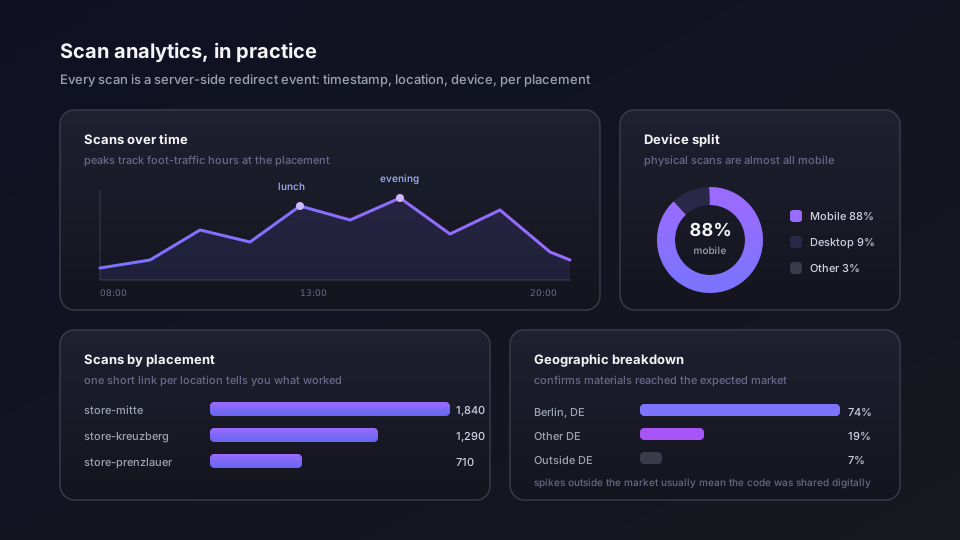
Every scan through a dynamic QR is a redirect event recorded by the shortener. In Elido, that event lands in our analytics store with a timestamp, resolved country, device type, and a click identifier. No cookies, no client-side state - the measurement happens entirely server-side at the redirect layer.
What the analytics surface gives you:
Click-over-time. The hourly and daily timeseries shows scan patterns. A poster campaign should show scan peaks correlated with foot traffic hours at the placement locations - lunchtime and evening for retail, morning for commuter contexts. If the peak does not align with the expected traffic pattern at the location, the placement may be in a low-visibility spot.
Geographic breakdown. At the workspace level, the geo view shows where scans originate by country and region. For a multi-city print campaign, this confirms that the campaign materials reached the expected markets. For a single-city campaign, anomalous geo traffic (scans from outside the market) usually indicates the QR was shared digitally - someone photographed the code and shared the image online.
Device breakdown. QR scans from physical media are almost entirely mobile. If your QR campaign shows significant desktop traffic, either the QR image was embedded in a digital communication (email, website) and clicked as an image link, or people are typing the short URL on desktop. Both are worth knowing.
Time-of-day patterns. Aggregate scan times across days tell you when your audience is active in the physical context where the code is placed. A food-service menu code that peaks during lunch and dinner confirms the placement works and the audience is scanning during the relevant decision moment. Use this to calibrate campaign flight timing if you have materials you can rotate.
Per-link breakdown. Each placement's link shows its own timeseries. Comparing link performance across placements in the same campaign tells you which locations drove the most engagement - data that is directly actionable for the next campaign's media plan.
For campaigns where scan-to-conversion attribution matters (not just scan counts), configure a postback from the landing page back to the Elido conversion API. A form submission, app install, or purchase event is sent from the destination page as a conversion event linked to the click record. This closes the loop from physical placement to downstream business outcome without relying on cookie-based attribution.
Step 7: Iterate - A/B test landing pages without reprinting
The core value of a dynamic QR campaign is that the printed artifact is decoupled from the destination. Once the materials are in circulation, you can change where the code points without touching a printer.
The practical iteration pattern:
Swap the landing page. If scan rates are healthy but conversion rates are low, the issue is the landing page, not the QR placement. Update the short link's destination to a revised landing page. The redirect updates immediately; every scan from that point forward goes to the new version. No reprinting, no new QR code.
A/B test destinations. Elido's smart link routing supports percentage-based traffic splitting at the redirect layer. Point 50% of scans to variant A and 50% to variant B. Both variants share the same QR code and the same short URL; the split happens at the edge. Monitor conversion rates across both variants in your analytics platform (via UTM or via postback), pick the winner, and cut the traffic to 100% on the winning variant. The printed code never changes.
Extend a campaign past its original end date. If a placement is still generating scans after the campaign officially ends, leave the redirect active rather than deleting the link. Update the destination to a relevant evergreen page if the original campaign page has been taken down. Deleting the link produces a 404 (or your workspace's configured fallback page) for everyone who scans a code that is still physically in circulation.
Update for seasonal relevance. A QR code on a permanent fixture - a store entrance poster holder, a menu, an interior display - can have its destination updated for each campaign cycle without printing new codes. The code on the fixture stays the same; the destination changes for each season or promotion.
Common pitfalls
Blurry or low-resolution print. SVG export from the shortener is lossless and resolution-independent. If the printer receives a PNG and rasterises it at 72dpi, the modules will be blurry at print size and scan rate will drop. Always send vector (SVG or PDF) to the printer. If the printer requires raster, export at a minimum of 1000px per cm of intended print size - a 3 cm code needs at least a 3000 × 3000px PNG.
Low ECC on a damaged surface. A QR code at level L with a scratch across 10% of its surface area will fail to scan reliably. Outdoor signage, packaging that moves through a supply chain, and any surface subject to handling should be H-level minimum.
UTMs in the QR payload. Encoding the full UTM URL directly into the QR code - without a short link - produces a large, dense grid and burns the UTM values permanently into the printed material. If the campaign name changes, or if you want to adjust the UTM taxonomy, you must reprint. Use a short link; keep UTMs in the destination URL behind it.
No call to action. A QR code with no adjacent instruction ("Scan for details", "Scan to save 10%") is invisible to a significant fraction of the audience who do not know or have forgotten that their camera scans codes. One line of text doubles scan rates in most documented A/B tests in retail contexts.
Deleting a link that is still in circulation. Physical materials last longer than campaigns. A code on packaging may be in a consumer's home for months or years after the campaign ends. Archive links, do not delete them. Set the destination to an appropriate evergreen page and leave the redirect alive.
No per-placement links. Running one QR code across multiple placements means you cannot attribute scans to specific locations or materials. The campaign-level total is the only number available. This eliminates the channel isolation advantage that makes QR measurement valuable.
Honest tradeoffs: where Elido fits and where it doesn't
Elido handles the analytical and operational side of a QR campaign well: dynamic QR generation with custom slugs and domains, per-link scan analytics with geo and device breakdown, landing page swapping and percentage-based A/B routing after print, and EU-resident click data that does not require a Transfer Impact Assessment for GDPR-compliant deployments. The mobile app and QR Studio cover the link-creation and export workflow without needing the web dashboard.
What Elido does not have today is a design editor for the visual appearance of the QR code itself - adjusting module shapes, gradient fills, or producing bespoke artistic QR styles. The generator produces standard ISO-compliant QR codes with logo overlay support, but if a campaign requires a heavily styled QR (circular modules, complex gradients, branded frame graphics), that design work happens in a separate tool after export. The SVG output is clean and editable in Illustrator, Figma, or Inkscape; the styling happens there, not in the dashboard.
The pricing page has the plan tier breakdown. Custom domains (required for the vanity URL approach described in Step 3) are on Pro and above. Analytics - click timeseries, geo breakdown, device split - are available on all paid plans. Percentage-based A/B routing at the redirect layer is on Pro and above.
For agencies managing QR campaigns across multiple client brands, the white-label and reseller setup covers per-client workspace provisioning and per-workspace domain configuration, which is the correct operational structure for keeping client analytics and link libraries isolated.
A QR campaign that closes the attribution loop - from physical placement to measured conversion - requires the right link structure before the code goes to print, not after. The decision to use a dynamic link, the UTM taxonomy, the error correction level, and the per-placement link strategy are all made before the print file leaves your hands. The analytics, the landing page iteration, and the A/B testing happen after. The infrastructure cost is one short link per placement and a QR generator that produces vector output at the right error correction level. The return is a closed measurement loop on every physical surface your campaign touches.
Related on the blog
- A/B test landing pages with short links - no CRO tool required
- Bulk-import short links from a Google Sheet (the real campaign workflow)
- Cookieless attribution explained: what still works in 2026
- URL shorteners for marketers: the 2026 comparison matrix
- How to track QR code scans and read the analytics
- Offline campaign tracking: print, billboards and TV
- Add to calendar link: build one that works everywhere
Try Elido
Paste a URL, get a working short link
No signup. Link lives for 30 days. Sign up to keep it forever.
Free, no signup required · 2 per day