
Every social platform gives you a small, fixed space for a link, and a bio page turns that space into a short menu. The page itself is easy to build. The hard part is deciding what goes on it, in what order, and how you'll know it works. This post covers those choices. If you only want the clicks-and-fields walkthrough, the step-by-step bio page tutorial has it.
TL;DR
- Open with a hero (photo, name, one-line promise) and put your three most useful links directly under it. That is what a visitor sees before scrolling.
- Give the page one main goal per season. The first link serves that goal, and everything else supports it or gets cut.
- Write labels as actions ("Get the free guide"), not names ("Newsletter").
- Measure weekly: clicks per link, the device and referrer behind them, and what happens after the click. Then reorder.
What a creator bio page is for
A bio page is a decision screen. Someone just saw your video, post or story, got curious about you, and tapped the profile link. They have one question: what should I do next? If the page answers with fifteen equal options, most people do nothing.
That changes how you design it. A portfolio shows everything you have made. A bio page shows what you want a new visitor to do now. The two goals pull in different directions, and when they collide, the bio page should lose the archive and keep the action.
Platforms differ in how many links they let you attach natively, and the limits change. Instagram's help page on adding links to your profile is the place to check the current rule (accessed 2026-10-24; the page loads, but its text is rendered by script, so I state no number here). What doesn't change is the shape of the problem: one entry point, many possible destinations. Our post on adding more than one link to your Instagram bio covers the platform side.
Pick one goal before you pick links
Write a single sentence: "This month, I want visitors to ___." Fill it with one outcome you can count. Subscribe, buy, book, watch, or follow somewhere else. The goal decides the first link, and the rest of the page serves it.
Three goals that work as a starting point:
- To grow an audience you own, the first link is the newsletter signup, then your best free resource, then your newest or most popular piece of content.
- To sell something, lead with the product page, follow with a short proof page (reviews, a demo, a case) and finish with a free sample that builds trust.
- To get booked: the booking page, a work sample, and a short "how I work" page, in that order.
If your answer is "all of the above", pick the one with the nearest deadline. You can change it next month, and the data from this month will tell you whether it was the right call.
The hero: what to say in two lines
The hero is the avatar, your name and a line or two of text. Its only job is to confirm the visitor is in the right place. Use the same photo as your social profiles, so people recognize you at a glance.
For the text, state what you do and for whom, in plain words: "Weekly tips for first-time home bakers" beats "Content creator | Dreamer | Coffee lover". A specific promise filters in the people who will click your links and filters out the rest, which is what you want.
Keep it short. A long bio pushes your links down, and on a small phone every extra line of text costs you part of the area where the links live.
Above the fold: three links and how to order them

"Above the fold" means what a visitor sees without scrolling. On a phone that is the hero plus roughly three buttons, though the exact number depends on the screen and on how tall your hero is. Treat three as a planning number and check your own page on a small phone.
Why so few? Attention falls with position. This is a pattern seen across menus, search results and link lists, and I would not quote a universal percentage for bio pages, because it varies by audience and platform. The way to know for your audience is to read your per-link click counts after a few weeks. If link four gets a tenth of the clicks of link one, you have your answer, and it's cheaper than any benchmark.
A simple ordering rule:
- First position: the main goal, the thing that pays you most.
- Second position: a safety net for visitors not ready for the first action, usually a free resource or your best content.
- Third position: proof, meaning your latest work, a press mention or a page that shows you're real.
Everything else goes below, and anything that gets no clicks for a month comes off the page. Old campaign links are the usual offenders.
Labels that get tapped
Names describe, actions persuade. Compare "My course" with "Start the free first lesson". The second says what happens after the tap. Keep labels under about five words so they don't wrap on a narrow screen, put the verb first, and avoid labels that need context ("Click here", "Link 1").
What to leave off
A creator page tends to collect links like a junk drawer. Common candidates to remove:
- Links to every social profile you own. Visitors came from one of them already, and a row of small icons at the bottom is usually enough, or nothing.
- Expired offers and past events.
- Two links to the same place with different wording.
- Anything that sends visitors to a page that is not mobile friendly. The visitor is on a phone, so check each destination on one.
What to measure
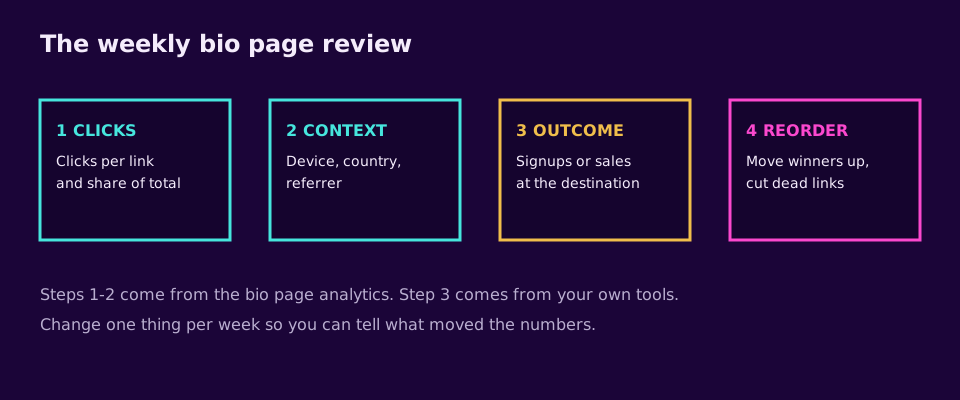
Three layers of numbers matter, from easy to hard.
Start with clicks per link. Elido records each tap on a bio page link and shows a click count per link, plus a total. This is your position test: do links one, two and three behave the way the order suggests, or has the second link quietly beaten the first? If so, swap them.
Next comes the context of the clicks. For each click Elido stores the country, device type, browser and referrer. Mobile versus desktop matters because most traffic from social apps is mobile, and a link that works poorly on a phone will show up here. The referrer shows which platform is sending people, which tells you where to post more.
The third layer, what happens after the click, is the number that pays the bills, and it lives at the destination, not on the bio page. Elido's bio page doesn't receive signup or purchase events back from your landing pages, so measure outcomes in your email tool, shop or analytics. To connect the two, add UTM parameters to each destination URL, for example ?utm_source=instagram&utm_medium=bio&utm_campaign=autumn-guide. Our UTM naming conventions post explains how to keep these tidy, and the free UTM builder generates them.
Then compare. A link with many clicks and few signups needs a better destination page, not a better position. A link with few clicks and strong signups deserves a higher spot.
A weekly routine that takes ten minutes
- Open the click counts for the last seven days.
- Note the share of total clicks each link got.
- Check outcomes at the destinations for the same week.
- Make one change: move a winner up, rewrite one weak label, or remove one dead link.
- Write the change and the date in a note so you can read the effect next week.
One change per week is slow, and that is the point. If you change five things, you'll not know which one mattered.
Patterns that work
For a launch week, put the launch link first for the length of the campaign, with a clear deadline in the label. After it ends, move it down or off. The stable links stay where they are.
An evergreen creator does better with three stable links (newsletter, flagship content, booking or shop) that rarely change, reviewed monthly. This suits people who post often and sell quietly.
Then there is the platform split. If TikTok and Instagram audiences behave differently, give each its own page and URL, with different first links. Our posts on link in bio for TikTok and link in bio ideas show what other creators do on each.
What Elido's bio page does, and what it doesn't
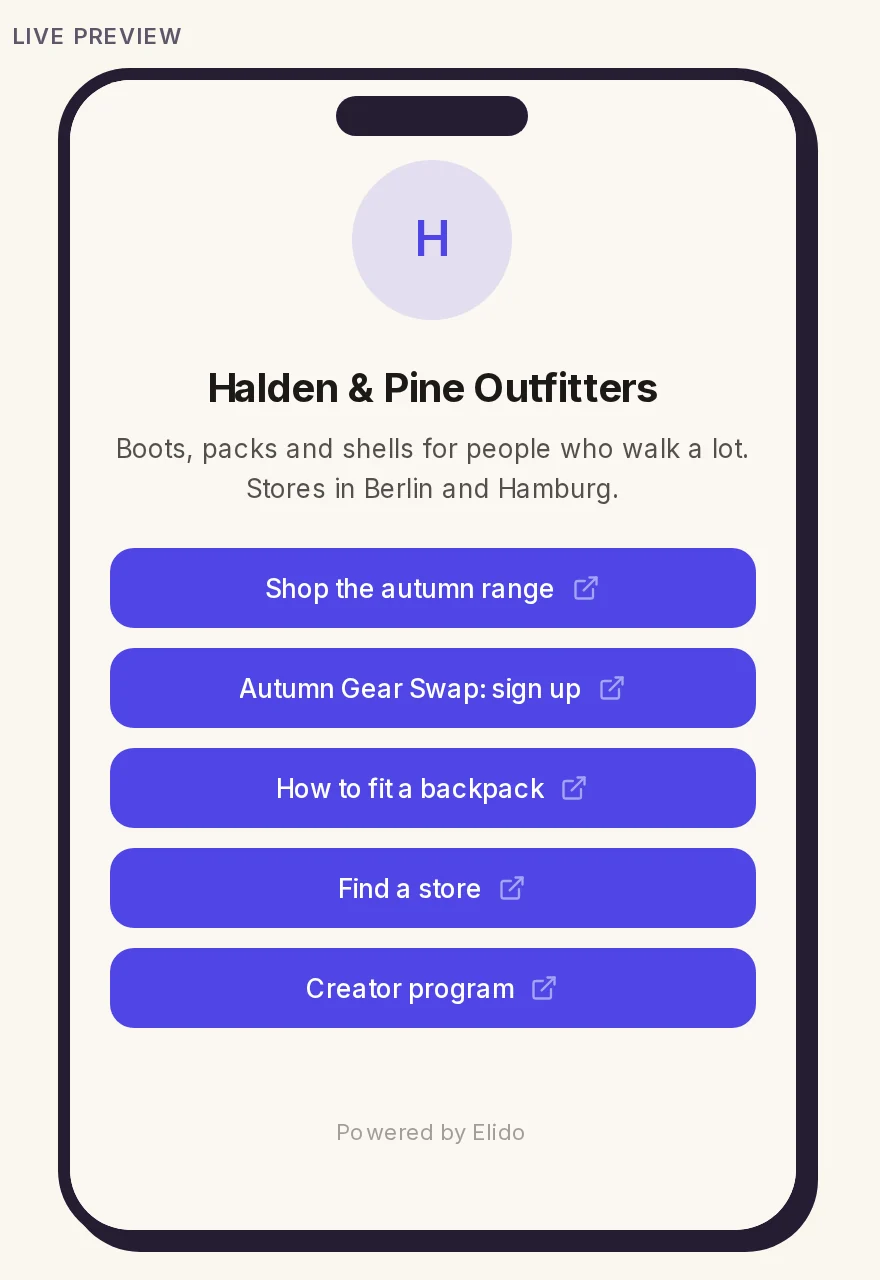
I checked this against the code before writing it. The Elido bio page has an avatar, display name, short bio, an ordered list of titled links, and theme controls for colors and button style. Taps are recorded per link with country, device, browser and referrer, and the dashboard shows a click count per link plus a total; there is no daily chart yet.
Beyond plain links, the editor adds image cards, product cards with a price, YouTube or Vimeo videos, a newsletter signup block that collects email addresses, a row of social icons, headings and text. What it doesn't have: checkout or tipping, scheduled links, a featured block, or conversion events sent back from your landing pages. If your income depends on selling digital products straight from the page, a creator-commerce tool such as Beacons covers more of that. For a side-by-side view see Elido vs Linktree. I could not load Beacons' pricing page for this update (it returned an access error), so I state no plan prices.
Related on the Blog
- Build a link in bio in 5 minutes
- Add a link to your Instagram bio
- Link in bio ideas
- Link in bio for TikTok
- Elido vs Linktree
- UTM naming conventions
External references: Instagram Help, adding links to your profile (accessed 2026-10-24); Beacons (pricing page returned an access error, accessed 2026-10-24).
- Ana
Frequently asked questions
How many links should a creator bio page have?
Three above the fold and no more than about eight in total. Visitors on a phone decide in a few seconds, so every extra link competes with the ones that matter. Keep the page short, put your one main goal first, and move anything rarely clicked off the page. Your own click counts will tell you which links earned their place.
What should be the first link on a bio page?
The single action that pays you most: a newsletter signup, a product, a booking page or your newest video, depending on your goal this month. Pick one, write the label as a verb ('Get the free guide'), and put it first. If you cannot choose, your goal for the quarter is unclear, and that is worth fixing before you redesign the page.
Do I need a bio page if Instagram allows several links?
Native links are fine for a quick start, but they vary by platform and give you little data. A bio page on one stable URL works the same on Instagram, TikTok, YouTube and X, and shows you click counts per link, so you can reorder with evidence. If you only ever need one or two links, the native field is enough.
How do I track which bio page link works best?
Use per-link click counts to see what people tap, then check outcomes at the destination, for example signups in your email tool. Tag each destination URL with UTM parameters such as utm_source=instagram and utm_medium=bio so your analytics tool can attribute the visit. Compare clicks and outcomes together, because a link with many clicks and no signups needs a better landing page.
How often should I change the links on my bio page?
Review weekly, change monthly. Swap the top link when your main goal changes, such as a launch or a new video. Avoid reshuffling every day, because you then cannot tell what caused a change in clicks. Change one thing at a time and give it a week of traffic before judging it.
What does Elido's bio page include today?
An avatar, display name, short bio, an ordered list of links with titles, theme presets with colors, background, button style and font, and per-link click tracking with country, device, browser and referrer. Besides links you can add image cards, product cards, videos, a newsletter signup block and a social icon row. It has no checkout, so product cards point to wherever you sell.
Try Elido
Paste a URL, get a working short link
No signup. Link lives for 30 days. Sign up to keep it forever.
No signup needed. Sign up free for 50 links a month.