Pinterest Analytics will tell you how many people left Pinterest for your site. It will not tell you which pin, which board, which country, or what happened next. Everything past the outbound click has to come from the link you saved with the pin, which is why tagging is the whole game here.
There is a second reason to care more than you would on another platform. Pins keep working for years, they get re-saved by strangers, and every copy carries the URL you typed the day you created it. A destination that moves eighteen months later breaks all of them at once. That combination, thin native reporting plus an unusually long tail, decides the setup below. For the general version of this problem, how to track social media links is the sibling post.
Claim Your Website Before You Publish Anything
Claiming is the step people skip and then wonder why the analytics are empty. It ties your domain to your Pinterest account, which means pins created from your site are attributed to you, their performance appears in your analytics, and your profile shows on them.
Pinterest's claim process is a DNS record or an HTML tag, and it takes minutes. Claim the site your links point at. If you run campaigns to a separate landing domain, that one needs claiming too, or the pins pointing there are invisible to you.
One thing worth deciding at the same time: whether pins point at your main domain or at a branded short domain. Both work. The short domain gives you a repointable link and a click count of your own; the main domain gives Pinterest a claimed host it already recognises. Most teams end up pointing pins at the claimed site and using short links for the placements where the URL is read by a human, such as a profile link or a printed campaign.
What Pinterest Reports, and What It Leaves Out
The metrics that matter split into two groups, and mixing them up produces confident nonsense.
Inside Pinterest: impressions, saves, and pin clicks, which are opens of the pin itself. These measure whether the creative works.
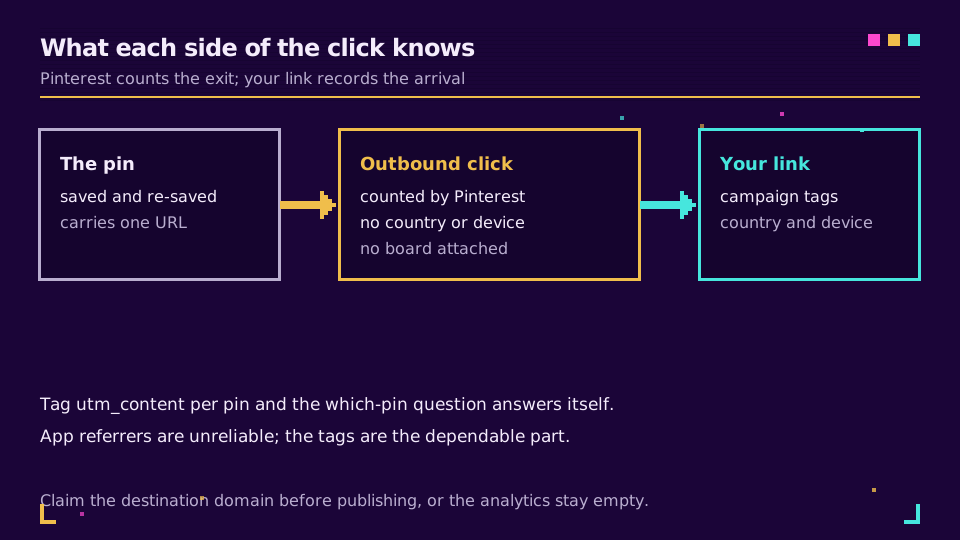
Leaving Pinterest: outbound clicks. This is the only number with a counterpart on your side, and Pinterest's analytics documentation is clear that it comes with no audience breakdown attached. You get a count. Country, device, referring board, and time of day are not in it.
Your own link fills that in. The same click, seen from your side, carries the campaign tags you attached, the country, the device and the timestamp, which is what turns a count into something you can act on.
Tag the Destination, Because Pinterest Will Not
There is no macro system here. No dynamic values, no auto-tagging, nothing that fills in the campaign for you. Whatever is on the URL when you save the pin is what a visitor arrives with, permanently.
A workable convention:
utm_source=pinterest, always, with no variants.pinterest.comandPinterestare separate rows in every report and they will haunt you.utm_medium=socialfor organic pins,cpcorpaid_socialfor ads. Pick one and never mix.utm_campaignper campaign, not per pin. Pins are the creative layer.utm_contentper pin, which is how you answer the which-pin question that Pinterest itself will not answer.
That last one is the practical trick. Pinterest cannot tell you which of your nine pins for one product drove the traffic; a distinct utm_content on each one can. UTM parameters explained covers the field definitions, and a free UTM builder saves the typing.
The Long Tail Is the Real Reason to Use a Short Link
This is where Pinterest differs from every other social channel. A tweet is dead in a day and a story in twenty-four hours. A pin saved in 2023 can still be sending clicks now, from boards belonging to people you have never met, carrying a URL you cannot edit.
So the question is not what the link points at today. It is what happens when the destination moves. A product page retires, a campaign ends, a site migrates and the old path 404s. Every copy of that pin becomes a dead end, and there is no bulk edit that reaches copies you do not own.
A short link in the pin destination turns that into a one-field change. Repoint it, and every copy of the pin, everywhere, resolves to the new page. Preventing link rot covers the same discipline applied across a whole catalogue, and it matters more on this platform than on any other.
Publishing pins that should still work in three years? Elido's custom domains put those links on a domain you own, so the destination stays yours to change.
Four Symptoms and What Causes Them
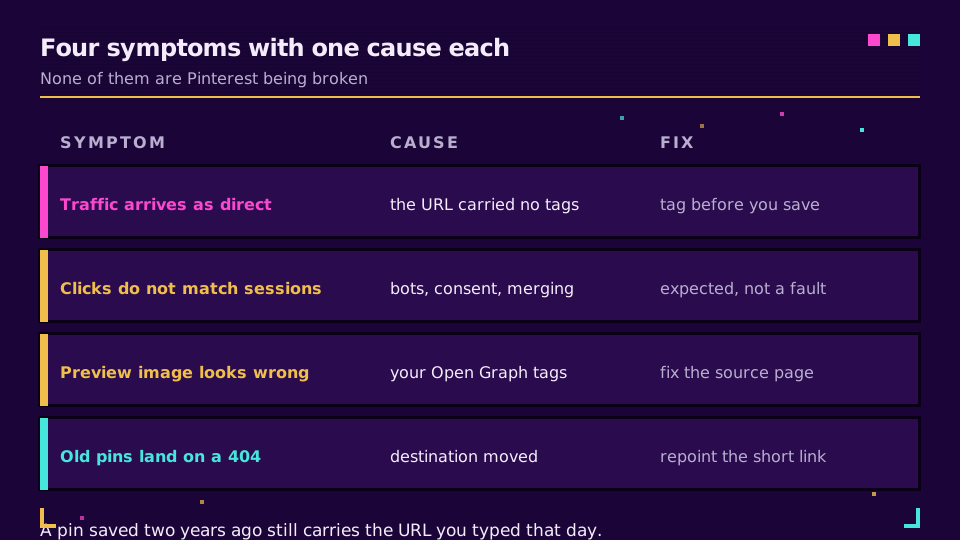
Traffic shows as direct. The URL had no tags. App referrers are unreliable enough that the campaign parameters are the only dependable signal, and without them the visit is unattributable.
Outbound clicks look nothing like sessions. Expected, and not a fault. Bots, consent denials and session merging all sit between the two counts; clicks versus GA4 sessions explains the arithmetic.
The preview looks wrong when a pin is saved from your site. That is your Open Graph and image markup, not Pinterest. Fixing a broken link preview covers the tags and the caching behaviour that makes a corrected image refuse to appear.
Old pins land on a 404. The destination moved and the pins did not. Nothing recovers this after the fact except a redirect on the old path, which is why the link should have been repointable from the start.
One Link Per Pin, or One Per Campaign?
Per campaign, with utm_content distinguishing the pins, is the setup that stays maintainable. Ten pins for one launch means one destination, ten tag variants, one row in your campaign report and ten rows when you drill in.
The exception is the evergreen anchor pin, the one that quietly earns traffic for two years. Give that one its own short link. When the product changes, you repoint a single link rather than reasoning about which of forty campaign URLs is still live, and you get a clean click history for the pin that actually matters.
I would rather maintain five deliberate links than fifty accidental ones, and Pinterest punishes the accidental kind slowly enough that you only notice a year later.
Read the Cornerstone Series
This post sits in the tutorials cluster. Track UTM parameters end to end is the cornerstone for the tagging chain, and link in bio ideas covers the profile link that Pinterest gives you alongside the pins.
Related on the Blog
Frequently asked questions
Does Pinterest support UTM parameters?
Pinterest does not add them for you, but it passes through whatever is already on the destination URL. You put the tags on the link before you save the pin, and your web analytics reads them when the visitor arrives. That is the only route to campaign-level attribution from Pinterest into GA4 or anything else.
What is the difference between a pin click and an outbound click?
A pin click opens the pin itself inside Pinterest, in the closeup view. An outbound click is the one that leaves Pinterest for your site. Only the second one can turn into a session, so it is the number to compare against your own analytics.
Can I change where an existing pin points?
You can edit the destination on pins you own, but you cannot edit copies that other people saved, and those copies are often the ones still circulating years later. A short link solves both cases at once, because repointing the link changes the destination for every copy of the pin that carries it.
Why does Pinterest traffic show up as direct in GA4?
Almost always because the destination URL carried no campaign tags. Referrer data from apps is unreliable, so without UTM parameters on the link the visit has nothing to attribute it to. Tag the URL before saving the pin and the traffic files itself correctly.
Should I claim my website on Pinterest?
Yes, before anything else. Claiming attributes pins created from your domain to your account, unlocks the analytics for them, and puts your profile on those pins. Without it you are publishing into a channel where you cannot read your own numbers.
Do short links hurt reach on Pinterest?
A branded short link on your own domain behaves like any other link. The risk is with generic shared shortener domains, whose reputation is built by everyone else using them. Use a domain you own and the question stops applying.
Try Elido
Paste a URL, get a working short link
No signup. Link lives for 30 days. Sign up to keep it forever.
Free, no signup required · 2 per day