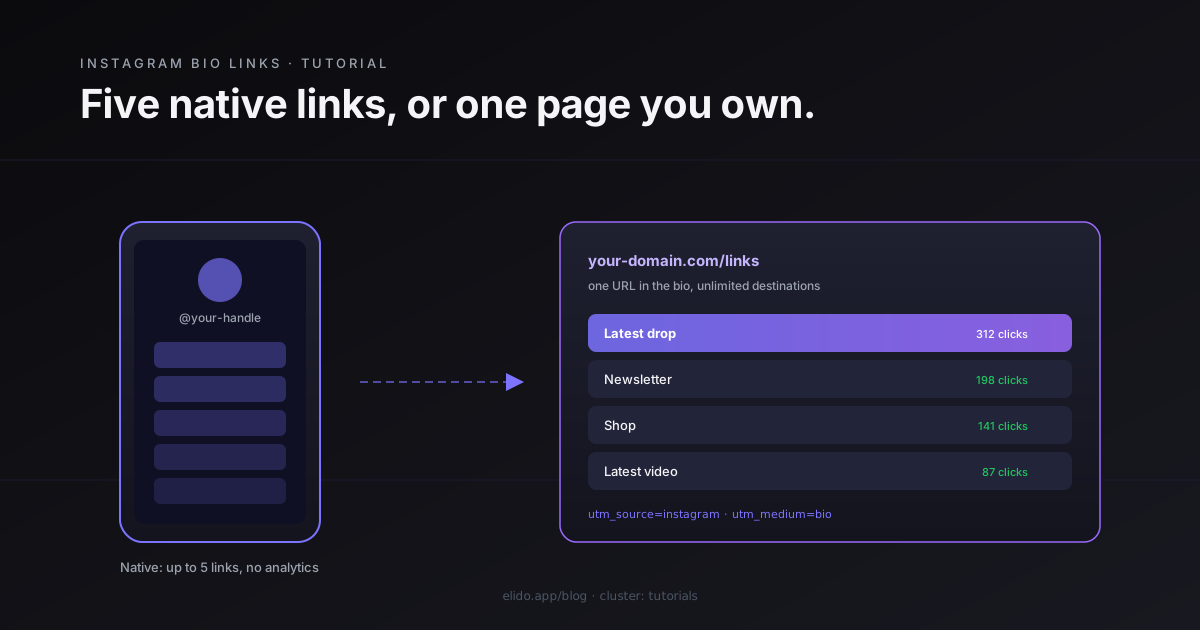
Instagram lets you add up to five links to your bio, and you set them up in under a minute: open your profile, tap Edit Profile, tap Links, then Add external link. That native feature arrived in 2023 and quietly retired the old one-link-only limit that made a separate bio tool almost mandatory.
Five links cover a lot of accounts. They also stop short of what most businesses and creators actually need. There is no click tracking on those links, no branding, no way to reorder them by what performs, and nothing to do when you want link number six. So the real question isn't how to add a link to your Instagram bio. It's whether the native links are enough on their own, or whether you'd rather point your bio at a link-in-bio page sitting behind a single URL.
This guide covers both. First the native method, step by step. Then the point where it runs out, and how a link-in-bio page plus a tracked short link picks up where Instagram stops.
The Short Answer: Instagram Now Allows Up to Five Bio Links
You can add more than one link to your Instagram bio. The cap is five, and they appear as a tappable list right under your bio text, so a visitor can pick a destination instead of being sent to a single hardcoded URL.
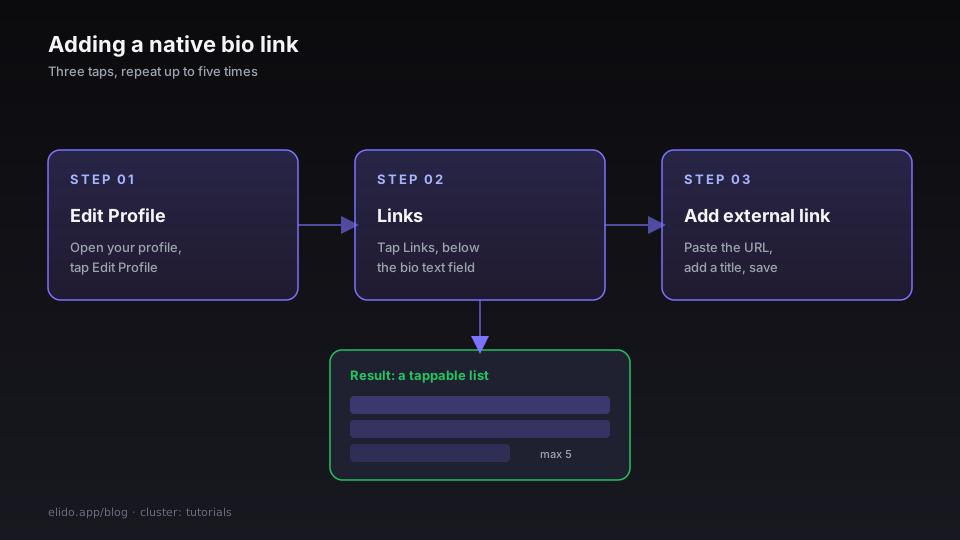
Here is the whole sequence:
- Open the Instagram app and go to your profile.
- Tap
Edit Profile. - Tap
Links, thenAdd external link. - Paste the URL, add an optional title, and tap done.
- Repeat up to five times. To reorder, open the link list, tap the menu, and drag.
That is the entire native flow, confirmed in Instagram's own help article on adding a link to your bio. The website field you may remember from years ago still exists, but the Links section is the part that gives you a list rather than a single link.
How to Add Links to Your Instagram Bio, Step by Step
The native method takes about a minute once you know where the setting hides. Most people miss it because they keep trying to paste a URL into the bio text box, where plain links never become clickable.
Start in Edit Profile. Below the bio text field you'll see Links. Tap it. On a fresh account the list is empty. Tap Add external link, paste your destination, and give it a short title so visitors see "Shop the drop" rather than a raw domain. Save, and the link shows up under your bio within a minute.
A few details that trip people up:
- Titles are optional but worth it. A labelled link reads as a button. An unlabelled one shows the bare URL, which looks unfinished.
- The order is yours to set. Open the link list, hit the menu in the corner, and drag links into the order you want. The top link gets the lion's share of taps on a phone.
- You can mix link types. A native link can point at a website, a YouTube video, a checkout page, or your own link-in-bio page.
If Links is missing entirely, your account is probably brand new, on an old app build, or under an age restriction. Update the app first, then wait a day if the option still has not appeared.
What Instagram's Native Bio Links Can't Do
The native links are a real upgrade over the old single-link era, but they were built for simplicity, not for marketing. Four gaps show up fast once you treat your bio as a channel.
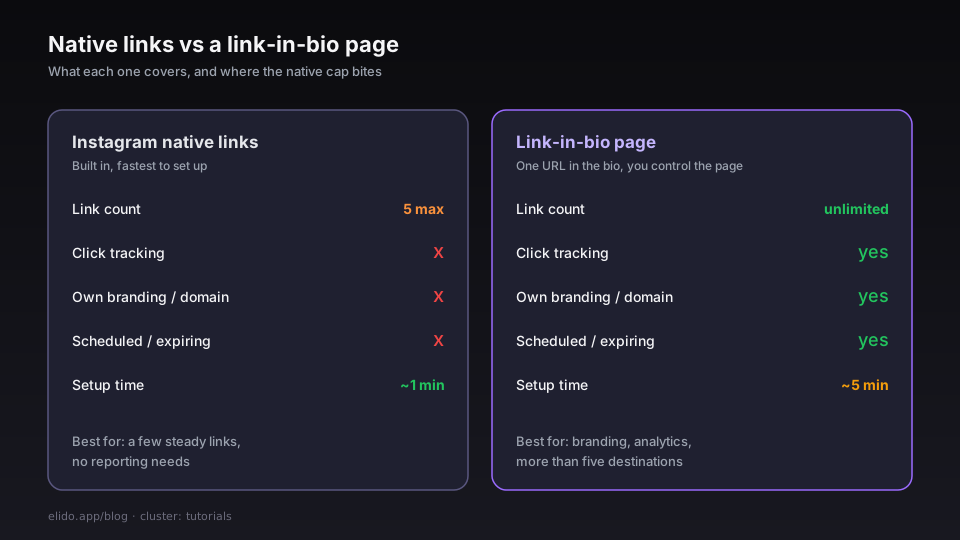
There's no click data. Instagram won't tell you how many people tapped any external link, which one won, or where those visitors went next. For an account running launches or affiliate links, flying blind on the most-tapped real estate you own is a hard limit.
There's no branding. Visitors see your destinations, but the links route through Instagram's interface, not a page you control. You can't apply your colours, your logo, or your own domain.
There is the cap itself. Five works until you run a campaign with a sixth thing to promote, or you want a permanent set of links plus a rotating featured one. And there is no scheduling: you cannot set a link to appear for a launch window and disappear afterwards.
None of that matters for a personal account with three steady links. It matters a lot the moment you want to measure or scale what your bio does.
When to Use a Link-in-Bio Page Instead
A link-in-bio page is a single web page that holds as many destinations as you want, and you put its one URL in your Instagram bio. Instead of fighting the five-link cap, you point Instagram at the page and manage everything from there.
That switch buys you the things native links don't have:
- Unlimited destinations, reorderable, each with an icon and a subtitle.
- Click analytics on every link, so you can see what your audience actually opens.
- Your own domain and branding, so the page reads as yours rather than a generic profile.
- Scheduled and expiring links for time-bound launches.
The tradeoff is a few extra minutes of setup, and one habit change: you update the page, not your Instagram bio, whenever something changes. That's usually a win, because editing a hosted page is faster than editing a mobile bio field, and the URL in your profile never has to move.
If you want the full walkthrough, the build a link-in-bio page in 5 minutes tutorial covers the setup end to end, and bio pages for creators covers what to put above the fold. For what to actually list, link in bio ideas sorts the options by goal. The Linktree alternatives comparison is worth a read if you are weighing tools.
Ready to give your bio a page you actually control? Create a free link-in-bio page on Elido and put one tracked URL in your profile.
How to Track Clicks on Your Instagram Bio Link
Instagram gives you zero analytics on outbound bio links, so tracking has to happen on your side of the click. Two pieces do it: a link that records the tap, and UTM parameters that tell your analytics where the visitor came from.
A short link or a link-in-bio page logs each click the moment it happens. That alone tells you how many people left Instagram through your bio. To connect those visits to what they do next, append UTM parameters to each destination, for example utm_source=instagram&utm_medium=bio. Google's own campaign URL guidance explains the parameter names, and the Campaign URL Builder generates them for you. Without UTMs, every bio visitor lands in your analytics as direct traffic, indistinguishable from someone who typed your address by hand.
The payoff is attribution you can act on. You learn which post drove the bio tap, which link won, and whether bio traffic converts as well as your paid channels. The track UTM campaigns end-to-end guide is the deeper version of this, and short link analytics: what to measure covers which numbers are worth your attention. If you want to generate tagged links quickly, the link shortener with a UTM builder post shows the fastest path. Elido's analytics record clicks without third-party cookies, which keeps the data usable after browser tracking changes.
Common Problems Adding a Bio Link
Most "I can't add a link" reports trace back to a handful of causes, and they're quick to rule out.
The Links option is missing. The account is new, the app is out of date, or there is an age restriction. Update Instagram, then give it a day. Editing on the web rather than the app sometimes surfaces the option sooner.
The link is in the wrong place. A URL typed into the bio text field stays plain text. Clickable links only come from the Links section under Edit Profile. This is the single most common mix-up - the full guide to when a bio link isn't clickable walks every cause and fix.
The link points at the wrong thing. If you are sending people to a page you own, use a subdomain or a hosted link-in-bio page rather than something that might break. Test the URL in a private browser tab before you paste it, so you catch a typo before your audience does.
Traffic shows up as "Direct" everywhere. That is expected if you skipped UTMs. Instagram and some in-app browsers strip the referrer, so without UTM tags your analytics cannot label the source. Add them once per link and the problem goes away.
For accounts that lean on their bio as a real acquisition channel, the difference between five untracked links and a measured link-in-bio page is the difference between guessing and knowing. Creators and influencers can dig into the channel-specific tactics in URL shorteners for influencers, and the marketers solution page shows how the same setup fits a wider campaign. Pricing for custom domains and higher click volumes lives on the pricing page.
Related on the Blog
- Build a link-in-bio page in 5 minutes - the full setup tutorial behind the page you put in your bio.
- Bio pages for creators: what to put above the fold - the strategy for what belongs on the page.
- Linktree alternatives - how the hosted bio-page tools compare.
- Track UTM campaigns end-to-end - the cornerstone for measuring every link you share.
- URL shorteners for influencers - channel tactics for creator accounts.
- TikTok link in bio: add and track links - the same idea on TikTok, where you also get only one link.
- Link in bio ideas: what to put and how to order it - the ideas to fill the page with.
- Why your Instagram bio link isn't clickable (and fixes) - troubleshooting when it won't link.
Frequently asked questions
Can you have more than one link in your Instagram bio?
Yes. Since 2023 Instagram lets you add up to five external links directly in your bio, and visitors see them as a tappable list under your bio text. If you need more than five, or you want click data and your own branding, you point the single bio link at a link-in-bio page that holds as many destinations as you like.
How many links can you add to your Instagram bio?
Instagram caps native bio links at five. A link-in-bio page has no practical limit, though three to seven links is the range that actually gets clicked before visitors stop scrolling on a phone.
Why can't I add a link to my Instagram bio?
The usual causes are a brand-new or age-restricted account, an outdated app version, or editing the wrong field. Native links live under Edit Profile then Links, not in the bio text box. Newer accounts sometimes wait a short period before the Links option appears.
How do I add a clickable link to my Instagram bio?
Open your profile, tap Edit Profile, tap Links, then Add external link. Paste the URL, add an optional title, and save. The link becomes tappable under your bio within a minute. The bio text field itself does not make plain URLs clickable, which is why the Links section exists.
How do I track clicks on my Instagram bio link?
Instagram shows you no click data for external bio links. To measure them, point your bio at a short link or a link-in-bio page that records clicks, then add UTM parameters so the traffic shows up correctly in Google Analytics. Without that, every bio visit lands as untagged direct traffic.
Is a link-in-bio page better than Instagram's native links?
It depends on the account. For five or fewer plain links with no reporting needs, the native feature is enough and faster to set up. For branding, click analytics, unlimited links, scheduled launches, or one URL you never have to edit again, a link-in-bio page wins.
Try Elido
Paste a URL, get a working short link
No signup. Link lives for 30 days. Sign up to keep it forever.
Free, no signup required · 2 per day