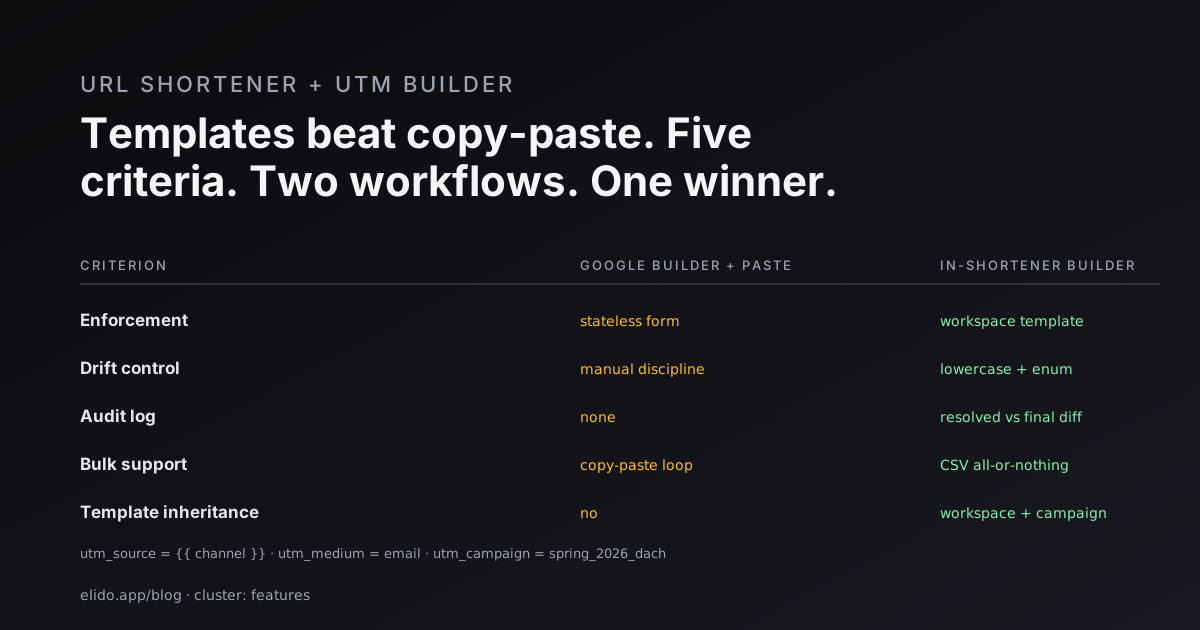
The Google Campaign URL Builder was released in 2013. Type the five UTM parameters into a form, copy the assembled URL, paste it into your shortener, paste the short link into the campaign brief. That workflow has not changed in thirteen years. The tool still works - what changed is that marketing teams now operate at a scale where the copy-paste loop is where consistency breaks.
This is a feature post, not a tutorial. The tutorial that walks templates and server-side forwarding end-to-end is the track UTM campaigns cornerstone. New to the tags themselves? UTM parameters explained covers what each one does before you automate them. This post covers the design argument: why a UTM builder belongs inside the shortener, what templates per channel look like, and which anti-patterns disappear once the shortener owns the assembly step.
The legacy workflow and where it breaks
The legacy workflow has three steps. You open Google's Campaign URL Builder. You type the source, medium, campaign, term, and content fields. You copy the assembled URL into a shortener. Bitly, Rebrandly, an in-house redirector - doesn't matter, the assembly happened upstream.
This breaks in four predictable ways.
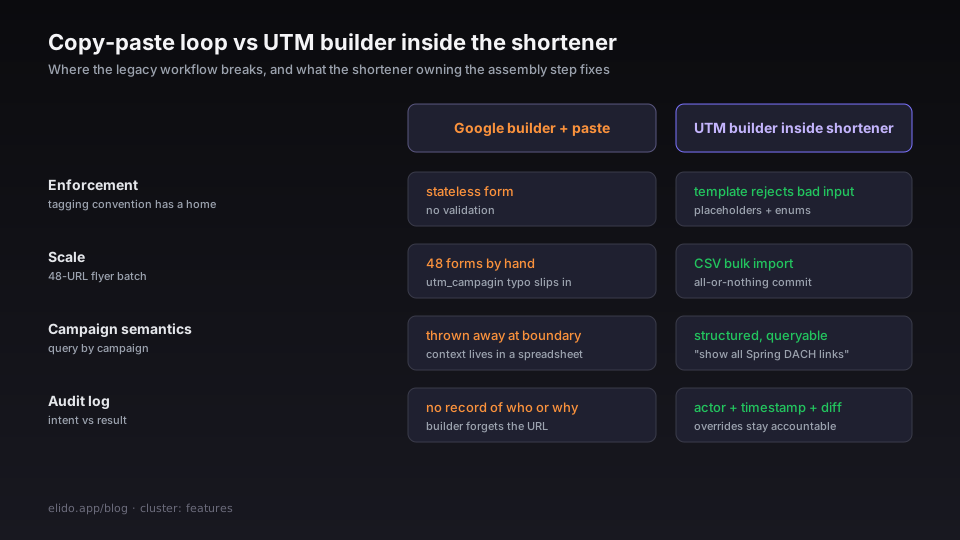
The form does no enforcement. One person types utm_source=newsletter, another types utm_source=Newsletter, a third pastes from a previous URL that had utm_source=email. The builder is a stateless form; there is nowhere for the team's tagging convention to live. Six months later, GA4 shows a fragmented channel mix and cleaning it up is a regex job against thousands of rows.
The form does not scale. A regional flyer campaign with 12 destinations across 4 countries is 48 URLs. Filling 48 forms by hand, copy-pasting 48 short links into a spreadsheet - the marketer doing this every Friday eventually types utm_campagin once. Six links. Three weeks before anyone notices.
The shortener has no idea what the UTM payload was for. It received a fully assembled long URL. It cannot tell you "show me all links tagged for the Spring DACH campaign" because that semantic was thrown away at the boundary. The campaign context lives in your spreadsheet, not in the system serving the redirects.
There is no audit log of intent vs result. Two months after launch, somebody asks why one specific link in a 200-link batch resolved to utm_term=manual_override. The builder produced a URL string and forgot. Nobody can say who built it, when, or whether the override was intentional.
Google's own guidance on UTM best practices reads like a tacit acknowledgement of the problem: "be consistent", "use lower case", "document your conventions". The advice is correct. The tool offers no help executing on it.
What a UTM builder inside the shortener changes
The change is not a better form. The change is that the shortener owns the assembly step, which means it can hold a template, validate inputs against that template, store the resolved-vs-final diff, and refuse to commit links that violate it. Same five fields, very different operational shape.
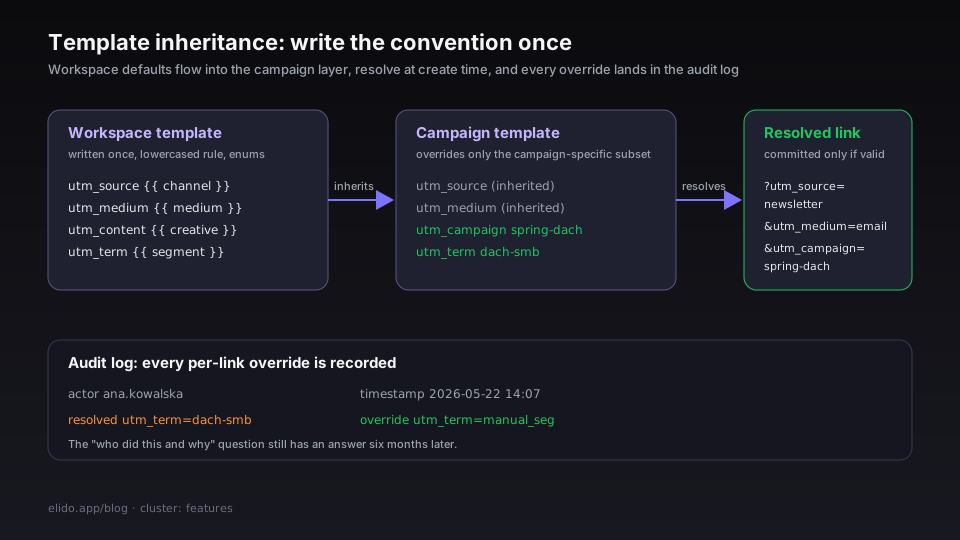
A workspace template is the first move. You write the convention once, at the workspace level, and every link inherits. Literal values fix the parameters that don't vary; placeholders fill from the link payload at create time:
{
  "utm_source": "{{ channel }}",
  "utm_medium": "{{ medium }}",
  "utm_campaign": "{{ campaign }}",
  "utm_content": "{{ creative }}",
  "utm_term": "{{ audience.segment }}"
}
A campaign template layers on top. The campaign inherits the workspace defaults and overrides only the subset that's campaign-specific - utm_campaign for sure, sometimes utm_term if the segmentation is campaign-bound rather than evergreen.
What this buys you in practice:
- A new marketer onboarding to the workspace cannot create a link with a malformed
utm_sourcevalue. The placeholder rejects it. - The case normalisation rule lives in one place. If the workspace defines
utm_sourceas lowercased, every link that resolves through the template gets that normalisation applied - no per-link discipline required. - The campaign metadata is structured. "Show me all links in the Spring DACH campaign" is a query against the shortener's own database, not an Excel filter against a spreadsheet someone might have forgotten to update.
- Per-link overrides remain possible. They just go through an audit log with actor + timestamp + the resolved-vs-final diff, so the "who did this and why" question has an answer six months later.
The full template reference, including dotted-path placeholders that read from the link's tag array, lives in the UTM templates guide.
UTM templates per channel - what they actually look like
The set of templates a marketing team needs is not infinite. Four channels cover the majority of the work. Each one has a different shape because the data that makes the link useful is different.
Email. Medium is fixed. Source identifies the list. Campaign identifies the broadcast. Content identifies the creative variant when you A/B test the hero.
{
  "utm_source": "{{ list }}",
  "utm_medium": "email",
  "utm_campaign": "{{ broadcast_id }}",
  "utm_content": "{{ creative }}",
  "utm_term": null
}
The literal utm_medium=email removes the choice. Without it, somebody eventually tags a newsletter link with utm_medium=newsletter and another with utm_medium=Email and the GA4 medium dimension fragments.
Organic social. Source is the platform. Medium is social (or social-organic if you split paid from organic at the medium layer). Campaign and content carry the post identifier and creative variant.
{
  "utm_source": "{{ platform }}",
  "utm_medium": "social",
  "utm_campaign": "{{ campaign }}",
  "utm_content": "{{ post_id }}",
  "utm_term": null
}
The platform placeholder is bounded to an enum - instagram, linkedin, tiktok, twitter, youtube, facebook. Anything else fails fast. This is the single most common drift source for organic social: IG for one campaign, instagram for the next.
Paid. This is where structure matters most because the ad platform's optimisation algorithm reads the UTM-attributed conversion data back. Mis-tagged paid clicks turn into mis-attributed conversions, which turn into the algorithm pulling budget from a campaign that's actually working.
{
  "utm_source": "{{ platform }}",
  "utm_medium": "{{ medium }}",
  "utm_campaign": "{{ campaign_id }}",
  "utm_content": "{{ ad_id }}",
  "utm_term": "{{ keyword }}"
}
medium is bounded to cpc, paid-social, display, video. The ad_id placeholder is the platform's native identifier rather than a human-readable label - the label belongs in the campaign manager, the identifier belongs in the URL.
Referral and partner. Source is the partner. Medium is referral. Campaign tracks the deal; content tracks the placement.
{
  "utm_source": "{{ partner }}",
  "utm_medium": "referral",
  "utm_campaign": "{{ deal_id }}",
  "utm_content": "{{ placement }}",
  "utm_term": null
}
The partner placeholder is bounded to your CRM's partner-account list. An off-list partner forces an explicit decision rather than a silent typo. Affiliate networks that pass an sub_id parameter can be appended without breaking the template - Elido preserves arbitrary ?… parameters from the destination URL alongside the template-resolved UTMs.
Four templates. Most of a marketing team's link volume falls into one of these shapes.
Smart-link defaults - where the builder meets the redirect
Templates handle the assembly side. The redirect side is where smart links come in, and the interaction between the two is the part that's easiest to underestimate at design time.
A smart link routes by visitor context - country, device, language, time of day. The destination URL is conditional, but the UTM context is the campaign's, not the destination's. This matters because the most common smart-link use case in marketing is "the same campaign points to the de-DE landing page for German visitors, the en-US one for American visitors, and the fr-FR one for French ones". You want one short link per campaign, not three. The smart link branches the destination; the UTM payload stays campaign-consistent across branches.
Without templates, each conditional destination needs its UTM string assembled separately and you've just tripled the surface area for typos. With templates plus smart-link routing, the UTM resolution happens once at link creation and the resolved string travels through every branch.
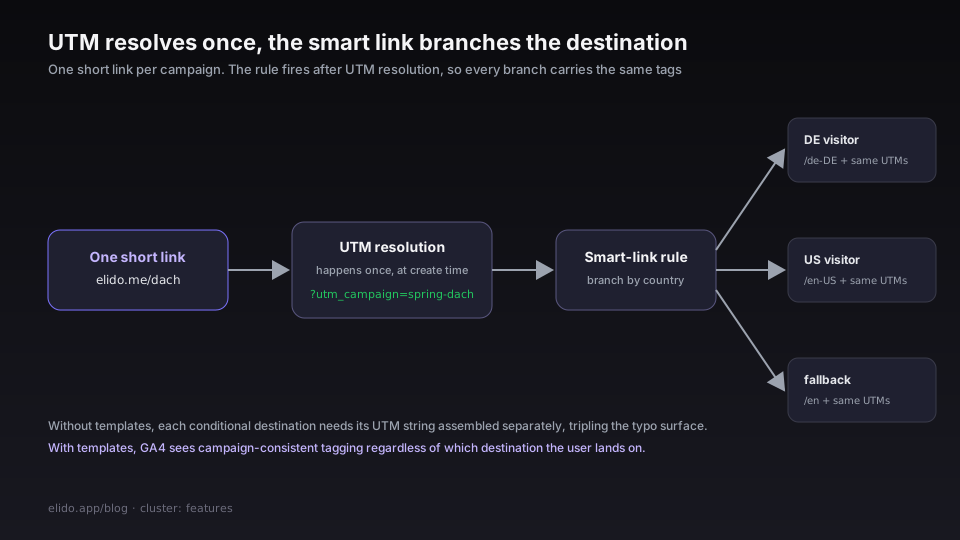
The smart links explainer walks the routing logic. The detail that matters for UTM hygiene is that the smart-link rule fires before the redirect but after the UTM resolution - the analytics platform sees campaign-consistent tagging regardless of which destination the user lands on. Even the fallback destination for "we forgot to write a rule for Liechtenstein" inherits the same UTM payload.
Anti-patterns the templates retire
Five anti-patterns disappear once the shortener owns the UTM assembly. Each one is a real failure mode I've watched eat a marketing team's quarter.
utm_source case mixing. The most common drift source by a wide margin. newsletter, Newsletter, NEWSLETTER, news_letter - the same channel split across four variants in GA4. The fix is a lowercase transform on the placeholder, applied at resolution time across both the bulk endpoint and the UI.
utm_medium mismatch with the channel. A paid Meta retargeting campaign accidentally tagged utm_medium=social instead of utm_medium=paid-social. GA4's channel grouping reads it as organic social, paid reporting underreports, the CFO asks why paid spend doesn't show up in attributed revenue. The fix is the literal - no placeholder, no choice.
Spaces in utm_campaign. utm_campaign=Spring 2026 DACH URL-encodes to Spring%202026%20DACH and breaks the campaign-name regex teams use to slice funnels. The fix is either a slugify transform or a hard rejection at validation time with the kebab-case alternative suggested. Marketers learn the convention fast when the API rejects the alternative.
utm_term as a dumping ground. Without a convention, utm_term becomes the field where everyone stashes the metadata they couldn't fit anywhere else. The fix is to define what utm_term is for at the workspace level - usually "audience segment for paid, null everywhere else" - and let the placeholder enforce it.
Manual overrides without an audit trail. A senior marketer needs to override the template for one link because of a special case. Three months later, that link's behaviour is anomalous and nobody can reconstruct the context. The fix is not to prevent the override but to record it: who, when, what the template would have resolved to, what the override changed it to.
How to migrate from the legacy workflow
The migration is gentler than the redesign suggests. Three steps, in this order.
First, audit your current UTM data. Pull six months of campaign data from GA4. Group by utm_source, then utm_medium, then utm_campaign. The variants that should be one row but show up as several are your drift inventory. An afternoon's work and an embarrassing list.
Second, write the four channel templates above. The literals come from your audit - pick the canonical spelling for each channel and lock it in. The placeholders come from your campaign-brief schema, which you may need to formalise at the same time. The setup branded short links walkthrough covers workspace setup from scratch.
Third, retire the Google URL Builder bookmark. The team's UTM construction now happens inside the shortener. The cultural change takes longer than the technical one.
For campaigns shipping hundreds of links at a time, bulk import from CSV closes the scale gap. The CSV column names match the placeholder names; the all-or-nothing commit guarantees you don't get half a campaign published with broken tagging. The QR code campaign walkthrough is a worked example - UTM templates threaded through a QR launch where the print run is finalised before the link tagging is.
What the templates do not fix
Two things, both worth naming.
Templates do not solve cross-device attribution. A click on mobile that converts on desktop is an identity-resolution problem; UTMs are touch-level metadata, not identity. Cross-device stitching needs an identity graph, which is what a CDP is for.
Templates also do not solve the server-side forwarding problem. Safari ITP and ad-blockers degrade pixel-only attribution; the fix is conversion forwarding via Meta CAPI and GA4 Measurement Protocol, not better UTM tags. Both problems live in the same pipeline but have different fixes - both are covered in the cornerstone walkthrough.
The shortener with a UTM builder fixes tagging hygiene and audit. It does not pretend to fix everything downstream. The honesty about scope is part of why marketers adopt templates faster than they adopt a CDP: the surface is small, the failure modes are concrete, and the dry-run is short.
Related reading
- UTM parameters explained - what the five tags do before you automate the assembly.
- Track UTM campaigns end-to-end without a CDP - the cornerstone tutorial that walks the full pipeline.
- Smart links explained - routing by country, device, language - how conditional destinations interact with UTM payloads.
- Setup branded short links on your domain - the prerequisite for owning the redirect surface end-to-end.
- QR code campaign from scratch - a worked example of UTM templates threaded through print collateral.
- Free UTM builder: make trackable campaign URLs - the parameter-by-parameter guide to building the tags this tool automates.
- UTM parameters for TikTok and LinkedIn ads - where a builder is mandatory, because LinkedIn has no dynamic parameters at all.
- Product surface:
/features/smart-links. - Operational walkthrough: UTM templates guide in the docs.
Try Elido
Paste a URL, get a working short link
No signup. Link lives for 30 days. Sign up to keep it forever.
Free, no signup required · 2 per day