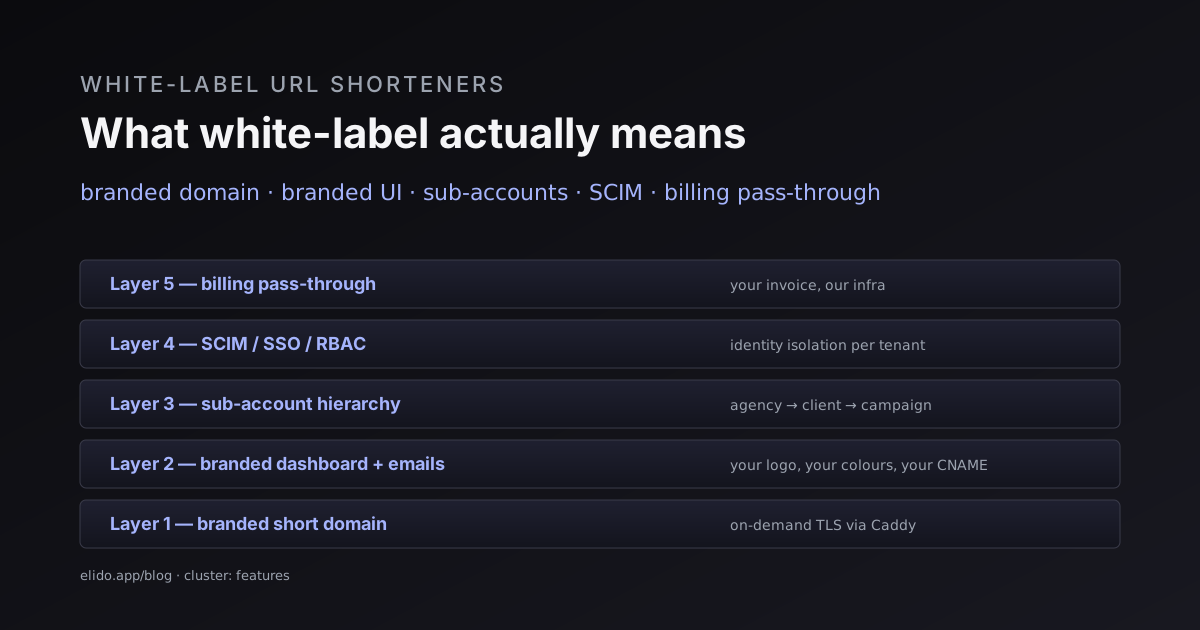
White-label is one of those words every link-shortener vendor ships in their pricing page and almost none of them define. The promise is that you can resell their product as yours: your domain on the short links, your logo in the dashboard, your invoice on the customer's credit card. The reality is usually that one or two of those things are true and the rest is a screenshot.
This post is the long-form definition. Four axes a white-label feature has to cover, vendor-by-vendor where the gaps tend to live, and the operational reality of running a branded link product on top of someone else's infrastructure. The audience is agencies and SaaS companies who want to wrap a URL shortener inside their own product without building the redirect tier themselves. The bitly alternatives cornerstone covers the broader feature gap; this post zooms into the white-label part.
The four axes of actual white-label
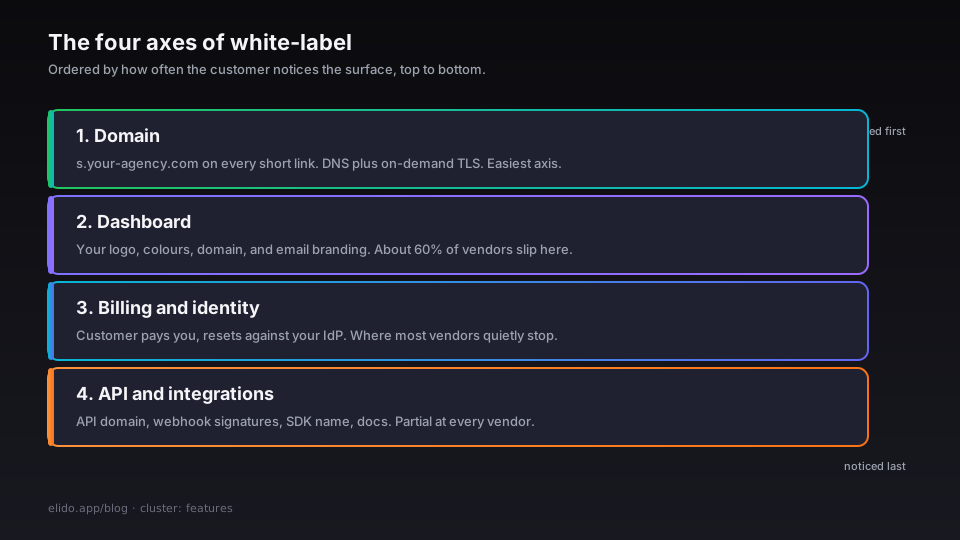
White-label as a label means nothing on its own. The useful question is which surfaces carry the vendor's brand and which carry yours. Four surfaces matter, in approximate order of how often a customer notices them.
Domain. The short URL itself. s.your-agency.com/abc123 rather than bit.ly/abc123 or s.elido.me/abc123. This is the surface most vendors get right because it is the surface every customer asks about first. It is also the simplest because DNS + on-demand TLS solves it in a couple of minutes. The custom domains walkthrough covers the underlying mechanism.
Dashboard. The interface your customer logs in to. Does it carry your logo, your colours, your domain (links.your-agency.com)? Can the customer reset their password without an email from [email protected]? Can they invite teammates without seeing the vendor's name anywhere in the email subject? About 60% of self-described white-label products fail one of those tests.
Billing and identity. Who is the customer paying, and who controls the user accounts? If your customer signs a contract with you, sees your invoice every month, and resets their password against your IdP, the white-label is real. If they sign with you but pay the vendor directly and get login emails from the vendor's domain, it is a partner-program rebadge, not white-label. This is where most vendors quietly fall short.
API and integrations. When your customer's developer reads your API documentation, do they see the vendor's API or yours? Are the webhook signatures from your domain or the vendor's? When they connect Zapier or HubSpot, does the integration mention you or the vendor? This axis is the one furthest down the funnel and the easiest to overlook until you have your first developer-customer asking why they have to read three sets of docs to integrate.
Across these four axes, vendors fall into three rough buckets: domain-only (the cheapest tier - you get a custom short domain and a co-branded dashboard at most), partial white-label (domain + dashboard + sometimes login emails), and full white-label (all four, with API and integration branding controllable). The pricing reflects the bucket - domain-only starts around $50/month, full white-label starts at $500/month and goes into the thousands for enterprise plans.
Domain: the surface that is easy to get right
Custom short domains are table stakes. The vendor publishes a CNAME target, you point your DNS at it, the vendor issues a TLS certificate through Let's Encrypt and serves traffic with your domain in the URL. The mechanism is identical at every vendor that supports it: automatic on-demand TLS, or equivalent for vendors built on different stacks.
The catches are operational, not technical:
- DNS apex restrictions. If you want
your-agency.comitself as the short domain (nots.your-agency.com), most DNS providers will reject the CNAME because the DNS specification forbids CNAME records at the apex. Cloudflare's CNAME flattening sidesteps this; OVH and Route53 require an ALIAS or ANAME record instead. The vendor cannot fix this for you. - Certificate transparency leakage. Public CT logs publish every Let's Encrypt certificate. If your customers are sensitive to "this domain is on the same hosting infrastructure as company X", which is rare but not zero in enterprise, that is information the CT logs expose. There is no way to suppress it short of running your own ACME-issuer setup.
- Subdomain quota. Some vendors cap the number of custom domains per account on lower tiers. If you intend to give each of your customers their own subdomain (
customer-1.short.your-agency.com,customer-2.short.your-agency.com), confirm the quota before signing.
The custom domain TLS post covers the issuance mechanism in detail. The relevant feature page is /features/custom-domains.
Dashboard: where the gaps usually live
A custom-domain dashboard is harder than it sounds. The vendor has to serve their UI under your domain, with your logo, your colour scheme, and your favicon, while still authenticating users against their identity store and serving API calls against their backend. The pieces that have to align:
- DNS pointing at the vendor's UI hostname, separate from the redirect tier. Most vendors use a subdomain like
app.your-agency.com → app.vendor.comwith the vendor's TLS cert covering it. - A theming layer the vendor exposes to you - logo URL, primary colour, optional secondary colour, optional dark-mode override, optional custom font (rare).
- Email branding. Password reset, invite, billing receipts, and notification emails should come from your domain, not the vendor's. Most vendors stop short here. Configuring SPF and DKIM for the vendor's outbound mail under your domain is operationally non-trivial; many vendors offer "from-name" branding (the From header says "Your Agency") but keep the actual sending domain as theirs.
- Help link and support contact. The "Help" link in the dashboard and the in-product chat widget should point at your support, not the vendor's. Surprisingly often, vendors hardcode their own help URL even on white-label plans.
A common pattern: the vendor offers a "Customer Portal" plan that handles the dashboard branding but routes support tickets back to the vendor with your account manager as a CC. This works for small agencies but breaks down when the customer wants to file an SLA-bound ticket. Confirm the support routing on the contract, not just on the marketing page.
The white-label feature in the Elido product surface is documented at /features/white-label and the operational walkthrough is in the white-label guide.
Billing: the bucket vendors quietly stop at
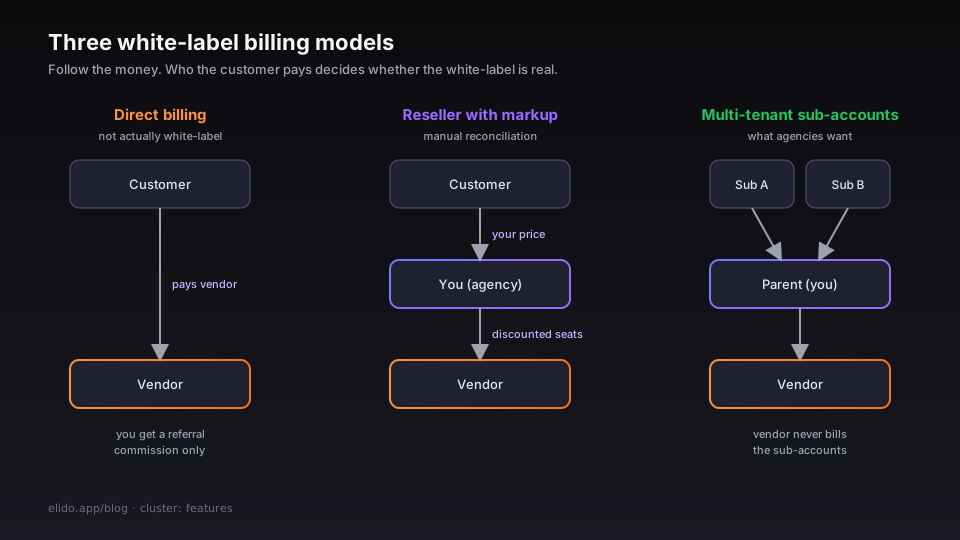
Real white-label billing means your customer pays you, you pay the vendor, and the vendor is invisible to the customer. Three models exist:
Direct billing (not actually white-label). Your customer pays the vendor directly with the vendor's name on the credit-card statement. You receive a referral commission. This is a partner program, not white-label, regardless of what the pricing page calls it.
Reseller billing with markup. You buy seats from the vendor at a discount, sell them to your customers at your own price, and bill your customers directly. The vendor's invoice goes to you. The customer's invoice comes from you. Implementing this requires you to track which customer is on which seat and reconcile usage against the vendor's bill - a manual process at most vendors, although some offer a usage-export API to help.
Full multi-tenant with sub-accounts. The vendor exposes a hierarchical account model: your agency is the parent, and each of your customers is a sub-account. You see consolidated usage; each customer sees only their own. Billing is at the parent level; the vendor never sends a bill to the sub-accounts. This is what most agencies actually want and what most vendors do not offer below the enterprise tier.
The reseller model is the most common in mid-tier white-label plans. The full multi-tenant model is the most common in vendors that primarily target agencies (less so for tools that target enterprises directly). Confirm before signing.
Identity: the SCIM/SSO question
Identity branding is the axis that matters most for enterprise customers and least for SMB agencies. The question is whether your customer's IT department can plug the dashboard into their IdP (Okta, Azure AD, Google Workspace) and manage user provisioning through SCIM.
The relevant feature set:
- SSO via SAML 2.0 or OIDC. Customer signs in to the dashboard through their IdP. The vendor needs to support a multi-tenant SSO configuration so each customer can plug in their own IdP without affecting other customers.
- SCIM 2.0 user provisioning. When the customer's IT department adds a user in their IdP, the user appears in the dashboard automatically; when they offboard, the dashboard account deactivates. This is a procurement-requirement check for any enterprise sale.
- Custom roles and permissions. Beyond admin/editor/viewer, the customer may want their own role mappings - particularly for agencies whose clients have specific access patterns. Most vendors offer fixed roles below the enterprise tier.
For sub-account models, the SSO configuration becomes more complex: each sub-account needs its own IdP integration. Not every vendor supports per-sub-account SSO; some require enterprise customers to live at the top of the hierarchy rather than as sub-accounts. The SCIM and SSO post covers the procurement-side detail.
API and integration branding
Developers ask different questions about white-label than marketers do. The questions that matter:
API endpoint. Does the customer's developer call api.your-agency.com or api.vendor.com? CNAMEing the vendor's API to your domain is operationally simple if the vendor supports it; many do not, citing TLS cert complexity. The result is the developer sees the vendor's domain in their codebase regardless of how white-label the dashboard is.
Webhook signatures. When the vendor delivers a webhook, the signature header is computed with a key the vendor controls. The webhook source IP is the vendor's POP. The signing-key documentation lives in the vendor's docs. Re-branding webhooks transparently is genuinely hard - it requires the vendor to support per-tenant signing keys and per-tenant outbound IPs.
SDK and library naming. The vendor's SDK is published on npm as @vendor/url-shortener. Your customers npm install that. There is no transparent re-brand here - even if the API is white-labelled, the SDK package name is the vendor's.
Documentation. Most vendors offer a docs portal you can fork or rebrand. Few of them keep the rebranded docs in sync with the vendor's docs automatically. Once you fork, you own the maintenance.
The pragmatic guidance: on the API and integration axis, white-label is partial at every vendor. The dashboard and domain can be fully yours; the API and SDK are almost always partially the vendor's. If your customer's developer is going to read your docs, plan to write or fork them.
Vendor matrix: where the gaps actually live
The current state of white-label coverage, by vendor, as of access 2026-05-22. The four columns map to the axes above.
| Vendor | Domain | Dashboard | Billing | Identity |
|---|---|---|---|---|
| Bitly Enterprise | Yes | Co-branded only | Reseller program | SAML SSO, no SCIM |
| Rebrandly Enterprise | Yes | Custom dashboard | Reseller with markup | SAML SSO, no SCIM |
| Short.io | Yes | Workspace branding | Reseller | SAML SSO at enterprise |
| Dub.co | Yes (beta) | Custom dashboard | Pass-through | SAML SSO |
| Elido | Yes | Custom domain + theming | Sub-accounts | SAML + SCIM |
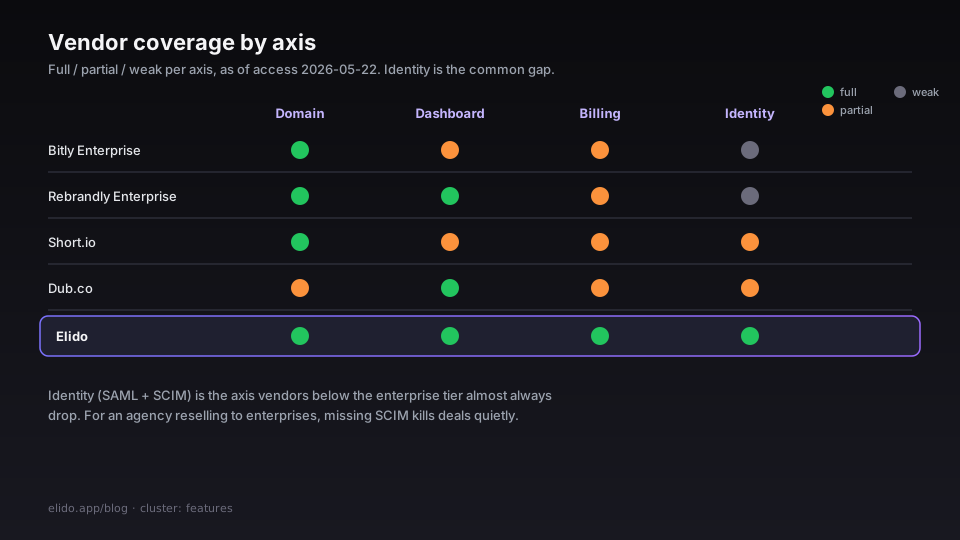
Two observations from the matrix. First, the dashboard axis is where most vendors converge - co-branded or theme-customisable is the common case. Second, the identity axis is where vendors below the enterprise tier almost always fall short. SCIM provisioning is the bit that gets quoted "available on request" or "add-on at $X/month per provisioned user". For a customer doing IT due diligence, SCIM is a checkbox; for an agency reselling to enterprises, the absence of SCIM kills deals quietly.
Operational reality of running a white-label
If you sign with a vendor that does cover all four axes, the operational work is still real. The pieces that come with the territory:
SLA pass-through. Your customer's SLA against you cannot be stricter than your SLA with the vendor. If the vendor offers 99.9% with credits, you can offer 99.9% with credits to your customer. You cannot promise 99.99% unless you build redundancy on top of the vendor.
Incident response. When the vendor has an incident, you are the customer-facing surface. You need a status page that pulls from the vendor's status (or a manual escalation path) and a communication template for your customers. Most vendors do not surface incidents on your white-label dashboard - the status page lives at the vendor's domain.
Feature parity drift. The vendor will ship features at their pace. If they add a new feature your customer asks about, you have to enable it (potentially via account flag); if they deprecate a feature your customer was using, you have to manage the deprecation timeline. This is the single largest hidden cost of reselling SaaS - you are tracking the vendor's roadmap as if it were yours.
Compliance evidence. When your customer's procurement team asks for your SOC 2 report, the vendor's SOC 2 is part of your scope, not yours. You need a documented sub-processor relationship and the ability to pass through the vendor's compliance evidence. The SOC 2 and HIPAA post covers what the evidence pack looks like.
Data export and exit. When you stop using the vendor, your customer data has to come with you. Confirm the export format and retention policy on the contract. "Export available on request" is not the same as "self-service export at any time" - and the difference matters when the vendor relationship ends.
What to ask before signing
The questions, in the order I have actually asked them during procurement:
- Can I add a custom short domain on the plan I am quoting, or does that require the next tier up?
- Can the dashboard live at my domain? Can the email "From" address use my domain? Can the email sending domain (not just From header) use my domain?
- Is billing direct, reseller, or sub-account? If reseller, what is the discount percentage and the markup cap?
- Is SSO available on my plan? SCIM provisioning? Per-sub-account SSO?
- Is the API addressable at my custom domain? Are webhook signing keys per-tenant?
- What is the data-export format and retention policy? Can I get a copy of my customer's data on demand?
- What is the SLA, the credit policy, and the incident-communication channel?
- Can I see your SOC 2, ISO 27001, or other compliance evidence under NDA?
If a vendor cannot answer all eight cleanly, the white-label plan is partial. That may be acceptable for your use case - most agencies and most SaaS resellers operate with partial white-label and it works fine - but the marketing description should not promise full coverage if it does not deliver.
Related reading
- Bitly alternatives - the actual feature gap - the broader vendor comparison cornerstone.
- URL shorteners for marketers comparison - the marketer-side feature checklist.
- SCIM and SSO for marketing tools - the identity-axis deep dive.
- SOC 2 and HIPAA for link tracking - the compliance pass-through detail.
- Setup branded short links on your domain - the operational tutorial for the domain axis.
- Product surface:
/features/white-labeland/solutions/agencies. - Operational walkthrough: white-label guide in the docs.
Try Elido
Paste a URL, get a working short link
No signup. Link lives for 30 days. Sign up to keep it forever.
Free, no signup required · 2 per day