
I've set up UTM tracking at three companies, and the same things broke each time, in the same order. Inconsistent tagging. Links typed by hand at scale. Revenue that never reached the campaign. No dry run. This post is the pipeline that fixes those with what Elido does today, and it names the gaps where they exist.
Unsure what the five tags do? UTM parameters explained is the primer. For the tooling comparison, see the UTM builder in a link shortener and the free UTM builder. This post is about the whole chain, not one tool.
You don't need a Customer Data Platform for this. You will need one if your problem becomes stitching four anonymous touches across three devices into one customer. For "tag every link consistently, record the click, credit the order to the campaign", a shortener with campaigns plus your payment webhooks is enough.
What Goes Wrong With UTM Tracking
The people I work with aren't bad at UTMs. Tools make it easy to type a UTM once. Enforcing it across a team is hard. Four failures repeat.
Drift. One person types utm_source=newsletter, another Newsletter, a third email. GA4 treats those as different values, so one channel splits into several rows. Cleaning that up afterwards is a regex job. Nothing enforces the convention. Write it down and make it the only place people copy from.
Manual tagging at scale. A flyer campaign with 80 links across four storefronts is 320 URLs. Half get the wrong utm_content, and nobody notices for two weeks.
Revenue that never reaches the campaign. The pixel fires on the thank-you page until Safari, an ad blocker or a consent banner stops it. Apple's ITP 2.3 notes (accessed 2026-10-24) describe the mechanism: after navigation from a classified domain to a URL with a query string, script-writable storage is capped, and a referrer carrying link decoration is cut to its base domain. The order still happened on your server; the browser just couldn't report it.
No dry run. The first real shopper becomes your test, and you find out three days later after the ad platform has already shifted budget.
Step 1: Write the Convention Down
Before any tool, decide the allowed values. One sheet, three columns: utm_source (the platform or list, such as newsletter, linkedin), utm_medium (the channel type: email, paid-social, qr), utm_campaign (the launch). Lowercase, hyphens, no spaces. GA4 values are case-sensitive, which is why drift costs you rows.
Put it where people create links. A convention nobody opens is no convention.
Step 2: Campaign UTM Defaults
In Elido, a campaign holds the five UTM fields (utm_source, utm_medium, utm_campaign, utm_term, utm_content) and a link is assigned to it with a campaign_id. Fill it once with the launch's values. Everyone building links then reads from one place.
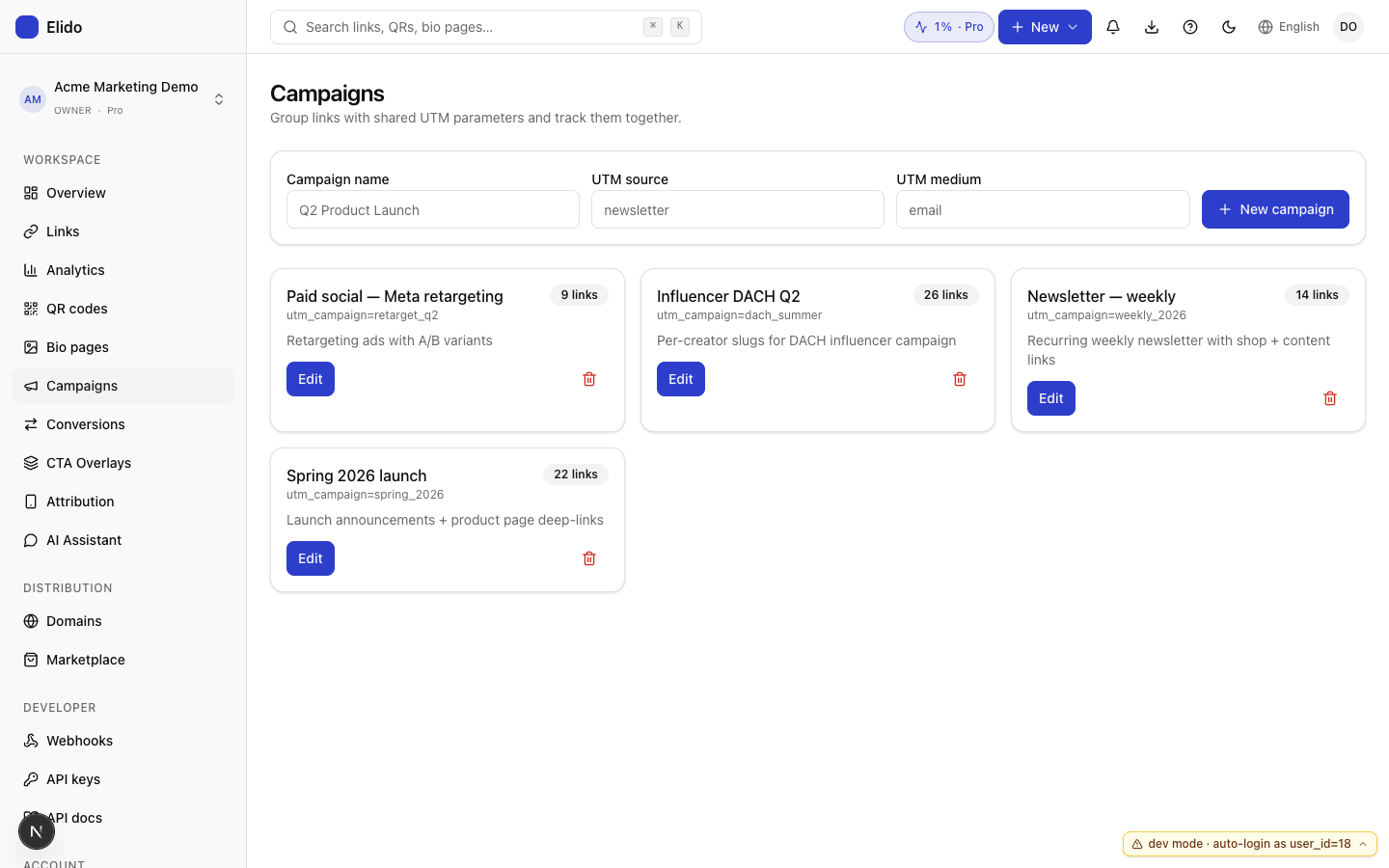
An honest limit: there is no workspace-level template with {{ placeholders }} that rewrites every link for you. The campaign fields are stored defaults. The tagged destination is built when you create the link. Treat the campaign as the source of truth for what to type, not as automatic enforcement.
Step 3: Build and Create the Links
For one link, the new-link dialog has a UTM builder with the five fields; it appends the non-empty ones to the destination before the link is created. For many links, the bulk path is a dashboard paste or CSV of url, slug, title rows, or POST /links/bulk with up to 100 links per call. Rows are processed independently, so a bad one doesn't sink the batch.
Bulk import has no UTM columns and stores the destination exactly as you give it, so build the full tagged URL in the sheet with a formula that concatenates your convention columns. That's more reviewable than template magic anyway. You see every final URL before you import. Bulk import from Google Sheets covers the real limits, including that there's no preview mode yet.
Step 4: Record Clicks and Attribute Revenue Server-Side
This is where the tagged link earns its keep, because the click is recorded at the redirect before any browser feature touches the landing page. Browsers that strip UTM parameters explains why that ordering matters, and clicks versus GA4 sessions explains why your two totals will still differ.
What Elido does with each visit, checked in the code:
- Analytics tools: under Integrations you can forward every redirect event to GA4, Mixpanel, Klaviyo, Brevo or Datadog. GA4 needs a measurement ID and an API key. Mixpanel receives it as an ordinary event; it isn't a conversion destination.
- Ad pixels: the Pixels tab holds Meta, Google, LinkedIn and TikTok IDs for the browser pixel on splash pages. Server-side Meta and TikTok events are not available yet. The pipeline has a dormant path for them (Meta would get a
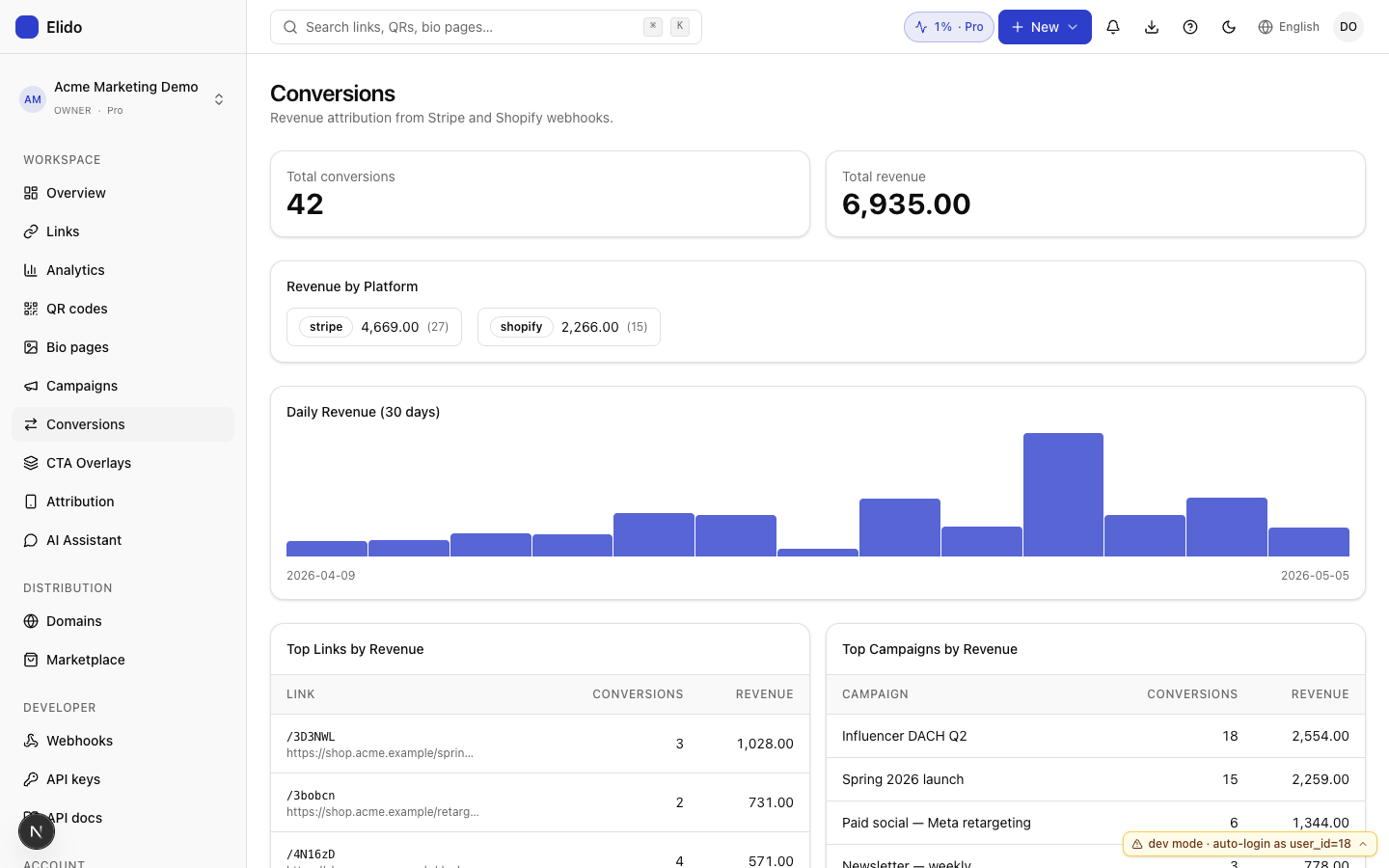
PageView, not a purchase), but it never fires, because the settings can't store an access token. - Revenue: Stripe and Shopify webhooks create conversions. To credit an order to a link, put the Elido link ID into the order: the
elido_link_idmetadata key orclient_reference_idon a Stripe checkout session, or anelido_link_idnote attribute on a Shopify order. The Conversions page then shows revenue by link, campaign, day and platform.
What this does not do yet: there is no endpoint to POST an arbitrary purchase event with an ID and have Elido forward it to Meta CAPI and GA4 as a conversion. If you need purchase-level CAPI today, send it from your own backend with your own event IDs, and lean on Elido's link attribution for the acquisition side. Server-side GA4 via the redirect tier covers the click-forwarding half in detail, and cookieless attribution covers what holds up without cookies.
Three Edge Cases Worth Planning For
Orders with no link ID come first. If your checkout can't carry the link ID, the order lands with no attribution. Test that the ID survives your checkout path before launch. A parameter dropped on your own domain is the usual culprit.
Refunds behave better than people expect. A Shopify refunds/create delivery is handled as a refund against the order rather than a new sale, so reported revenue doesn't keep a refunded order. Check the Stripe side with a test refund before you rely on it.
Late conversions are the hard one. A B2B deal closing weeks after the click needs the link ID stored on your own customer record at signup, because you can't rebuild it from a browser session later. Keep it in a first-party field, not only a cookie.
Anything unattributed is still a useful number. Report it as its own row instead of hiding it.
The Pre-Launch QA
Don't let the first real shopper be your test. Thirty minutes is cheap. Do three checks.
- Read the final URLs. Open the sheet or the campaign and click three links: the first, the last, and any you edited by hand. Confirm the address bar shows exactly the tags your convention says. Check they survive the destination's own redirects.
- Click from a clean browser. Use a private window on mobile data. Confirm the click appears in the link's click log, the event arrives in GA4 DebugView (set
debug_modeon the integration or use the DebugView-enabled browser), and the campaign shows in the session source. - Run one test order. Pass the link ID through your real checkout in Stripe test mode or on a Shopify test order and confirm a conversion appears on the Conversions page against the right link.
Then send.
When You Actually Want a CDP
Cross-device identity stitching is the clear case. A visitor clicks on mobile, converts on desktop, and you want one journey. Click-level attribution works per touch, and the identity layer that joins touches is what Segment, mParticle or RudderStack exist for. Elido doesn't operate an identity graph.
Real-time personalisation driven by prior touches is another case, and so are heavier multi-touch models, where attribution models compared walks through the credit differences between them.
For everything else, four habits put you ahead of most teams. Write the convention down, set campaign defaults, record clicks server-side, and dry-run before each launch. Build it once. Then move on.
Related on the blog
Frequently asked questions
Do I need a CDP to track UTM campaigns?
Not for the common case of tagging every outbound link consistently, recording the click and crediting orders to a campaign. You need an identity graph only when you must join the same person across devices or sessions.
Where should UTM parameters be added, in the sheet or in the shortener?
Either works if one place owns the convention. Elido's UTM builder composes the tagged destination when you create a link, and bulk import stores the destination exactly as given, so for bulk work build the tagged URL in the sheet.
Does Elido forward conversions to Meta and GA4?
Not as a generic conversions API today. Elido forwards each click to GA4, Mixpanel, Klaviyo, Brevo and Datadog. Server-side Meta and TikTok events are not available yet: the code path exists but never fires, because no access token can be saved. Revenue comes in through Stripe and Shopify webhooks and is attributed to a link.
How do I attribute a Stripe or Shopify order to a short link?
Put the Elido link ID in the order: the elido_link_id metadata key or client_reference_id on a Stripe checkout session, or an elido_link_id note attribute on a Shopify order. The webhook then records the conversion against that link.
Can I enforce one UTM naming convention across a team?
Not automatically in Elido today. A campaign stores the five UTM values and the UTM builder composes the tagged URL, but nothing blocks a hand-typed variant. Keep one shared sheet of allowed values and build links from it.
Why do UTM-tagged clicks still go missing?
Usually the destination host drops the query string, the analytics tag is blocked or denied consent, or the link never carried the tags. Recording the click at the redirect covers the first two for acquisition counting.
Try Elido
Paste a URL, get a working short link
No signup. Link lives for 30 days. Sign up to keep it forever.
No signup needed. Sign up free for 50 links a month.