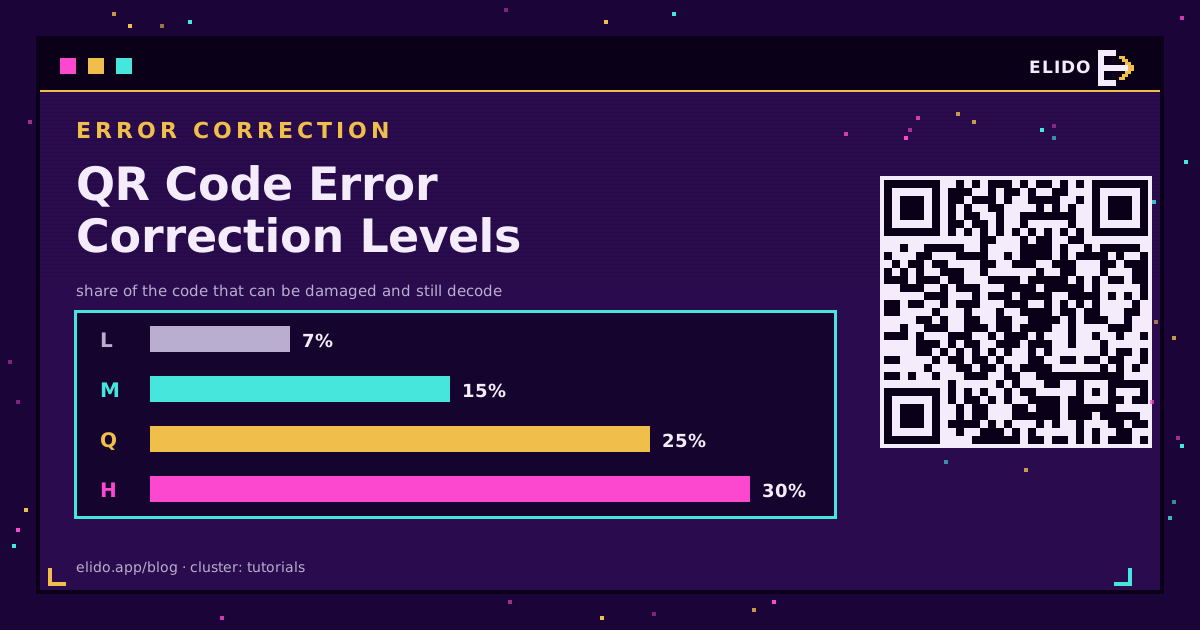
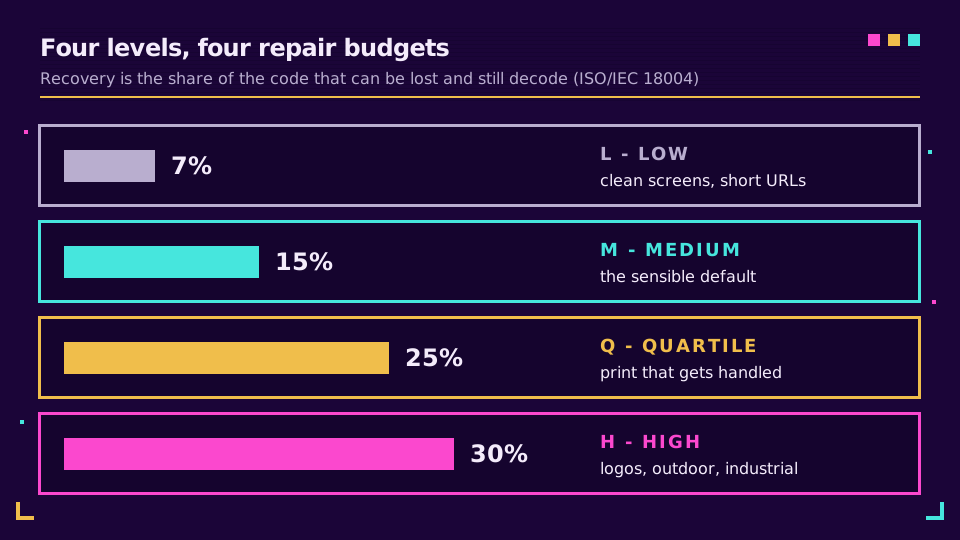
QR code error correction levels are the amount of redundant data a code carries so a scanner can rebuild what is smudged, scratched, or covered by a logo. There are four: L, M, Q, and H, which recover roughly 7%, 15%, 25%, and 30% of the code. Pick M for most screens and short links, and H when a logo or rough handling will eat into the code. The price of every step up is density: more modules, smaller squares at the same printed width.
That trade is where most "my QR code won't scan" stories begin, and it's why this tutorial works through real module counts instead of hand-waving. If you haven't built a code yet, how to create a QR code is the place to start; this piece is about choosing the level once you have.
What Error Correction Actually Does in a QR Code
A QR code stores your data as bytes called codewords. Alongside them it stores extra codewords computed with Reed-Solomon error correction, the same family of math used on CDs. When a scanner reads a damaged code, it uses those extra codewords to work out which data codewords are wrong and what they should have been.
The level you choose decides how many extra codewords there are. Denso Wave, which invented the format, describes the error correction feature as four levels and notes that raising the level improves recovery but increases the amount of data, and so the size of the symbol. The recovery figures below are the ones listed in ISO/IEC 18004 and repeated on Wikipedia's QR code entry.
- Level L (Low): about 7% of codewords restorable.
- Level M (Medium): about 15%.
- Level Q (Quartile): about 25%.
- Level H (High): about 30%.
Note the word "about". The percentage counts codewords, not a patch of ink. Think of it as a repair budget, not a damage guarantee.
The Density Trade-Off: Why Higher Is Not Always Safer
Redundancy has to live somewhere. A higher level pushes your data into a bigger symbol. QR codes come in versions 1 to 40, and the side length is 17 + 4 x version modules: version 1 is 21 x 21 and version 40 is 177 x 177, per Denso Wave's version and capacity table. The encoder picks the smallest version whose capacity, at your chosen level, fits your data.
For URLs, that data is byte-mode text. Version 2 holds 32 bytes at L, 26 at M, 20 at Q, and 14 at H. Version 8 holds 192, 152, 108, and 84. Version 11 holds 321, 251, 177, and 137.
The cost shows up in version 8: 192 bytes at L, 84 at H. Same grid, less than half the room for your URL, because the rest is parity.
Why a denser code scans worse
A phone has to resolve each module. Print the code 3 cm wide and a 33-module grid gives modules roughly 0.9 mm across; a 61-module grid gives roughly 0.5 mm. Same camera, same light, same shaky hand. Half the margin. The sizing rules in how big should a QR code be assume you're working with a reasonable module size, and density is what quietly breaks that assumption.
Worked Example: One URL at Every Level
Here's the experiment I run whenever someone tells me to "just set it to H". I took a tracked campaign URL, 126 characters long: a domain, a path, and utm_source, utm_medium, utm_campaign, and utm_content parameters. Then I took a 25-character short link, https://s.elido.me/qr7kP2, as an illustrative example. Both are byte mode. I encoded each at all four levels with a standard encoder, and the capacity table above predicts the result.
| Level | Recovery | 126-char URL | 25-char short link |
|---|---|---|---|
| L | ~7% | V6, 41 x 41 | V2, 25 x 25 |
| M | ~15% | V8, 49 x 49 | V2, 25 x 25 |
| Q | ~25% | V9, 53 x 53 | V3, 29 x 29 |
| H | ~30% | V11, 61 x 61 | V4, 33 x 33 |
Two things jump out. First, the long URL grows from 41 to 61 modules per side going L to H, which is 1681 to 3721 modules, about 2.2 times the area. Second, and this is the part nobody mentions: the short link at the strongest level, H (33 x 33), is still smaller than the long URL at the weakest level, L (41 x 41).
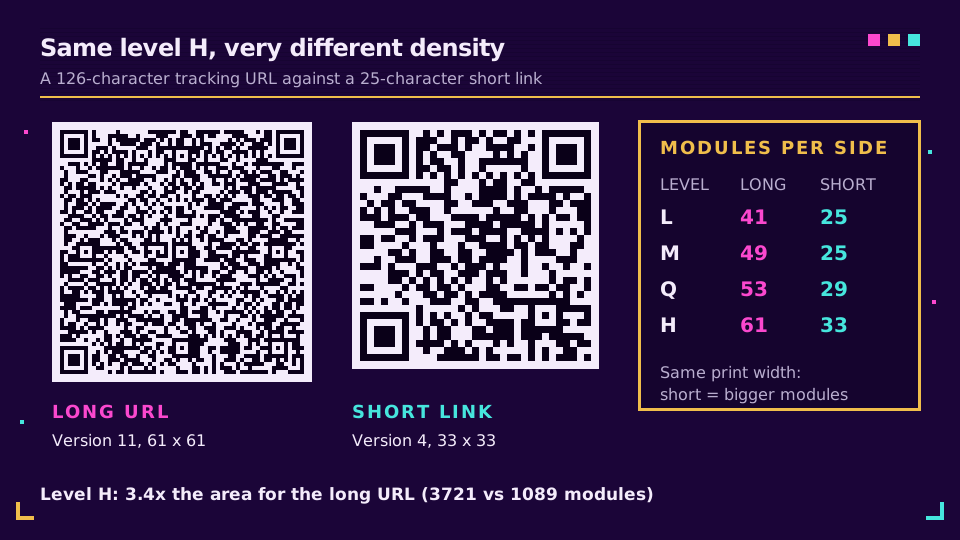
The payload matters more than the level. You can buy the maximum 30% repair budget for a short link and end up with a sparser, chunkier code than the "efficient" level L code for the long URL.
When to Pick H, and When L or M Is Better
Match the level to what will actually happen to the code. Caution in general is not a spec.
Pick H (or Q) when
- A logo or brand mark sits in the middle. It hides modules the scanner must rebuild.
- The code is printed on packaging, a flyer in a pocket, a sticker, a table that gets wiped, or anything outdoors.
- The surface is rough or curved and you can't control the finish.
- Rescanning isn't possible, such as a code on a product already shipped.
Elido's help article on QR codes says the same: keep a logo below 20% of the code area, and switch to H when you go past that or print with a logo.
Pick L or M when
- The code appears on a screen: a slide, a web page, a checkout confirmation.
- The URL is short and nothing will cover or scratch it.
- Space is tight and the code must stay small, so every module counts.
M is the practical default. Denso Wave says it is the level most often chosen, and our own QR code not scanning post makes the same point from the support-desk side: H is the wrong default for a plain code, because the density it adds causes more failed scans than the damage it protects against.
A caution on logos: error correction repairs missing modules, it doesn't fix poor contrast, blur, or a cropped margin. The design rules for spending the budget on a logo are in branded QR code design, including why the three corner squares stay untouched.
Short Links Keep the Code Sparse (and Dynamic QR Codes Use Them)
The worked example gives a rule you can apply today: shrink the payload before you raise the level. A dynamic QR code does exactly that. Instead of encoding the full destination, it encodes a short link, and the short link redirects to wherever you point it.
Encoding a short link has three effects on reliability:
- The grid stays at a low version, so modules stay large at any print size.
- You can afford level Q or H for a logo or print wear without the code ballooning.
- The tracking parameters live on the destination, not in the pattern, so changing a campaign tag never forces a new, denser code.
There's a fourth benefit that has nothing to do with density: because the code points at a short link, you can repoint it later without reprinting, and you get scan counts for free. With a static code the destination is baked into the pattern, so the only way to fix a typo is to print again.
If you want to try this on your own links, the QR code generator lets you set the level per code, with M as the starting point, and plan details are on the pricing page. Make one at M and one at H from the same short link, print them at 3 cm, and compare. I'd bet you struggle to tell them apart by eye, which is the point.
A Short Checklist Before You Print
Run these in order.
- Shorten the URL first; keep tracking parameters on the destination.
- Choose the level from the table: M for screens and plain print, Q or H for logos and wear.
- Check the version your generator picked. Past roughly version 10 for a URL, ask why the payload is that long.
- Keep the quiet zone: at least four modules of blank border on every side.
- Print at the final size and scan it with two different phones in ordinary light.
Step 5 catches what no table predicts. A logo that looked small on screen can cover more modules than you'd guess.
Read the Cornerstone Series
This post sits in the tutorials cluster, and its cornerstone is how to create a QR code. For the size and distance rules that decide whether your module size is big enough, see how big should a QR code be.
Related on the Blog
Frequently asked questions
What is the best error correction level for a QR code?
Level M is the sensible default: it recovers about 15% of the code and keeps the grid small. Denso Wave, the inventor of the format, says M is the level most frequently selected. Move to Q or H when the code carries a logo or will be printed on something that gets scuffed, folded, or left outdoors.
What does 30% error correction mean on a QR code?
It means a level H code can still be decoded when up to roughly 30% of its data codewords are unreadable or hidden. The code stores extra Reed-Solomon parity data, and the scanner uses it to rebuild what is missing. It is a ceiling on repairable damage, not a promise that any 30% of the surface can go.
Does a higher error correction level make a QR code harder to scan?
Indirectly, yes. Higher levels add parity data, so the same URL needs a higher version with more, smaller modules. At the same printed width, smaller modules are harder for a phone camera to resolve. The fix is a shorter payload, not a lower level on a code that needs the protection.
Do I need level H to put a logo on a QR code?
Use H, or at least Q, for any code with a logo in the middle. The logo hides modules, and the scanner treats them as damage to be repaired. Keep the logo well under a quarter of the code area and away from the three corner squares, so wear in print still has budget left.
Can a damaged QR code still be scanned?
Often, yes, within the level's limit. A scratched, smudged, or partly covered code decodes if the lost area stays inside what its level can repair and the corner squares are intact. A level L code tolerates about 7% damage, a level H code about 30%.
What is the default QR code error correction level?
There is no single default in the standard; every generator picks its own, and M is the most common choice. Elido's QR playground starts at M, with L, Q and H available from the same control.
Try Elido
Paste a URL, get a working short link
No signup. Link lives for 30 days. Sign up to keep it forever.
Free, no signup required · 2 per day