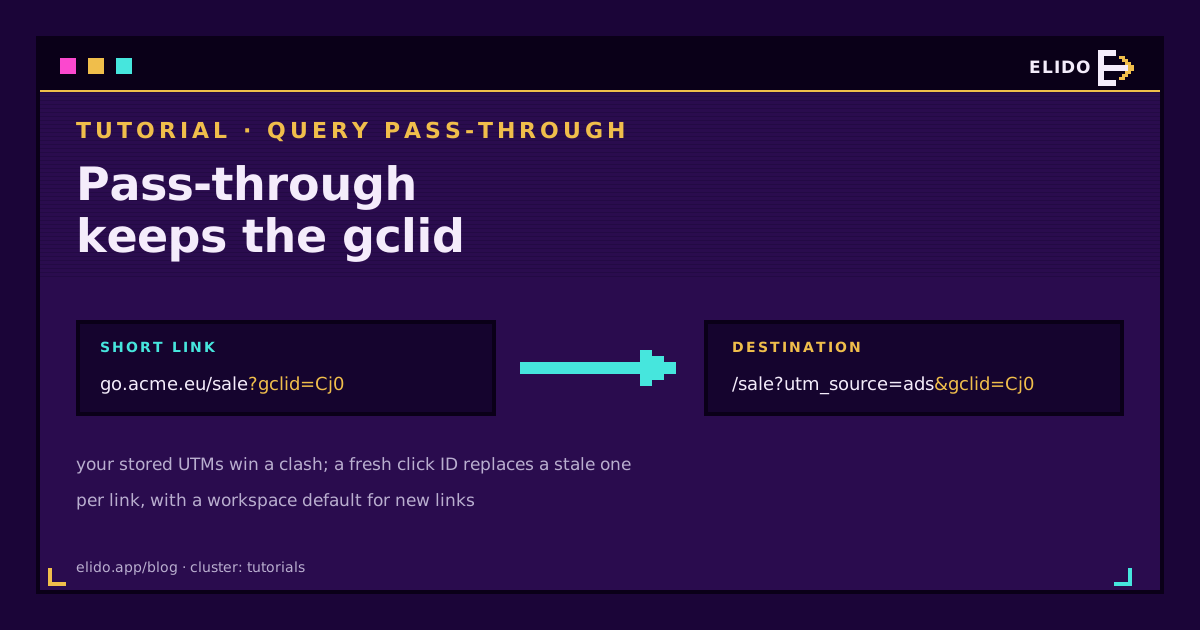
Query parameter pass-through means the redirect copies the query string a visitor arrives with onto the destination URL. Click go.acme.eu/sale?gclid=Cj0abc and you land on acme.eu/sale?utm_source=google&gclid=Cj0abc, not on the bare destination. Without it, a short link quietly eats the ad click ID, and the conversion it was meant to prove never gets matched.
On Elido it's a switch on each link, Pass query parameters through, with a workspace default for new links. New workspaces start with it on. The interesting part isn't the switch, though. It's what happens when the short link and the destination both carry the same parameter, because shorteners disagree on that, and the wrong answer breaks your reports in a way nothing flags. If you're still setting up campaign tagging, track UTM campaigns end to end is the cornerstone this post hangs off.
What Query Parameter Pass-Through Does
Every URL can carry a query string, the part after the ?. A short link has two of them in play: the one stored in its destination, which you wrote, and the one the visitor's request arrives with, which someone else appended.
A redirect that ignores the second one sends everyone to the stored destination as written. That's fine for a link in a newsletter you tagged yourself. It isn't fine when an ad platform, an email tool or a partner appends something you need on the landing page.
With the switch on, Elido merges the two. The destination's #fragment is kept, parameters are re-encoded, and Elido's own control parameters (preview and ok) are never forwarded. The work happens inside the redirect with no extra lookup; in our benchmarks it costs about 0.1 microseconds.
Why Ad Click IDs Need It
Ad platforms add their click identifier to whatever URL the ad points at. Google Ads auto-tagging appends gclid, Meta appends fbclid, and Microsoft, TikTok, LinkedIn, X, Pinterest and Snapchat do the same with their own names. If the ad points at a short link, that's where the parameter lands.
Here's the failure. The redirect sends the visitor on without the click ID, the landing page never sees it, and the purchase two days later can't be matched to the click that paid for it. Smart bidding loses a signal, and your cost-per-acquisition looks worse than it is. Click IDs explained covers what each platform does with its ID once it has it.
With pass-through on, these ten click IDs reach the landing page:
- Google:
gclid,gbraid,wbraid - Meta, Microsoft and TikTok:
fbclid,msclkid,ttclid - LinkedIn, X, Pinterest and Snapchat:
li_fat_id,twclid,epik,ScCid
UTM tags appended to the short link come through the same way, along with anything else, such as a partner's ref or a newsletter tool's own tracking parameter.
How Elido Merges Parameters on a Clash
When the short link and the destination share a parameter, someone has to win. Shorteners answer differently. Dub's parameter passing lets the short link's value override the destination's, and Short.io's merging rules overwrite the same way unless you add shortio_nomerge=1 to the destination (both accessed 12 November 2026).
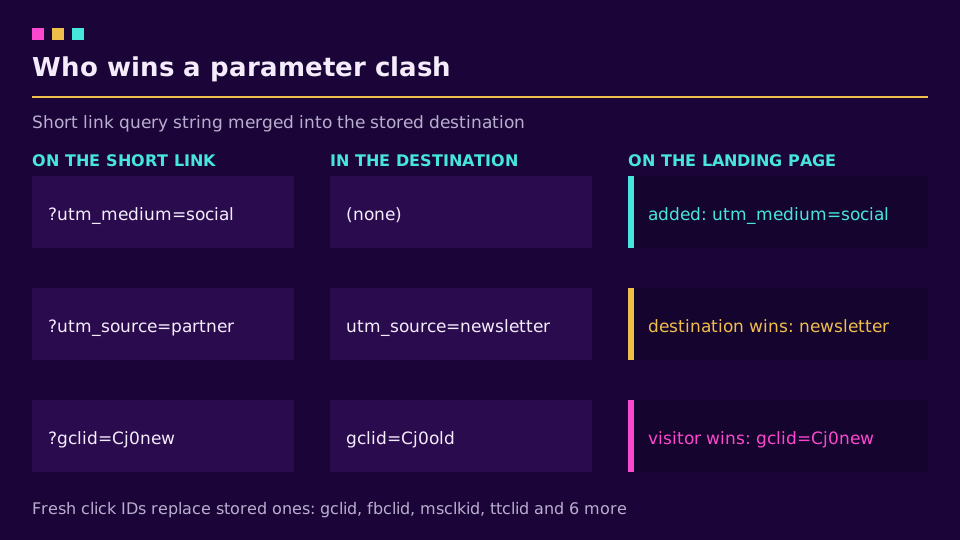
We went the other way, on purpose. On Elido the destination's value is authoritative: if you stored utm_source=newsletter, a visitor arriving with ?utm_source=whatever doesn't change it. I've cleaned up enough GA4 properties where a scheduler or an ESP silently re-tagged every link to know that the person who built the link should own its tags.
Click IDs are the exception, and they replace a stored value. A click ID identifies one click, so a stale gclid baked into a destination (it happens when someone copies a landed URL into the link editor) is wrong for every visitor after the first. The visitor's fresh value is the right one.
| Parameter on the short link | Already in the destination | Result on the landing page |
|---|---|---|
utm_medium=social | none | added |
utm_source=partner | utm_source=newsletter | destination wins: newsletter |
gclid=Cj0new | gclid=Cj0old | visitor wins: Cj0new |
If you need the other behaviour for UTMs, leave them off the destination and let the incoming ones through.
Turning It On per Link and per Workspace
There are two places to set it. In the link editor, the Pass query parameters through switch controls that one link; over the API the field is forward_query. Under Settings, Workspace, the default for new links decides what every link created afterwards starts with (forward_query_default in the API).
Workspaces created from 12 November 2026 have that default on. Older workspaces keep it off, and so does every link that existed before, until someone switches it on. Nothing changes under your existing campaigns by surprise.
The create-link form doesn't have the switch yet, so a new link takes the workspace default; change it afterwards in the link editor if it should differ. A change to the switch reaches the redirect servers within a second or two, because saving it clears the cached link.
Pass-through works on every plan, with no extra charge and no limit. If your ads already point at branded short links, creating a link on your own domain and flipping the switch is the whole setup.
Where Pass-Through Stops
Some links redirect without forwarding, and it's better to know which before a launch than after:
- Password-protected links. The unlock page doesn't carry the parameters through yet.
- Encrypted links, and destinations that aren't http or https, such as app deep links and
mailto:. - Oversized requests. If the merged URL would be longer than 8 KB, or the request carries more than 64 parameters, the visitor goes to the stored destination unchanged.
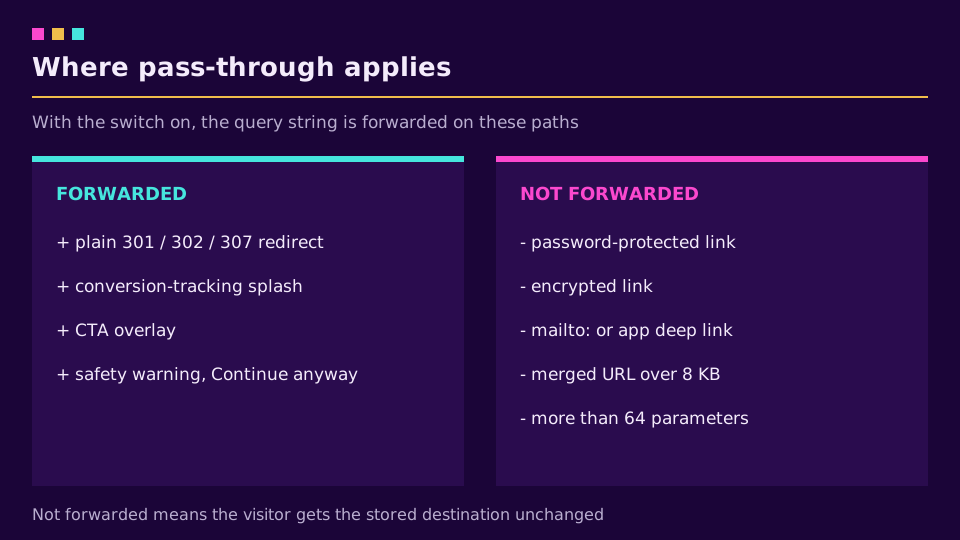
Forwarding does work on plain redirects, the conversion-tracking splash page, CTA overlays, and after "Continue anyway" on the safety warning. One more thing sits outside the redirect: Google's destination requirements still apply to the final URL, which is why many advertisers keep a short link for organic, email and QR placements and point ads at their own domain. The Google Ads tracking template guide covers that split.
Testing Pass-Through Before a Campaign
Don't trust the switch, test the link. One curl shows what the browser would get:
curl -sI "https://go.acme.eu/sale?gclid=test123&utm_source=override" | grep -i '^location'
# location: https://acme.eu/sale?utm_source=newsletter&gclid=test123
Two things to read off that line. gclid=test123 arrived, so the click ID survives. And utm_source still says newsletter, because the stored tag won the clash. If the location header shows the bare destination, the switch is off for that link or the link is one of the exceptions above.
Then open the landing page with the same test URL and check that your own site keeps the parameter. A redirect on the destination side (to www, to a locale path, to a login page) can drop it again, which is the most common cause of UTM parameters not showing in GA4.
What It Doesn't Do Yet
Three gaps, stated plainly. Elido doesn't store which click IDs arrived on each click, so you can't report on them in Elido's analytics. There are no per-link custom clash rules, and no allow or deny list of parameters: it's all of the query string or none of it. And as above, the create-link form has no switch of its own.
None of that changes the core job, which is getting the click ID to the page that needs it. For what happens after it arrives, server-side conversion tracking and forwarding conversions to Meta CAPI pick up the trail.
Read the cornerstone → How to track UTM campaigns end-to-end
Related on the Blog
Frequently asked questions
Do URL shorteners pass query parameters to the destination?
Some do by default, some only with a setting, and some drop them. On Elido it's a per-link switch called Pass query parameters through, with a workspace default for new links. Workspaces created from 12 November 2026 start with it on; links that existed before keep it off until you switch it on.
Will gclid survive a short link in Google Ads?
Only if the shortener forwards the query string. Google Ads auto-tagging appends gclid to the URL the ad points at, so with a short link it lands on the short link. With pass-through on, Elido adds it to the destination. Google's destination policy still applies, so many advertisers keep the final URL on their own domain.
What happens if the short link and the destination have the same parameter?
On Elido the destination's value wins, so the UTM tags you stored can't be overwritten by whatever someone appends. Ad click IDs are the exception: gclid, gbraid, wbraid, fbclid, msclkid, ttclid, li_fat_id, twclid, epik and ScCid from the visitor replace a stored value, because a click ID belongs to one click.
Does pass-through slow down the redirect?
No measurable amount. It's string work on the redirect, with no extra network or database call, about 0.1 microseconds in our benchmarks. It's available on every plan with no extra charge or limit.
Which links don't pass parameters through?
Password-protected links (the unlock page doesn't carry the parameters yet), encrypted links, and destinations that aren't http or https, such as app deep links and mailto. If the merged URL would exceed 8 KB, or the request carries more than 64 parameters, the link redirects to its stored destination without forwarding.
Does Elido store the gclid or fbclid it forwards?
No. The click record doesn't keep which click IDs arrived, so capturing gclid or fbclid for a conversion is still your landing page's job. Elido's own click analytics are unaffected either way.
Try Elido
Paste a URL, get a working short link
No signup. Link lives for 30 days. Sign up to keep it forever.
Free account required. The free plan includes 25 links in total. Already have an account? Log in