
Elido doesn't forward conversions to Meta's Conversions API today. If you landed here from the integration list expecting a switch to flip, there isn't one, and I'd rather say that up front than send you down a setup path that ends nowhere. What follows is what Elido does record, what Meta's documentation (accessed 2026-10-25) requires, and how to build the server-side call yourself, with or without a short link in the path.
Short version: Elido gives you clicks per link and, for Shopify and Stripe, revenue per link. Meta wants an event with an event_id, hashed customer data and ideally the fbc click ID. You assemble that yourself.
What Elido does and doesn't do for Meta today
Here's the state of the code, checked in the repository on 2026-10-25:
- Meta pixel ID: a workspace can store one. It's used for the browser pixel on Elido's splash and interstitial pages. That is a browser-side tag, not CAPI.
- Server-side Meta call: the click pipeline contains a Meta code path that would post a
PageViewwith IP and user agent. It only runs when both a pixel ID and an access token exist, and the settings never store a token, so it never fires. - Conversions: orders arrive only through Shopify and Stripe webhooks and are tied to a link by an
elido_link_idvalue you pass. There's no public conversions endpoint and no click ID header or cookie. - fbclid: Elido doesn't capture or forward it.
The conversion tracking feature page describes the same webhook model. Treat any older write-up promising one-call forwarding to Meta as describing a plan, not a product.
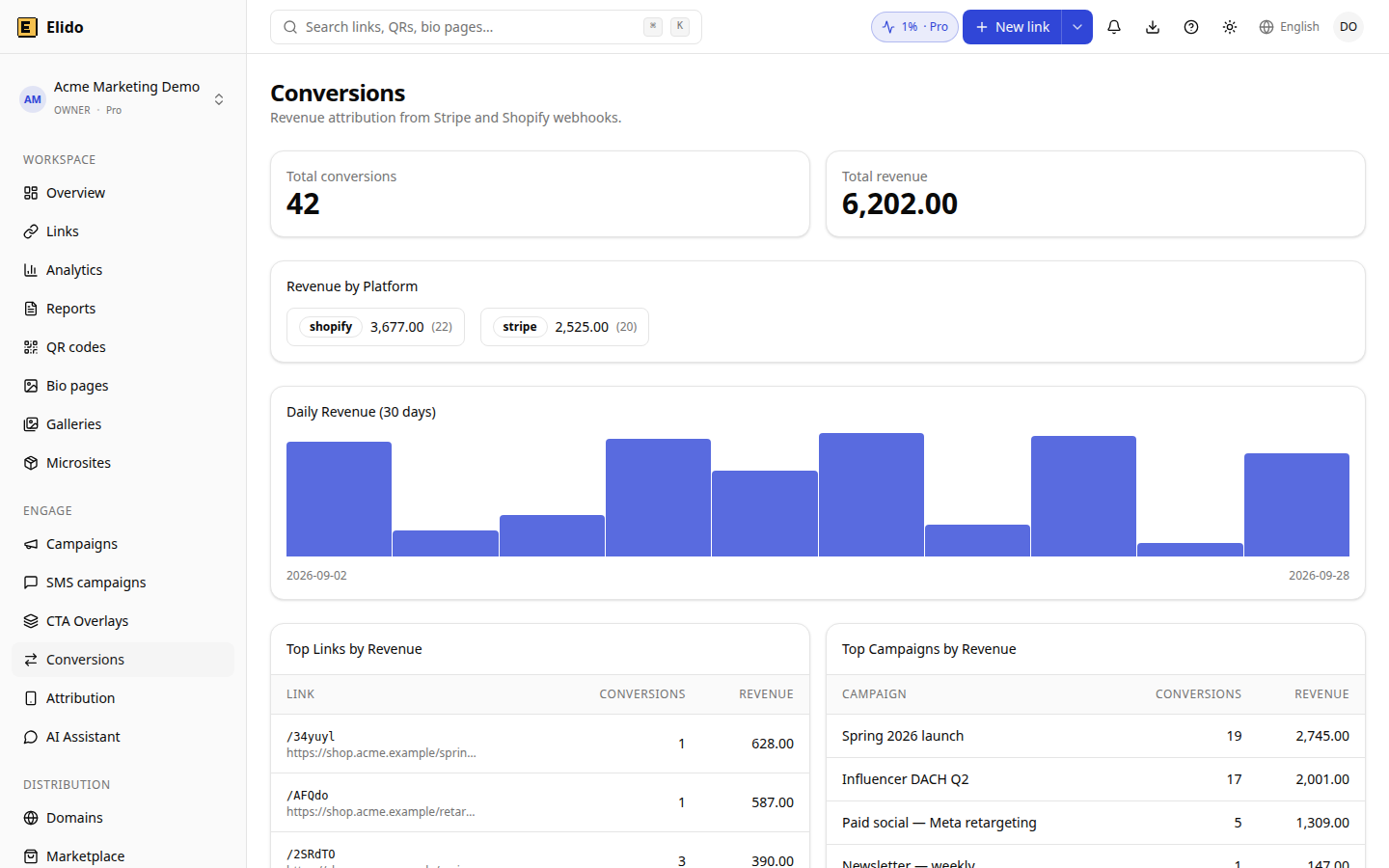
Demo workspace with synthetic example data, not customer results.
That screen still helps next to Meta. Revenue per campaign from your own orders checks what Ads Manager claims. The two rarely agree to the cent.
How Meta's Conversions API works
Per Meta's Conversions API documentation (accessed 2026-10-25), you send a POST to https://graph.facebook.com/{API_VERSION}/{PIXEL_ID}/events with an access token. The current docs example uses v26.0. A few limits worth knowing before you write code:
- One request can carry up to 1,000 events.
event_timecan be up to 7 days old. If any event in the batch is older, Meta rejects the whole request.- Send an
event_idwith every event. If Meta sees the sameevent_idandevent_nametwice, it keeps the first copy, which makes retries safe.
For the token, Meta's get started guide (accessed 2026-10-25) recommends generating it in Events Manager: pick the pixel, open Settings, and use "Generate access token" under the Conversions API section. That link is visible only to users with developer privileges for the business. Keep the token in a server secret.
Build it yourself, step by step
Same steps whether the click came from a short link, a QR code or a direct ad.
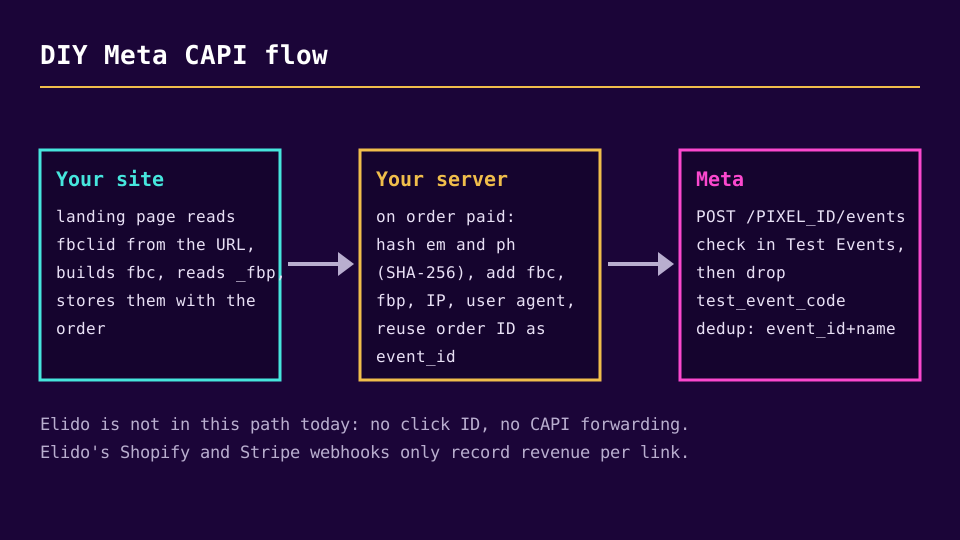
- Keep the click ID. Meta's fbp and fbc guide (accessed 2026-10-25) says to read
fbclidfrom the landing URL on the server when it's present and format it asfb.1.<creation time in ms>.<fbclid>. Store that as thefbcvalue with the visitor's session, then copy it onto the order. Also store the_fbpcookie value if the pixel set one. - Pick the event ID. Use the order ID, and use the identical string in the browser pixel call (
eventID) and the server event (event_id). Two different formats for the same order, likeord_98231and98231, will not deduplicate. - Normalise and hash. Per Meta's customer information parameters (accessed 2026-10-25), email is trimmed and lowercased, then hashed with SHA-256. Phone numbers lose symbols, letters and leading zeros and must include the country code before hashing.
fbc,fbpandclient_ip_addressare never hashed. - Send the event when the order is paid, from your backend or order webhook handler.
- Verify in Test Events, then remove the test code.
A minimal Node example:
import { createHash } from "node:crypto";

const sha256 = (v) => createHash("sha256").update(v).digest("hex");

const event = {
  event_name: "Purchase",
  event_time: Math.floor(Date.now() / 1000),
  event_id: order.id, // same string the browser pixel uses as eventID
  action_source: "website",
  event_source_url: order.thankYouUrl,
  user_data: {
    em: [sha256(order.email.trim().toLowerCase())],
    fbc: order.fbc,
    fbp: order.fbp,
    client_ip_address: order.ip,
    client_user_agent: order.userAgent,
  },
  custom_data: { currency: "EUR", value: 89.5 },
};

await fetch(
  `https://graph.facebook.com/v26.0/${PIXEL_ID}/events?access_token=${TOKEN}`,
  {
    method: "POST",
    headers: { "Content-Type": "application/json" },
    body: JSON.stringify({ data: [event] }),
  },
);
Add test_event_code to the body while you test. Don't log the full URL in production, because it contains the token.
Deduplication and Test Events, the two traps
Meta's deduplication guide (accessed 2026-10-25) describes matching on event_id plus event_name, comparing the pixel's eventID with the server's event_id, within a 48-hour window. It says this mainly works when the browser event arrives first and the server event follows. It also says deduplication doesn't happen at all if you only use one source.
The Test Events tool has a trap. The test_event_code is meant for testing only, and Meta's using the API page states that events sent with it are not dropped: they flow into Events Manager and are used for targeting and measurement. So a "harmless" test purchase of 500 EUR still counts. Send a few small test events and remove the code from the production payload.
After you start sending, Meta says you should be able to verify events within about 20 minutes in the Events Manager overview. Check that the event name matches what your pixel sends and that the event shows matched user data.
Where a short link fits
A short link doesn't change how CAPI works. It matters in two places, and only two.
First, the click ID. Meta appends fbclid to the destination URL you set on the ad. If that destination is a short link, the parameter arrives at the short link. I found no code in Elido's redirect path that copies the incoming query string onto the destination. So for Meta ads, I'd point the ad at the final landing URL with UTMs and keep short links for email, SMS, QR codes and organic posts. If you do want a short link in an ad, test it first with a dummy ?fbclid=test and check what your landing page receives.
Second, reporting. Tag the Shopify or Stripe checkout with elido_link_id. Elido's conversions report then shows revenue per link and campaign, from your own orders. The Shopify walkthrough covers the webhook side. For the wider picture of why browser-only counting loses events, see server-side conversion tracking and cookieless attribution explained.
Consent and privacy
Hashing isn't anonymisation. A SHA-256 hash of an email address is still personal data under GDPR, because Meta can match it against its own records. In the EU you need a lawful basis, which for ad measurement is normally consent, and the server call should respect the same choice the visitor made in your banner. Consent Mode v2 for tracking and Schrems II and tracking pixels cover the consent and transfer questions. If a visitor declined, send nothing.
What's missing in Elido
Forwarding purchases to Meta from a single call, capturing fbclid at the redirect, and an access-token field in the Meta settings are all unbuilt. They're tracked on the product backlog, and this post will change when they ship. Until then the honest setup is the one above: your server sends the event, and Elido supplies the link-level click and revenue data around it.
Related on the blog
Frequently asked questions
Does Elido send conversions to Meta's Conversions API?
No. As of 2026-10-25 there is no active Meta CAPI forwarding for conversions in Elido. The workspace settings store a Meta pixel ID, which is used for the browser pixel on splash pages, and the click pipeline has a dormant Meta code path that never runs because no access token is ever saved. Elido does record Shopify and Stripe orders per short link, which you can use to cross-check Meta's numbers.
Do I need the Conversions API if I already run the Meta Pixel?
Meta documents the Conversions API as a way to send events from your server alongside, or instead of, the browser pixel. If you send both, you must share an event_id so Meta can deduplicate. Whether it's worth the effort depends on how much of your traffic blocks or loses the pixel. Measure that gap in Events Manager before you build anything.
What is event_id and why does it matter?
It's an identifier you attach to the same conversion in the browser pixel and in the server call. Meta's deduplication guide says it discards a later event when it finds the same event_id and event name from the browser and the server within 48 hours. Without a shared event_id, one order can be counted twice.
Which customer parameters should I send?
Everything you legitimately have. Hashed email (em) and hashed phone (ph) are normalised then hashed with SHA-256. The click ID (fbc), browser ID (fbp), client IP address and user agent are sent unhashed. Meta recommends always sending _fbc and _fbp when available. Under GDPR you also need a lawful basis, normally consent, before sending hashed identifiers.
How do I test CAPI events without polluting reports?
Use the Test Events tool in Events Manager, which gives you a test code to send as test_event_code. Be careful: Meta's documentation says events sent with that code are not dropped. They still flow into Events Manager and are used for targeting and measurement. Use the code only for a handful of deliberate test events, then remove it.
Can a short link keep the fbclid from a Meta ad?
Not reliably. Meta appends fbclid to the ad's destination URL, so if that destination is a short link, the parameter lands on the short link. I found no code in Elido's redirect path that copies the incoming query string to the destination. Point Meta ads at the final landing URL with UTMs, or test with a dummy fbclid before relying on a short link.
Try Elido
Paste a URL, get a working short link
No signup. Link lives for 30 days. Sign up to keep it forever.
No signup needed. Sign up free for 50 links a month.