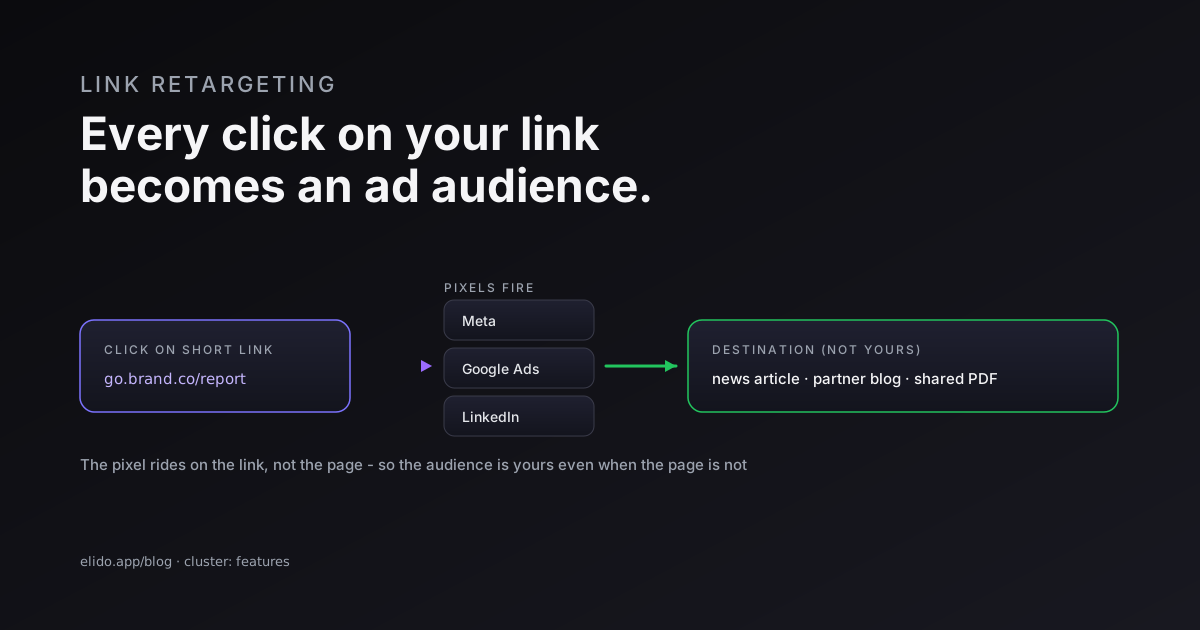
Link retargeting is the practice of attaching an advertising pixel to a shortened link, so that everyone who clicks it lands in your remarketing audience. The pixel - Meta, Google Ads, LinkedIn, TikTok, or X - fires the moment the click resolves on your redirect, then the visitor carries on to the destination without noticing. You get a new person in your ad audience; they get the page they wanted.
The trick that makes this powerful is where the pixel sits. It is not on the landing page, it is on your short link. So you can build a retargeting audience from clicks on pages you do not own and could never tag: a news article you shared, a partner's blog, a curated resource, an affiliate offer. If the click went through your link, the audience is yours. That single shift is why link retargeting turns ordinary link-sharing into audience growth.
This is a feature post in the smart links family - the same redirect tier that can route by country or device can also fire a pixel on the way through. Here is how that works, where it pays off, and the consent rules you cannot skip.
How Link Retargeting Works on a Click
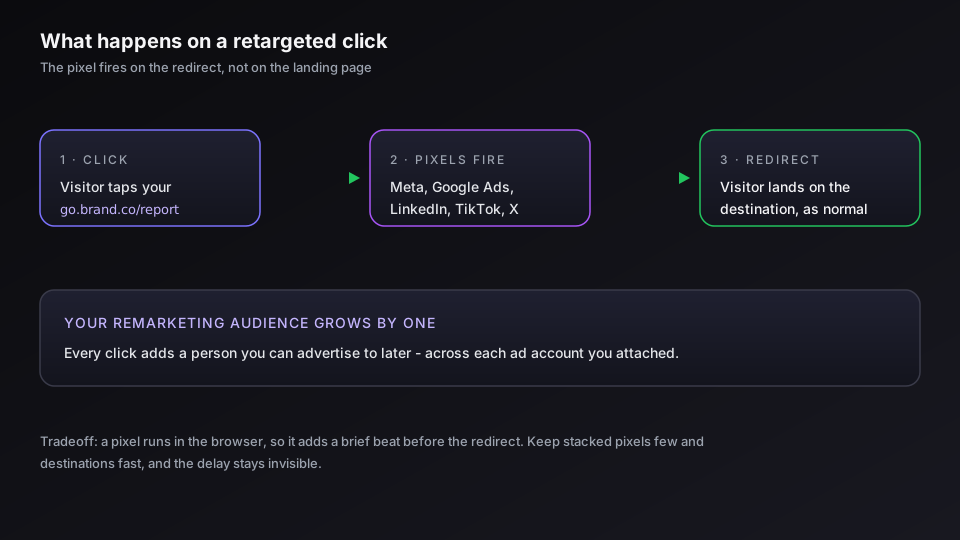
A retargeted short link does one extra thing before it redirects. The click reaches your link, the platform fires whatever advertising pixels you configured, and the browser is then sent on to the real destination. From the visitor's side it is a redirect like any other. From your side, a tag just dropped that marks this person as someone who clicked.
The pixels you can attach are the same ones the ad networks give you for your website: the Meta Pixel for custom audiences from visitors, the Google Ads tag for remarketing data segments, and the LinkedIn Insight Tag for professional audiences, plus TikTok and X equivalents. You can usually stack more than one on a single link, so a click feeds several ad accounts at once.
There is an honest tradeoff to name. A pixel runs in the browser, so firing it adds a brief beat to the redirect - the click has to load the pixel before moving on. A good platform keeps that beat short and the redirect fast, but it is not free, and a slow pixel can cost you the click. Keep the number of stacked pixels sane and point links at destinations that load quickly, and the delay stays invisible.
The Real Advantage: Audiences From Content You Don't Own
Standard retargeting pixels only see people who reach your own pages. That caps your audience at the traffic you already have. Link retargeting removes the cap, because the pixel lives on the link instead of the page.
Think about what marketers actually share. A community manager posts a Gartner report. A founder links a flattering press piece. An affiliate sends traffic to a merchant's product page. A newsletter curates five articles from around the web. In every case the clicks are real interest signals, and in every case the destination is someone else's site where you can never place a pixel. Wrap those links and each click becomes a retargetable visitor. You have turned content you merely shared into an audience you can advertise to.
That is the use case where link retargeting earns its keep: content distribution, curation, influencer and partner programs, anywhere your best clicks land somewhere other than your domain. For your own pages you already have a pixel, so the gain is smaller. For everyone else's pages, this is the only way to capture the audience at all.
Link Retargeting vs Conversion Tracking
These two get confused constantly, and they are not the same thing. Link retargeting builds an audience you can show ads to later. Conversion tracking measures whether a click became a sale or a signup. One is about reach, the other is about proof.
A retargeting pixel answers "who can I advertise to next?" A conversion setup, especially a server-side one through a conversions API, answers "did this click make money?" The first grows the top of your funnel; the second confirms the bottom. They use similar plumbing - both can ride on the same short link - but you size and judge them on different metrics. We cover the measurement side in server-side conversion tracking and the platform specifics in forwarding conversions to Meta CAPI.
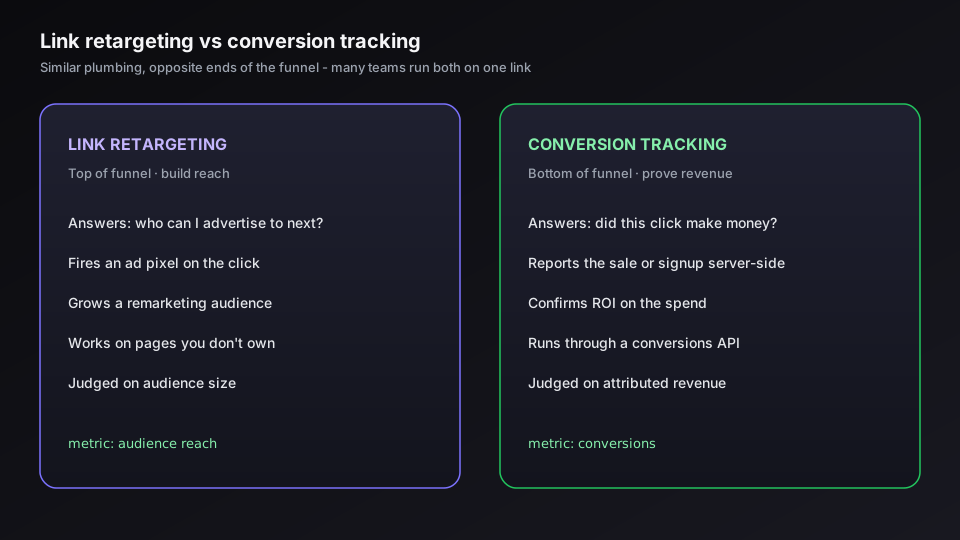
Run both and they complement each other. The retargeting pixel fills your remarketing pool from every click; the conversion API tells you which of those clicks actually paid off, so you know whether the audience is worth spending against. Most mature setups do exactly this on the same link. If you only pick one, choose by where your gap is: thin audiences point to retargeting, blind reporting points to conversion tracking.
If you want both running on a branded link without gluing tools together, start a free Elido workspace and add a pixel to your first link.
Consent and Privacy: Pixels Need Permission
A retargeting pixel is an advertising cookie, and that means consent law applies to it the same way it applies to a pixel on your website. In the EU and the UK, you may not fire it on a visitor until they have agreed. Firing a Meta or Google pixel on every click regardless of consent is not a grey area - it is the kind of thing that draws regulator attention.
So a compliant setup suppresses the pixel by default and releases it only when consent is given. In practice that means wiring your link platform into your consent signal, the same mechanism that governs pixels on your site. We walk through the current model in Consent Mode v2 for tracking, and the broader obligations for any link that collects click data are in GDPR for URL shorteners. The short version: retargeting is fine when the visitor has said yes, and a liability when they have not.
This is also where the "audiences from content you don't own" advantage needs a sober second look. The reach is real, but so is the duty. If you are retargeting EU clicks, the consent has to travel with them, and that is on you to configure, not something a link magically handles.
Setting Up a Retargeting Short Link
The setup is a one-time job per pixel, then every link you create inherits it.
- Add your pixel or tag IDs in the link platform's retargeting settings - Meta Pixel ID, Google Ads tag, LinkedIn Insight Tag, and so on. The operational steps for our side live in the retargeting-pixels guide.
- Create the short link on a domain you control, so the pixel and the redirect share your brand's reputation. If you have not set that up, custom domains for short links covers the DNS and TLS.
- Confirm the pixel fires with the network's debugger - Meta Pixel Helper, Google Tag Assistant - on a real click, before you push the link into a campaign.
- Wire in consent so the pixel honors opt-in, then let the audience build until it clears the network's minimum size for ad delivery.
Once that is in place, retargeting is just a setting on a link rather than a project. The retargeting feature page has the product detail.
When Link Retargeting Is Worth It
It is worth it when your valuable clicks land off your own site. Content marketers sharing third-party research, PR teams amplifying coverage, affiliates and partners, newsletter curators - all of them are leaving audience on the table without it, and link retargeting is the only way to recover it.
It is worth less when you mostly drive traffic to your own pages, because your site pixel already catches those visitors. And it is worth pausing on when most of your clicks come from the EU, where the consent overhead is real and the audience you can legally build is smaller than the raw click count suggests. I would still turn it on in that case - just with eyes open about the consent wiring, not as a set-and-forget toggle.
The mental model is simple. A retargeting pixel on a short link converts a share into an audience. Use it where the share points somewhere you do not control, respect consent everywhere, and pair it with conversion tracking when you need to know the audience is paying off.
Related on the Blog
Frequently asked questions
What is link retargeting?
Link retargeting is attaching an advertising pixel - Meta, Google Ads, LinkedIn, TikTok, or X - to a shortened link so that everyone who clicks it joins your remarketing audience. The pixel fires the instant the click resolves, then the visitor continues to the destination as normal. It lets you build an ad audience from clicks even when the page you are linking to is one you do not own.
How do you add a retargeting pixel to a short link?
You paste your pixel or tag ID into the link platform's retargeting settings, create the short link on a domain you control, and the platform fires that pixel on each click before redirecting. Then you confirm it works with the ad network's debugger - Meta Pixel Helper or Google Tag Assistant - and build a remarketing audience from the people the pixel collected. No code goes on the destination site, which is the whole point.
Can you retarget people who click a link to a site you don't own?
Yes, and that is the main reason link retargeting exists. Because the pixel fires on your redirect rather than on the landing page, you can build an audience from clicks on a news article, a partner's blog, a shared PDF, or any curated link - content where you could never install a pixel directly. The click passes through your short link, so the audience is yours even though the destination is not.
Is link retargeting GDPR compliant?
Only if the pixel respects consent. A retargeting pixel is an advertising cookie, so under GDPR and similar laws it must not fire on a visitor in a consent region until that person has agreed. That means wiring the link platform into your consent setup so the pixel is suppressed by default and released only on opt-in. Done that way it is compliant; fired blindly on every click it is not.
What is the difference between link retargeting and conversion tracking?
They do different jobs. Link retargeting builds an audience you can advertise to later - it is top of funnel. Conversion tracking, including server-side conversion APIs, measures whether a click turned into a sale or signup - it is bottom of funnel. One grows your remarketing pool; the other proves revenue. Many teams run both on the same short link.
Try Elido
Paste a URL, get a working short link
No signup. Link lives for 30 days. Sign up to keep it forever.
Free, no signup required · 2 per day