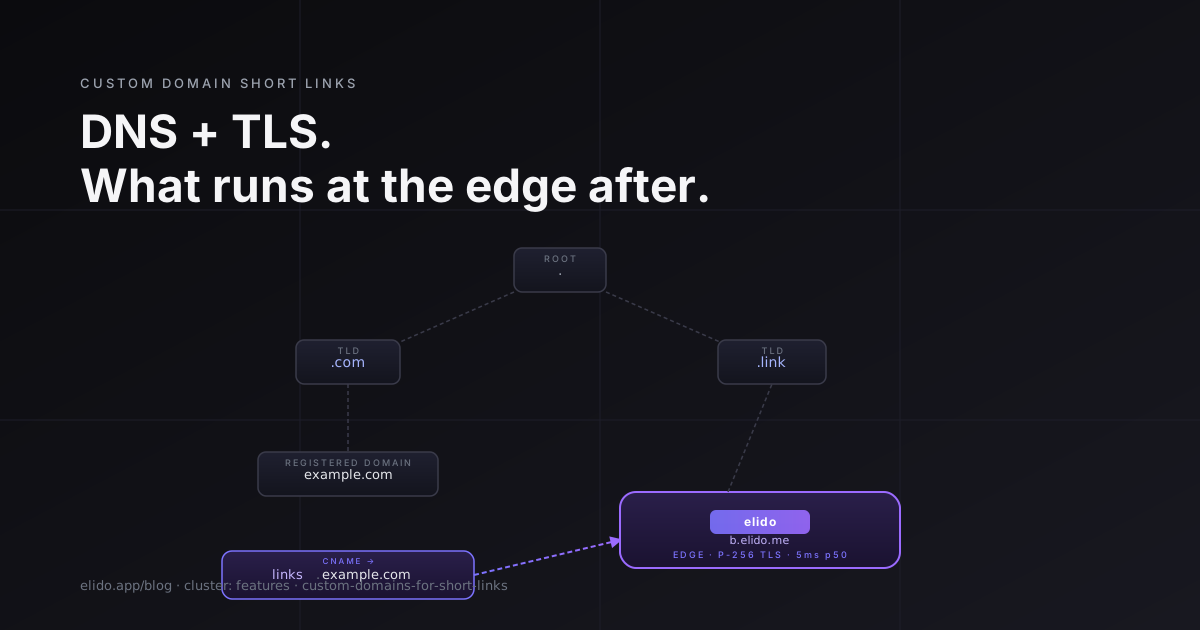
A branded short link is, at its core, two infrastructure pieces bolted together: a DNS record that tells the internet your subdomain lives here, and a TLS certificate that proves the HTTPS connection is legitimate. Neither of those is complicated in isolation. The interesting question is what runs at the edge after the redirect resolves - how a platform that handles thousands of tenants' custom domains issues certs on-demand, avoids Let's Encrypt rate limits, stays under a 15ms p95 latency budget, and recovers gracefully when a customer's DNS team nukes their CNAME mid-campaign.
That is what this post is about.
TL;DR
- DNS verification is a CNAME or TXT challenge; TLS issuance happens via ACME on-demand, triggered the first time a new hostname receives a request.
- Let's Encrypt caps at 50 certificates per registered domain per week - meaning you need a separate registered domain per tenant at scale, not subdomains of a single
elido.me. - ECDSA P-256 certificates are materially faster than RSA-2048 at the TLS handshake layer; Elido issues P-256 for every custom domain.
- Three things routinely break custom domain setups in production: DNS propagation lag, expired CAA records, and customers deleting their own CNAME. Each has a concrete recovery path.
The two parts of a custom domain shortener
Custom domain short links require two things from you, the domain owner, and two things from the platform. A custom domain is also what turns an ordinary short link into a true vanity URL - a readable, branded address like go.acme.com/spring.
From you: a DNS change (a CNAME or ALIAS record pointing your subdomain at the platform's edge) and an ownership proof (usually a DNS TXT record or a CNAME challenge that lets the platform verify you control the domain before it agrees to serve it).
From the platform: a routing rule that recognises your hostname and knows which workspace to serve links from, and a TLS certificate issued to your hostname so that browsers see a green padlock instead of a warning.
Elido handles the second two through a domain-validation service, which is responsible for DNS verification, certificate issuance, and keeping the routing table updated. It drives automatic on-demand TLS and resolves the workspace mapping. The edge service - the one with the sub-10ms in-region latency budget - knows nothing about certificate issuance; that all happens ahead of the request path.
The verification flow is straightforward. You add a CNAME from your subdomain to b.elido.me (Business tier), then add a TXT record like _elido-verify.acme.example.com = "ws_abc123" to prove you own the domain. The domain-validation service polls the TXT record, confirms it, marks the domain as verified, and registers it for TLS. The first HTTPS request to acme.example.com triggers on-demand TLS issuance - more on that in a moment.
DNS: CNAME vs ALIAS vs A
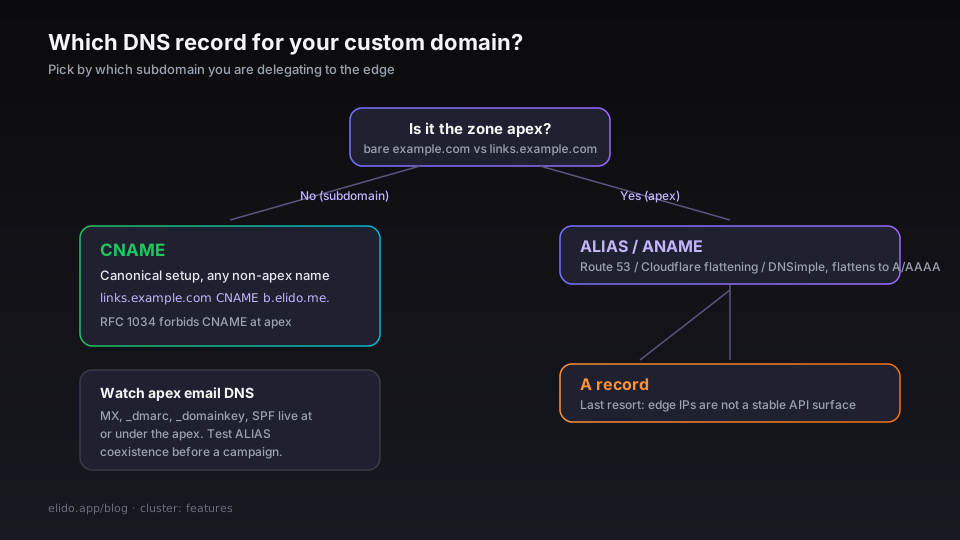
The type of DNS record you can use depends on which subdomain you are delegating.
CNAME works for any non-apex subdomain. links.example.com CNAME b.elido.me. is the canonical setup. RFC 1034 §3.6.2 prohibits CNAME records at the zone apex (the bare example.com) because they conflict with SOA and NS records that must exist there. Almost every registrar and DNS provider enforces this.
ALIAS / ANAME records are a non-standard extension that several DNS providers implement (Route 53 ALIAS, Cloudflare CNAME flattening, DNSimple ALIAS) to solve exactly the apex problem. They behave like CNAMEs syntactically but resolve to A/AAAA records behind the scenes, so the DNS provider's nameservers flatten the lookup before publishing it. If you absolutely need example.com (not www.example.com) to redirect, ALIAS is your only DNS-spec-compatible option. Check your DNS provider's documentation - they are not interoperable, and the feature name varies.
A record pointing directly at an Elido IP is a last resort. IPs can change when we add a POP or re-address an edge cluster, and we do not consider edge IPs a stable API surface. If you are on an A record today, move to a CNAME or ALIAS.
One more thing operators miss: apex redirects often collide with email DNS. MX, _dmarc, _domainkey, and SPF TXT records all live at or under the apex. An ALIAS at the apex does not conflict with them - they are different record types - but some DNS providers' ALIAS implementations do have undocumented restrictions on apex record coexistence. Test this before putting it in front of a campaign.
TLS: ACME, rate limits, and the on-demand issuance pattern
Every custom domain gets its own certificate. We do not use wildcard certificates for tenant domains because they require a DNS-01 challenge per RFC 8555 §8.4, which means we would need to control the DNS zone of every tenant's domain - and we don't. HTTP-01 challenges are simpler (they require only HTTP reachability) and cover per-hostname certificates. We use HTTP-01 for every custom domain.
The certificate authority is Let's Encrypt. Their rate limits are the main operational constraint you need to understand: 50 certificates per registered domain per week, where "registered domain" is the eTLD+1 (the part just above the public suffix - example.com for links.example.com). Duplicate certificate renewals do not count toward this limit, but every new domain does.
This has an important implication for multi-tenant platforms. If you let all your users create custom domains under *.yourbrand.com, your 50 cert per week budget is shared across all those subdomains of yourbrand.com. At any meaningful scale you hit the cap. The correct architecture - and the one Elido uses for its own tier subdomains - is for each tenant's verified custom domain to be a subdomain of their own registered domain (links.example.com), so the rate limit applies per tenant, not per platform.
On-demand TLS issuance is how the edge handles the volume. Rather than pre-issuing certificates for every verified domain before any traffic arrives, the certificate is issued on the first request to that hostname. Automatic on-demand TLS asks an upstream endpoint (in our case, the domain-validation service) whether the hostname is allowed before attempting issuance. If it returns 200 (domain is verified), the edge proceeds with the ACME HTTP-01 challenge, obtains the cert, caches it, and serves the request. If the hostname is unknown, the edge returns a TLS alert and the connection fails before a cert is ever requested.
The ACME flow per RFC 8555:
- The edge requests a new order from the ACME server (Let's Encrypt).
- Let's Encrypt responds with an HTTP-01 challenge: "place a token at
http://acme.example.com/.well-known/acme-challenge/<token>." - The edge places the token in its in-memory HTTP handler and notifies Let's Encrypt.
- Let's Encrypt fetches the token over plain HTTP (port 80), validates it, and issues the certificate.
- The edge stores the certificate in its storage layer and serves the original HTTPS request.
Steps 1–5 add latency to the very first request from a newly verified domain, typically 1–3 seconds. Every subsequent request hits a cached certificate with no observable overhead.
Performance: TLS handshake math
Once the certificate is issued, the per-request cost is the TLS handshake plus the redirect logic.
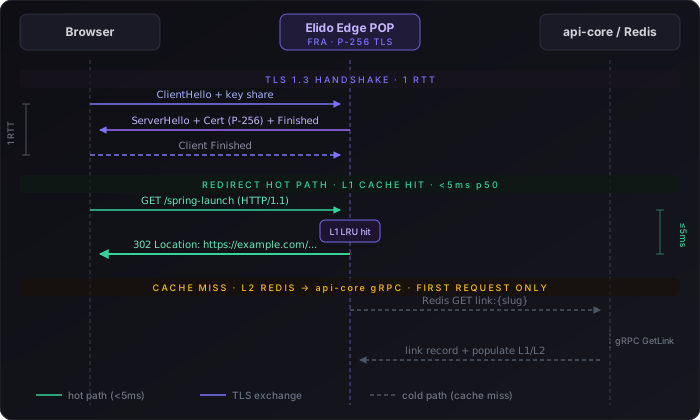
A full TLS 1.3 handshake is 1 RTT. From a European client to our in-region EU POP, that is roughly 10–20ms depending on the city. TLS 1.3 session resumption (tickets or session IDs) brings subsequent connections to 0-RTT or 0.5-RTT for data - the client can send application data in the first flight. For short links, where the HTTP request is tiny and the response is a 302 with a Location header, resumed sessions feel near-instantaneous from the client's perspective.
Certificate algorithm matters. ECDSA P-256 certificates have a signature that is about 70 bytes; RSA-2048 certificates carry roughly 256 bytes of signature plus a much larger public key. On a slow mobile connection the difference in bytes is negligible, but the CPU cost of RSA signature verification is not: verifying an RSA-2048 signature takes about 30–50× the CPU cycles of verifying an ECDSA P-256 signature at equivalent security level. For an edge serving thousands of concurrent connections, that CPU difference compounds. Elido issues P-256 for all custom domain certificates. Cloudflare's analysis of ECDSA vs RSA in production reaches the same conclusion and is worth reading if you manage your own TLS termination.
After the handshake, the redirect itself lands in the hot path: in-process LRU lookup (L1), fall through to the in-memory cache (L2) if not found, fall through to origin over gRPC as the last resort. On an L1 cache hit - which accounts for the overwhelming majority of traffic once a link is warm - the redirect resolves in sub-10ms in-region (p50), end-to-end at the edge, excluding handshake. The 15ms p95 budget accommodates L2 hits and the small fraction of cold traffic. See the smart links deep-dive for the full cache architecture and invalidation mechanics.
What breaks in production
Custom domain setups fail in predictable ways. Here are the three we see most often and what to do about each.
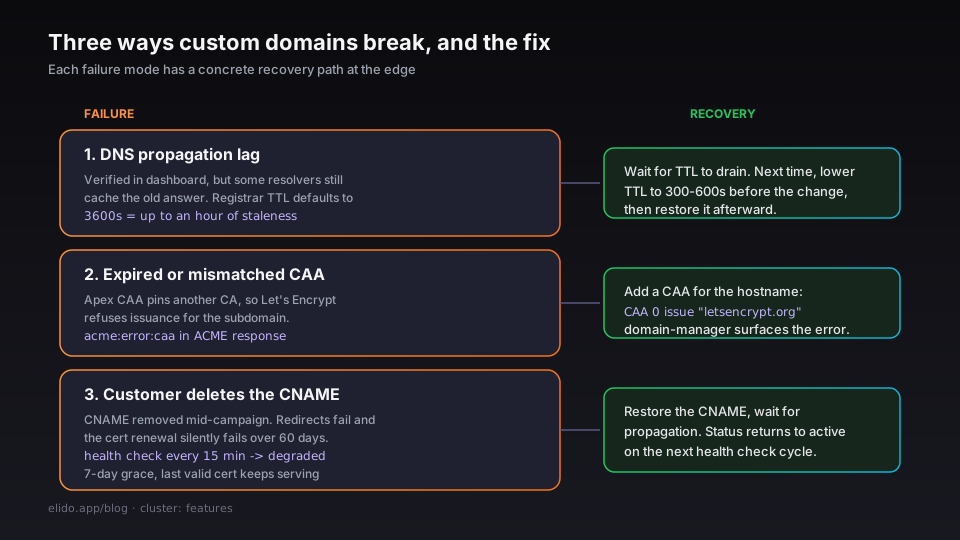
DNS propagation lag. You add the CNAME, verify in the dashboard, and the link still doesn't resolve for some users. DNS TTL values for many registrar-managed zones default to 3600 seconds - an hour of potential staleness. The dashboard's domain status reflects whether the domain-validation service can see the correct DNS answer from the EU region. If it shows "verified" but users elsewhere still get the old destination, they are hitting a resolver that has cached the previous answer. There is no shortcut; you wait for TTL to drain. The fix for next time is to lower the TTL to 300–600 seconds before making the change, then restore it afterward.
Expired or mismatched CAA records. Certification Authority Authorization (CAA) records tell CAs which one is allowed to issue certificates for a domain. If your DNS admin previously added example.com CAA 0 issue "digicert.com", Let's Encrypt will refuse to issue a certificate for links.example.com because links.example.com inherits the apex CAA policy. The error is urn:ietf:params:acme:error:caa in the ACME response; the fix is to add links.example.com CAA 0 issue "letsencrypt.org" (or remove the apex CAA restriction if that is appropriate for your security policy). The domain-validation service's status endpoint returns CAA errors in its error body so you can diagnose this without digging through edge logs.
Customer deletes the CNAME mid-campaign. This is the painful one. A DNS admin on the customer's side removes or changes the CNAME - maybe as part of a domain migration, maybe accidentally - and every redirect from that custom domain starts failing because the edge can no longer serve it, or worse, the TLS cert renewal fails silently over the next 60-day renewal window and the cert expires. Elido's domain-validation service runs a periodic DNS health check on all verified domains and marks a domain as degraded when the CNAME no longer resolves to the expected target. The workspace owner gets a notification; there is a 7-day grace period before the domain is moved to suspended. During the grace period, requests continue to be served from the last valid cert. Recovery is: restore the CNAME, wait for propagation, and domain status returns to active automatically on the next health check cycle (runs every 15 minutes).
A short walkthrough
Here is what the setup looks like end-to-end, starting from a blank slate.
Step 1: Add the DNS records. In your DNS provider's control panel:
acme.example.com   CNAME   b.elido.me.
_elido-verify.acme.example.com   TXT   "ws_01HXK4..."
The ws_01HXK4... value is your workspace verification token, shown in the dashboard under Settings → Custom Domains → Add Domain.
Step 2: Register the domain with the API. You can also do this in the dashboard, but if you are automating a multi-tenant setup - say, an agency onboarding a new client - the API is cleaner:
curl -X POST https://api.elido.app/v1/workspaces/{workspace_id}/domains \
  -H "Authorization: Bearer $ELIDO_API_TOKEN" \
  -H "Content-Type: application/json" \
  -d '{
    "hostname": "acme.example.com",
    "tier": "business"
  }'
The response includes a verification_token and a status of pending_verification. Poll GET /v1/workspaces/{id}/domains/{domain_id} or watch the dashboard until status transitions to verified.
Step 3: The first request issues the cert. Once verified, any HTTPS request to acme.example.com will trigger on-demand TLS if the cert is not already cached. That first request may take 2–3 seconds while the ACME exchange completes. Every subsequent request is sub-15ms at p95.
Step 4: Create links under the custom domain. Pass domain_id when creating links:
curl -X POST https://api.elido.app/v1/workspaces/{workspace_id}/links \
  -H "Authorization: Bearer $ELIDO_API_TOKEN" \
  -H "Content-Type: application/json" \
  -d '{
    "domain_id": 17,
    "slug": "spring-launch",
    "destination_url": "https://example.com/landing/spring"
  }'
The link resolves at https://acme.example.com/spring-launch immediately. If you are managing this setup as infrastructure-as-code, see the Terraform provider post - elido_custom_domain is a data source you can chain into elido_link resources.
When not to use a custom domain
Not every situation benefits from a custom domain, and adding one has setup cost on both sides.
Internal tooling and staging links. If the short link is only ever clicked by people inside your company - internal docs, staging environment pointers, Slack-shared resources - a custom domain adds DNS management overhead for zero brand benefit. Use a workspace on f.elido.me or s.elido.me and move on.
Throwaway campaign links with a 48-hour shelf life. The DNS propagation window alone is potentially an hour. If your campaign launches tomorrow and you don't have the DNS record in place yet, a custom domain is a liability. Use a platform subdomain, get the campaign out, and add the custom domain to the roadmap for the next one.
Enterprise SSO buyers who haven't approved the subdomain delegation. In companies with mature IT security postures, subdomain delegation to a third-party SaaS requires security review - sometimes a formal risk assessment. The review can take weeks. If your procurement motion is already in a long approval queue, don't block the deal on custom domain setup. Start with the platform domain; offer to migrate to a custom domain as part of the post-sale onboarding. Elido supports domain migration without breaking existing links, and the solutions page for agencies has more on the white-label configuration that makes this transition clean.
Custom domains are available on Business and Enterprise plans. The Free and Pro tiers use platform-provided subdomains. If you are evaluating the feature, the dashboard lets you add one verified domain on Pro as a trial path - check the current plan comparison on the pricing page for the exact limit.
The full configuration guide, including CAA record recommendations, API reference for all domain endpoints, and the domain health-check response schema, is at /docs/guides/custom-domains. The custom domains feature page covers the Apple App Site Association integration and the Universal Link / App Link flow for mobile deep-linking on a custom domain.
Marius Voß is DevRel + edge infra at Elido. He owns the edge redirect and domain-validation services.
Related on the blog
- Hitting p95 < 15ms for redirects from FRA, ASH, and SGP
- Set up branded short links: pick a domain, ship in an afternoon
- Deep links for mobile apps without an SDK
- EU data residency for marketing tools: what your DPO actually asks
- Vanity URLs explained: branded links people remember
- How to shorten a URL: free, branded, and bulk links
- Short link not working? Diagnose it in one command
Try Elido
Paste a URL, get a working short link
No signup. Link lives for 30 days. Sign up to keep it forever.
Free, no signup required · 2 per day