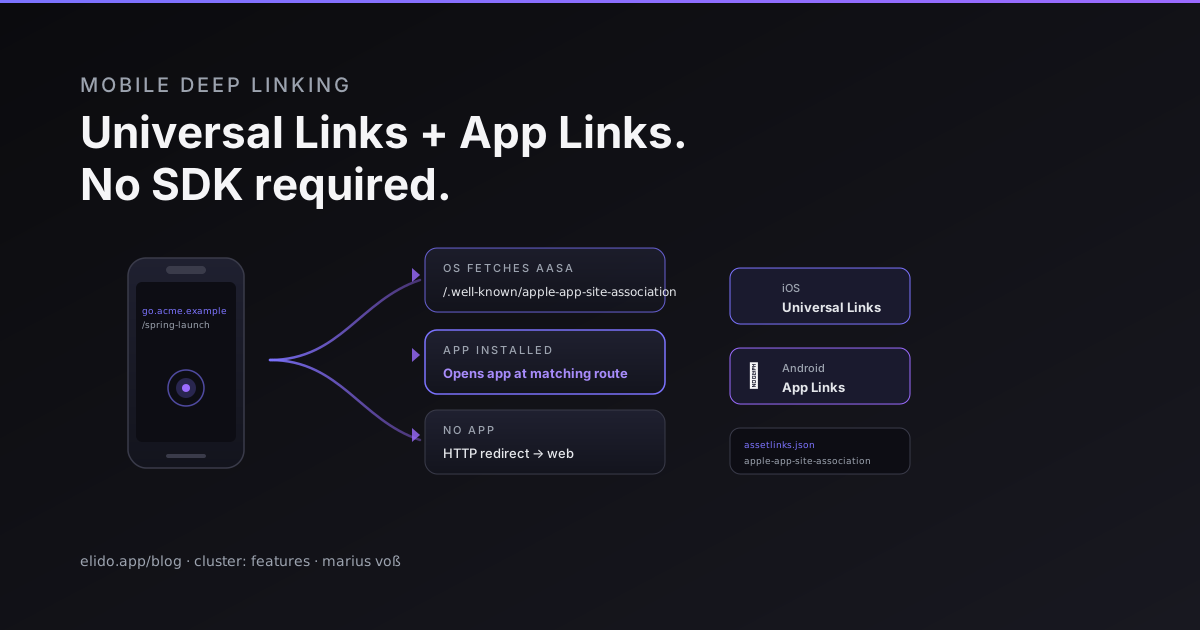
A deep link is a URL the operating system hands to an app instead of a browser. Tap it with the app installed and the app opens. Without the app, the browser loads the web page. On iOS this is called Universal Links, on Android App Links, and neither needs an SDK.
The setup is two JSON files on a domain you control, plus one entitlement or intent filter in the app. Below: both files, how a short-link domain fits in, the part most guides skip (the app receives the short URL, not the redirect target), and the three jobs an SDK still does better.
This matters more than it used to. Google shut down Firebase Dynamic Links on August 25, 2025, and its FAQ now returns HTTP 404 for those links (Firebase support FAQ, accessed 2026-10-24). That FAQ lists a vendor for full feature parity, and App Links plus Universal Links for apps that only need to open when installed. For the print-to-install case, a QR code for app downloads puts the same routing behind a scannable code.
TL;DR
- Android App Links (Android 6, API 23, and later) and iOS Universal Links cover "open in the app if installed, web page if not" with no third-party SDK.
- Each needs a domain you control, served over HTTPS, with an association file under
/.well-known/. - On a short-link domain, the app is launched with the short URL. Your app code must resolve it to a screen. The 302 never runs.
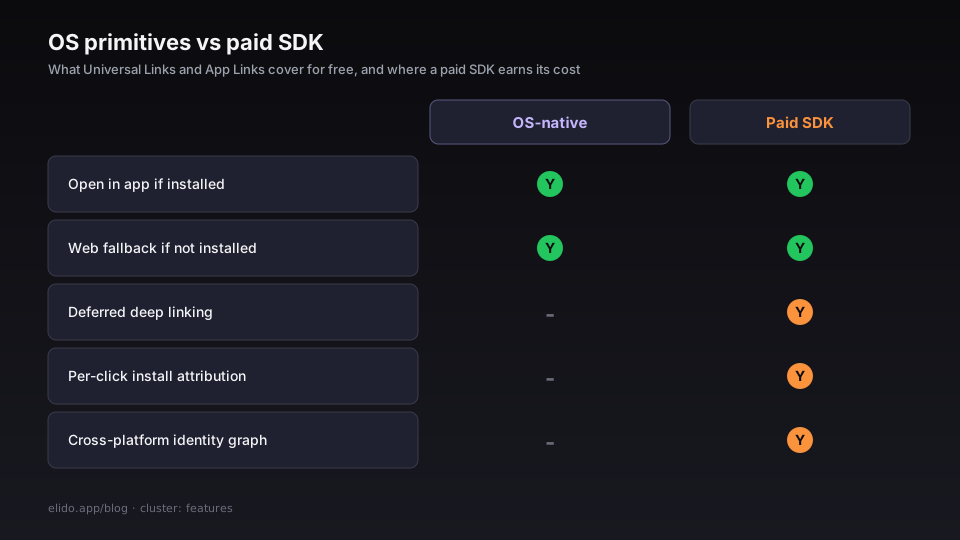
- SDKs still earn their cost for deferred deep linking, install attribution and identity stitching. Skip them if you don't need those.
How the OS decides to open your app
Both systems assert a verified relationship between a domain and an app. Android's docs say that App Links let verified website URLs "immediately open corresponding content in your Android app, without requiring the user to select your app from a disambiguation dialog", and that users without the app "go to your website instead - no 404s, no errors" (developer.android.com/training/app-links/about, accessed 2026-10-24).
Android verifies at install time. When an intent filter carries android:autoVerify="true", a device on Android 6 or later checks the declared hosts against https://hostname/.well-known/assetlinks.json as the app installs (developer.android.com/training/app-links/verify-android-applinks, accessed 2026-10-24). Wait at least 20 seconds for that check before testing. On Android 15 and later, re-verification also runs periodically, and file changes can take up to seven days to propagate. Android 14 and earlier pick up changes only on install or update.
Apple's developer pages (developer.apple.com, Supporting associated domains and Supporting universal links) did not render for my fetch on 2026-10-24, so I am not quoting Apple behaviour beyond what its published examples show: the file lives at /.well-known/apple-app-site-association, the app declares applinks:your-domain in its Associated Domains entitlement, and a Universal Link reaches the app as a web-browsing user activity carrying the URL. Check the current Apple page before you ship, especially for caching and development-mode behaviour.
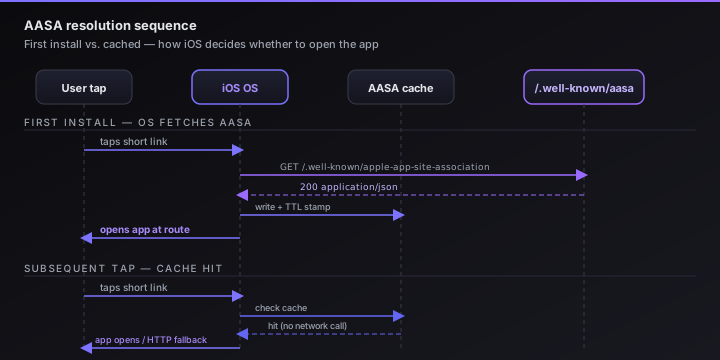
The consequence for short links follows directly. The OS decides on the URL that was tapped. That happens before any request to your server. If that URL's domain is verified for your app, the app opens with that URL. No HTTP request to the short link happens, so no redirect runs.
The two files
One file per platform, each at a fixed path on the same domain.
apple-app-site-association
The AASA file must be served at https://yourdomain.example/.well-known/apple-app-site-association . Serve it over HTTPS with a valid certificate chain, a 200 status and Content-Type: application/json, and without a redirect.
Apple's format reference is Supporting associated domains; its page did not render for me on 2026-10-24, so treat the sample below as the commonly published shape and check it against that page.
A minimal AASA shape:
{
  "applinks": {
    "details": [
      {
        "appIDs": ["ABCDE12345.com.example.acme"],
        "components": [
          {
            "/": "/spring-*",
            "comment": "Match any path starting with /spring-"
          },
          {
            "/": "/campaigns/*"
          }
        ]
      }
    ]
  }
}
appIDs is the concatenation of your Apple Team ID and your app's bundle identifier, separated by a dot. The components array controls which paths trigger app routing; anything that doesn't match a component falls through to the browser. You can register multiple apps in the details array - useful if you have a consumer and an enterprise variant of the same product on the same domain.
One detail worth stating plainly: "/" with a wildcard pattern like /spring-* is a path prefix match. The pattern syntax in the same reference includes * (any substring), ? (any single character), and exclusion objects. If you want to match every path on the domain, use "/" : "/*". If you want to exclude a specific path from app routing - say, your /account/delete page should always open in the browser - add an exclusion object before the wildcard:
{
  "/": "/account/delete",
  "exclude": true
}
Rules are evaluated first to last, so put exclusions before wildcards.
assetlinks.json
Android's Digital Asset Links file lives at https://yourdomain.example/.well-known/assetlinks.json. Google documents the format at developers.google.com/digital-asset-links/v1/getting-started.
[
  {
    "relation": ["delegate_permission/common.handle_all_urls"],
    "target": {
      "namespace": "android_app",
      "package_name": "com.example.acme",
      "sha256_cert_fingerprints": [
        "AA:BB:CC:DD:EE:FF:00:11:22:33:44:55:66:77:88:99:AA:BB:CC:DD:EE:FF:00:11:22:33:44:55:66:77:88:99"
      ]
    }
  }
]
package_name is your app's application ID in the Play Store. sha256_cert_fingerprints holds the SHA-256 fingerprints of your app's signing certificate (Google's page says mobile app targets are identified by certificate hash and package name). Get it from keytool -list -v -keystore your.keystore, or from your Play Console signing settings if Play signs the app for you. List every certificate you install builds with, debug included.
Unlike the AASA file, the Android file carries no path rules. Path matching for App Links is done in the AndroidManifest.xml via <intent-filter> with android:pathPrefix, android:pathPattern. The assetlinks.json file asserts domain ownership; the manifest declares which paths the app handles.
How a short-link domain fits
A link like go.acme.example/spring-launch is just a URL on a domain. Give go.acme.example the two association files and declare it in the app, and a tap on that link opens the app on devices where it's installed. That's the trick, and also the catch. The app receives https://go.acme.example/spring-launch, not the page the link redirects to.
Your app code then has two options. One: match the path itself (/spring-launch means the spring screen), which works when you control the slugs. Two: ask a server what the short link points to and route from the answer. Elido has no documented endpoint for an app to resolve a slug to its target. The public redirect just answers with a 302. Today the first option is the reliable one, and the gap is on our backlog.
On devices without the app, or when the tap happens somewhere that doesn't hand links to the OS, the short link behaves as it always does. The edge answers with the redirect (302 by default; a link can be set to 301 or 307), and the browser follows it. Elido's targeting rules can match on OS, so one link can send iOS visitors to an App Store page and Android visitors to Google Play when the app isn't there.
Here is what Elido does and doesn't do for this today, checked against the code:
| Capability | Status | Where |
|---|---|---|
Serve apple-app-site-association for a custom domain | Yes | Paste JSON per domain in the dashboard |
Serve assetlinks.json for a custom domain | Yes | Same panel |
| Return 404 when a domain has no file configured | Yes | Domains without an app expose nothing |
| Route iOS and Android visitors to different URLs | Yes | Targeting rules (OS match) |
| Deferred deep linking after install | No | Use a vendor SDK |
| Install attribution per click | No | Store consoles or a vendor |
Elido stores the JSON you author and serves it unmodified under the domain's own /.well-known/ paths. Elido doesn't generate the Team ID, bundle ID or signing-certificate fingerprint for you; those come from your Apple Developer account and your signing key. Setup of the domain itself (CNAME and TLS) is the same as in custom domain short links, and the deep links feature page shows the dashboard flow. For product teams using short links for onboarding, this pattern covers invite and referral links without adding an SDK to the binary. The half of the problem where nothing is installed yet is what App Clip Codes address on iOS.
What an SDK still does better
Three things sit outside what the OS gives you.
Deferred deep linking. A user taps before installing. The OS has no app to hand the URL to, so the tap goes to the browser and the intent is lost. Vendors recover it with probabilistic matching on request data or a clipboard handoff. Apple's tracking-consent prompt makes the edge cases ugly. Elido doesn't do this today.
Install attribution. Without an SDK you can still see installs in App Store Connect and Play Console, but you can't tie one to a specific link tap. Relative signals survive: run smart link experiments and compare installs per campaign. Per-device attribution needs a vendor.
Identity stitching. Connecting a tap to an email address or CRM contact is a data project. Vendors maintain a device graph for it.
If none of those three matters, the OS primitives are enough. If one does, hire the vendor for that job only.
Configuration cookbook
Three places to get right: the server, the iOS project and the Android manifest.
HTTPS and path requirements
Serve both files over HTTPS with a certificate that chains to a public root CA. Google's Digital Asset Links page says the statement list "must" live at /.well-known/assetlinks.json and that lists elsewhere or under other names are not valid (developers.google.com/digital-asset-links/v1/getting-started, accessed 2026-10-24). That page doesn't say whether redirects are followed, so serve the file directly with a 200 and don't gamble on it. The same advice applies to the Apple file.
iOS: Associated Domains entitlement
In Xcode, under Signing & Capabilities, add the Associated Domains capability with the value applinks:go.acme.example. Apple documents a ?mode=developer suffix for development builds that makes the device fetch the file from your server instead of going through Apple's cache; I couldn't re-check that page on 2026-10-24, so confirm it in Apple's docs. Handle the incoming link as a browsing-web user activity (SwiftUI onContinueUserActivity(NSUserActivityTypeBrowsingWeb), or the UIKit continue userActivity delegate) and read webpageURL.
Android: App Links in the manifest
Inside the activity that should handle links:
<intent-filter android:autoVerify="true">
  <action android:name="android.intent.action.VIEW" />
  <category android:name="android.intent.category.DEFAULT" />
  <category android:name="android.intent.category.BROWSABLE" />
  <data
    android:scheme="https"
    android:host="go.acme.example"
    android:pathPrefix="/campaigns/" />
</intent-filter>
Android considers filters with the VIEW action, both categories above and an http or https scheme for auto-verification. On Android 11 and lower, the system makes your app the default handler only if it finds a Digital Asset Links file for every host in the manifest, so one bad host breaks them all. On a given device only one app can be associated with a domain at a time.
Checking it works
On Android, give verification at least 20 seconds after install, then run adb shell pm get-app-links com.example.acme (Android 12 and later) and look for verified. You can force a re-run with adb shell pm verify-app-links --re-verify com.example.acme. Results such as none, denied or legacy_failure mean the file or the fingerprint is wrong.
For the file itself, Google's Digital Asset Links API lists the statements it can read for a site: https://digitalassetlinks.googleapis.com/v1/statements:list?source.web.site=https://go.acme.example&relation=delegate_permission/common.handle_all_urls. An empty response means Android won't verify the app.
For both platforms, fetch the file the way a crawler would:
curl -si https://go.acme.example/.well-known/assetlinks.json | head -20
curl -si https://go.acme.example/.well-known/apple-app-site-association | head -20
You want a 200 and a JSON body. Elido sends application/json on both files. The usual mistakes are a typo in the Team ID or bundle ID, a release build whose signing certificate isn't in the fingerprint list, and a file that only exists on the apex while the links use a subdomain.
The trade-off, stated plainly
Dropping the deep-link SDK removes a dependency from the app binary and a data-sharing relationship from your privacy notice. I won't put a size figure on it; it varies by vendor and I didn't measure one. The cost: a tap before install can't be tied to the install.
For early-stage teams where per-channel cost per install isn't driving budget yet, start with the OS primitives and add an attribution vendor when the data becomes actionable.
Related on the Blog
Frequently asked questions
Can I do deep linking without Firebase or a third-party SDK?
Yes, for the case where the app is already installed. iOS Universal Links and Android App Links need a domain you control, a JSON association file on that domain, and a few lines in the app. Google's own Firebase Dynamic Links FAQ points to these two mechanisms as the option for deep linking to installed apps. What you give up is deferred deep linking, meaning opening the right screen after a fresh install.
Do Universal Links and App Links work with a short link domain?
Yes, if the short-link domain serves the association files and the app declares that domain. The catch is that the operating system opens the app with the tapped short URL itself, so the app has to turn that URL into a screen. It can't rely on the redirect having run. When the app isn't installed, the same tap loads in the browser and the normal redirect applies.
Where do the association files go?
Android reads https://your-domain/.well-known/assetlinks.json, and Google's Digital Asset Links docs say that is the only valid location. Apple's file goes at https://your-domain/.well-known/apple-app-site-association with no file extension. Serve both over HTTPS with a certificate that chains to a public CA.
Why does my Android app show a chooser instead of opening directly?
Direct opening needs a verified App Link. Android checks the domain against assetlinks.json when the app is installed, and only when an intent filter carries android:autoVerify="true". If the file is missing, wrong, or lists a different signing certificate than the installed build, the link behaves like a normal deep link.
What is deferred deep linking and can I skip it?
Deferred deep linking carries a link's destination through an app install, so a user who taps before installing still lands on the right screen at first launch. Universal Links and App Links do nothing in that case because the app isn't there to receive the tap. You can skip it for onboarding flows where landing on the home screen is fine, and add a vendor for it only if first-launch routing moves your numbers.
Which parts of this does Elido handle?
Elido serves the apple-app-site-association and assetlinks.json files for custom domains, using JSON you paste into the domain settings in the dashboard. It also routes iOS and Android visitors to different destinations with targeting rules. It does not offer deferred deep linking or install attribution, so use a vendor SDK if you need those.
Try Elido
Paste a URL, get a working short link
No signup. Link lives for 30 days. Sign up to keep it forever.
No signup needed. Sign up free for 50 links a month.