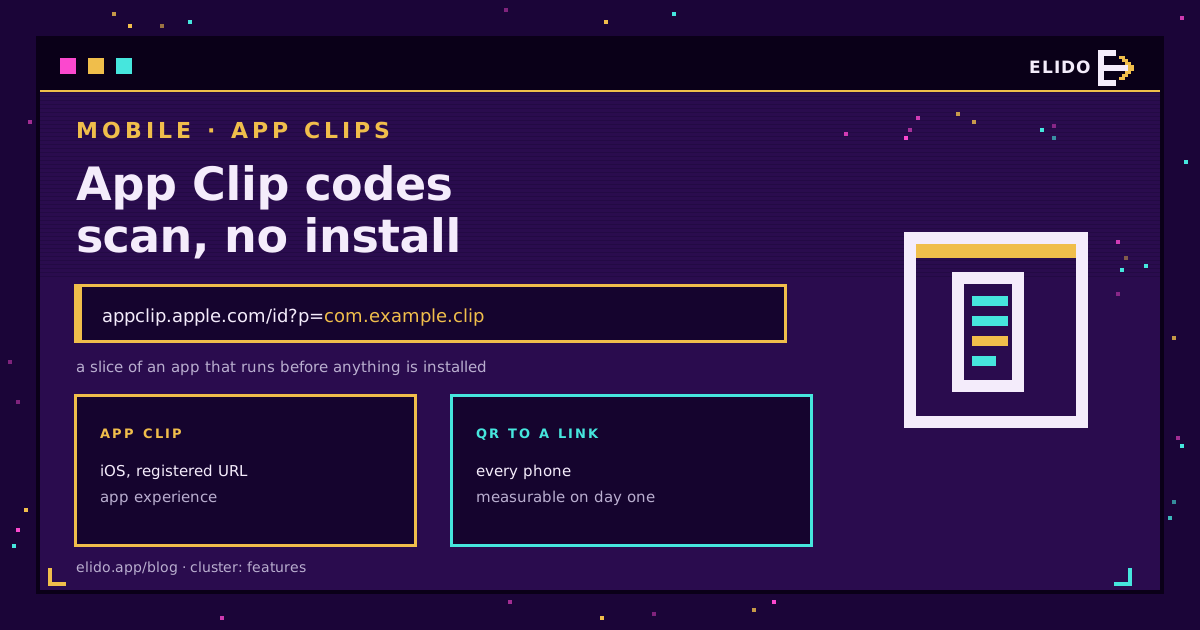
An App Clip code is Apple's round, scannable badge that opens a small slice of an app instantly, with nothing to install. Scan it with the Camera app, or tap it if it carries an NFC chip, and the App Clip card slides up from the bottom of the screen within a couple of seconds. Tap Open and you're in a stripped-down version of the app, just big enough to order the coffee, unlock the scooter, or check in for the flight. No App Store detour, no signup screen, no download queued in the background while you wait.
That's the whole idea. What follows is what that sentence skips: what an App Clip actually is under its size cap, how the invocation URL gets registered so the OS knows which app answers which link, what happens when someone scans the same code on Android, and whether the engineering project is worth it next to a QR code that points at a short link.
What Is an App Clip
Forget a separate app in the App Store: an App Clip isn't one. It's a lightweight build target of your existing iOS app, scoped to one job: ordering, paying, renting, checking in, whatever single task justifies skipping the install. Apple caps a standard App Clip at 10MB after thinning if it needs to run on devices older than iOS 16.4. One that only launches from a digital invocation, meaning an App Clip Code, an NFC tag, or a link, and drops pre-16.4 support, can go up to 50MB.
The card UI is the tell. Instead of a full-screen launch, a compact card rises from the bottom third of the screen with your branding and an Open button. Finish the task, and Apple can prompt a "Get the full app" offer that carries over whatever the App Clip already collected, so nobody re-enters their order or their seat number.
I've watched more product teams stall on that 10MB limit than on any other part of the spec, and it's a healthy constraint: it forces a real decision about which one screen matters, instead of shipping a shrunk copy of the whole app.
What Is an App Clip Code
An App Clip Code is the physical trigger Apple designed specifically for this: a ring of dashes around a center mark, closer to Apple's own visual language than to a generic QR grid, registered to one specific App Clip experience. You generate it in App Store Connect or with Apple's command-line generator, and you can print several different codes for the same App Clip, a takeout code at the register and a dine-in code on the table, for instance.
Some people just call this an app clip QR code, and functionally that's close enough: a 2D scannable graphic that encodes a URL. The difference is it's proprietary to Apple and comes in two interaction modes. A scan-only code works with any camera; an NFC-integrated code adds a chip so a tap does the same job, and that tap-versus-scan trade-off, on its own, outside the App Clip context, is exactly what NFC tags vs QR codes works through.
Under the hood, this solves the same problem that deep linking without an SDK solves for ordinary web links: the OS has to know a URL should open an app instead of a browser tab. Apple just wrapped that in a dedicated code format and a physical form factor that reaches a table tent, a parking meter, or the side of a delivery locker.
How the Invocation URL Works, and Why You Have to Register It
What an App Clip code encodes isn't the App Clip's content directly. It encodes a URL, called the invocation URL, the way a short link encodes a destination rather than the page itself: https://[host][/path][?query][#fragment], HTTPS only, lowercase. What launches an app instead of a browser tab is registration, not the code.
Registration has two parts, laid out in Apple's guide to configuring the launch experience. In Xcode, add the Associated Domains capability to both the main app and the App Clip target, with an entry like appclips:example.com. On your own domain, the apple-app-site-association file at /.well-known/ needs an appclips key listing the App Clip's app ID. The device checks the invocation URL's domain against that registration on scan; if it matches and the file validates, iOS resolves which experience opens. URLs match by prefix, so one registered pattern covers every query-string variant.
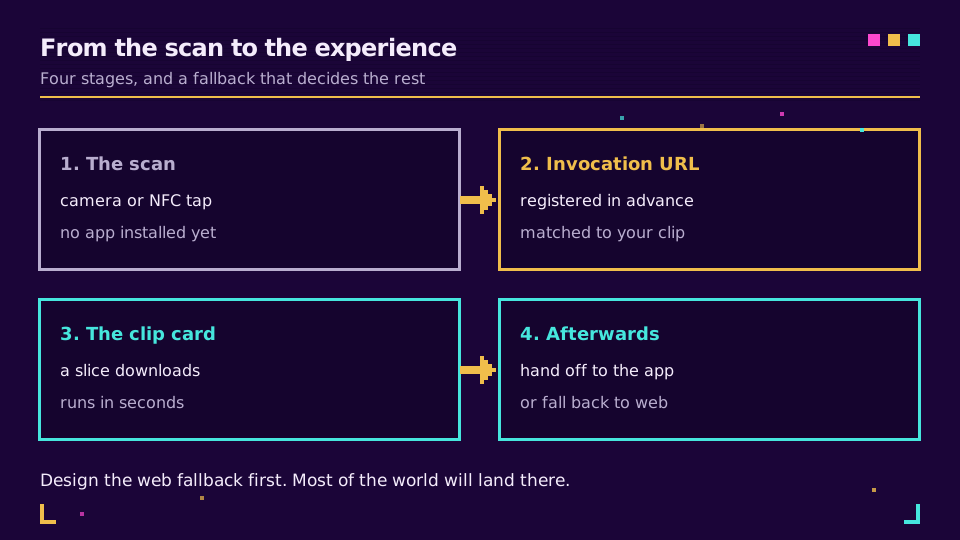
If nothing matches, the OS falls back to Safari and the invocation URL behaves like any other web link, the same fallback behavior a Universal Link uses, with Apple-specific vocabulary on top. If you've already set up Universal Links on a domain, this registration is familiar ground: the same domain-ownership proof Elido's deep link feature relies on, plus one more key in a file you're already serving.
App Clip Code vs a Plain QR Code to a Short Link
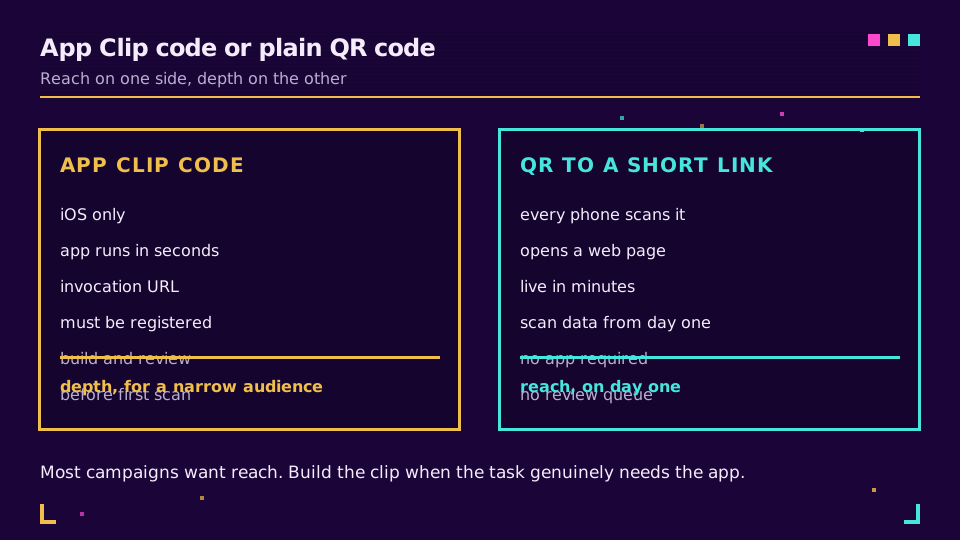
Here's the honest comparison. The two look similar at scan time and are not similar at all in cost or reach.
iOS only: that's as far as an App Clip code reaches. A plain QR code scans on every phone with a camera. Building an App Clip is a native engineering project: a new Xcode target, App Store review, domain registration, the works. Measured in days to weeks. Setting up a QR code on a short link takes minutes flat.
| What you're comparing | App Clip code | QR code to a short link |
|---|---|---|
| Reach | iPhones on iOS 14 and later only | Any phone with a camera |
| What opens | A native app experience | A web page, or a smart link that branches by device |
| Setup cost | New Xcode target, App Store review, domain registration | A few minutes, no app review |
| Time to first scannable code | Days to weeks | Immediate |
| Measurement | App Store Connect, opt-in, aggregated | Server-side redirect log, every scan |
For the QR side explained from zero, what is a QR code covers the module grid and scanning mechanics behind it. That QR code should specifically be a dynamic one: see dynamic vs static QR codes for why. A static code frozen at print time gives up the one advantage that keeps a QR code competitive with an App Clip code at all, the ability to change where it points after it's already on a poster. Elido's QR code feature generates that dynamic code against a short link in under a minute.
If the App Store review queue and a new Xcode target aren't on this quarter's roadmap, you don't have to wait. Set up a dynamic QR code pointed at your best mobile landing page today, and revisit the native App Clip once the campaign has proven it's worth the build.
What Happens on Android: Instant Apps Are Gone
Android had its own version of this idea, Instant Apps, launched in 2016 and 2017: tap a link or scan a code, run a slice of an app, no install, the same job an App Clip does on iOS today. Google shut it down. Starting December 2025, Instant Apps can no longer be published through Google Play, and the supporting APIs stopped working, according to Android's own developer documentation. Google's guidance for developers who relied on them is a standard deep link with a strong web fallback instead.
Practically, there is no Android equivalent to scan right now. Point an Android camera at an App Clip code and, assuming it even parses the graphic, all it can do is open the invocation URL as a plain web link. That's why the web fallback matters so much for a mixed-platform campaign that reaches both an iPhone and an Android phone: Android traffic never sees the App Clip.
The Measurement Gap: an Invocation Is Not a Page View
Plan for this before you build, because it surprises teams every time. An App Clip invocation does not produce a web page view: no page load, no cookie, no server access-log line the way a redirect off a short link produces automatically. Apple exposes App Clip Card Views, Sessions, and the invocation source, meaning App Clip Code, NFC, Safari, or Maps, inside App Store Connect Analytics. That data is opt-in, appears about a day after launch, and arrives aggregated, not as a per-event log.
Compare that to how QR code scans get tracked at the redirect layer: every scan pointed at a short link is a row you can query within seconds, filterable by country, device, and time, no opt-in ceiling, no next-day lag. If an App Clip is your main acquisition channel, don't rely on the dashboard alone. Have it fire an event to your own analytics the moment the task completes, the same way you'd track any other conversion elsewhere in your funnel. Apple's dashboard is a discovery-and-retention view, not a marketing attribution feed.
Who Should Actually Build One
Build it when the friction you're removing sits at a real transaction moment and your audience skews iOS. Retail displays, premium unboxing, restaurant tables, parking meters, event badges: anywhere a person stands in front of the object with a decision already in hand. Phone already out, thumb already moving. Build it when your team ships native iOS often enough that a second Xcode target is routine, not a special project.
Skip it, or defer it, when meaningful Android share sits in your audience, when you're still testing whether the campaign works at all, or when you need same-day numbers over a next-day aggregated dashboard. For those cases, smart links simulate the platform-branching an App Clip offers: route iOS scanners to the App Store, Android scanners to the Play Store, everyone else to a web page, from one short URL. If the goal is just getting the full app installed, a plain QR code for app downloads gets you there with zero native code.
My rule of thumb: build the App Clip when the without-install experience is the product. Don't build it when it's just a fancier shortcut to installing the real one.
Related on the Blog
Frequently asked questions
What is an App Clip on an iPhone?
An App Clip is a small, fast-loading slice of a full app that lets someone complete one task, like ordering, paying, or checking in, without installing the whole app first. It opens as a card at the bottom of the screen in a couple of seconds and can offer to install the full app afterward, carrying over whatever the person already did.
How do you open an App Clip without installing the app?
Scan an App Clip code with the Camera app or the Control Center code scanner, tap an NFC-enabled App Clip code, or tap a link from Messages, Safari, or Maps. Any of those triggers the invocation URL, and the App Clip card appears without a visit to the App Store.
What is an App Clip Code?
An App Clip Code is Apple's own round, scannable badge, visually somewhere between a QR code and the Touch ID ripple, that is registered to a specific App Clip. It encodes a URL and can also carry an NFC chip, so the same physical code works as either a camera scan or a tap.
Do App Clips work on Android?
No, there is no direct Android equivalent. Google ran a similar program, Instant Apps, but stopped accepting new Instant Apps through Google Play and turned off the supporting APIs starting December 2025; the current Android guidance is a standard deep link with a solid web fallback instead.
How big can an App Clip be?
Apple caps a standard App Clip at 10MB after app thinning if it needs to support devices before iOS 16.4. An App Clip that only needs to launch from a digital invocation, meaning an App Clip Code, NFC tag, or link, and only targets iOS 16.4 and later, can go up to 50MB.
Can you track App Clip scans the way you track QR code scans?
Only partially. Apple reports App Clip card views, sessions, and the invocation source inside App Store Connect Analytics, but that data is opt-in, aggregated, and only starts appearing a day after launch, not a per-scan log you can query the moment it happens.
Try Elido
Paste a URL, get a working short link
No signup. Link lives for 30 days. Sign up to keep it forever.
Free, no signup required · 2 per day