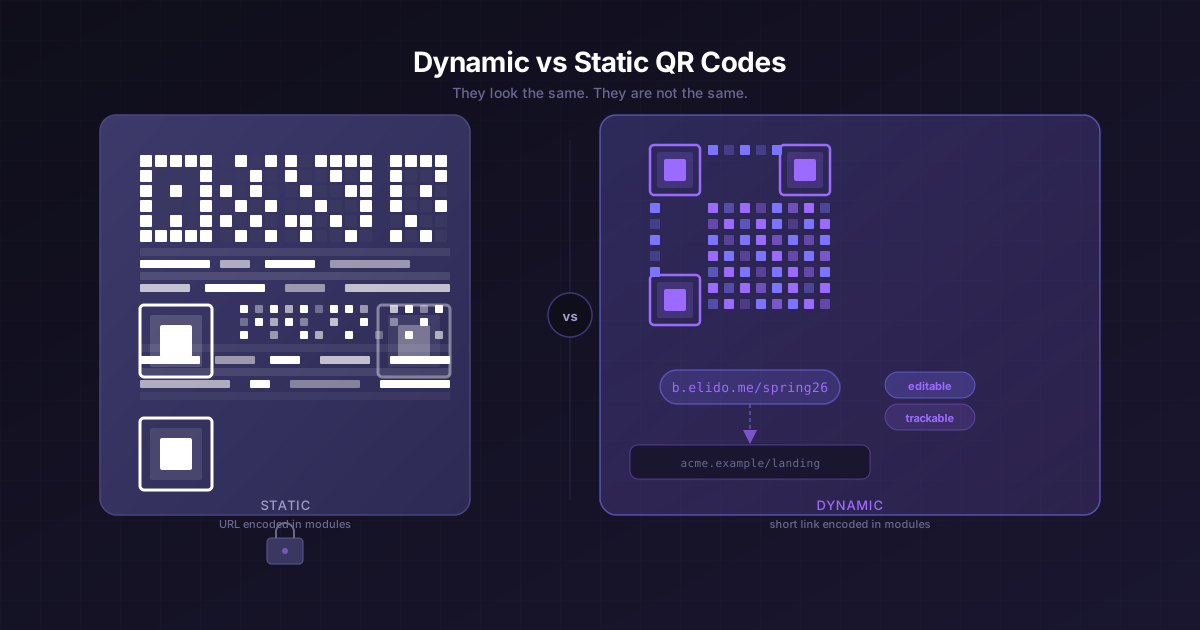
Static and dynamic QR codes are not two flavours of the same thing. They're two completely different artifacts that happen to look similar at scan time. One of them encodes a URL permanently into a grid of black-and-white modules. The other encodes a short link - a pointer. Whether that distinction matters to you depends entirely on what you're pointing at and whether you ever expect it to change.
TL;DR
- A static QR code encodes the destination URL directly in the module pattern. Print it and the destination is frozen.
- A dynamic QR code encodes a short link. The actual destination lives at the shortener and can be changed, tracked, or A/B routed after the code is already printed.
- Dynamic QR codes add one HTTP redirect hop (~5–15ms on Elido's edge). In practice, scanners never notice.
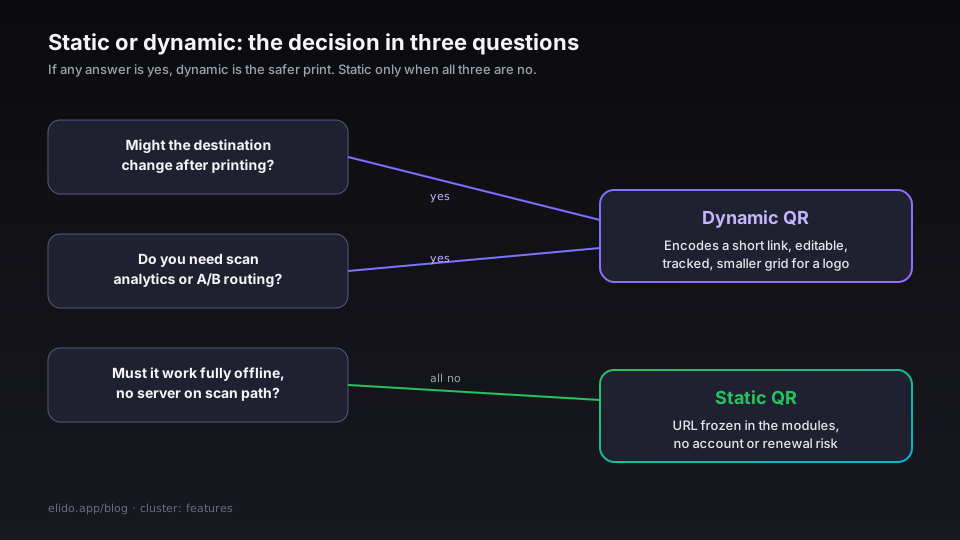
- If there is any chance the destination changes, or you need scan analytics, use dynamic. Static is a viable choice only when the URL is permanently stable and you genuinely need no tracking.
What a static QR actually encodes
A QR code is not an image of a URL. It's a 2D matrix of binary modules - dark and light squares arranged in a grid - that encodes data using four possible encoding modes (numeric, alphanumeric, byte, kanji). A long HTTPS URL typically forces byte mode.
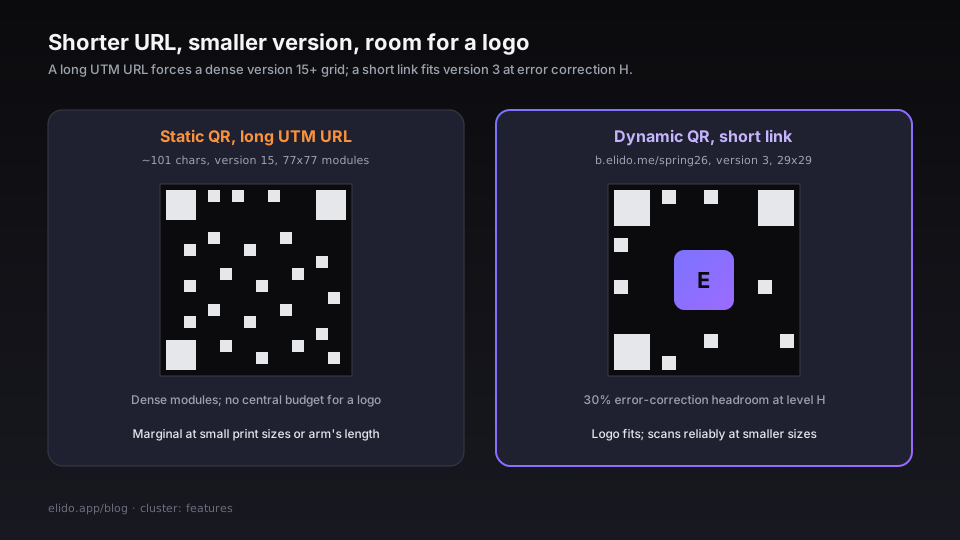
The size of that grid is called the version. ISO/IEC 18004, the standard that defines QR code structure, specifies 40 versions: version 1 is a 21×21 module grid capable of holding 17 alphanumeric characters; version 40 is 177×177 and can hold 4,296 alphanumeric characters. Every additional version adds four modules per side. A URL like https://example.com/products/spring-collection-2026?utm_source=flyer&utm_medium=print&utm_campaign=march is 101 characters. At error correction level M, that needs at least version 15 (77×77 modules), which is already dense enough that a scan at arm's length from a worn or low-contrast print can fail.
Error correction levels - L, M, Q, H - trade data capacity for damage tolerance. Level H can recover from up to 30% of the module data being damaged or obscured; level L handles 7%. The more correction headroom you buy, the larger the grid has to be to fit the same payload. More on this in the logo section below.
Once the QR is printed, the URL is burned into the module pattern. There is no "edit destination." A typo in the URL, a moved page, a campaign that ended - all of that means reprinting. The QR inventor Denso Wave publishes the full version/capacity tables if you want to model the exact breakeven point.
What a dynamic QR encodes
A dynamic QR code encodes a short link instead of the full destination URL. Something like https://b.elido.me/spring26 - 32 characters, version 3 (29×29) at error correction H. The actual destination sits in Elido's datastore, resolved at scan time.
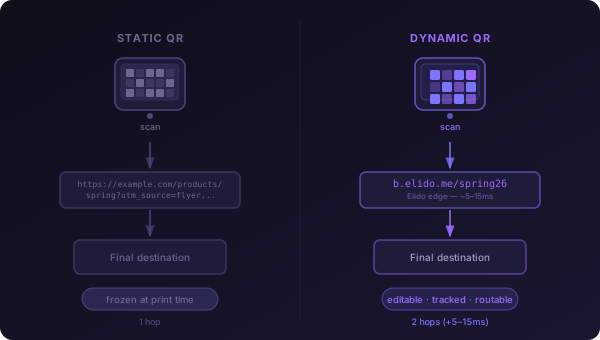
That one layer of indirection enables four things a static QR cannot do:
Redirect changes. Update the destination URL in the dashboard or via the API. The printed code never changes. The campaign moves to a new landing page; the flyers already in the field follow it.
Scan analytics. Every scan is a redirect event. Elido logs it to our analytics store - timestamp, country, device type - without sampling. The conversion tracking feature can close the loop from scan to downstream conversion if your landing page fires the postback.
A/B routing. Smart links let you route on country, device, or language at the redirect layer. A single QR on a product box can send iOS visitors to the App Store, Android visitors to the Play Store, and desktop visitors to the marketing page. One printed code, three destinations, zero reprints.
Expiration. You can set a link to redirect to a "campaign ended" page after a date. The code still scans; it just goes somewhere sensible instead of a 404.
The latency penalty is one extra HTTP redirect. Elido's edge is at p95 15ms on a cache hit. A scan from a phone involves a camera frame capture (~100–300ms), a QR decode pass by the OS library, a DNS resolution, a TLS handshake, and the redirect - all of which dwarf the 5–15ms the redirect itself adds. Scanners never notice.
The error correction tradeoff
Dynamic QR codes are smaller (shorter URL → smaller version). That matters for the logo embedding use case.
At error correction level H, 30% of the module data can be wrong or obscured and the scanner still recovers the payload. That 30% headroom is what lets you stamp a brand logo over the centre of the QR - the logo occludes modules, and the error correction reconstructs them.
The catch: H-level correction costs space. For the same data payload, version at H versus version at M means roughly 15–20% more modules. A static QR at version 15 (M-level) that you try to move to H-level would become version 22 or so, a significantly denser grid. A dynamic QR at version 3 (H-level) for a short URL like b.elido.me/spring26 stays tiny and still leaves correction budget for a logo.
This is the underappreciated reason teams reach for dynamic QR codes even when they don't need redirect editing: shorter URL → smaller version → more error correction headroom → logo fits → brand-consistent printed material.
Performance and scannability
Module size at print distance is the practical constraint nobody talks about until a QR fails in the field.
A version 3 QR (29×29) printed at 3 cm × 3 cm gives you modules roughly 1mm wide. At 30cm from the camera, most phone cameras resolve that cleanly. Go to a version 20 QR (97×97) at the same physical print size and you get 0.3mm modules - at arm's length, on a gloss-coated flyer under halogen shop lighting, reliable scanning is marginal.
QRTIGER's print guide (accessed 2026-05-10) documents a rule of thumb that has held up empirically: the minimum printed size of a QR code should be 1/10th of the scanning distance. A code meant to be scanned at 1m should be at least 10cm × 10cm. Anything smaller and you're relying on a good camera in good light.
The minimum module size is a floor, not a target. If you're printing on packaging that's viewed at varied distances - a shelf product, a poster - use the version that gives you the smallest dense module count, which means the shortest URL, which means a short link.
When static is the right pick
Static QR codes have legitimate uses. They are the right tool when:
- The destination is genuinely permanent and stable: a DOI, a statutory disclosure, a public records link that a government agency controls.
- The code is on something that will never be reprinted and you have no interest in scan analytics (a one-run book, a product where the landing page is the product manual and the manual will not change).
- You're generating QR codes offline, without a network connection to a shortener, and you need the code to work without any server dependency.
In all three cases the static code is simpler. No account needed, no renewal risk, no external service on the scan path. A QR code embedded in a PDF archive with a stable URL is still scannable in ten years with no infrastructure on your side.
When dynamic wins
Everything else. Specifically:
Anything you might edit after printing. Any campaign with a defined end date. Any use case where you want to know how many people scanned, from where, on what device. Any code on packaging that ships across geos and needs geo-specific landing pages. Any situation where the "final" URL is still being decided when the code needs to go to print. Hotel rooms are the case where reprinting costs the most: a chain reprinting an in-room directory card across hundreds of rooms after every rate or menu change is paying for exactly the mistake a dynamic code avoids, a pattern QR codes for hotels works through touchpoint by touchpoint.
Dynamic QR codes also reduce the operational blast radius of a bad URL. If the destination has a bug, you fix the link, not the packaging. A printed survey code is the everyday version of this: a QR code for a Google Form can be repointed at next term's form without a reprint. That's the kind of insurance that costs nothing at creation time and occasionally costs everything when you need it and don't have it.
See also: custom domains for short links, which covers how to put your own domain on the short URL embedded in the QR rather than relying on a shared elido.me subdomain.
The same editability argument is what separates a QR code from the linear barcode beside it on a pack, which barcode vs QR code works through.
The third option: dynamic QR with a vanity short URL
The practical default for most teams is not "static or dynamic" - it's dynamic with a short URL on your own domain. Something like links.acme.example/spring26 instead of a raw b.elido.me/spring26.
Why it matters for QR specifically: a vanity domain like links.acme.example is typically 17–20 characters shorter than an unbranded tracking URL with UTM parameters. That difference at version 3 / error correction H produces a meaningfully smaller module count than a version 7 encoding of the full UTM string. Smaller module count means better scannability at smaller print sizes and more margin for logo overlay.
Beyond the physics: a custom domain on the short URL means the QR code stays valid even if you migrate shortener vendors. The destination of the redirect lives at the domain, and the domain is yours. Custom domain setup is covered in the features page, and the tier availability is on the pricing page - custom domains are on Pro and above.
For marketers managing QR codes at scale, the solutions page for marketers covers the campaign workflow end-to-end, and bulk QR code generation has the CSV-to-print-files pipeline for a run of thousands.
Operational pitfalls
The failure mode nobody documents until it bites them: a dynamic QR code whose shortener domain lapses is a dead artifact in the wild. The QR code is on physical media - packaging, signs, merchandise, books - and scans route to a domain that no longer resolves. The code can't be updated, because it encodes the short URL, not the final destination. The short URL is gone.
Custody is the mitigation, not the technology. Know who owns the domain, know the renewal date, keep the renewal in the same billing system as everything else that matters. If you're using Elido's elido.me subdomains, that renewal is our problem. If you're using a custom domain, it's yours, and you should treat it with the same operational seriousness as api.acme.example.
The second pitfall is link deletion. A dynamic QR code pointing at a link you've deleted will 404 or redirect to a fallback page depending on your shortener's behaviour. Elido redirects deleted links to the workspace's configured "not found" URL - a configurable landing page that's better than a raw 404, but still not the original destination. If a QR code is on physical materials, archive the link, don't delete it.
Both of these are arguments for treating QR-backing short links differently from campaign links. Tag them, put them in a dedicated folder, and set a reminder before any renewal. The GS1 standard for QR codes on retail packaging adds a layer on top of this - GS1 Digital Link encodes product identity in the URL structure, which gives the retail ecosystem a stable resolution layer even when individual brands change shortener vendors. Worth knowing if you're in retail.
For the technical anatomy of the redirect path that backs a dynamic QR - how the L1/L2 cache works, what happens on a cache miss, what the latency distribution looks like in production - the smart links post covers the same edge infrastructure that serves every QR redirect.
- Marius
Related on the blog
- How to create a QR code: static, dynamic, trackable
- Building a QR code campaign from scratch - a step-by-step guide
- A/B test landing pages with short links - no CRO tool required
- Hitting p95 < 15ms for redirects from FRA, ASH, and SGP
- URL shorteners for marketers: the 2026 comparison matrix
- QR codes for hotels: one dynamic code per guest moment
- How to track QR code scans and read the analytics
- Are QR codes safe? quishing and how to stay protected
- Google review QR code: get more reviews fast
- Bulk QR code generation: from a CSV to print-ready files
- What is a QR code, and how does scanning actually work?
- QR code for a Google Form: create, track, and repoint it
- Barcode vs QR code: which one belongs on your product
Try Elido
Paste a URL, get a working short link
No signup. Link lives for 30 days. Sign up to keep it forever.
Free, no signup required · 2 per day