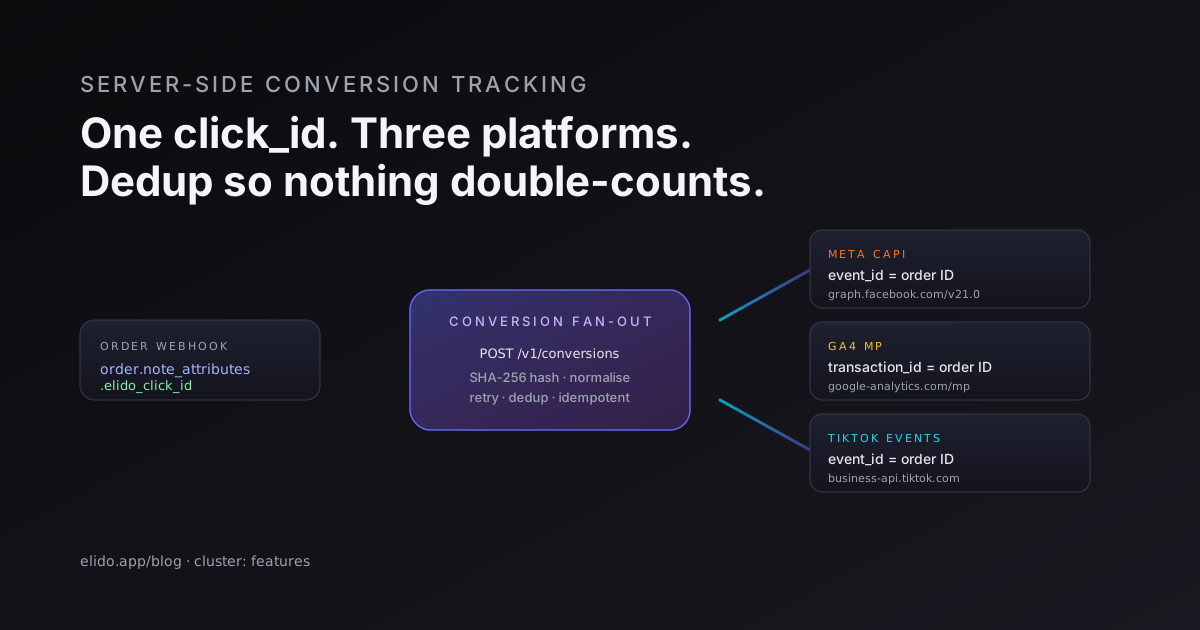
The browser pixel is the part of attribution that breaks first. Apple's Intelligent Tracking Prevention caps third-party cookies and degrades referrer; ad blockers strip the pixel network call before it leaves the page; iOS 14.5's App Tracking Transparency cut Meta's signal quality on iPhone traffic by enough that Meta themselves now treat the browser pixel as a backup.
Server-side conversion tracking is the answer everyone agrees on. The implementation is what people get wrong. This post walks through the architecture as it lands when a URL shortener owns the click_id - what the shortener does, what your back-end does, what the ad platforms expect on their end, and the deduplication shape that keeps you from double-counting when both browser and server events fire.
New to the concept? What marketing attribution is sets the vocabulary this post assumes. If your goal is building an ad audience rather than measuring sales, the sibling discipline is link retargeting, which fires the pixel on the click instead of on the conversion.
The three platforms most teams forward to: Meta CAPI, GA4 Measurement Protocol, TikTok Events API. Mixpanel, Klaviyo, and Pinterest accept the same shape with vendor-specific field names. I'll be specific about Meta and GA4 because they're the ones that drive most of the budget; the others follow the same template.
Why server-side
The short version: the browser is no longer a reliable signal source. The longer version is worth understanding because it shapes how you set up the deduplication.
Three things degrade browser-side conversions:
Cookie partitioning and lifetime caps. Safari's ITP partitions cookies by top-level site and caps script-set first-party cookies at 7 days (24 hours after a known cross-site tracker is detected). Firefox's Total Cookie Protection does similar partitioning. Brave and the privacy-extension cohort go further. The first-party cookie attribution flow that worked in 2018 doesn't work in 2026.
Ad blockers. uBlock Origin, AdBlock Plus, Pi-hole, NextDNS, and the network-level blockers ship default rules for connect.facebook.net, googletagmanager.com, analytics.tiktok.com, and the rest of the marketing tag surface. The pixel never fires; the conversion never registers.
iOS App Tracking Transparency and the iOS 17 link tracking changes. ATT cut Meta's signal quality. The iOS 17 Link Tracking Protection extended this to query parameters in private browsing and Mail, stripping fbclid, gclid, and a list of others before the link is opened.
The cumulative effect on a typical Shopify shop with iOS-heavy traffic: 25-40% of conversions are missed by browser-side pixels. The exact number depends on your traffic mix; iOS-heavy beauty and apparel brands sit at the high end. The recovered-revenue arithmetic is what justifies the engineering work - for a shop doing €10M/year in revenue with a 30% pixel-attribution gap, recovering even half of that gap is €1.5M of attributable revenue routed back to the platforms that drove it.
Server-side conversion forwarding closes most of the gap. It doesn't close all of it - there are conversions where the click_id was never captured (organic, direct, brand-search) that no amount of CAPI will recover - but it closes the gap that came from browser-side blocking.
The architecture
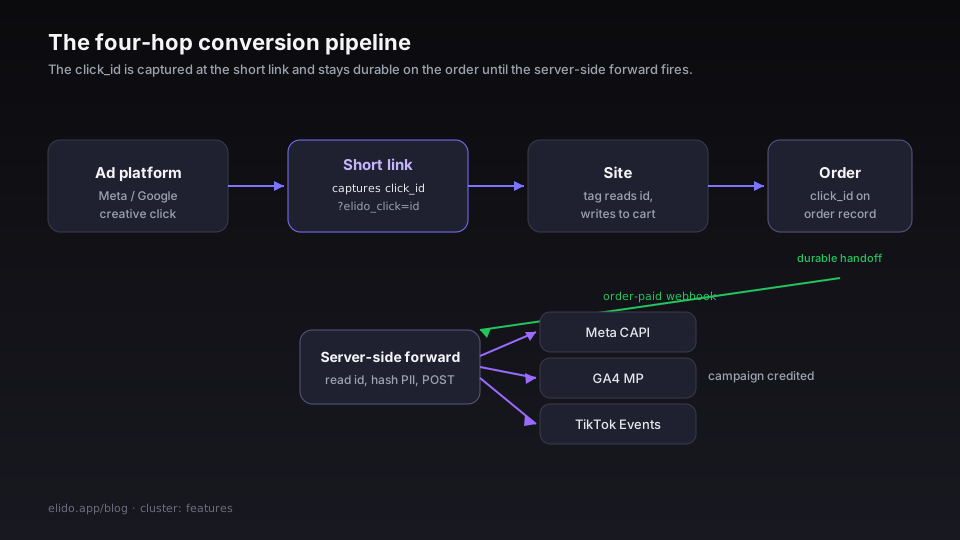
The data flow is four hops: ad → short link → site → server-side forward.
Ad platform → short link. The Meta or Google Ads creative's destination is a short link. The user clicks; the short link's edge handler captures the click event and redirects to the destination URL with a click_id appended.
Short link → site. The destination URL has ?elido_click=<id> appended (configurable per-workspace). The site's tag manager or theme code reads it and writes it to a first-party cookie or, more importantly, into the cart or order's custom attribute.
Site → order. When the user finalises an order (Shopify cart submitted, WooCommerce order created, headless cart converted), the click_id is on the order record's attributes/metadata. This is the durable handoff point - once the click_id is on the order, it's not subject to cookie expiry or browser session lifetime.
Order → server-side forward. The order-paid webhook fires from your commerce platform. Your back-end (or Elido, if you've delegated to it) reads the click_id, looks up the conversion forwarding credentials, and POSTs the conversion to each connected ad platform. The platforms receive the conversion and credit the originating campaign.
The shortener's role is the click_id at hop 2 plus the orchestration at hop 4. The first is straightforward; the second is where the integration earns its keep.
Deduplication: the thing nobody mentions until production
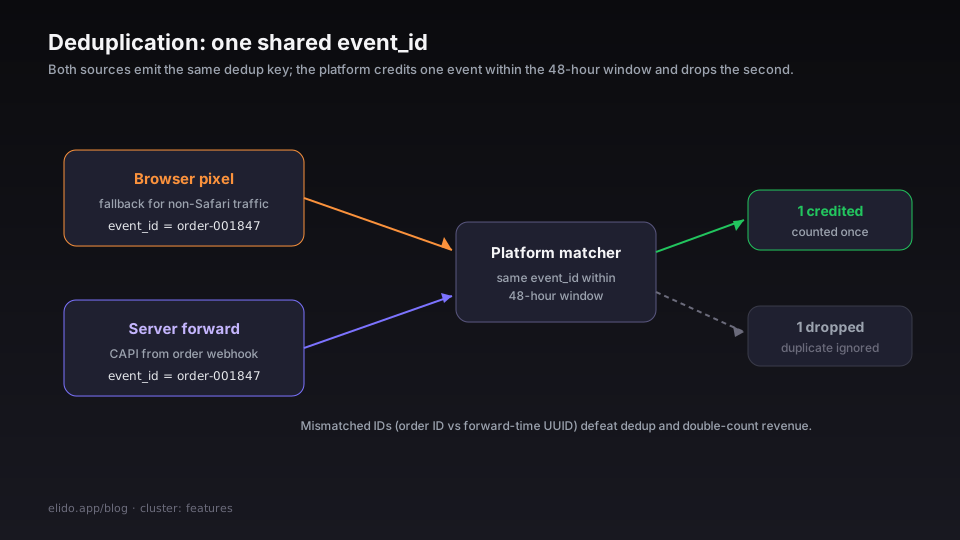
The big production-incident I see most often is double counting. The browser-side pixel is still on the page (the team didn't disable it because they wanted browser fallback for non-Safari traffic), and the server-side forward fires too. Meta ingests both events. The conversion is double-counted, the budget allocator over-pulls, the next campaign budget review notices "wait, why is our reported ROAS 3× revenue?".
The fix is the deduplication identifier. Meta CAPI accepts an event_id. GA4 Measurement Protocol accepts a client_id and a transaction_id. TikTok Events accepts an event_id. If both browser and server send the same event with the same dedup ID, the platform credits one and ignores the second.
The dedup ID has to be the same value on both sides. The order ID works for purchase events - both the browser-side pixel and the server-side forward see it. The click_id works for upstream events (lead, add-to-cart, view-content) where the order doesn't exist yet.
Meta's deduplication documentation walks through the matching window: events received within 48 hours of each other with the same event_id are treated as duplicates. GA4's client_id-based dedup is similar in principle though shorter on documentation.
The operational rule: every server-side conversion has to carry the dedup ID, and the dedup ID has to be the same one the browser-side pixel emitted. Skipping this is the difference between a working CAPI integration and one that quietly inflates your reported numbers for three months until someone notices.
Hashing requirements
Both Meta CAPI and TikTok Events require email and phone identifiers to be SHA-256 hashed before transmission. GA4 doesn't strictly require it but accepts it. The hashing is on the customer identifiers - em (email), ph (phone), fn (first name), ln (last name), ge (gender), db (date of birth), ct (city), st (state), zp (zip), country (country) - not on the event metadata.
Two gotchas. First, the format has to be normalised before hashing - lowercase, trimmed, country-code stripped from phone, dashes removed. Hashing [email protected] produces a different value from hashing [email protected]; the platforms expect the latter. Meta's parameter requirements page lists the normalisation rules per field.
Second, the hash has to be lowercase hex without spaces. SHA256("[email protected]") produces a3b6...; the API expects a3b6..., not A3B6... and not \xa3\xb6.... Most language SDKs return uppercase hex by default; you have to lowercase the result.
If you're routing through Elido's POST /v1/conversions endpoint, the hashing is handled platform-side - you POST the raw email/phone, Elido does the normalisation and hashing per platform requirement, and forwards. The benefit is one set of normalisation rules for your back-end to maintain instead of three. The cost is that you're trusting Elido with the raw PII at the moment of forward; the request is encrypted in transit and not persisted server-side, but the trust model is worth understanding before you wire it up.
A worked Meta CAPI POST
What the platform actually wants. The endpoint is POST https://graph.facebook.com/v21.0/{pixel_id}/events. The body is JSON.
{
  "data": [
    {
      "event_name": "Purchase",
      "event_time": 1716480000,
      "event_id": "order-acme-2026-05-23-001847",
      "action_source": "website",
      "event_source_url": "https://acme.example/checkout/thanks?order=001847",
      "user_data": {
        "em": ["a3b6...sha256 of email"],
        "ph": ["c4d7...sha256 of phone"],
        "client_user_agent": "Mozilla/5.0 ...",
        "client_ip_address": "203.0.113.42",
        "fbc": "fb.1.1716470000.AbCdEf",
        "fbp": "fb.1.1716470000.987654321"
      },
      "custom_data": {
        "currency": "EUR",
        "value": 89.5,
        "content_ids": ["sku-spring-jeans-32-blue"],
        "content_type": "product",
        "num_items": 1
      }
    }
  ],
  "test_event_code": "TEST12345",
  "access_token": "EAAxxxxxxx"
}
Three things worth noting:
The event_id is the dedup key. Set it to your order ID; the browser-side Purchase pixel sets the same value. Meta dedupes within the 48-hour matching window.
fbc and fbp are Meta's cookie identifiers. fbc is the click identifier (fbclid from the landing URL, prefixed); fbp is the browser identifier from the _fbp cookie. Both are first-party from your domain's perspective and capture-able server-side once you've persisted them off the landing page. If you don't have them, Meta's match rate drops; if you have them, match rate is excellent.
test_event_code lets you fire test events that don't count toward production reporting. Always wire this up first; verify in Events Manager Test Events before flipping production traffic.
The Elido API equivalent: POST /v1/conversions with {click_id, event_name: "Purchase", value, currency, order_id, customer: {email, phone}}. Elido normalises and hashes per Meta's spec, looks up the workspace's fbc/fbp from the click event, and constructs the CAPI payload.
A worked GA4 Measurement Protocol POST
GA4's wire format is similar in shape but the field names differ. Endpoint: POST https://www.google-analytics.com/mp/collect?measurement_id=G-XXX&api_secret=xxx.
{
  "client_id": "click-id-as-fallback-if-no-ga4-cookie",
  "user_id": "user-acme-12847",
  "events": [
    {
      "name": "purchase",
      "params": {
        "transaction_id": "order-acme-2026-05-23-001847",
        "value": 89.5,
        "currency": "EUR",
        "items": [
          {
            "item_id": "sku-spring-jeans-32-blue",
            "item_name": "Spring Jeans 32 Blue",
            "quantity": 1,
            "price": 89.5
          }
        ],
        "engagement_time_msec": 1
      }
    }
  ]
}
Notes:
client_id is the GA4 cookie's _ga value if present; if not, the click_id makes a usable fallback (because GA4 will create a session against it).
transaction_id is the dedup key - set it to your order ID, same value as the browser's gtag purchase event, GA4 dedupes within its session window.
engagement_time_msec has to be present and positive for the event to count toward attribution; setting it to 1 satisfies the requirement.
api_secret is workspace-level. The GA4 MP docs cover the credentials setup.
Retry semantics
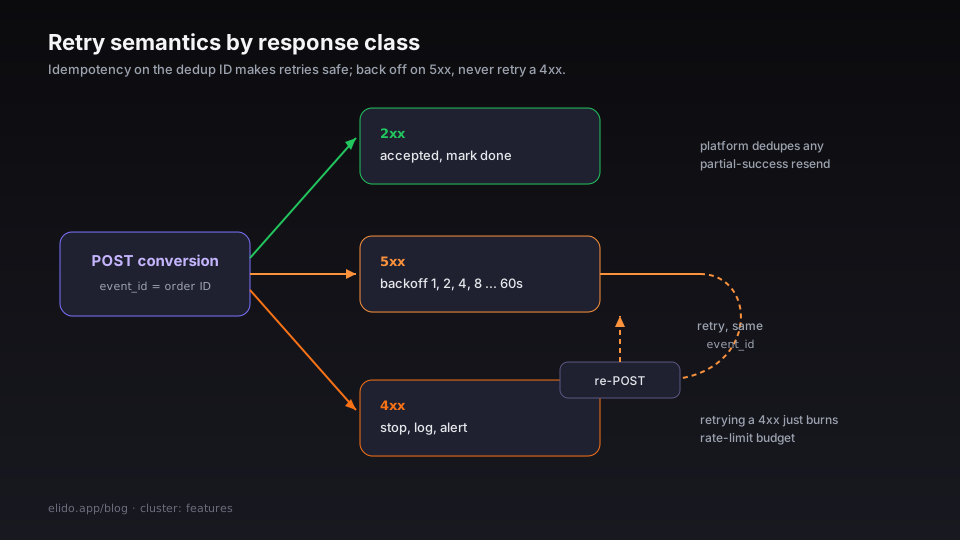
The platforms accept retries; what you can't do is retry blindly. Three patterns hold up.
Idempotency on the dedup ID. If the platform's event_id / transaction_id is the order ID, and you retry the same payload, the platform dedupes - the second send is silently ignored. Safe.
Exponential backoff on 5xx. Both Meta and GA4 occasionally return 5xx. Retry with backoff (1s, 2s, 4s, 8s up to 60s, then give up). The retries should preserve the same event_id so the platform dedupes any partial-success cases.
Don't retry on 4xx. A 4xx response means the payload is malformed or the credentials are wrong. Retrying won't fix it; the retry just burns rate-limit budget. Log it, alert, fix the upstream issue.
If you're routing through Elido, the retry/backoff is handled - POST /v1/conversions returns immediately and the fan-out to platforms happens in the background, with the retry state observable via GET /v1/conversions/{id}. If you're rolling your own, the queue layer (RabbitMQ, Kafka, AWS SQS) is where the retry shape lives.
Test mode and dry-run
The single biggest mistake teams make is skipping the dry-run.
Meta has Test Events. You set test_event_code on the payload, the events show up in the Test Events panel within seconds, you verify the shape and the deduplication. Production events come through the same endpoint but without the test_event_code.
GA4 has DebugView. You set debug_mode: 1 on the event params, the events show up in DebugView, you verify before flipping production traffic. Run the payload through the validation server first, and remember it never checks the API secret; the GA4 Measurement Protocol debugging guide covers that order step by step.
TikTok has a similar test mode in the Events Manager interface.
The verification checklist is short. Place a test order, observe the order-paid webhook, observe the conversion forward firing, observe it landing in the platform's test panel. Confirm the event_id matches the browser-side pixel's value. Confirm the value, currency, and content_ids look right. Then disable test mode and watch the first ten production orders.
If you skip this, you find out the integration is broken three days later when reports are flat. Skipping the dry-run is the most common single failure mode I see.
Common failure modes
Click_id missing on the order. The most common one. Already covered in the ecommerce cornerstone; fix is to plumb the click_id through the cart to the order.
Hash mismatch. [email protected] hashed without normalisation produces a different value than [email protected]. The platforms reject the match, the conversion lands without identifier matching, and Meta's reporting attributes it to "unmatched". The fix is the normalisation rules in the Meta CAPI parameters doc; the cleaner answer is to delegate the hashing to the shortener so the rules live in one place.
fbc not captured. When the user lands from a Meta ad, the URL contains fbclid; the page has to capture it and persist it (typically into the order's custom attributes). Without fbc, Meta's match rate drops materially. The fix is the landing-page tag manager step that writes fbc to a first-party cookie or to the cart attribute.
Dedup ID inconsistent. Browser-side pixel uses the order ID; server-side uses a UUID generated at forward time. Both events ingest, neither is deduped. The fix is to make sure the server-side forward uses the same event_id value as the browser-side pixel emitted - order ID for purchases is the standard answer.
Currency mismatch. Browser sends USD (because the gtag config defaults to USD); server sends EUR (because the order is in EUR). GA4 and Meta both treat the currency as part of the event signature in some matching contexts, and the conversions land but don't aggregate cleanly. The fix is to source currency from the order, not from the page-level config.
Where this lives in the data plane
The conversion forwarding is one piece of the broader attribution pipeline. The cornerstone for the surrounding pipeline is How to track UTM campaigns end-to-end without a CDP - that post covers the workspace UTM template, the campaign-level overrides, the bulk import, and the dry-run verification step in detail. This post is the deeper drill-down on the server-side fan-out that closes the loop.
For the operational guide, the conversion forwarding doc is the step-by-step. For the architectural detail behind how Elido fans out without exceeding platform rate limits, the click ingestion architecture post covers the fire-and-forget pipeline.
Read the cluster
Sibling posts in the features cluster: Smart links explained (the cornerstone), Webhooks for link events (the broader event shape), and Forwarding conversions to Meta CAPI (the deeper Meta-specific drill-down). For the persona-facing version, solutions/marketers is the page; the conversion-tracking feature page is the product surface.
Related on the blog
- Link retargeting explained: pixels on your short links
- GA4 server-side tracking via the redirect tier
- GA4 Measurement Protocol debugging: why 2xx proves nothing
- Cookieless attribution explained: what still works in 2026
- Click attribution after Safari ITP: what still works in 2026
- Why we use ClickHouse for click analytics (and not Postgres)
Try Elido
Paste a URL, get a working short link
No signup. Link lives for 30 days. Sign up to keep it forever.
Free, no signup required · 2 per day