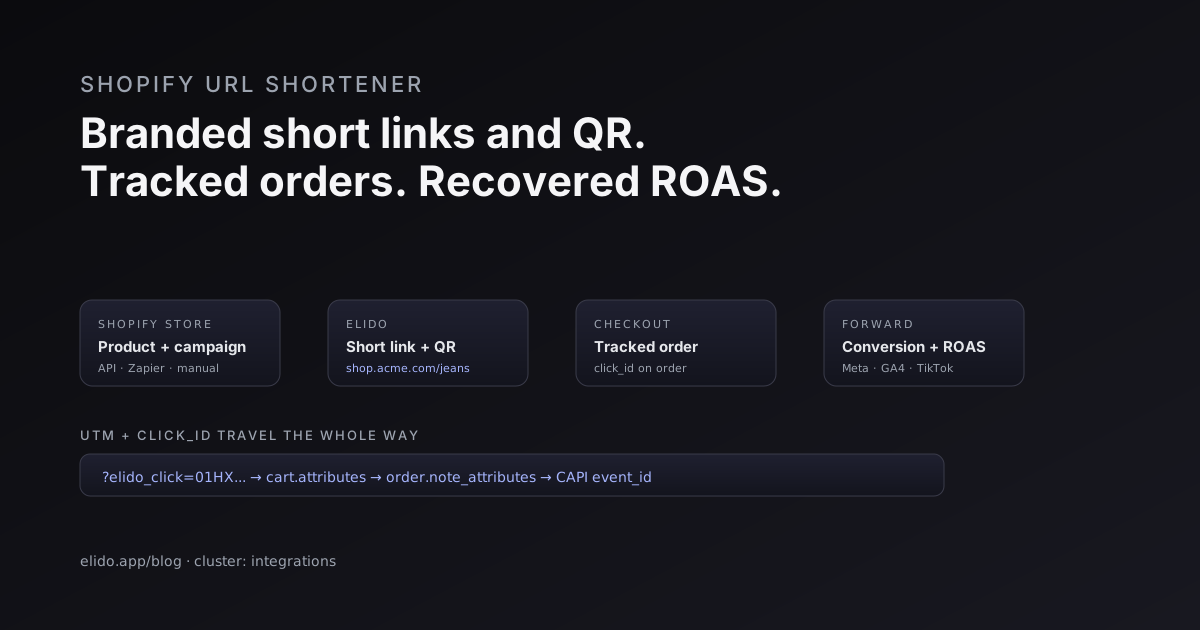
A Shopify URL shortener turns a long myshopify.com product address into a branded short link you control, then tracks every click and ties it back to the order it produced. That is the whole job. A shopper sees shop.acme.com/blue-jeans on a flyer, an Instagram story, or a packaging insert instead of a forty-character URL with a query string trailing off the edge, and you get a clean attribution trail from that tap to the checkout.
Stores reach for this for a handful of concrete reasons. Branded product and collection links read as trustworthy and fit on physical surfaces. QR codes on packaging and receipts need a short, stable destination behind them. Trackable links in email, SMS, and social let you see which message drove revenue rather than guessing. UTM hygiene stops your analytics from fragmenting into a hundred near-duplicate URLs. And server-side conversion forwarding lets you feed verified purchases back to the ad platforms so your return on ad spend (ROAS) survives the next browser privacy update. This post walks through how to wire a shortener to Shopify, what each use case looks like in practice, and the one workflow that ties it together.
A note on accuracy up front. Elido has a Shopify app under review at the time of writing, so this is not a "install our app and you're done" story yet. It is a guide to using a URL shortener with Shopify through the paths that work today: the API, no-code automation, and manual workflows. Everything below holds regardless of when the app lists.
How To Connect A URL Shortener To Shopify
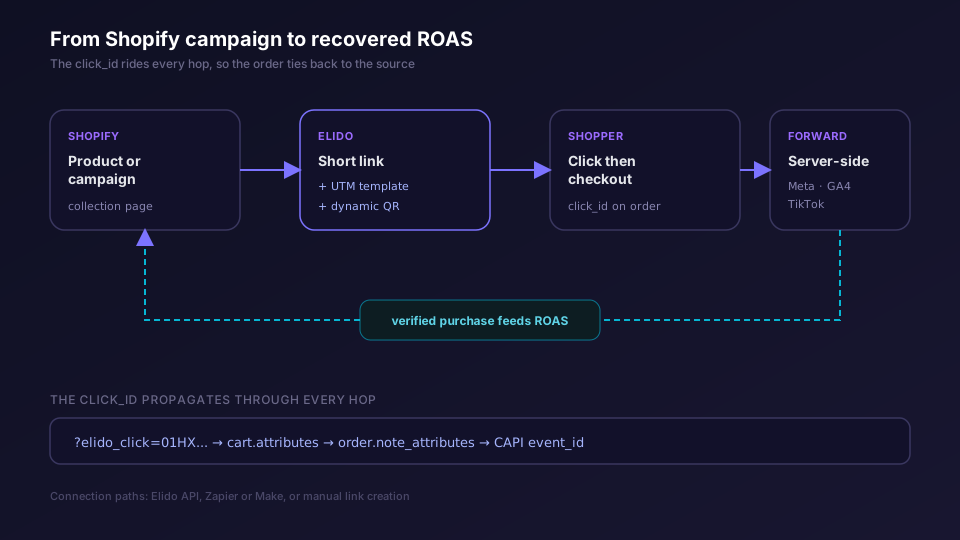
There are three connection paths, and most stores end up using more than one. They differ in effort, not in the result: each produces the same branded, tracked short link.
The first is the API. If your team writes code or runs a headless storefront, the Elido API mints links directly. A product-launch script can read your collection from the Shopify Admin API, create a short link per product with the right UTM template, and write the slugs back to a metafield or a Google Sheet. SDKs ship for TypeScript, Python, and Go, so the integration is a few lines rather than a project. This is the path for high volume and for anything that needs to run on a schedule.
The second is no-code automation through Zapier or Make. A trigger fires in Shopify, such as a new product or a new collection, and a step calls Elido to create the short link, then writes it wherever you need it. No deployment, no server. The trade-off is throughput and cost per task, so this fits stores minting tens or low hundreds of links rather than tens of thousands. The Zapier automation guide covers the recipe shape.
The third is manual, in the Elido dashboard. For a single campaign, a seasonal promo, or a one-off QR code on a pop-up banner, you paste the destination, set the slug and UTMs, and copy the link. No integration overhead. Plenty of stores run their whole link program this way until volume forces an upgrade.
If you are new to the concept entirely, what a URL shortener actually does is the primer. For the broader ecommerce picture across every funnel stage, the URL shorteners for ecommerce cornerstone is the reference; this post zooms in on the Shopify specifics.
Branded Product And Collection Short Links
Start with the surface a shopper sees. A raw Shopify product URL looks like acme.myshopify.com/products/blue-slim-jeans?variant=4471 or, on a custom domain, a long path with a query string. Neither fits on a printed card, a Reels caption, or a story sticker. A branded short link such as shop.acme.com/blue-jeans does.
The mechanics are simple. You point a domain or subdomain you own at Elido, then every short link you mint lives on that domain. Collection links work the same way: shop.acme.com/spring redirects to your spring collection page. Because the slug is human-readable, the link itself becomes part of the creative rather than an apology for a long URL.
There is a measurable click-through benefit to branded links over generic shortener domains, and it compounds across every channel where the link appears. Platforms have grown skeptical of generic shortened URLs, and some now warn on them in posts and messages. A link on your own domain sidesteps that and reinforces the brand at the same time. The redirect itself adds a few milliseconds and then hands the shopper to the canonical Shopify URL, so there is no SEO cost: these are marketing links, not indexed pages competing with your storefront.
One detail that saves grief later. Decide a slug convention before you mint the first link. Something like channel-product-region, so ig-bluejeans-de reads at a glance in a report. Random slugs work for the shopper but turn your link list into noise for the team.
Track Shopify Links With UTMs And Conversion Forwarding
This is where a shortener stops being cosmetic. The reason to put a short link in front of every Shopify destination is attribution, and attribution starts with two things travelling on the link: UTM parameters and a click_id.
UTMs give you channel-level reporting in Shopify analytics and GA4. Set them at the campaign level so every link in a campaign inherits the same utm_source, utm_medium, and utm_campaign, with per-link overrides where you need them. That discipline is what keeps your reports from splintering into dozens of almost-identical entries. The end-to-end UTM guide is the reference for getting the taxonomy right and keeping it consistent across sends.
The click_id is the durable identifier that survives the rest of the journey. Here is the chain on Shopify. The short link redirects to your product page with the click_id appended, for example ?elido_click=01HX.... Your theme reads it and writes it into Shopify.checkout.attributes so it persists into the order's note_attributes when the cart finalises. The browser cookie can be lost to tracking prevention, the session can expire, the shopper can switch from phone to laptop. As long as the click_id is on the order record, the attribution holds.
That sets up the high-value move: server-side conversion forwarding. When the order-paid webhook fires, your back end reads the click_id off the order and posts a conversion to each ad platform you run. On a typical Shopify shop, the browser pixel alone misses a meaningful share of conversions to tracking prevention and ad blockers, and iOS-heavy traffic sits at the worse end of that. Forwarding the purchase from the server recovers most of the gap, so your ROAS numbers reflect orders that actually happened rather than only the ones the browser managed to report.
QR Codes For Unboxing And Retail
A QR code is just a short link in physical form, and Shopify stores have more surfaces for them than most verticals. Packaging inserts, the box itself, receipts, hang tags, pop-up displays, retail shelf talkers if you sell offline too.
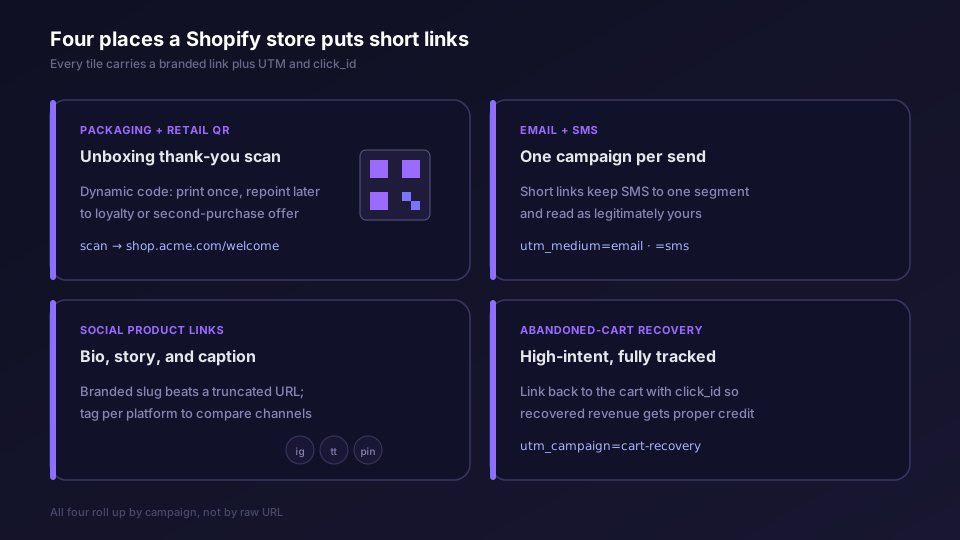
The unboxing moment is the one worth designing for. A shopper opens the package, scans a code, and lands on a thank-you page that offers a loyalty signup or a second-purchase incentive. Because the code carries the same UTM and click_id treatment as any other short link, that scan shows up in your analytics next to your paid and email traffic, not as an unknowable "direct" blob.
Use dynamic QR codes for anything printed, and this is the part stores miss until it bites them. A static QR encodes the destination directly, so once it prints, it is frozen. A dynamic QR encodes the short link, and the short link's destination is editable. You can print "scan for your welcome offer" on ten thousand boxes, ship them, and three weeks later repoint that same code to a replenishment offer once the welcome window closes. The difference is covered in dynamic vs static QR codes; for the build itself, the QR codes feature page has the generator.
One caution for packaging specifically. Print at a generous size with strong contrast and a quiet zone around the code, and test the scan on a cheap phone in poor light before committing to a print run. A QR that only scans under ideal conditions is worse than no QR, because the shopper who tries and fails does not try twice.
Trackable Links In Email, SMS, And Social
Owned channels are where short links earn their keep on volume. Every email send, every SMS blast, every social post is a chance to either learn what drove revenue or to lose that signal in a pile of untagged URLs.
For email, the pattern is one campaign in the shortener per send in your email tool. The campaign owns the UTM template; the per-link payload only varies by product and recipient. Send-time link minting for Klaviyo is on the Elido roadmap but not available yet, so for now you mint the links before the send, through the API or a bulk import. What Klaviyo gets today is the click side: each short-link click arrives as an Elido Link Click metric, covered in Klaviyo click events to profiles. Shopify Email and most SMS apps take a link you paste or template into the message body. Either way, your analytics roll up by send, so you can say "the Tuesday restock email converted at this rate and this cost per click" rather than staring at a wall of individual URLs.
SMS deserves a specific call-out because character count is real money there. Carriers and SMS apps charge by segment, and a long product URL can push a message into a second segment on its own. A branded short link keeps the message tight and, on a recognised domain, reads as legitimately yours rather than as a phishing attempt, which matters a lot for tap rates on a channel where trust is fragile.
Social is the branded-link showcase. A short, readable link in a bio, a story sticker, or a post caption beats a truncated myshopify URL on both trust and aesthetics. Tag each by platform so you can compare Instagram against TikTok against Pinterest on real numbers. For the marketer-facing rollup of all of this, the marketers solution page is the persona view.
Abandoned-Cart SMS And Email Short Links
Cart recovery is the highest-intent flow a Shopify store runs, and short links make it both cleaner and more measurable.
The setup mirrors any other lifecycle message. Your recovery flow, whether it lives in Shopify, Klaviyo, or an SMS app, sends a message with a short link back to the cart or product. The link carries a campaign-level UTM such as utm_campaign=cart-recovery plus the click_id, so when the shopper completes the purchase, the conversion forwards server-side and the recovery flow gets proper credit. Without that, recovered revenue tends to get miscredited to "direct" or to the original acquisition channel, and the flow looks weaker than it is.
SMS recovery in particular benefits from the short, branded link. The message is short by nature, the link has to be too, and a recognised domain reduces the "is this a scam" hesitation that kills tap rates on recovery texts. Keep one short link per recovery step so you can see whether the first nudge or the second one does the work.
A Practical Workflow, Start To Finish
Here is the sequence I would set up for a store running two paid channels, an email program, and a cart-recovery flow.
First, point a branded subdomain at Elido and pick a slug convention. Second, set a workspace-level UTM template and a campaign per channel, so paid, email, SMS, and social each have a stable home for their links. Third, mint links: through the API or Zapier for product and collection links at volume, manually for one-off campaigns. Fourth, wire the click_id through checkout. Add the snippet that reads ?elido_click= on landing and writes it to the cart attributes, then place a real test order and confirm the click_id appears on the order-paid webhook payload before you send any traffic. This step is the one most stores skip, and it is the one that quietly breaks attribution for weeks.
Fifth, turn on server-side conversion forwarding. Point the order-paid webhook at your conversion endpoint, connect Meta, GA4, and any other platform you run, and set a deduplication identifier such as the order ID so a browser pixel and the server event for the same order do not double-count. The conversion tracking feature page and the conversion tracking guide cover the credential setup; forwarding conversions to Meta CAPI and server-side conversion tracking go deeper on the mechanics and the dedup logic.
Sixth, add the physical layer. Generate dynamic QR codes for packaging and receipts, point them at thank-you and loyalty pages, and test the scan on real hardware. Seventh, review weekly. Because every link carries UTMs and a click_id, your report reads in revenue per channel and per campaign, not in raw URL counts. When a channel underperforms, you have the data to cut it rather than the hunch.
That is the whole system. A branded domain, a UTM taxonomy, click_id propagation through checkout, server-side forwarding, and dynamic QR for the physical world. None of it requires a native app to function today, and all of it gets simpler when one lists. When you are ready to put real numbers against your own funnel, the pricing page lays out which tier carries custom domains and conversion forwarding.
Read More
- URL shorteners for ecommerce: the data plane behind the funnel
- Forwarding conversions to Meta CAPI
- Track UTMs end to end, from click to order
- Dynamic vs static QR codes: which to print
For the platform side, Shopify's developer documentation covers the Admin and Storefront APIs and webhook payloads, and Meta's Conversions API docs detail the server-side event format and parameter requirements.
Frequently asked questions
Does Elido have a native Shopify app?
Elido has a Shopify app under review at the time of writing. Until it lists, you connect a URL shortener to Shopify three ways: the Elido API for code-driven minting, a no-code bridge through Zapier or Make, and manual link creation in the dashboard for one-off campaigns. All three produce the same branded, tracked short links.
Why shorten links for a Shopify store at all?
Three reasons. Branded short links on a domain you own out-perform raw myshopify URLs and generic shortener links on click-through. Short links carry UTM parameters and a click_id you can attribute back to orders. And a short link can sit behind a QR code on packaging or a receipt, where a long product URL cannot.
How do I track which Shopify orders came from a short link?
Append UTM parameters and a click_id to the short link's destination. When the shopper lands, your theme writes the click_id into the cart's attributes so it persists onto the order. At the order-paid webhook, the click_id is on the payload, and you forward the conversion server-side to Meta, GA4, or TikTok.
Can I put a short link or QR code on Shopify packaging?
Yes, and a dynamic QR code is the right choice. The code prints once, but you can repoint its destination later without reprinting. That lets you swap a launch thank-you page for a replenishment offer weeks after the package ships.
Will branded short links hurt my SEO or look spammy?
Branded links on your own domain signal legitimacy rather than the opposite. Marketing links in email, SMS, and social are not indexed product pages, so they do not compete with your storefront SEO. The redirect passes the shopper straight to the canonical Shopify URL.
Do short links work with Shopify Email, Klaviyo, and SMS apps?
Yes. You mint links per send and drop them into the template. Klaviyo already receives Elido clicks as an Elido Link Click metric, and send-time link minting for Klaviyo is on the roadmap; Shopify Email and SMS apps take a link you paste or template in. Each send maps to a campaign so analytics roll up by message, not by raw URL.
Try Elido
Paste a URL, get a working short link
No signup. Link lives for 30 days. Sign up to keep it forever.
Free, no signup required · 2 per day