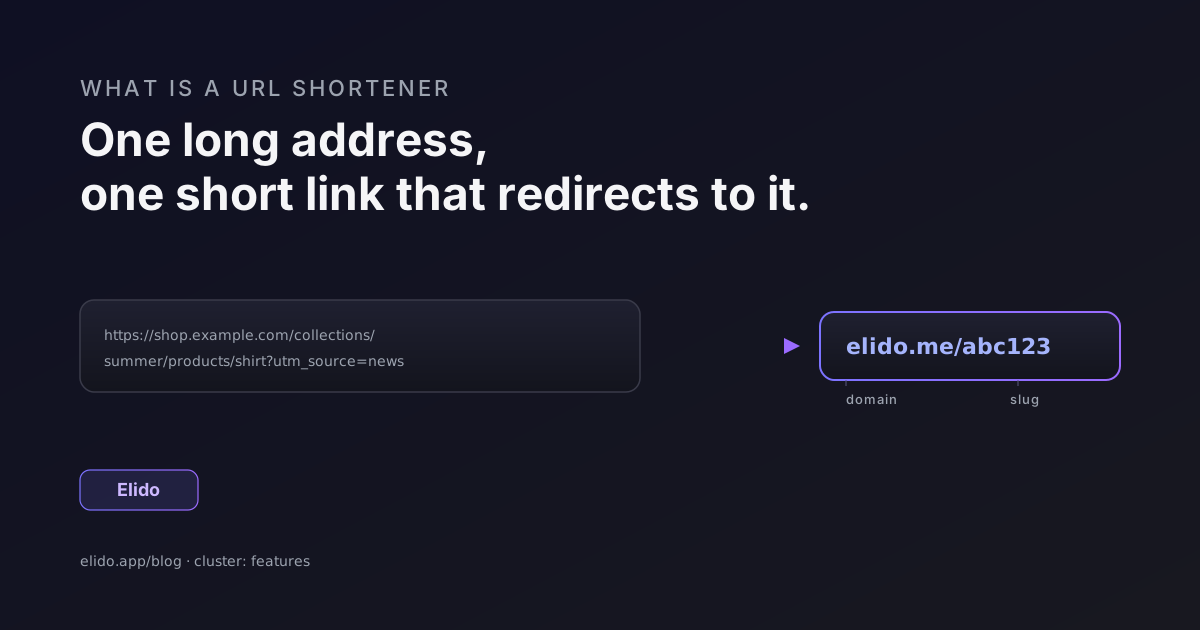
A URL shortener is a tool that turns a long web address into a short one that redirects to the same page. You paste in something like https://shop.example.com/collections/summer-2026/products/striped-linen-shirt?variant=42&utm_source=newsletter, and you get back something like elido.me/shirt. Click the short version and your browser quietly forwards to the long one. That forwarding step is called a redirect, and it is the entire job.
That is the url shortener meaning in one sentence: a short address that stands in for a long one. (The technique has been around since the early 2000s; Wikipedia's URL shortening entry traces the history if you want it.) The short link is easier to type, fits in a tweet or a printed flyer, survives being copied into a chat without wrapping across three lines, and - on almost every modern service - counts each click so you can see how a link performed. Nothing about the destination changes. The page you land on is identical. You have just swapped a long, fragile string for a short, durable one.
People reach for shorteners for four practical reasons: tracking how many people clicked, branding the link with their own name, generating QR codes that are not a wall of pixels, and beating character limits in places like SMS or social bios. We will get to each. First, the anatomy.
What a short link is made of
Every short link has two parts: a domain and a slug.
In elido.me/abc123, the domain is elido.me and the slug is abc123. The slug goes by a few names - key, back-half, short code, path - but it means the same thing: the unique string that tells the service which destination to send you to. Change the slug and you point at a different page. Change the domain and you are using a different shortener (or your own).
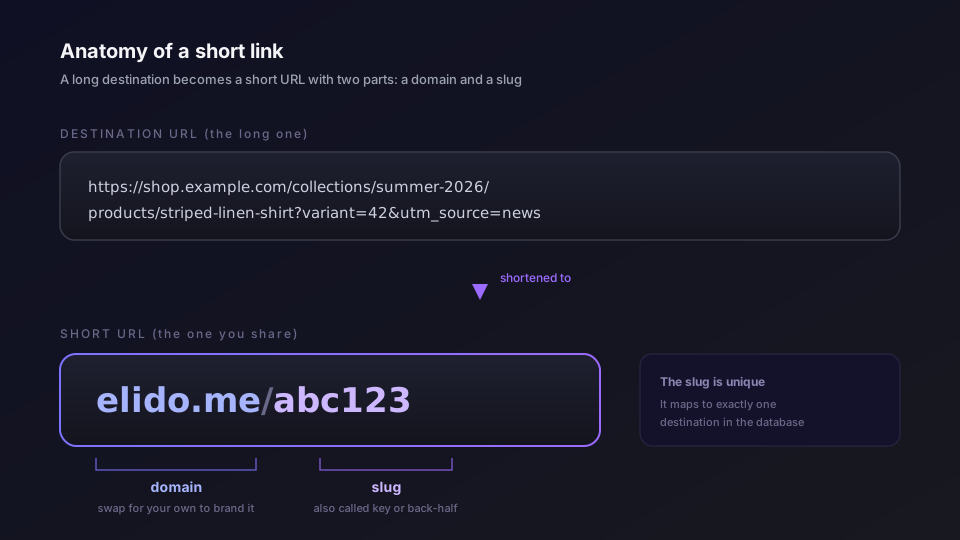
The slug can be random or chosen. A random slug like 7Gh2Qx is what you get by default - short, hard to guess, fine for most uses. A custom slug like elido.me/spring-sale is one you set yourself so the link reads cleanly and people half-remember it. Custom slugs are a small thing that makes a real difference in print, on a podcast, or anywhere someone might type the link by hand.
The domain is the more strategic half. A generic shortener gives you its domain, shared by everyone on the service. A branded short link puts your own domain in front - go.acme.com/sale instead of a generic one. That single change does two things: it tells people who the link belongs to before they click, and it means you own the link. If you ever leave the tool, you can repoint your domain elsewhere and your links keep working. We dig into the setup in the custom domains guide, and the strategy in custom domains for short links.
Why people use URL shorteners
The reasons cluster into a handful of jobs. Most teams care about two or three of them at once.
Tracking is the big one. A plain link tells you nothing about who clicked. Route it through a shortener and every click becomes a data point: when it happened, roughly where from, what kind of device. Pair that with UTM parameters and you can tie a click back to the exact email, post, or ad that drove it. For a marketer, that is the difference between guessing and measuring. Elido stores raw click events in a columnar analytics store with no sampling, so the numbers you see are the actual clicks, not an estimate.
Branding is the second. A short link on your own domain looks deliberate and trustworthy. A link on a random free domain looks like spam, and increasingly gets treated like spam by filters. If you are putting links in front of customers, the domain is part of your brand, managed or not.
QR codes are the third, and an underrated one. A QR code encodes a URL as a grid of squares. The longer the URL, the denser and more fragile the code - harder to scan from a poster across a room, easier to break if part of it smudges. A short link keeps the code sparse and reliable. Better still, point the QR at a short link you control and you can change the destination later without reprinting anything. That is the gap between dynamic and static QR codes, and it matters the moment you put a code on something physical.
The fourth job is plain mechanics. SMS messages, social bios, ad character counts, and printed material all punish long URLs. A short link fits where a long one will not. Sometimes that is the whole reason, and it is a perfectly good one.
How URL shorteners work
Here is how url shorteners work once you peel back the surface. The flow is simpler than most people expect.
When you create a short link, the service stores a row: this slug points to that destination. When someone clicks the short link, their browser sends a request to the shortener's server asking for that slug. The server looks up the slug, finds the destination, and replies with an HTTP redirect - a small response that says "the thing you want is over there" along with the destination address. The browser reads that, then loads the real page. You usually never notice the hop because it happens in a few milliseconds.
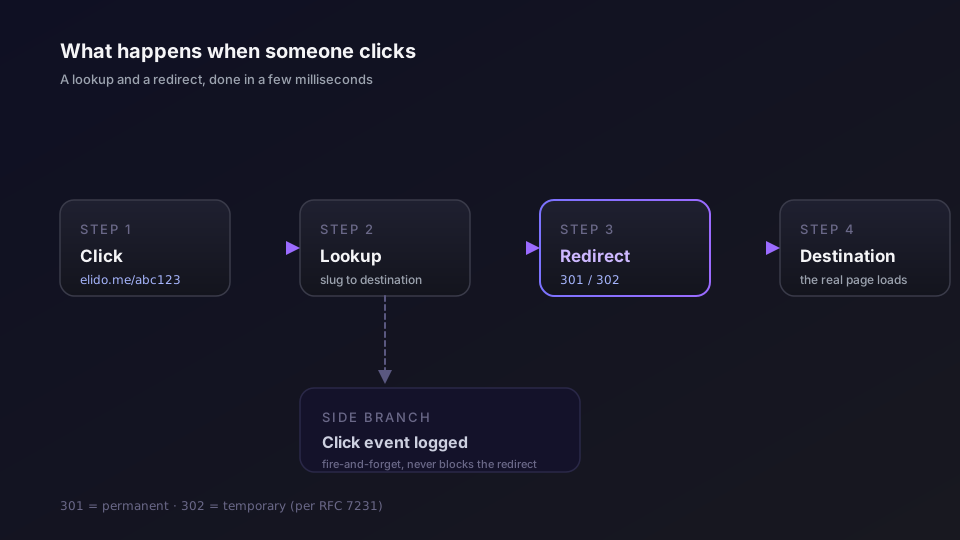
The redirect carries a status code, and the two you will see are 301 and 302. A 301 means "moved permanently" and tells browsers and search engines they can cache the jump. A 302 means "found, but temporary" and tells them to keep checking back. The distinction is defined in RFC 7231, the spec for HTTP semantics. Most link tools use a 301 for stable links and a 302 when the destination might change, such as a rotating campaign target. For the deeper version of this, see how do URL shorteners work.
Two things happen alongside the redirect on a good service. The click gets logged for analytics, and - this is the part that decides whether the link feels instant or sluggish - the lookup is cached close to the user. Elido runs the redirect on edge servers across the EU, US East, and Asia-Pacific, with the slug-to-destination mapping held in memory and in an in-memory cache so a cached hit returns in under 15 milliseconds at the 95th percentile. The click event fires off to the side and never holds up the redirect. That edge layer is what we call smart links, and it is where routing by country, device, or language happens too.
The redirect mechanics are the same everywhere. The speed, the analytics depth, and where your data physically sits are what separate tools from each other.
Are short links safe
The honest answer to "are short links safe" is: it depends, and the question itself points at the real risk.
A short link hides its destination. You see elido.me/abc123, not the page it leads to. That opacity is convenient for legitimate use and convenient for bad actors too - a phishing link is easier to disguise behind a short URL. So short links are neither safe nor dangerous on their own. They borrow the trust of whoever made them and wherever they point.
Three things narrow the risk. First, reputable shorteners scan destinations for malware and known phishing before a link goes live, and keep scanning. Second, many offer a preview so a cautious clicker can see the target first. Third, branded domains help more than people expect: a link on go.yourcompany.com is far harder to forge than one on a domain anyone can sign up for. When recipients learn to trust your domain, an attacker cannot easily borrow it.
If you publish links at any scale, treat safety as a checklist rather than a feeling. We wrote one: the URL shortener security checklist covers destination scanning, link expiry, access control, and what to verify before you trust a provider. For European teams there is also the data side - what gets logged, where it is stored, and who can request it - which we cover in GDPR for URL shorteners. Elido keeps click data in the EU region by default, which keeps the privacy story simple for EU businesses.
Branded versus free shorteners
The line between a free tool and a paid, branded setup is worth understanding before you commit.
A free shortener is fine for what it is. You paste a link, you get a short one, you often get a click count. For sharing a one-off link with friends or dropping a tidy URL into a forum post, that is all you need, and paying would be silly. We ranked the usable ones in free URL shorteners ranked if that is where you are.
The limits arrive when the link starts to matter. Free tiers cap how many links or clicks you get - Elido's free tier, for instance, is 50 links and 500 clicks a month, a hard cap meant for evaluation rather than production. Free domains are shared and generic, so you cannot brand them. Analytics are usually shallow. And the quiet risk is link rot: if a free service shuts down or expires your links, every link it ever made breaks at once, including the ones already printed on your packaging. A branded domain on a provider you pay protects against that, because you control the domain and can move it.
The decision is not really free versus paid. It is "does a broken or unbranded link cost me anything?" If the answer is no, stay free. If a dead link means a lost sale or an embarrassed brand, the branded route pays for itself. For the EU-specific shortlist, we compared the options in best EU URL shorteners, and Elido's own pricing lays out where the free cap ends and paid plans begin.
When you actually need one
You do not need a URL shortener to share a link. You need one when the link has a job to do.
Reach for a shortener when you want to measure a campaign and tie clicks back to a source. When you are putting a link in print, on a slide, or in a podcast script where length and typability matter. When you need a QR code on something physical and want to change the destination later. When the link represents your brand and a generic domain would undercut it. Or when you are a marketer running enough links that you need them organized, tracked, and owned rather than scattered across three free tools.
If none of those apply - you just want a shorter string for a one-time share - a free tool is genuinely the right call, and you can stop reading here. If you only want the steps, how to shorten a URL covers the free and branded flows.
But the moment a link carries weight, the same small object you started with becomes infrastructure: a tracked, branded, durable redirect you control. That is the whole arc of this topic, from "what is a url shortener" to "which one, on whose domain, storing data where." The mechanics never get more complicated than a lookup and a redirect. Everything else is about trust, measurement, and ownership. You can check what Elido logs and where on the analytics page and the trust page.
Related on the blog
- Smart links explained: routing one slug to many destinations
- How do URL shorteners work: the redirect path in detail
- Custom domains for short links: own your link, not just the tool
- URL shortener security checklist: what to verify before you trust one
- How to shorten a URL: free, branded, and bulk links
- What is link management? a practical guide
Frequently asked questions
What is a URL shortener in simple terms?
A URL shortener is a tool that takes a long web address and gives you a much shorter one that points to the same page. When someone opens the short link, the service looks up where it should go and forwards the browser there. The short link is easier to type, share, and print, and most shorteners also count every click.
What does a short link actually contain?
Two parts: a domain and a slug. In elido.me/abc123, elido.me is the domain and abc123 is the slug, sometimes called the key or back-half. The slug is the unique code that tells the service which destination to forward to. A branded short link swaps the generic domain for your own, like go.acme.com/sale.
How do URL shorteners work behind the scenes?
When you click a short link, your browser asks the shortener's server for that slug. The server looks it up in a database, finds the long destination URL, and sends back an HTTP redirect, usually a 301 or 302 status code. Your browser then loads the destination. The whole hop takes a few milliseconds and you rarely see it happen.
Are short links safe to click?
Short links are neither safe nor unsafe by themselves; they inherit the trust of whoever made them and where they point. The risk is that the destination is hidden until you arrive. Reputable shorteners scan destinations for malware and phishing, and many let you preview the target. Branded domains help, because a link on a company's own domain is harder to spoof.
Do short links expire or stop working?
It depends on the provider. A well-run shortener keeps links live indefinitely unless you delete them. Some free tools expire inactive links or shut down entirely, which breaks every link they ever made. This is called link rot, and it is the main argument for using your own branded domain so you keep control if you switch tools.
Is a free URL shortener good enough?
For occasional personal sharing, yes. Free tools shorten a link and often count clicks. The limits show up when you need branded domains, detailed analytics, team access, or a guarantee the links will outlive the vendor. If a broken link costs you money or reputation, a paid plan with your own domain is worth it.
Try Elido
Paste a URL, get a working short link
No signup. Link lives for 30 days. Sign up to keep it forever.
Free, no signup required · 2 per day