A URL shortener browser extension turns the address of your current tab into a short link without leaving the page. You click the toolbar icon, the extension reads the active tab's URL, and it hands back a branded short link you can paste anywhere, usually with a QR code and a copy-to-clipboard step built in. That's the whole pitch: skip the round trip to a separate dashboard.
Most people who go looking for a url shortener browser extension are tired of the same loop - copy the long link, switch tabs, open the shortener, paste, wait, copy the short link, switch back. A browser extension to shorten links collapses that into one action. If you're new to what a short link can carry beyond a plain redirect, like routing rules, campaign tags, and device targeting, the smart links explainer is a good starting point, because the extension is really just a fast front door to those features.
What a URL Shortener Browser Extension Does
An extension is a small program that lives in your browser toolbar and talks to your shortener account. The good ones share a predictable feature set, and it pays to know what to expect before you install one.
- Shorten the active tab in one click, because the extension auto-detects the current URL so you never paste anything.
- Add UTM or campaign parameters before shortening, so the link is tagged the moment it's created rather than patched up later.
- Copy the short link and its QR code straight to the clipboard.
- Choose which workspace or brand domain the link belongs to, so a work link and a side-project link land in the right account.
Two extra touches separate a toy from a tool. The first is a right-click context-menu action that shortens any link or the whole page without opening the popup. The second is an optional keyboard shortcut for people who never reach for the mouse. Most extensions also keep a short list of your recent links, so grabbing one you made five minutes ago takes no digging.
The One-Click Workflow
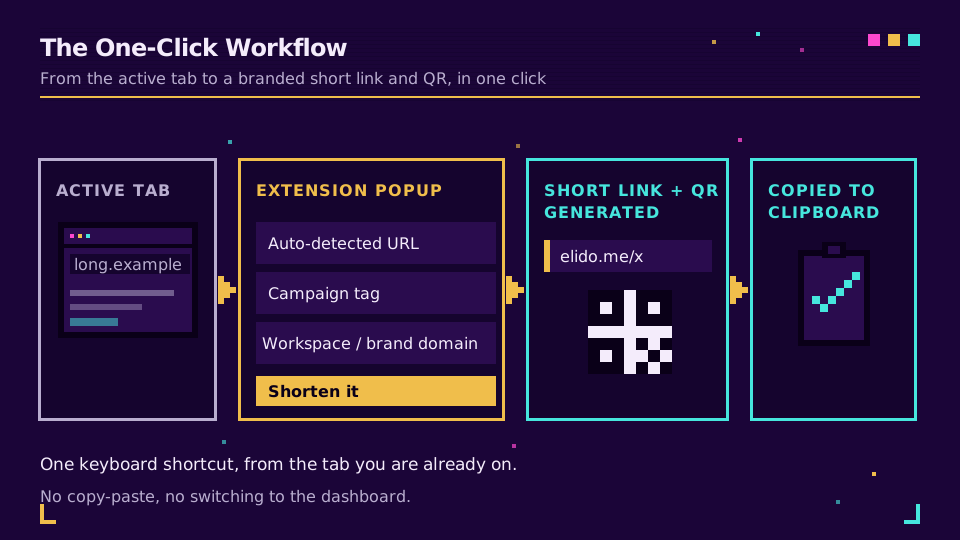
Here's the flow, start to finish. You're on a page worth sharing. You click the extension icon. A small popup opens showing the detected URL, a field for a campaign name, and a dropdown for the brand domain. You confirm, and the short link plus a QR code appear, already on your clipboard. Paste it into Slack, a post, an email, or a print file. Total time is about two seconds.
The first time I wired our extension against a staging account, the part that sold me wasn't the speed. It was that the campaign field remembered the last value I typed, so tagging ten links for the same launch meant typing the campaign name once. Small thing. Saved the afternoon.
Chrome vs Firefox: What's the Same
A chrome extension url shortener and a firefox url shortener extension are usually the same codebase wearing two badges. Both browsers build on the WebExtensions model, so the popup, the context menu, and the permission prompts behave almost identically across the two. Mozilla documents the shared API surface in its WebExtensions reference, and Firefox's Extension Workshop covers the small porting differences that remain.
The differences that survive are mostly cosmetic:
- Where you install it, which is the Chrome Web Store versus Firefox Add-ons.
- How each browser exposes its keyboard-shortcut settings.
The link you generate, the account it talks to, and the analytics behind it are the same on both.
Permissions and Privacy: What to Check Before Installing
This is the part to slow down on. A shortener needs to read the address of the tab you're on, and that's the entire job. It does not need to read and change data on every website you visit. Before you install any shortener extension, open its permission list and confirm it asks for the least it can get away with.
- Active tab on demand, not "read your browsing history on all sites." A careful extension reads the current tab's URL only when you click the icon.
- Clipboard write, so it can hand you the finished short link.
- Local storage, so it can keep your login token and recent links on your device.
Anything broader deserves a reason. Google's own guide to declaring permissions explains why the strongest extensions request narrow scopes and treat the powerful ones as optional, and why a permission warning that mentions every website is worth a pause. One more habit to keep: shortening a link doesn't make it private. A short link to a password-reset page still resolves to that page, so don't shorten anything you wouldn't paste in public.
Extension vs API vs Bulk Import: Which to Use
The extension is one of three ways to make short links, and picking the wrong one is how people end up doing by hand what should have been a script. Here's the split.
| Method | Best for | Typical volume |
|---|---|---|
| Browser extension | Ad-hoc links while you browse | One at a time |
| API and SDK | Automated creation inside your own code | Bulk, unattended |
| Dashboard bulk import | A prepared batch you already have | Dozens to thousands |
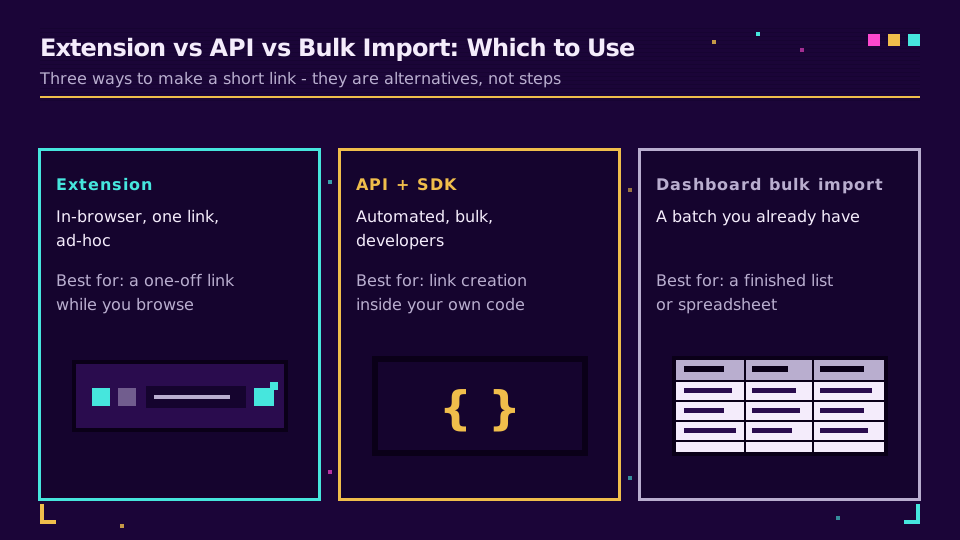
Reach for the extension when the link is a one-off and you're already looking at the page. Reach for the API and SDKs when link creation should happen inside your own code, like a CMS publish hook, a support tool, or a nightly job; the API and SDK quickstart has copy-paste examples in a few languages. And when you already have a finished list, such as a product catalog or a set of event links a colleague sent, a dashboard import or a Google Sheets bulk import creates the whole batch in one commit. There's no single right answer here; the point is to match the tool to the shape of the work rather than forcing one habit onto every job. The extension, the API, and Sheets are all listed side by side in the integrations directory if you want to see the full set.
Want every one of those methods to default to the same brand domain and routing rules? Set them once in Elido's smart-link settings and each surface inherits them automatically.
Setting It Up
Setup is short. Install, sign in once, set your defaults, and you're done.
- Install from the Chrome Web Store or Firefox Add-ons and pin the icon to your toolbar.
- Sign in to your Elido account inside the popup; the extension stores the token locally.
- Pick a default brand domain and, if you tag campaigns, a default UTM template so you're not retyping it every time.
- Optional: set a keyboard shortcut so you can shorten url from browser without touching the mouse.
Elido's browser extension lets you shorten the page you're on, tag it with a campaign, and copy the branded short link without leaving the tab. If your links are marketing links, the same account powers a UTM builder and per-channel templates; the link shortener with a UTM builder post covers why tagging at creation time beats fixing tags afterward. Working on a locked-down machine where you can't install anything? The how to shorten a URL walkthrough covers the dashboard route, and the WordPress URL shortener plugin handles links created straight inside your CMS. The extension ships on every plan, and the pricing page shows the workspace and brand-domain limits that apply to each tier.
Related on the blog
- Smart links explained - what a short link can carry beyond a plain redirect.
- How to shorten a URL - the dashboard route when you can't install an extension.
- Link shortener with a UTM builder - tag campaigns at the moment a link is created.
- Bulk import from Google Sheets - turn a finished spreadsheet into a batch of links.
- How to shorten a URL on iPhone with the Shortcuts app
- How to shorten a URL on Android from the share sheet
- URL shortener CLI: shorten links from the terminal
Frequently asked questions
Is there a URL shortener extension for Chrome?
Yes. Several shorteners ship a Chrome extension that shortens the active tab in one click, and Elido's works the same way in both Chrome and Firefox. You install it from the Chrome Web Store, sign in once, and click the toolbar icon to turn the current page into a branded short link.
How do I shorten a URL directly from my browser?
Click the shortener extension's toolbar icon while you're on the page you want to share. The extension reads the current tab's address, creates a short link, and copies it to your clipboard, often with a QR code attached. If you'd rather not install anything, you can paste the URL into your shortener's dashboard instead.
Are URL shortener browser extensions safe?
They're safe when they request narrow permissions and come from a known publisher. A shortener only needs to read the current tab's URL when you click it, plus clipboard access and local storage. Be cautious with any extension that asks to read and change data on every site you visit without a clear reason.
What permissions does a URL shortener extension need?
A well-built one needs active-tab access on demand, clipboard write, and local storage. Active tab lets it read the page URL only when you click the icon, clipboard write lets it hand you the short link, and storage keeps your login token and recent links on your device. Anything broader deserves an explanation.
Can the extension generate a QR code for the short link?
Yes, most shortener extensions build a QR code alongside the short link and let you copy or download it. That's useful for turning an on-screen page into something you can print or show on another screen without opening a separate tool.
Does the extension work in both Chrome and Firefox?
Yes. Because both browsers build on the WebExtensions model, the same extension runs in Chrome and Firefox with near-identical behavior. You install it from the Chrome Web Store or Firefox Add-ons, and the short links, account, and analytics are the same either way.
Try Elido
Paste a URL, get a working short link
No signup. Link lives for 30 days. Sign up to keep it forever.
Free, no signup required · 2 per day