A WordPress URL shortener turns the long permalinks your CMS generates into short, branded, trackable links you can share off-site. WordPress is great at publishing. It is not built to tell you how many people clicked the link you dropped in a newsletter, a tweet, or a print flyer. That gap is why you reach for a shortener.
Here is the short version before the detail. You shorten and track links from WordPress for four reasons: branded social shares that match your site instead of a generic domain, tracked outbound and affiliate links so you know what actually gets clicked, QR codes for print and packaging that point at a link you can change later, and click analytics your CMS simply does not give you. WordPress knows a post was published. It does not know the link inside it got 4,000 clicks from Germany on a Tuesday.
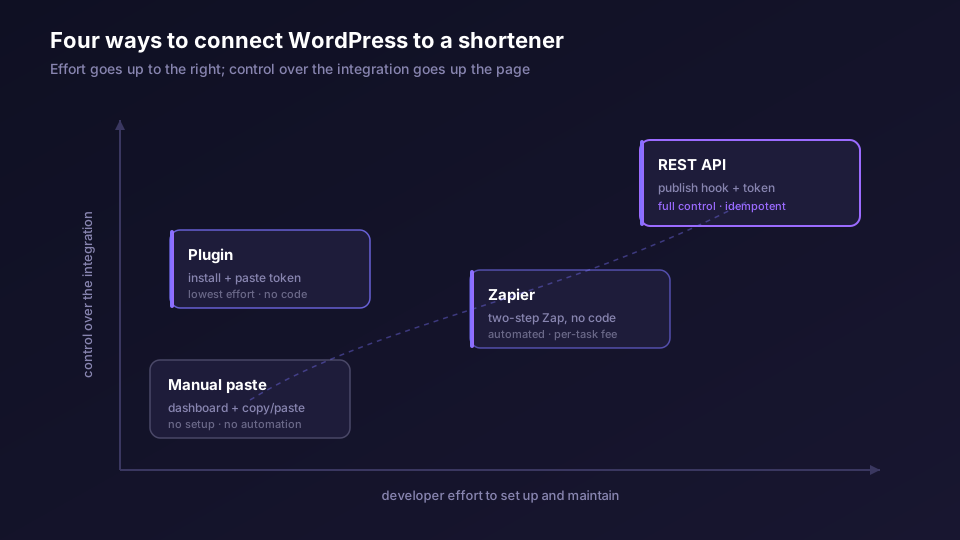
There are four ways to wire this up, and they trade effort against control. A plugin is the least work if a compatible one exists. The Elido REST API is the most flexible and the path most teams settle on. Zapier sits in the middle as a no-code bridge. And you can always paste links in by hand. The rest of this post walks each one, then covers the parts people get wrong: pretty permalinks versus short links, replacing fragile redirect plugins, and where the redirect should actually happen so it never slows your site down.
What a WordPress URL Shortener Actually Does
Strip away the marketing and a shortener does two jobs. It maps a short slug to a long destination, and it counts every time someone follows that slug. WordPress does neither for the links you share elsewhere.
Your posts already have URLs. WordPress builds a permalink for each one, usually a readable slug on your own domain. That permalink is for people reading your site. It is not short, it is not branded for sharing on a platform with a character budget, and WordPress keeps no record of who clicked it once it leaves your page. A short link is a separate object: a compact URL on a redirect domain, optionally your own branded domain, that forwards to the destination and logs the click.
The distinction matters because the two are easy to conflate. A pretty permalink and a short link look similar and both lead somewhere. Only one of them is built to be shared in the wild and measured. We will come back to this.
Path One: A WordPress Plugin
The plugin path is the one most people look for first, and for good reason. A plugin installs from the WordPress plugin directory, you connect it with an API token, and short links start appearing without you touching a line of PHP.
I want to be honest about the state of this, because plugin availability changes and I would rather you know the shape of the path than trust a stale screenshot of settings. The general pattern any shortener plugin follows is the same: you install it, paste a workspace-scoped API token from your link tool, and the plugin calls the shortener's API on your behalf when you publish or when you click a button in the editor. Some plugins auto-create a short link on publish and write it into a custom field. Others add a meta box where you generate one on demand. The good ones let you pick the branded domain and add tags so the link lands in the right place in your analytics.
If a maintained Elido WordPress plugin is listed, install it from the dashboard and connect it with a token from /settings/api. If you cannot confirm a current, maintained plugin for your shortener, do not force it. A half-abandoned plugin that breaks on the next WordPress release is worse than the API route, which you control. When a plugin fits, it is the lowest-effort option on the board. When it does not, skip to the API.
One thing to check before trusting any plugin: where does the redirect happen. A plugin that only registers the link with an external shortener is fine. A plugin that also installs a local redirect handler so links resolve through your own WordPress server is the slow pattern we will dig into later. You want the link created in WordPress and resolved at the edge, not resolved in PHP.
Path Two: The Elido REST API
This is the path with the most moving parts and the most control, and it is what teams reach for once they want short links created automatically and reliably on every publish.
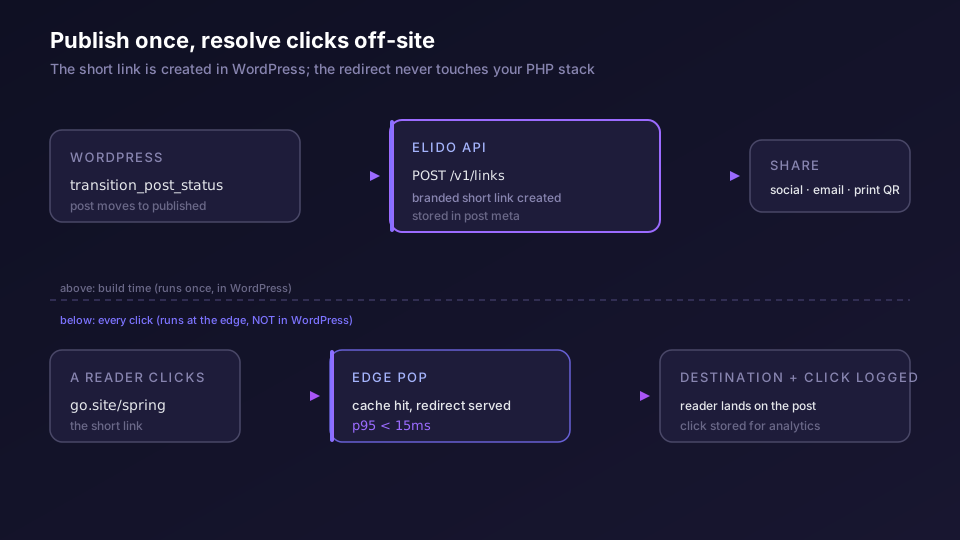
WordPress fires an action when a post changes status. The relevant one is transition_post_status, which runs whenever a post moves between states, including the move to publish. You hang a handler on it, call the Elido API to create a link for the post's permalink, and store the returned short URL in post meta so you can render it in the template, the editor, or a sharing widget. The WordPress plugin handbook documents the hook system, and the WordPress REST API reference covers the meta endpoints if you want to expose the short link to the block editor.
The Elido side is three lines. Here is a publish handler in PHP that creates a branded short link the first time a post is published and skips it on later edits:
add_action( 'transition_post_status', 'elido_shorten_on_publish', 10, 3 );

function elido_shorten_on_publish( $new_status, $old_status, $post ) {
    if ( $new_status !== 'publish' || $old_status === 'publish' ) {
        return; // only on the first publish, not on every edit
    }
    if ( get_post_meta( $post->ID, '_elido_short_url', true ) ) {
        return; // already has one
    }

    $res = wp_remote_post( 'https://api.elido.app/v1/links', array(
        'headers' => array(
            'Authorization'   => 'Bearer ' . ELIDO_TOKEN,
            'Content-Type'    => 'application/json',
            'Idempotency-Key' => 'wp-post-' . $post->ID,
        ),
        'body'    => wp_json_encode( array(
            'destination_url' => get_permalink( $post ),
            'tags'            => array( 'wordpress', 'auto-publish' ),
        ) ),
    ) );

    if ( is_wp_error( $res ) ) {
        return; // log and move on; publish should never fail on this
    }

    $link = json_decode( wp_remote_retrieve_body( $res ), true );
    if ( ! empty( $link['short_url'] ) ) {
        update_post_meta( $post->ID, '_elido_short_url', $link['short_url'] );
    }
}
Two details in there earn their place. The Idempotency-Key is derived from the post ID, so if the publish hook fires twice, which happens, you get the same link back rather than a duplicate. And the handler swallows its own errors. Creating a short link must never block a publish; if the API call fails, the post still goes out and you create the link later. The quickstart on the API and SDKs walks the idempotency model and error handling in more depth across five languages, and the API and SDKs feature page lists the full endpoint surface.
If you want the link to live on your own domain rather than a generic shortener host, pass a domain_id and set the domain up first. The custom-domains guide covers the DNS record and the automatic TLS, and the custom domains feature explains why a branded link on your own host outperforms a generic one for trust and click-through.
Path Three: Zapier, the No-Code Bridge
Between a plugin and a code handler sits Zapier. It is the right answer when you want automation, do not want to ship PHP, and cannot find a plugin you trust.
The wiring is a two-step Zap. The trigger is "New post published in WordPress." The action is "Create link in Elido." You map the post's permalink to the destination field, optionally pass the post title as a tag, and turn it on. From then on, every published post mints a short link without anyone touching the editor. You can chain a third step to write the short URL back into a Google Sheet, post it to Slack, or push it into your social scheduler.
Zapier costs you a per-task fee and a few seconds of latency, and you do not get the fine control the API gives you over idempotency and error handling. In exchange you get a working integration in ten minutes with no deploy. For most publishing teams that is the right trade until volume or precision pushes them to the API. The dedicated Zapier automation walkthrough covers the multi-step Zaps in detail.
Path Four: By Hand
Do not dismiss the manual path. If you publish a few posts a week and share each one deliberately, creating the short link by hand in the Elido dashboard and pasting it into your post or your social tool is completely reasonable. You get branded links and full click tracking with zero integration to maintain.
The manual route stops scaling when you publish often, when several people share the same links and need consistency, or when you want the link in the post body before you hit publish. That is the moment to automate. Until then, the dashboard plus copy-paste is a legitimate setup, not a stopgap.
Pretty Permalinks Are Not Short Links
This trips people up constantly, so here it is plainly. WordPress permalinks and short links solve different problems and you usually want both.
A pretty permalink is the human-readable URL of a post on your own domain. It helps readers and search engines understand the page. It is not compact, it is not designed to be shared on a platform that counts characters, and WordPress does not track clicks on it once the link leaves your site. WordPress also has an old ?p=123 short-URL form and a wp_shortlink hook, but that is just an alias on your own domain. It is not branded and it is not tracked.
A short link is a deliberate, shareable, measured object. It lives on a redirect domain, can carry your brand, can append UTM parameters at redirect time, can expire, and logs every click to analytics you can actually query. When you share a post in a newsletter or on social, you want the short link, not the raw permalink, because the short link is the only one that tells you what happened after the click. The post on branded short links covers the brand-domain setup, and URL shorteners for publishers goes deep on the publishing workflow specifically.
Replacing Fragile WordPress Redirect Plugins
A lot of WordPress sites accumulate redirect plugins. Some are for legitimate SEO hygiene, fixing a 301 after you change a permalink. Others get stretched into doing something they are bad at: managing outbound and affiliate links you share and want to track.
That second use is where they fall down. A redirect plugin that resolves a "pretty" outbound link runs the redirect through PHP and your database on every click. Under any real traffic that adds load to the host serving your actual content, and the click data it gives you, if any, is thin. The pattern looks tidy in the dashboard and behaves badly under load.
The clean split: keep redirect plugins for internal 301s on your own URLs, where they belong, and move shareable outbound and affiliate links to a shortener that resolves off-site and tracks properly. You stop paying the PHP redirect tax on links that were never your site's job to serve, and you get real analytics on the ones that matter.
Do the Redirect at the Edge, Not in PHP
This is the performance point that decides whether a shortener helps or hurts, and it is the reason the architecture matters more than the plugin.
When a short link resolves through WordPress, the click hits your PHP stack and your database before anyone reaches the destination. That is fine at a trickle and painful at scale, and it couples the speed of your shared links to the load on your content site. When a short link resolves at the edge, the click never touches WordPress at all. It hits a redirect POP close to the user, gets answered from cache, and forwards on.
Elido resolves redirects at multi-region edge points of presence with a sub-15ms p95 on a cache hit. Your WordPress host is not in that path. Whether you used the plugin, the API, Zapier, or your own hands to create the link, the click itself is served off-site, so a viral post does not drag your CMS down with it. The post on a sub-15ms p95 redirect explains how that latency budget is held, and the analytics feature page covers what gets logged on every one of those clicks.
That is the whole argument for resolving off-site in one line: the link your readers click should never share a server with the page you want them to read.
Picking a Path
If you want the least work and a maintained plugin exists for your shortener, use it. If you want automation without code, use Zapier. If you want full control and links created reliably on every publish, use the API and the transition_post_status hook. If you publish rarely and share deliberately, do it by hand. Most teams start manual or with Zapier and graduate to the API once short links become part of how every post ships.
Whatever path you pick, get two things right: create the link with your own branded domain so it matches the site it came from, and make sure the redirect resolves at the edge and not through your WordPress PHP. Branded links the marketing side wants, edge resolution the engineering side wants, and they are not in tension. You can have both. See the marketers solution page for the campaign-tracking side and the pricing page for what each tier includes.
Related on the Blog
- URL shortener API: a 30-minute quickstart in five languages
- How to shorten a URL in PHP with curl, Guzzle, or WordPress
- Set up branded short links on your own domain
- URL shorteners for publishers: a workflow that scales
- How a sub-15ms p95 redirect is held at the edge
- What is a URL shortener, and when do you need one
Frequently asked questions
Do I need a plugin to shorten links in WordPress?
No. A plugin is the lowest-effort path if a compatible one exists, but you can also call the Elido REST API from a small snippet in your theme or a custom plugin, wire it through Zapier with no code, or paste short links in by hand. The plugin and Zapier routes need no PHP from you; the API route is the most flexible and is what teams reach for once they want links created automatically on publish.
What is the difference between a WordPress pretty permalink and a short link?
A pretty permalink is the readable slug WordPress builds for a post, like /2026/05/my-post. It lives on your own domain and is for humans reading your site. A short link is a separate, compact URL on a redirect domain like elido.me or your own branded domain, built for sharing off-site and for tracking clicks. Permalinks are not tracked; short links are.
Can WordPress create a branded short link automatically when I publish a post?
Yes, if you call the Elido API from a publish hook. WordPress fires a transition_post_status action when a post moves to published; a small handler can create the short link, store the returned URL in post meta, and surface it in the editor. The plugin path can do the same thing without code if the plugin supports it.
Will a URL shortener slow down my WordPress site?
Not if the redirect runs off-site. The slow pattern is a WordPress redirect plugin that resolves every short link through PHP and the database on your own server. Elido resolves redirects at edge POPs with a sub-15ms p95 on a cache hit, so the hop never touches your WordPress host.
Should I replace the built-in WordPress redirect plugins?
If you use redirect plugins for outbound or affiliate links that you share and want to track, yes, move those to a real shortener. Keep WordPress redirect plugins for internal 301s after you change a permalink. They solve different problems: one is SEO hygiene on your own URLs, the other is shareable tracked links.
Can I use my own domain for WordPress short links?
Yes. Add a custom domain or subdomain in Elido, point a DNS record at it, and your short links resolve on your brand instead of a generic shortener domain. TLS is issued automatically. This is the branded-links setup most publishers want so the link matches the site it came from.
Try Elido
Paste a URL, get a working short link
No signup. Link lives for 30 days. Sign up to keep it forever.
Free, no signup required · 2 per day