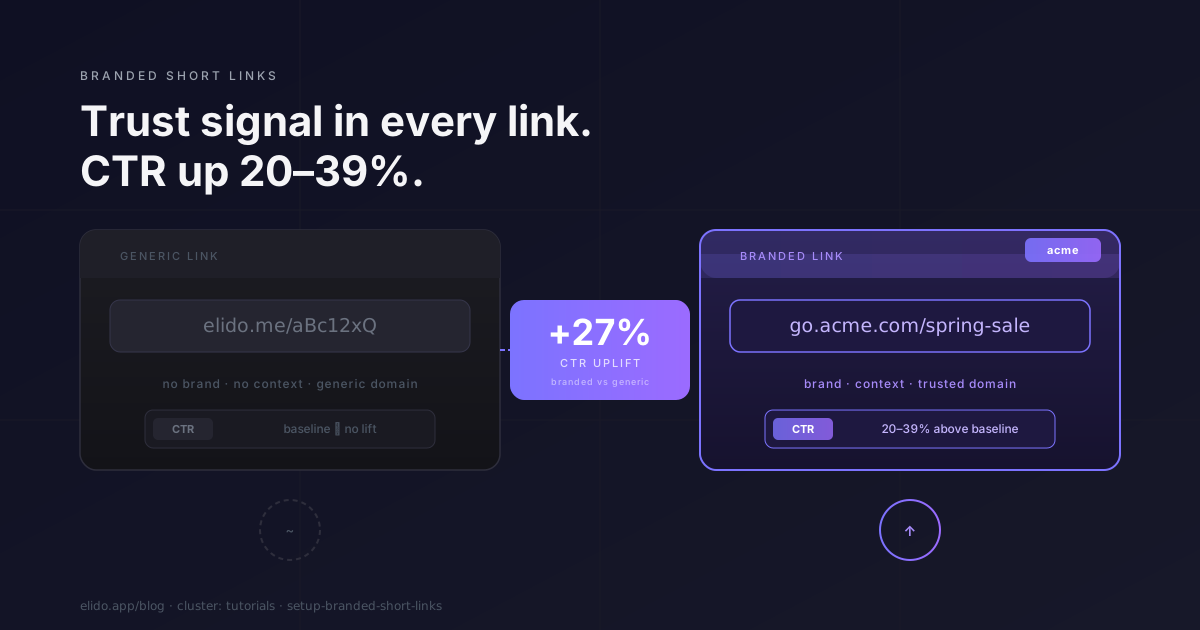
A link in an email footer, a social post, or a QR code on a conference badge is doing marketing work before anyone clicks it. The domain name is a signal. elido.me/aBc12xQ tells the reader nothing about where they are going or who sent it. go.acme.com/spring-sale tells them both. That difference in perceived trust has a measurable effect on whether people click.
Industry data from Rebrandly's branded link research puts the lift at 20–39% higher CTR for branded links over generic short URLs (accessed 2026-05-12). The mechanism is not mysterious: a recognisable domain removes the micro-friction of "is this safe to click" that generic short links introduce in every feed, inbox, and ad unit. The lift is larger in contexts where trust is already strained - cold outreach, paid social, physical QR codes.
This post is the brand and marketing perspective on setting up branded short links. If you want the DNS and TLS mechanics, read Custom domain short links: DNS, TLS, and what runs at the edge. If you want the operational quickstart with exact API calls, read How to set up a custom domain with TLS in 5 minutes. This post covers why to bother, how to pick the right domain, what the four steps look like from a marketer's seat, and how to migrate existing links without breaking anything.
TL;DR
- Branded short links lift CTR 20–39% over generic short URLs because the domain is a visible trust signal before the click.
- Three domain patterns work:
go.brand.com(cheapest, easiest),brnd.co(separate short TLD, +€20–40/yr),brand.link(premium TLD, +€40–100/yr). - Setup is four steps: buy or designate the domain, add it in Elido's custom domains settings, add two DNS records, wait for verification.
- Migration from
elido.me/xyztogo.acme.com/xyzis a controlled 301 redirect cutover - existing links are preserved, not recreated.
Picking the right domain
The domain you choose will appear in every link you send for the foreseeable future. It is worth a few minutes of deliberate thought.
The three patterns
Subdomain of your primary brand (go.brand.com) is the most common choice for teams that already own a recognisable domain. You are not buying anything new; you are just delegating a subdomain. The marketing benefit is the brand name itself - readers who know acme.com will recognise go.acme.com without additional context. The DNS setup is a CNAME, which is straightforward on every major provider.
The tradeoff is length. If your primary domain is long - globalmarketingsolutions.com, say - then go.globalmarketingsolutions.com/spring-sale is not a short link in any useful sense. It might work fine in email where hyperlinks can hide behind anchor text, but it is unwieldy in podcast show notes, print, or social posts where the URL renders as text.
Short separate TLD (brnd.co, acme.io) buys you two things: a shorter link and domain independence. If your primary domain changes through a rebrand or acquisition, the short link domain is unaffected. Pricing for a second-level .co or .io domain runs roughly €20–40 per year at most registrars - see Namecheap's domain pricing table for current rates (accessed 2026-05-12). .co in particular reads as "company" in most markets and has none of the technical connotations that make .io feel odd in non-developer-facing contexts.
The risk is squatting. A short domain that does not include your brand name - lnk.co, for instance - is easier for bad actors to spoof with lookalike domains. Include a recognisable brand fragment if you go this route.
Premium TLD (brand.link, acme.shop) gives you the shortest possible branded URL at the cost of a higher annual registration fee. .link domains specifically were designed for short-URL use and run €40–100/year depending on the registrar and the specific name. ICANN's registrar list (accessed 2026-05-12) is the authoritative source for finding an accredited registrar that sells the TLD you need.
What to avoid
Domains longer than 10 characters dilute the brevity benefit. If the domain itself is long, the link stops being short even with a terse slug.
Hyphenated domains carry a trust penalty. acme-links.com reads as a phishing attempt in many users' mental models - hyphenated domains have been historically overrepresented in spam and brand-impersonation campaigns. Avoid them for branded link domains specifically.
Non-HTTPS domains. Some platforms - ad networks, email clients, chat apps - will actively warn users or block redirect chains from non-TLS short links. A valid URI as defined in RFC 3986 does not require HTTPS, but a practical branded link does. Elido handles TLS issuance automatically via ACME on-demand, so this is not extra work on your side - it is just a reason not to skip the custom domain setup and rely on an HTTP-only domain.
The four setup steps from a marketer's seat
The technical details live in the two sibling posts. Here is the same process described at the level of decisions you need to make, not DNS records you need to understand.
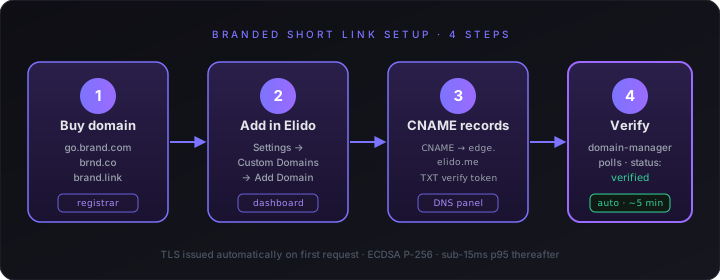
Step 1: Buy or designate the domain. If you are using a subdomain of an existing domain, you own the domain already - skip to step 2. If you want a separate short domain, register it at any accredited registrar. Pick a name that is short, brand-adjacent, and free of hyphens.
Step 2: Add the domain in Elido. Open Settings → Custom Domains → Add Domain. Enter your hostname (e.g. go.acme.com). The dashboard gives you two DNS record values: a CNAME target and a verification token. Custom domains are available on Business and Enterprise plans - see the pricing page for the current plan comparison.
Step 3: Add the two DNS records. In your DNS provider's control panel, add the CNAME pointing your subdomain at Elido's edge and the TXT record containing the verification token. You need both: the CNAME routes traffic, the TXT record proves ownership. For most providers this takes under five minutes. If you use Cloudflare, leave the CNAME proxy toggle off (grey cloud, DNS-only mode) - the proxied mode breaks the verification check.
Step 4: Wait for verification. Elido's domain-manager polls your DNS automatically. With a 300-second TTL on the records, verification typically completes in under five minutes. The dashboard shows the domain status in real time; you will see it move from pending_verification to verified. Once verified, TLS is issued automatically on the first request to your domain - you do not manage certificates.
That is the full setup. No certificate uploads, no manual renewal, no support ticket to unlock the feature.
What changes in analytics
Once a domain is verified and links are created under it, every click event in Elido carries the branded domain as an attribute. This matters for a few reasons.
The clicks dashboard shows the domain alongside the slug, so go.acme.com/spring-sale appears as a distinct link from elido.me/oldslug even if they point to the same destination. You can filter by domain to isolate performance across campaigns run on different domains - useful if you manage multiple brands or agencies in one workspace.
The underlying analytics dimensions are unchanged: geo, device, OS, browser, referrer, and UTM attribution all work identically on a custom domain as on the platform subdomain. The difference is attribution clarity. When a campaign shows up in your analytics labeled go.acme.com, your ops team knows immediately which brand and channel it belongs to without decoding a random slug.
For teams using the solutions for marketers workflow, the branded domain also appears in the UTM template context - you can set a workspace-level default domain so every new link created in that workspace automatically uses go.acme.com as the base.
Marketing surfaces to update after setup
Once the domain is verified and your first branded links are live, a systematic update of existing touch-points closes the gap between old generic links and new branded ones.
The surfaces most worth updating immediately:
Email signatures. Every send from your team's email carries a signature link. A branded short link here gets low click volume but high trust context - it is going to people who already know the brand.
Social media bios. Instagram, LinkedIn, X, and TikTok bio links are high-value slots. Replacing elido.me/xyz with go.acme.com/bio takes two minutes per platform and makes the link visibly brand-associated in a context where followers are already scanning for credibility signals.
Newsletter footers. Recurring sends have long link lifespans. A newsletter sent weekly for two years with a generic short link in the footer has two years of accumulated sends pointing at a non-branded domain. Updating the footer template switches all future sends.
Podcast show notes. Spoken URLs in podcast episodes are impossible to update retroactively, but show notes are editable on most hosting platforms. Update the written links; future episodes use the branded domain by default.
Ad copy. Display URLs in paid social and search ads are often the first place users see a URL before clicking. A branded display URL in a Facebook or Google ad copy line reads more credibly than a generic shortener domain. Update any live ad sets where the display URL is still showing a generic domain.
Migrating from elido.me/xyz to go.acme.com/xyz
If you have been using Elido's platform subdomains and want to move to a branded domain without breaking existing links, the process is a controlled redirect cutover.
Elido preserves your existing links during the transition. You do not recreate them under the new domain - instead, you set the branded domain as the default for new links going forward and update your high-traffic existing links individually to move them under the branded domain via the link edit flow.
For a clean migration with zero broken links:
- Verify the new branded domain (steps above).
- Identify high-traffic existing links using the analytics view sorted by clicks. These are the ones worth updating individually.
- For each high-traffic link, update the domain in the link settings. The slug is preserved; only the domain changes. The old
elido.me/xyzURL continues to redirect to the destination during the cutover window via a 301 redirect chain - Elido maintains this automatically for 90 days after a link is migrated to a custom domain. - Update any hard-coded references to the old URLs in email templates, social posts, and ad copy as part of your normal content refresh cycle.
- Set the branded domain as the workspace default so all new links created after the migration use the new domain.
The 301 redirect chain means the cutover is safe to do incrementally - you do not need to update every link and every reference simultaneously. Start with the highest-traffic links, work down the list at whatever pace suits your team.
For the technical details of DNS cutover, TTL management, and the API-level domain migration call, see the custom domain setup guide.
Common mistakes
Domain too long. The link is only as short as the domain plus the slug combined. marketing.globalacmegroup.com/q1-email-footer is not a usable branded short link. Keep the domain under 10 characters if possible; pick a slug that adds no more than 10–15 characters.
Hyphenated domain. As noted above: hyphenated domains pattern-match to spam in users' and spam filters' heuristics. acme-go.com is worse than acmego.com or go.acme.com for trust signaling.
Skipping HTTPS. Any branded link domain without TLS will be flagged by modern browsers and may be actively blocked by ad platforms and chat applications. Elido issues ECDSA P-256 certificates via ACME automatically - there is no reason to skip this.
Using the same domain for multiple unrelated brands. Each brand should have its own short link domain. Sharing go.acme.com across both a consumer brand and a B2B subsidiary creates attribution confusion in analytics and makes rebranding either property more painful later.
Not setting a workspace default domain. After verification, if you forget to set the new domain as the workspace default, your team will keep creating links on the platform subdomain by default. One settings change prevents this.
Branded short links are not a cosmetic upgrade. The CTR data is consistent across industry studies: a recognisable domain in the link is a real trust signal, and trust signals drive clicks. The setup is an afternoon of work at most. The ongoing maintenance is zero - TLS renewals, DNS health checks, and certificate issuance are all handled automatically.
Once the domain is live, the focus shifts back to where it belongs: writing the link slugs and campaign content that make people want to click in the first place.
For next steps: if you are still deciding what to call your links, vanity URLs explained covers the naming side, and how to shorten a URL covers the basic creation flow. The custom domains feature page covers additional configuration options including wildcard subdomains and the Apple App Site Association file for Universal Links. The marketers solutions page covers the full attribution and UTM workflow for campaign-level link management.
Ana Kowalska is marketing solutions engineering at Elido. She works with performance marketing and agency teams on link attribution, UTM governance, and conversion pipeline setup.
Try Elido
Paste a URL, get a working short link
No signup. Link lives for 30 days. Sign up to keep it forever.
Free, no signup required · 2 per day