iOS has no built-in URL shortener, and Safari's Share sheet copies the full address. The fix is the Shortcuts app: a four-action Shortcut that takes whatever URL you are looking at, posts it to a shortener's API, and puts the short link on your clipboard. After a three-minute setup it is two taps from any app that can share a link.
This is the phone version of how to shorten a URL, which covers the desktop and dashboard route. If you want the same thing inside an app you are building rather than on your own phone, the JavaScript and Python walkthroughs cover the same API call in code.
You need one thing before starting: an API key. Any shortener with a REST API works; the field names below are Elido's and the free URL shortener API overview documents the request shape.
Build the Shortcut: Four Actions
Open Shortcuts, tap the plus, then add these in order.
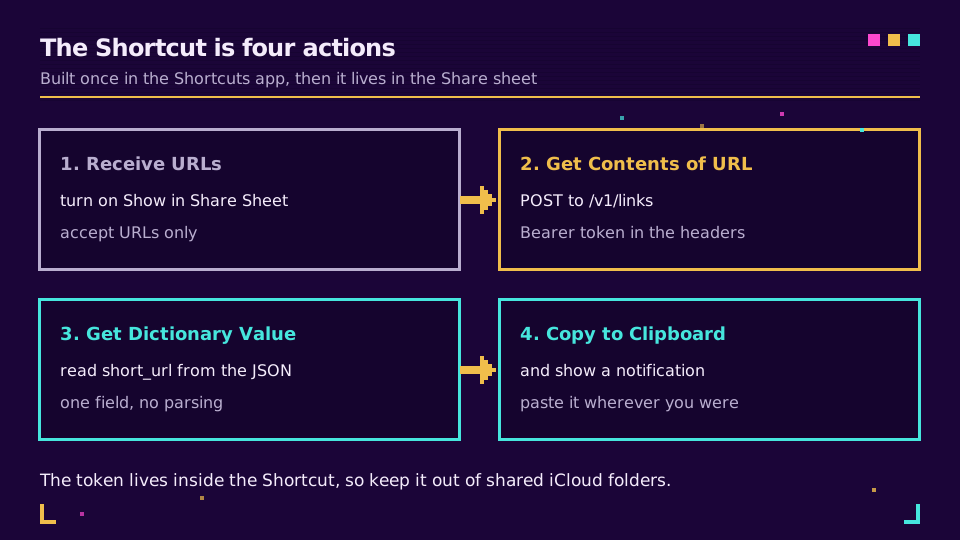
1. Receive URLs. In the Shortcut's details panel (the info button), turn on Show in Share Sheet, then set the accepted input to URLs only. That last part matters: leave it on Anything and the Shortcut appears when you share a photo, which is noise.
2. Get Contents of URL. Point it at https://api.elido.app/v1/links and open the arrow to expand the options:
- Method: POST
- Headers:
Authorization=Bearer YOUR_API_KEY, andContent-Type=application/json - Request Body: JSON, with one field,
destination_url, whose value is the Shortcut Input variable
3. Get Dictionary Value. Key short_url, from the output of the previous action. The response is already parsed, so there is no JSON step to write.
4. Copy to Clipboard. Add Show Notification after it if you want confirmation; without it the Shortcut runs silently and you are never quite sure it worked.
Name it something short. The name is what you will be tapping in the Share sheet, and it is what you say to Siri.
Need a key to point it at? Create one on the free plan, paste it into the header field, and the Shortcut works on the first run.
Using It
Open a page in Safari, press Share, scroll to your Shortcut, tap. The short link is on your clipboard; paste it wherever you were going.
It works from anywhere that offers a Share sheet, which is most of iOS: Mail, Notes, the App Store, Photos with a shared album link, third-party browsers, most reader apps. Apple's Shortcuts user guide covers the details of the Share sheet integration, and Shortcuts can also be run from a URL scheme if you want to trigger it from another automation.
Two refinements worth adding once the basic version works:
- Automatic UTM tags. Insert a Text action before the API call that appends
?utm_source=…&utm_medium=…to the Shortcut Input, and pass that text asdestination_url. Every link shared from your phone then carries the same tags as the ones built on a desktop, which is the difference between a clean report and a pile of untagged traffic. See UTM naming conventions for a scheme that survives a team. - A slug you choose. Add a second field to the JSON body if you want a readable back-half rather than a random one. What is a custom back-half explains where that shows up.
When It Does Not Work
Two mistakes account for almost every failed run.
The first is a Get Contents of URL action left on GET. The default is GET, the Method row is easy to skip past, and the API replies with a 404 or 405 that Shortcuts reports as an unhelpful error.
The second is Request Body set to Form instead of JSON. Form sends application/x-www-form-urlencoded, the API cannot read the destination out of it, and you get a 400 that looks like a server problem.
If both are right and it still fails, add a Quick Look action straight after Get Contents of URL. It shows the raw response, and the API's error message usually names the field it objected to.
The Alternatives, Honestly
The Shortcut is not the only route, and it is not always the right one.
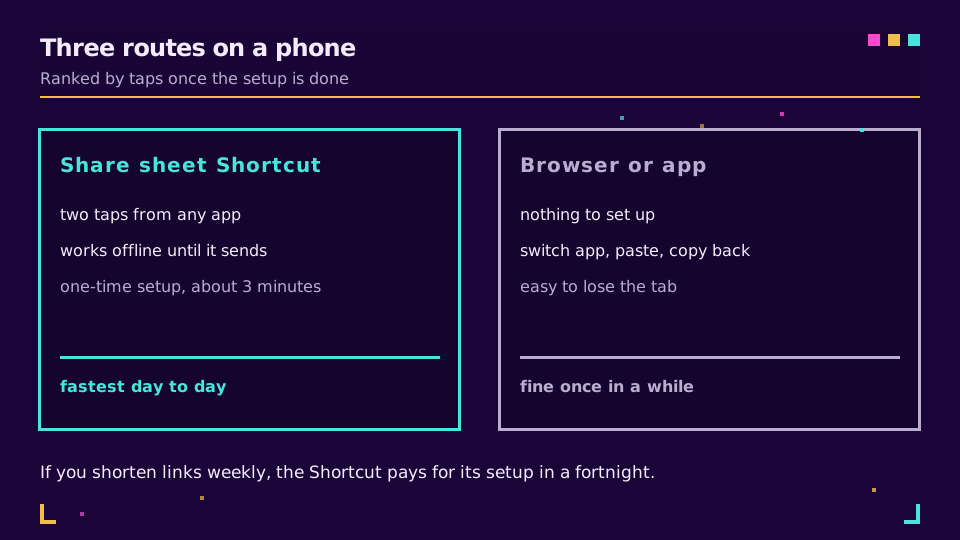
If you shorten a link once a month, opening the shortener's site in Safari and pasting is fine and costs you nothing to set up. If you do it weekly, the Shortcut pays back its three minutes inside a fortnight. And if you are managing campaigns rather than sharing the odd link, a dashboard with folders, tags, and click reports is a better home than a phone; the mobile app covers the same ground with real link management behind it.
One security note. The API key lives inside the Shortcut, so treat the Shortcut as a credential. Do not publish it to a shared iCloud link or a public gallery, and if a colleague wants it, send them the recipe rather than the file so they paste their own key. Use a key scoped to link creation only where the API supports scoping.
Read the Cornerstone Series
This sits in the tutorials cluster. The general version is how to shorten a URL, the measurement side is how to track link clicks, and free URL shortener API documents the request the Shortcut is sending.
Related on the Blog
Frequently asked questions
How do I shorten a URL on iPhone?
Build a four-action Shortcut in the Shortcuts app that receives URLs, posts the URL to a shortener's API, reads short_url from the response, and copies it to the clipboard. Turn on Show in Share Sheet and it becomes a two-tap action from Safari or any app that can share a link.
Does iPhone have a built-in URL shortener?
No. iOS has no system shortener, and Safari's Share sheet copies the full URL. The Shortcuts app is the built-in way to add one, because it can call any HTTP API and put the result on your clipboard without a third-party app in the middle.
Can I shorten a link on iPhone without an app?
Yes, by opening a shortener's website in Safari and pasting the URL there. It works but costs you a tab switch, a paste, and a copy each time. The Shortcut exists to remove those three steps for anyone who shortens links more than occasionally.
Is the Shortcuts approach safe for my API key?
The key is stored inside the Shortcut, so treat the Shortcut like a credential. Do not publish it to a shared iCloud link or a Shortcuts gallery, and use a key scoped only to link creation. If you share the Shortcut with a colleague, have them paste their own key.
Why does my Shortcut return nothing or an error?
The two usual causes are a Get Contents of URL action set to GET instead of POST, and a request body sent as Form rather than JSON. Check that Request Body is JSON with a destination_url field, and that the Authorization header reads Bearer followed by a space and the key.
Can the Shortcut add UTM tags automatically?
Yes. Add a Text action that appends your campaign parameters to the received URL before the API call, then pass that text as the destination. It is the easiest way to make sure every link shared from a phone carries the same tags as the ones built on a desktop.
Try Elido
Paste a URL, get a working short link
No signup. Link lives for 30 days. Sign up to keep it forever.
Free, no signup required · 2 per day