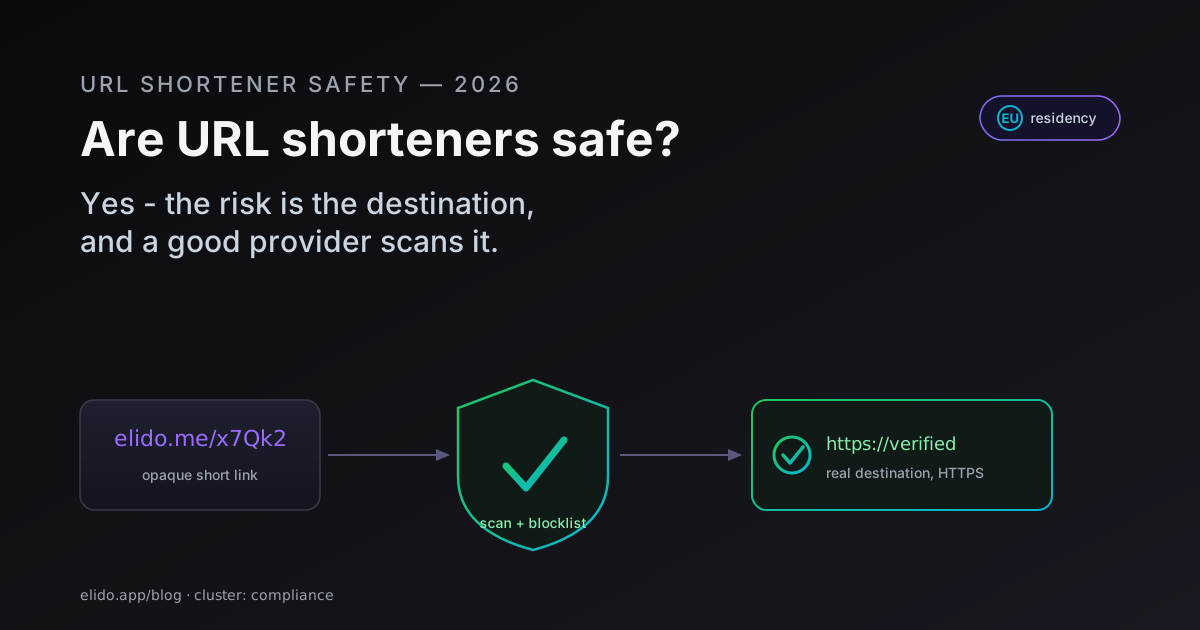
Are URL shorteners safe? For reputable providers, yes. A short link is a redirect, and the redirect itself carries no payload, no malware, nothing that can hurt you on its own. The genuine risk lives in two places: you cannot see where the link goes before you click it, and a careless provider lets attackers turn that opacity into phishing and malware delivery. Both are manageable. This post is the balanced version of the answer, with the mechanics of how to check a short link yourself and how to tell a safe provider from a reckless one.
I review link infrastructure for a living, mostly from the compliance and data-residency angle, so I will be specific about what "safe" means here and where it breaks down. The short version: the format is fine, the destination is the question, and the provider is what decides whether bad destinations ever reach you.
Why People Distrust Short Links
The distrust is rational. The whole point of a URL shortener is that elido.me/x7Qk2 tells you nothing about where it leads. That opacity is the feature for the marketer who wants a clean, branded, trackable link, and it is exactly the same property an attacker wants when hiding a credential-harvesting page.
A normal URL gives you signals. You can read the domain, notice it is misspelled, see that it ends in a country code you did not expect. A short link strips all of that away. You are asked to trust the destination sight unseen, and most people click anyway because short links are everywhere and usually harmless.
That mismatch between how often short links are safe and how completely they hide the destination is what national cyber agencies keep flagging. The US CISA's phishing guidance and the UK NCSC both call out hidden and shortened links as a common social-engineering technique, precisely because they defeat the read-the-URL habit that users are trained to rely on. The distrust is not paranoia. It is an accurate read of one specific weakness, which is fixable.
The Real Risks, Named Honestly
There are four real risks with short links. None of them is "the shortener will install something on your machine," which is the fear people often carry and the one that is unfounded.
Phishing. This is the big one. An attacker shortens a link to a fake login page and sends it in an email or DM. The recipient sees a tidy short domain, not the suspicious destination, and the link sails past filters that would have flagged the raw URL. Google maintains Safe Browsing precisely to catch these destinations, and a serious shortener checks every link against it before activation.
Malware distribution. Same mechanism, different payload: the destination hosts a drive-by download or a malicious file instead of a login form. The link is structurally identical to a safe one, which is what makes scanning at the provider level the only scalable defence.
Link rot. Less dramatic, but real. A short link is a permanent dependency on the provider staying alive and the destination not moving. If the shortener shuts down or the target page disappears, the link breaks, sometimes years later, sometimes after it has been printed on physical material. We covered the durability side in the link-rot prevention guide; for safety, the relevant point is that an abandoned link can also be repointed or repurposed if the provider is sloppy about expiration.
Tracking and privacy. Every redirect logs signals to make click analytics work: IP address, user-agent, timestamp, referrer. That is legitimate, but under GDPR an IP address can be personal data, so the question is how much of it the shortener keeps and for how long. A privacy-conscious provider minimises by default. We will come back to this, and GDPR for URL shorteners has the article-by-article detail.
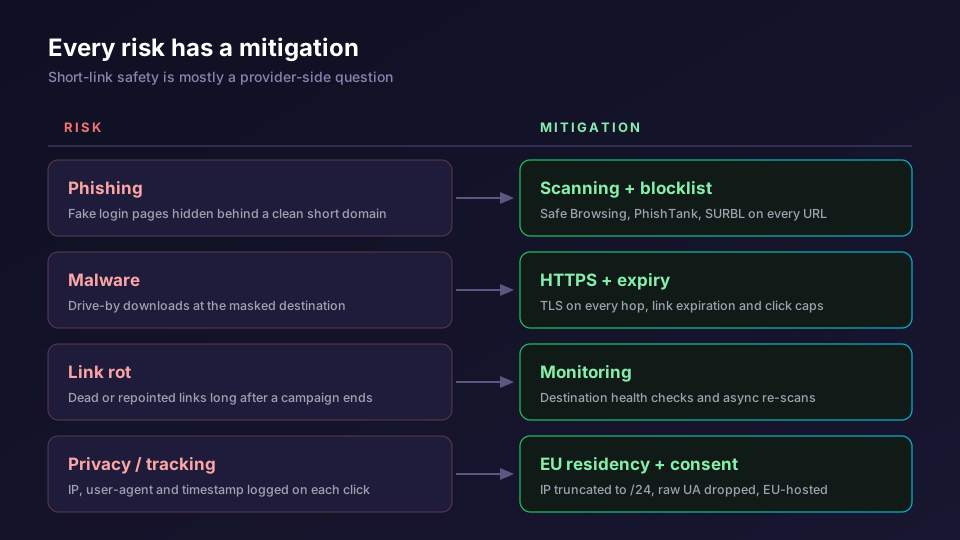
Notice the pattern. Each risk has a known mitigation, and most of the mitigations live on the provider side. That is why "are URL shorteners safe" collapses into "is this URL shortener safe."
How to Check Where a Short Link Goes
You do not have to click to find out where a short link leads. There are three reliable ways to look first, ordered from quickest to most thorough.
The fastest is a URL-expander or link-preview service, and how to see where a short URL goes walks each method with what it costs you in privacy. You paste the short link, the service follows the redirect chain on its own servers, and it shows you the final destination without ever loading it in your browser. Many of these also run the destination through a reputation check and give you a verdict alongside the unmasked URL. Reading that unmasked domain only protects you if you can tell a real one from a fake. A homograph attack builds a domain from characters that read as identical to the real ones in another script, and it passes that same glance test undetected, a separate trick covered in how a lookalike domain fools you.
Some shorteners offer a built-in preview. The classic trick is appending a character to the link, the way bit.ly historically supported a + suffix to show the destination and stats instead of redirecting. A short link is just an HTTP redirect under the hood, the 301 and 302 status codes defined in RFC 7231, and an expander simply reads that redirect rather than following it blindly. Support for the preview suffix varies by provider, so do not assume it works everywhere, but when it does it is the cleanest option because the shortener itself is telling you the truth about the link.
The method people reach for first, hovering over the link to read the browser status bar, is the weakest. It only reveals the short domain, not the destination behind the redirect. It tells you the link is a bit.ly or elido.me link, which you already knew. It does not tell you where that link goes.
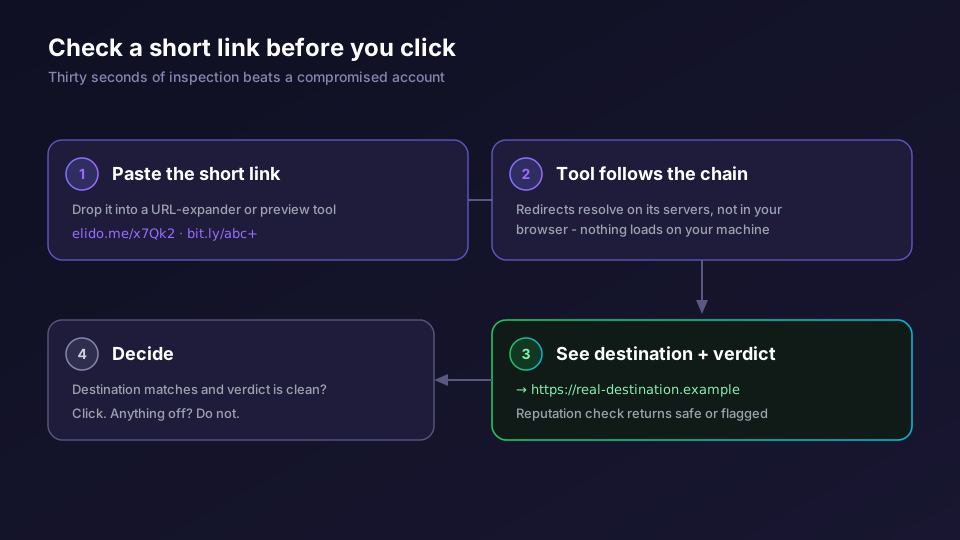
The rule of thumb for users: treat an unexpected short link from an unknown sender the way you would treat an unexpected attachment. Expand it first. The thirty seconds it takes is cheaper than a compromised account.
What a Safe URL Shortener Actually Does
On the provider side, "safe" is a set of concrete controls, not a badge. Here is what separates a shortener you can trust from one that is a phishing accelerator.
Destination scanning is the load-bearing control. Elido's url-scanner service checks every submitted URL against four independent sources in parallel before the link goes live: Google Safe Browsing v4, PhishTank, SURBL, and a structural heuristic. Each source returns a 0 to 100 risk score, and the composite uses the maximum, so a confident hit on any single feed blocks the link. Links scoring 80 or above are blocked immediately; 40 to 79 are quarantined for a deeper async scan. That is the difference between a provider that catches malicious destinations and one that ships them.
A blocklist backs the scanner. Some abusive destinations are known bad regardless of what a feed says on a given day, and a per-workspace and platform-wide blocklist lets a provider refuse them outright and at the edge.
HTTPS on every redirect is table stakes and worth confirming anyway. The redirect hop should never downgrade to plaintext, because a redirect over HTTP is interceptable. Reputable shorteners serve every link over TLS.
Link expiration and click caps shrink the blast radius. A link that deactivates at a set date, or after N clicks, cannot be quietly repurposed for abuse months after a campaign ends. We dig into the controls in link expiration and self-destructing links, and the wider provider evaluation lives in the URL shortener security checklist.
Then there is the privacy layer, which is where EU buyers spend most of their scrutiny. A safe shortener minimises what it logs. Elido truncates IPs to /24 for IPv4 (or /48 for IPv6) before persisting a click event and drops the full user-agent after parsing it into device and OS fields. Data stays in the EU region by default. For the compliance-officer version of this, the GDPR-focused provider list and our trust page lay it out, and the compliance solutions overview maps controls to regulations.
A Checklist for Users
If you are on the receiving end of short links, safety is mostly habits.
- Expand any short link from a sender you do not recognise before clicking. Use a preview or expander tool, not the status bar.
- Be most cautious with links that arrive with urgency: a password reset you did not request, a delivery notice for a parcel you are not expecting, an invoice from a vendor you do not use.
- Check that the unmasked destination matches what the message claims. A "your bank" link that expands to a random domain is the whole tell.
- On mobile, where the destination is even harder to inspect, lean harder on expander apps and on not clicking at all when in doubt.
None of this is exotic. It is the same skepticism you would apply to any link, with one extra step because the destination is hidden.
A Checklist for Marketers Choosing a Provider
If you are picking a shortener to send links from, the safety question flips. Now you are responsible for what your recipients trust. These are the questions worth asking before you commit.
- What threat-intelligence feeds does the provider scan against, and does it block at creation time or only react to reports later?
- Is there an abuse blocklist, and can you maintain your own per-workspace deny rules?
- Is every redirect served over HTTPS, including on custom domains? A branded link on your own domain should carry the same TLS guarantee as the default one.
- Can you set link expiration and click caps so old campaign links cannot be repurposed?
- Where is click data stored, how is the IP handled, and is EU residency contractual or a marketing line? Our best EU shorteners comparison and the ranked free shorteners list both score providers on this.
- Is there independent attestation? Elido is ISO 27001 certified and mid-flight on SOC 2 Type II, targeting H2 2026; the SOC 2 evidence guide shows what that audit covers.
A provider that scans destinations, blocks bad ones, serves HTTPS, and minimises what it logs is a safe place to send links from. One that does none of those is lending its clean domain reputation to whoever signs up, which is how a shortener ends up on a blocklist and takes your links down with it.
So, Are They Safe?
Yes, with the qualification this whole post has been building toward. The technology is safe; the format is neutral. The risk is opacity plus abuse, and both are handled by a provider that scans every destination, maintains a blocklist, serves HTTPS, lets you expire links, and treats your click data with EU-grade restraint. As a user, expand before you click. As a marketer, pick a provider that does the scanning so your recipients do not have to.
If you are new to the category and want the ground-floor explanation of what these tools do before evaluating safety, what is a URL shortener is the primer. For sensitive links you want gated rather than merely scanned, password-protected short links add a second layer. And to see the controls on a live plan, the pricing page lists which safety features land on each tier, while QR codes inherit the same destination scanning when you print a campaign.
Related on the Blog
- URL shortener security checklist: what to expect from your provider
- Homograph attack: how a lookalike domain fools you
- GDPR for URL shorteners: what your DPO actually wants to see
- Link-rot prevention: keeping short links alive for years
- Best EU URL shorteners, compared on residency and self-host
- Open redirect vulnerabilities and how to prevent them
- Are QR codes safe? quishing and how to stay protected
- How to see where a short URL goes before you click
Frequently asked questions
Are URL shorteners safe to use?
Yes, reputable URL shorteners are safe. The shortened link is just a redirect, and the technology itself does not carry malware. The real risk is that you cannot see the destination before clicking, which makes short links useful to attackers as well as to honest marketers. A safe provider closes that gap with malware and phishing scanning, blocklists, HTTPS, and link expiration. The thing to evaluate is the provider, not the format.
Are short links dangerous?
A short link is no more dangerous than the page it points to. The danger is opacity: you trust the destination sight unseen. That is why phishing campaigns favour them. You reduce the risk to near zero by expanding the link before you click and by only clicking links from senders you trust. On the provider side, scanning every destination against threat-intelligence feeds removes most malicious links before they reach anyone.
How can I see where a shortened URL goes before clicking?
Paste the short link into a link-expander or URL-preview service, which follows the redirect chain and shows you the final destination without loading it in your browser. Some shorteners also support a preview mode appended to the link. Hovering over the link to read the status bar only shows you the short domain, not the destination, so a dedicated expander is the reliable method.
Why do phishing emails use URL shorteners?
Because a short link hides the real destination and can slip past filters that flag known-bad domains. The recipient sees a clean short domain instead of a suspicious URL. CISA and national cyber agencies specifically warn about shortened links in phishing. A shortener that scans destinations and maintains a blocklist removes most abusive links before delivery, which is why provider choice matters.
What makes a URL shortener safe?
Destination scanning against threat-intelligence feeds such as Google Safe Browsing, an abuse blocklist, HTTPS on every redirect, optional link expiration and click caps to limit blast radius, bot filtering, and a clear privacy posture with EU data residency where that matters. Elido runs four scanning sources in parallel on every submitted URL and blocks high-risk links before they go live.
Can a URL shortener track me?
Every redirect logs some signals: IP address, user-agent, timestamp, and referrer. That is how click analytics work. Under GDPR an IP address can be personal data, so a privacy-conscious shortener truncates or hashes the IP, drops the raw user-agent after parsing, and is transparent about retention. Elido truncates IPs to /24 before storing click events and discards the full user-agent by default.
Try Elido
Paste a URL, get a working short link
No signup. Link lives for 30 days. Sign up to keep it forever.
Free, no signup required · 2 per day