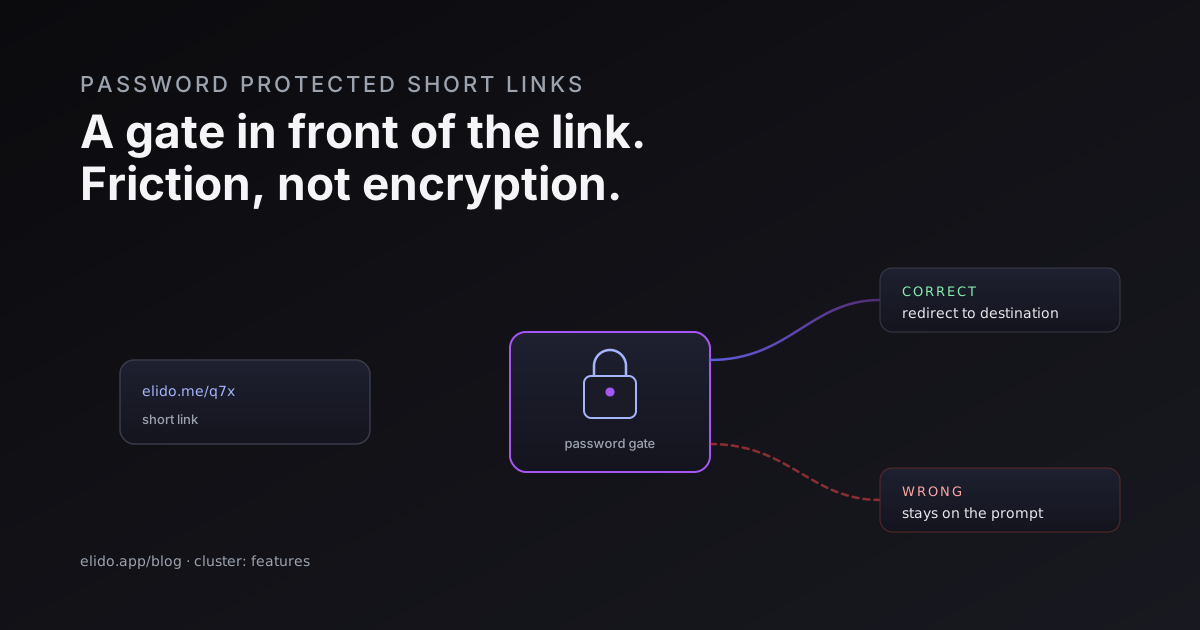
A password protected short link is a short URL that asks for a password before it sends anyone onward. You open the link, you hit a small interstitial page instead of the destination, you type the password, and only then does the redirect fire. Get the password wrong and you stay on the prompt. The destination is never exposed until the check passes.
That is the whole idea, and it is worth being precise about it because the name oversells it. A password gate is access friction in front of a link. It is not encryption of the page behind the link. Those are different guarantees, and confusing them is how people end up surprised later. This post covers what the gate is good for, the use cases that actually fit, how the check works at the redirect, where the security ends, and what to combine it with so the whole thing holds up.
What a Password Protected Short Link Is For
The useful cases share a shape: you are sharing a link through a channel you do not fully control, and you want a second thing besides the URL to be required for entry.
A sensitive document is the obvious one. You are sending a contract draft, a financial model, or an internal deck to someone outside your company. Email forwards. PDFs get re-sent. A short link that anyone with the URL can open is only as private as the least careful person who ever held it. Put a password on it and an accidental forward no longer means automatic access.
Client deliverables are the same pattern with a deadline attached. An agency hands over a batch of assets, a video edit, a campaign report. The client should reach it, the client's whole address book should not. A gated URL keeps the deliverable behind a shared secret you set when you create the link.
Private campaigns and gated content round out the list. A pre-launch landing page you want a small group to preview. An early-access offer for a waitlist. A members-only resource where the audience already has a password from somewhere else. In each case the link travels through email or chat, and the password is the thing that separates "I was given this" from "I stumbled on this."
What does not fit: anything truly secret, anything regulated, anything where a leak is a reportable incident. For those, a shared link password is too blunt. You want per-person authentication on the destination itself, which is a different control and one I will come back to.
How a Password Gate Works at the Redirect
Here is the mechanical part, because the order of operations is what makes the gate meaningful.
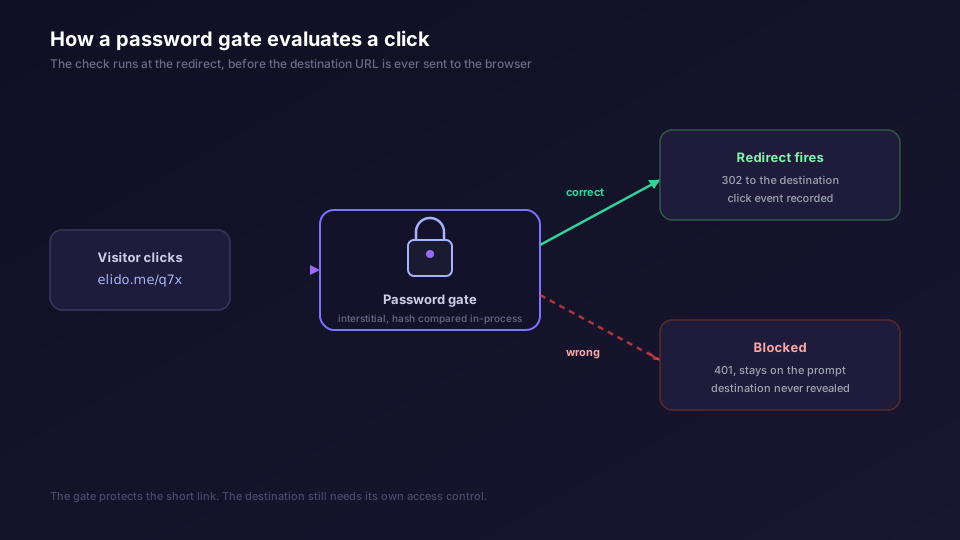
A normal short link is a redirect. The edge looks up the slug, finds the destination, and writes a 302 to the visitor's browser. Fast, stateless, no questions asked. A password protected short link inserts one step before the redirect: the edge sees that the link has a password set, so instead of forwarding, it returns a challenge. The visitor gets an interstitial page asking for the password. They submit it. The submitted value is checked against the stored hash. If it matches, the redirect proceeds. If it does not, they stay on the prompt and the destination URL is never sent to their browser.
Two details matter for whether this is worth anything.
First, the password is hashed, never stored in plaintext. A link's stored secret should be a one-way hash so that a database read does not hand an attacker every link password on the system. Argon2id is the current recommendation for password hashing, and it is what Elido uses for link passwords, with the verification done in-process using a constant-time comparison so the check itself does not leak information through timing. The API for a link never returns the hash; it returns a boolean that says whether a password is set. A recipient hitting a protected link gets a 401 with a password_required flag and a challenge token, and has to submit the correct password in a follow-up request before the redirect happens. The mechanics of that storage are laid out in the URL shortener security checklist, section on per-link password protection.
Second, the check happens before the destination is revealed. That sounds obvious, but a surprising number of "private" link schemes leak the destination in client-side code or a redirect chain that a determined visitor can read off the wire. The point of doing the check at the redirect, server-side, is that the destination URL stays on the server until the password is right. If you have ever seen a gate implemented as JavaScript that fetches the real URL and then redirects, you have seen a gate that anyone with the browser dev tools can walk straight through. Server-side evaluation is the difference, the same reasoning that makes smart links route at the edge rather than in a JS shim on a landing page.
The Security Limits, Said Plainly
This is the section people skip and then regret, so it goes in the middle where it is hard to miss.
A password gate protects the short link. It does not protect the destination. If the destination is a public URL that anyone can reach by typing it directly, then the password is only stopping people who have the short link, not people who can guess or stumble onto the underlying page. The gate raises the bar for the common sharing case, where all anyone has is the short URL. It does nothing for a destination that is already exposed.
So the rule is simple: the destination should be access-controlled too. A document behind a password protected short link should also live somewhere that checks who you are, not just somewhere that happens to have a long unguessable path. The OWASP Authentication Cheat Sheet and the companion Access Control guidance are the reference here: authentication proves who someone is, access control decides what they can reach, and a shared link password is a weak form of the first that says nothing about the second. Use it as a convenience layer, not as the thing standing between an attacker and regulated data.
A few more honest limits.
A shared password is shared. Everyone who has it is the same identity to the gate. There is no per-person trail of who opened the link, no way to revoke one person's access without rotating the password for everyone. If you need to know that Dana specifically opened the deliverable, a shared link password will not tell you.
The link should be served over HTTPS, always. A password submitted over plain HTTP is a password sent in the clear to anyone on the network path. Transport encryption is the floor, not a feature; MDN's overview of HTTPS covers why. Elido serves redirects over HTTPS by default, including on custom domains, but the principle holds wherever you put a gate.
And a password is not a substitute for expiry. A link that stays live forever is a liability whether or not it has a password, because the secret leaks slowly over time as it gets pasted into more places. Pair the gate with a lifetime.
What to Combine It With
A password gate is one control. It works best stacked with others that cover what it cannot.
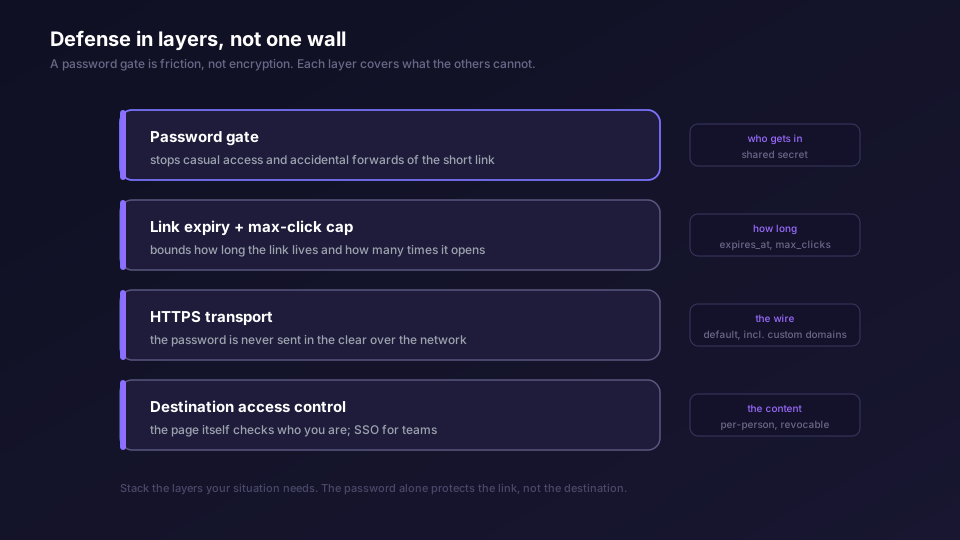
Expiration and max-click caps bound the link in time and use. Set an expires_at so a client deliverable goes dark after the engagement ends, and a max-click cap so a single-use download link deactivates after it has been opened once. Both are enforced at the redirect before any click event is recorded, which means a wrong password attempt against an already-expired link never even reaches the gate. The trade-offs around lifetime live in the forthcoming link expiration and self-destructing links post.
IP or geo limits narrow who can attempt the gate at all. If a client deliverable only ever gets opened from one office, restricting the link to that range means a leaked password plus a leaked link still fails from anywhere else. Region-level controls are covered in the geo-targeting short links writeup, and they compose with the password rather than replacing it.
For teams, the right answer is usually not a shared password at all. It is SSO. When the people who should reach a link are employees in your identity provider, gate the destination behind SCIM and SSO so access follows the directory: someone leaves the company, their access is gone, no password rotation required. A shared link password is for ad-hoc external sharing; directory-managed access is for anything where you need per-person revocation. The SCIM and SSO setup guide walks through wiring it, and the enterprise solutions page covers where it fits.
The general principle is defense in layers. No single control here is strong on its own. A password stops casual access, expiry bounds the window, HTTPS protects the wire, destination access control protects the content, and SSO handles the team case. Stack the ones your situation needs.
A Practical How-To
If you want to gate a link, the shape of the work is the same regardless of tool.
Set the password when you create or edit the link. The link's settings should let you attach a password; once set, the link stops being a plain redirect and starts returning the challenge. Pick a password that is not trivially guessable and not reused from somewhere else, because a shared secret that also unlocks your email is a bad shared secret.
Share the link and the password through separate channels. This is the single highest-value habit. Send the short link in the email or the document, and send the password over a chat message, a separate email, or a quick call. If both travel in the same message, one intercepted message hands over everything, and the gate bought you nothing. Splitting them means an attacker needs two channels, not one.
Set an expiry at the same time. Decide up front how long the link should live and whether it should cap out after a known number of opens, and set those when you create it rather than promising yourself you will clean it up later. You will not.
Verify the destination has its own access control if the content is sensitive. The gate is doing its job for the sharing case. If the underlying document also needs to resist someone who guesses the URL, that protection has to live on the destination, not on the short link. For a fuller treatment of how these pieces fit into a threat model, are URL shorteners safe walks through the broader picture, and the trust page covers Elido's posture.
That is the honest version of password protected short links. They are a useful, low-friction way to keep a shared URL from being open to anyone who happens to receive it. They are not a vault. Used as one layer in a stack, with expiry and a properly access-controlled destination, they do exactly the job they should. Used as the only thing between an attacker and something that matters, they will let you down. Set the gate, split the channels, bound the lifetime, and lock the destination, and you have a sharing flow that holds.
If you want to see which controls land on which plan, the pricing page lists them, and the custom domains feature covers serving gated links on your own branded domain over HTTPS. Setting that up is covered in how to set up branded short links.
Related on the Blog
Frequently asked questions
What is a password protected short link?
It is a short link that shows a password prompt before it forwards anyone to the destination. The visitor opens the short URL, lands on an interstitial page, types the password, and only a correct entry triggers the redirect. A wrong entry stays on the prompt. The password is a gate in front of the link, not encryption of the page it points to.
When should I password protect a link instead of just keeping it unlisted?
Use a password when the link will be shared in a channel you do not fully control: an email forward, a Slack message, a PDF that gets re-sent. An unlisted link is only as private as the people who hold it. A password adds a second factor that a forwarded URL alone does not carry, so an accidental forward does not automatically grant access.
Is a password protected short link secure?
It is access friction, not a security boundary on the destination itself. The gate stops casual access and accidental forwards. It does not encrypt the destination, and anyone who has both the link and the password can reach the content. For anything genuinely sensitive, the destination needs its own access control as well. Treat the password as one layer, not the whole defense.
Can someone bypass the password by guessing the destination URL?
If the destination is a public, guessable URL with no access control of its own, then yes, the gate is only protecting the short link, not the page. That is why the destination should be access-controlled too. The password gate raises the bar for people who only have the short link, which is the common sharing case.
Should I use a password or link expiration?
Often both. A password controls who gets in. Expiration and a max-click cap control how long the link stays usable and how many times it can be opened. A client deliverable that should be reachable for two weeks and then go dark is a password plus an expiry date. They solve different problems and compose well.
How do I share the password without leaking it?
Send the link and the password through separate channels. Link in email, password over a chat message or a quick call. If both travel together in the same message, a single intercepted message hands over everything. Splitting them means an attacker needs to compromise two channels, not one.
Try Elido
Paste a URL, get a working short link
No signup. Link lives for 30 days. Sign up to keep it forever.
Free, no signup required · 2 per day