
A short link is a promise to keep resolving. The page behind it makes no such promise. Link rot is the gap between the two, and the fix is two habits: check every destination on a schedule, and repair by editing the existing link so the slug and its click history survive. This playbook covers what breaks, what Elido checks today (verified against our code on 2026-10-24), what it doesn't check, and how to retire links cleanly.
Why links rot, and why short links feel it more
Tim Berners-Lee made the case in 1998 that cool URIs don't change (page accessed 2026-10-24). Most don't hold to it. Pew Research published an analysis of vanished web content in 2024, but its page returned an HTTP 403 when we tried to load it on 2026-10-24, so we're not quoting a figure from it here.
The causes we see behind campaign links are ordinary:
- A marketing tool gets sunset. The landing page lived on a tool the team stopped paying for, and the domain still resolves to a generic "site unavailable" page.
- Engineering retires a subdomain like
promo.example.comafter a rebrand, and marketing hears about it from support two weeks later. - A CMS migration restructures URLs, moving posts to new paths, and the old redirects get cleaned up months later.
- The domain lapses. Grace and redemption periods differ by registry, and after them anyone can register the name.
- An acquisition or rebrand forwards the old brand URL to a homepage, and the campaign page is gone.
- A signed URL expires: the gated asset link carried a signature that simply ran out.
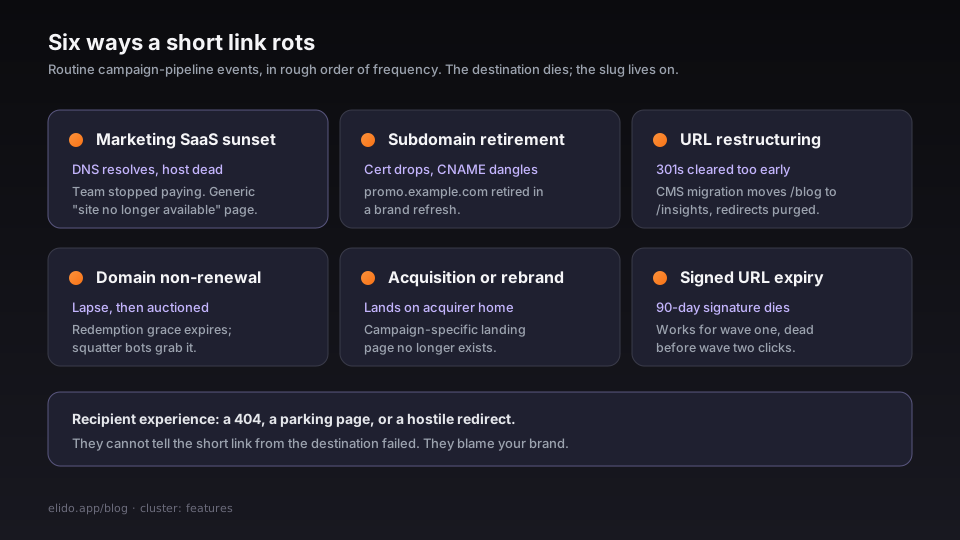
Short links concentrate the damage because they outlive the campaign. A code printed on packaging gets scanned for the product's whole shelf life, and nobody can reprint the box. The recipient also can't tell whether the short link or the destination failed. They blame your brand.
The same property is the fix. The redirect is one record, so changing it repairs every copy at once. Smart links add routing rules on top, so expired-campaign traffic can go to an archive page while live traffic goes to the current product.
What Elido checks today
A cron job in the url-scanner service walks the active links once every 24 hours and sends a HEAD request to each destination. Details from the code:
- Up to three redirects are followed, so a 404 hiding behind a same-site 301 chain is still caught.
- Each probe has a 5-second timeout, and requests are spaced 200 ms apart so a single host isn't hammered.
- Destinations that refuse HEAD (some CDN and storage endpoints return 405) are retried with a one-byte ranged GET.
- 4xx and 5xx responses, timeouts, DNS failures and refused connections all count as failures. A later success marks the row resolved.
- The links run through the checker one at a time, which is simple and polite to destination hosts. A very large inventory therefore takes proportionally longer per pass.
Failures show up in the workspace's broken-links list (with an unresolved count) and are flagged in the links table. The first failure raises an alert, and a link that stays broken re-alerts at most once every 24 hours. Alerts publish a link.broken event (workspace, link, status code, error message, first-seen time) to the webhook system, and workspaces with the Linear integration connected also get an issue opened automatically.
| Signal | Covered today? | Notes |
|---|---|---|
| Dead page (4xx/5xx) | Yes | Daily HEAD check |
| Host unreachable, DNS or timeout | Yes | Same check |
| Parked or repurposed domain returning 200 | No | Status only, no content comparison |
| Click or conversion drop | Manual | Use analytics and set your own alerts |
| Expiring signed URLs | No | Flag these when the link is created |
I'd treat the parked-domain gap as the one that matters most. A parked domain that answers 200 passes every status check, so a clean broken-links list isn't proof that every destination is healthy. For campaign-critical links, compare click-through against conversions, and open the final destination yourself every quarter.
How to fix rot without losing history
The wrong repair is delete-and-recreate. It breaks every distributed copy and resets analytics. The right one is to edit the destination_url of the existing link: slug, QR code and click history stay put. Elido re-validates the new destination (including blocking private-network targets) before saving. The edge keeps destinations in a 60-second in-process cache and a 5-minute shared cache, so the new target is live everywhere within minutes at most.
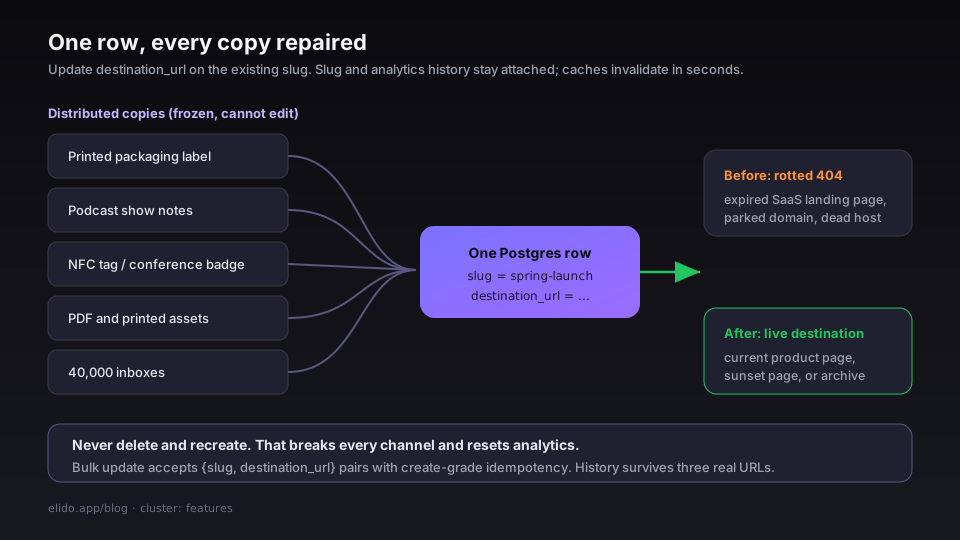
Three patterns that work:
For an ended campaign, use a sunset page: point the link at a short "this campaign has ended, here's the current offer" page that you instrument. Residual traffic becomes a measurable signal.
When a product page moves, do a cutover. Update every short link pointing at the old URL and add a 301 from the old path for other inbound traffic, both in the same release.
If the original is gone and has no equivalent, archive it: point at an Internet Archive snapshot. This keeps citations in research and press coverage working, and the short link never has to change. Archive.org's about page describes the Wayback Machine (accessed 2026-10-24).
One honest limitation: there is no bulk destination edit. The bulk-mutate endpoint takes up to 200 links per request but can only add or remove tags, enable or disable, delete and restore. Changing 4,000 destinations today means one update per link through the API, scripted. We've logged a bulk find-and-replace for destinations as a gap.
Retire, don't just delete
Some links shouldn't be repaired: QA tests, one-off demos, links replaced by a CRM flow. Retire them in two steps. First disable the link or give it an expiry. A disabled link answers with a 410 and an expired link shows a branded "expired" page, so visitors see an explanation rather than a dead end. Then delete after a quiet period, around 90 days if you want a rule of thumb. The window catches stragglers from old distribution. See link expiration and self-destructing links for how expiry and click caps work.
Custom domains help here. A retired link on your own domain shows your brand on the sunset page, and you keep control of the hostname if you ever change shortener.
A simple scoreboard
Track four numbers per workspace each month, from the broken-links list and your own exports:
- Active links versus links with an unresolved failure.
- New failures per month. A spike usually means an upstream workflow broke.
- Median time from
link.brokenalert to repair. - Repaired versus retired links. High-traffic campaigns should be repaired, the long tail retired.
We don't ship these as a dashboard aggregate today; they're a recipe for a spreadsheet or your own warehouse.
What we haven't built
- Content-change detection, so parked pages are caught.
- A
link.health.degradedstyle event for gradual decline. - Bulk destination edits.
- Configurable check frequency. The 24-hour interval is a deployment setting, not a per-workspace one.
Until then, a small amount of manual review is part of the job. If you're evaluating tools, ask any vendor how often destinations are checked, what counts as a failure, and how you're told. Our security checklist lists the same style of questions for abuse controls, and the pricing page shows plan limits.
Related on the blog
Frequently asked questions
What is link rot?
Link rot is what happens when a URL stops leading to the content it once did: the page returns a 404, the domain lapses and gets parked, or the content is replaced by something unrelated. It affects every kind of link, but short links in print, podcasts, PDFs and NFC tags are hit hardest because you can't edit the places where they were distributed. The only repair point is the redirect record itself.
How do I find broken short links?
Check the destination of every link on a schedule and watch click behavior. A scheduled check catches dead pages and unreachable hosts; a sudden drop in clicks or conversions on an unchanged campaign points to a destination that still loads but no longer does its job. Elido runs a daily HEAD request against each active link's destination and lists failures in the dashboard, with a link.broken webhook event and an optional Linear issue.
Can a status check detect a parked domain?
Usually not. A parked or repurposed domain often answers 200 OK with a normal-looking page, so a status-code check passes it. Elido's checker records status, redirects and errors only, and doesn't read page content. For high-value links, add a quarterly manual review of final destinations, and watch conversions as well as clicks.
How do I fix a broken short link without losing analytics?
Edit the destination of the existing link instead of deleting and recreating it. The slug stays the same, every printed or shared copy keeps working, and the click history stays attached. Deleting and creating a new link resets the history and breaks every distributed copy. Allow a short delay for caches to expire before testing the new destination.
Should I delete old short links or keep them?
Retire the ones with no value, but keep a graceful ending. Disable or expire the link so visitors see a clear page rather than a 404, wait for the long tail of clicks to fade, then delete. Anything printed or cited in published work deserves a permanent redirect to a current equivalent or an archived copy.
Does a URL shortener make link rot worse?
It hides decay from the recipient until the click, and it adds a second failure point: the short link can be disabled or expire separately from the destination. In return, a shortener gives you one place to repair every distributed copy. Net effect depends on whether you monitor destinations; with monitoring, shorteners reduce rot.
Try Elido
Paste a URL, get a working short link
No signup. Link lives for 30 days. Sign up to keep it forever.
Free account required. The free plan includes 25 links in total. Already have an account? Log in