
Release notes travel further than almost anything an engineering team writes. Nobody measures them. You paste a download link into the release body, someone copies it into Slack, marketing drops it into the newsletter, a maintainer posts it on X. Six months later half of those links point at a file that no longer exists and none of them told you anything. To shorten links in release notes properly, you need three things: one stable "latest" short link that you repoint on every release, a separate tagged link per channel for each version, and a workflow on the release: published event that creates both so nobody has to remember.
That's the whole answer. The rest of this post is how to wire it without making a mess, and what the click data can and can't tell you afterwards.
I've watched a lot of projects handle GitHub release notes links by hand, and the failure mode is always the same: someone links to a versioned asset, the link gets quoted in a forum thread or a Stack Overflow answer, and the next release silently orphans it. If you already manage links as code, the approach below slots next to short links managed in Terraform, with the difference that release links change on a schedule you don't control by hand.
Why Release Note Links Rot and Lose Attribution
Two separate problems hide here. They need different fixes.
The first is link rot. GitHub gives you stable URLs for the release page (/releases/latest) and for files, via /releases/latest/download/asset-name, but the second only works when the asset keeps an identical name across releases, according to GitHub's own docs on linking to releases. Most build pipelines stamp the version into the filename, so app-2.3.0.dmg becomes app-2.4.0.dmg and the "latest" download URL that worked last week now returns a 404. Docs links rot too, whenever a docs site gets reorganized. The broader patterns are in our link rot prevention strategy; release notes are just the place it bites hardest, because the links travel furthest.
The second problem is attribution, and it's quieter. GitHub's REST API does report a download_count on each release asset, which is more than most people realize. What it doesn't report is where the download came from. A spike of 4,000 downloads the day after release could be the newsletter, a Hacker News thread or a single enterprise customer's CI pulling the binary on a loop. Links pasted into Slack and DMs strip the referrer entirely, which is the dark social attribution problem in miniature.
A Stable Latest Link You Repoint Per Release
Create one short link, say get.example.dev/latest, and treat it as a pointer. Every doc page, README badge and install script uses it. On each stable release, you update where it points. The slug never changes, so nothing that quoted it ever breaks.
In Elido that pointer is an ordinary link. You create it once with POST /v1/workspaces/{workspace_id}/links, passing the domain_id of your branded domain, the slug, and the destination_url. Save the id from the 201 response. Repointing is a PATCH /v1/workspaces/{workspace_id}/links/{link_id} with a new destination_url and nothing else; the slug, tags and click history stay put.
Keep it a 302. Elido links default to 302, and there's a reason not to change it for this one: a 301 is cacheable by default under RFC 9110, so a browser that saw last month's redirect may never ask again. A pointer that browsers remember forever is no longer a pointer. More in 301 vs 302 redirects for short links.
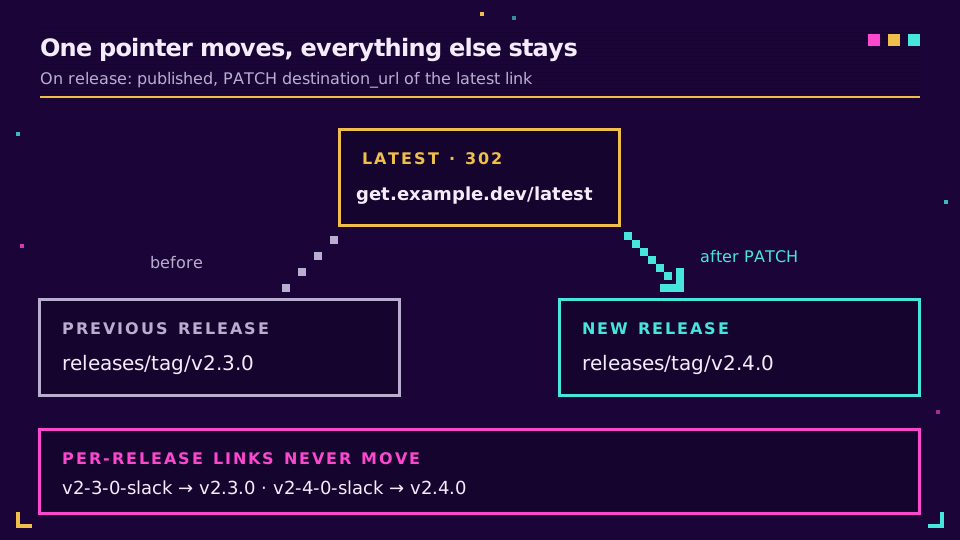
Decide one thing up front. Should the latest link point at the file, or at the release page? I'd point it at the release page for anything with more than one platform build, and keep per-platform latest links (/latest-mac, /latest-linux) only if your install docs really need a direct file. Fewer moving pointers means fewer things to repoint wrong.
Per-Release Tagging for GitHub Release Notes Links
The latest link answers "does the link still work". It can't answer "which channel worked", because everyone clicks the same slug. For that, each release gets its own small set of links, one per channel, created at publish time.
Here's the part most UTM guides skip. Tacking utm_source=slack onto a github.com URL does nothing useful, because you'll never see GitHub's analytics. UTMs earn their place only when the destination is a site you measure, like your docs or your own download page. When the destination is GitHub, the separate short link per channel is the attribution: the click is counted at the redirect, before GitHub ever sees it.
| Channel | Slug for v2.4.0 | Destination | What the clicks tell you |
|---|---|---|---|
| Slack community | v2-4-0-slack | GitHub release page | Clicks from your own community |
| X / Mastodon | v2-4-0-social | GitHub release page | Reach beyond existing users |
| Newsletter | v2-4-0-news | Docs upgrade guide + UTMs | Clicks plus on-site behaviour in your analytics |
| Latest (stable) | latest | Current release, repointed | Total demand across every version |
Tag each per-release link with the version and the channel (["release", "v2.4.0", "slack"]), because tags are how you'll pull the set back out later: GET .../links?tags=v2.4.0 lists everything for one release. Keep any UTM values boring and identical between releases. The UTM naming conventions guide has the rules I'd copy.
Creating Links on the Release Published Event
A sibling guide covers generic CI link creation, so this section stays on the release-specific parts. The trigger is release with the published activity type. According to GitHub's list of workflow events, published fires for stable releases and pre-releases alike, including pre-releases published from a draft, which is exactly why the repoint step below checks the prerelease flag.
name: release-links
on:
  release:
    types: [published]

jobs:
  links:
    runs-on: ubuntu-latest
    env:
      API: https://api.elido.app/v1/workspaces/${{ vars.ELIDO_WORKSPACE_ID }}
      DOMAIN_ID: ${{ vars.ELIDO_DOMAIN_ID }}
      TAG: ${{ github.event.release.tag_name }}
      PAGE: ${{ github.event.release.html_url }}
      ELIDO_TOKEN: ${{ secrets.ELIDO_TOKEN }}
    steps:
      - name: Create one link per channel
        run: |
          v=$(echo "$TAG" | tr '.' '-')
          for ch in slack social news; do
            body=$(jq -n --argjson d "$DOMAIN_ID" --arg s "$v-$ch" \
              --arg u "$PAGE" --arg t "$TAG" --arg c "$ch" \
              '{domain_id:$d, slug:$s, destination_url:$u, tags:["release",$t,$c]}')
            code=$(curl -s -o /dev/null -w '%{http_code}' -X POST "$API/links" \
              -H "Authorization: Bearer $ELIDO_TOKEN" \
              -H "Content-Type: application/json" -d "$body")
            case "$code" in 201|409) ;; *) echo "create $ch failed: $code"; exit 1;; esac
            echo "- $ch: https://get.example.dev/$v-$ch" >> "$GITHUB_STEP_SUMMARY"
          done

      - name: Repoint the latest link
        if: ${{ !github.event.release.prerelease }}
        run: |
          curl -sf -X PATCH "$API/links/${{ vars.ELIDO_LATEST_LINK_ID }}" \
            -H "Authorization: Bearer $ELIDO_TOKEN" \
            -H "Content-Type: application/json" \
            -d "$(jq -n --arg u "$PAGE" '{destination_url:$u}')"
The job summary gives whoever posts the announcement a ready list of links, and a 409 on re-run means the slug already exists, so a retried workflow doesn't fail or duplicate anything. The newsletter link would point at your docs with UTMs in the destination; I left it on the release page here to keep the example short.
Three gotchas that cost me an afternoon
The first one is silent. If your release pipeline publishes the release using the default GITHUB_TOKEN, this workflow never runs, because events created with GITHUB_TOKEN don't trigger new workflow runs. No error, no skipped job, nothing. Publish with a GitHub App token instead.
Second, dots. I convert v2.4.0 to v2-4-0 for the slug because version strings with dots look like file extensions in chat previews, and some clients linkify them oddly.
Third, don't let the workflow edit the release body unless you have to. It works (gh release edit --notes-file), but it rewrites text a human just approved, and it fires edited events that other automations may react to. The step summary is less clever and much safer. Retries get their own post: API rate limits and idempotency.
If you're still pasting release links by hand, the workflow above is about twenty minutes of setup. Start a free Elido workspace, point a branded domain at it, and let the next tag create its own links.
How to Track Clicks on Release Notes by Channel
After two or three releases, the data starts answering questions GitHub's counter can't.
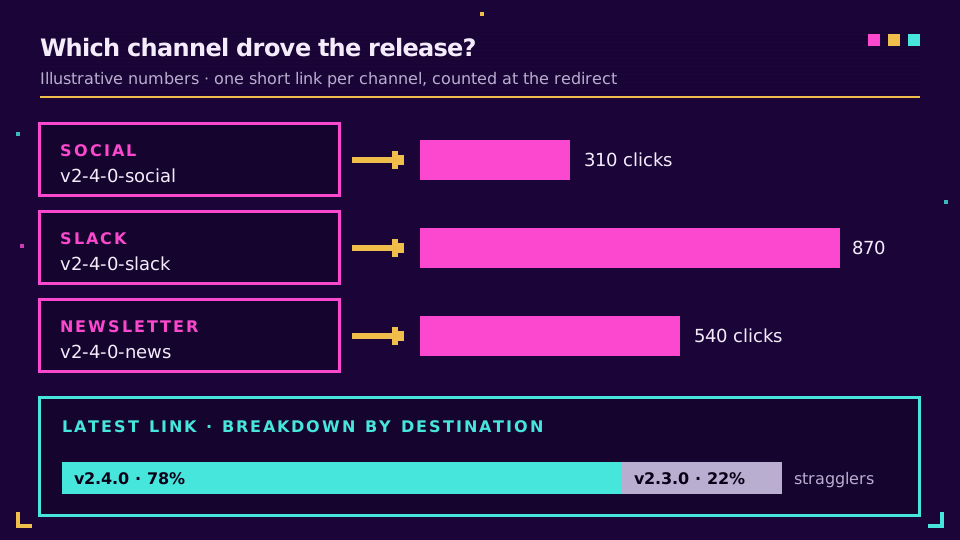
Per-channel comparison is the simple one. Pull the links tagged with a version, then read each link's click summary scoped by link_id. If v2-4-0-news beats v2-4-0-social by five to one for three releases running, you've learned where your users actually are, and it's rarely where the team assumed. The announcement with the most likes is often not the one that sends people to the download, so expect pushback the first time you show the numbers, and wait for the third release in a row before anyone rewrites the launch plan around them.
The latest link has a less obvious trick. Every click records the destination it resolved to at that moment, so the analytics breakdown by destination, scoped to the latest link, splits its traffic by version. After a repoint you can watch the old destination's share fall off and see how long stragglers keep arriving on cached pages and old bookmarks. That's your real upgrade curve, measured at the top of the funnel.
Two honest limits. Clicks aren't downloads: someone can click through to the release page and leave, and GitHub's download_count stays the source of truth for completed fetches. And bots do click release links, especially link-preview fetchers in chat apps, so read trends across releases rather than trusting any single day. The analytics feature page lists which breakdowns are available on each plan.
Keeping Old Release Links Alive
Per-release links never move. v2-3-0-slack points at the v2.3.0 tag in March and still points there in five years, which is what someone reading an old forum thread expects. Only the latest link changes, and only on stable releases.
The one case where you should touch an old link is a pulled release. If v2.4.0 ships with a data-loss bug, don't delete its links; repoint every v2-4-0-* link to v2.4.1 with the same PATCH call and a short note in the release body. Deleting gives people who saved the link a dead end at exactly the moment they most need the fix. A newer version beats a 404. Every time.
For projects that also keep old release links in READMEs, install scripts and package manager metadata, the developer-focused guide to URL shorteners covers where else short links earn their keep. The full REST surface is on the API and SDKs page.
Read the cornerstone → Manage your short links as Terraform
Related on the Blog
- Link rot prevention strategy - the wider playbook for links that have to outlive the page they point to.
- URL shortener API quickstart - authentication, SDKs and the create call used in the workflow.
- URL shortener CLI - the same operations from a terminal, for one-off releases.
- Slack URL shortener bot - shortening links where the release announcement actually lands.
- 301 vs 302 redirects - why a repointable link has to stay temporary.
- Short links from GitHub Actions - the generic create-or-update step for any workflow.
Frequently asked questions
How do I link to the latest GitHub release?
GitHub supports /releases/latest for the release page and /releases/latest/download/asset-name for a file, as long as the asset keeps the same name in every release. If your asset names carry the version number, put a short link in front and repoint it on each release instead.
Can you track clicks on GitHub release downloads?
Partly. The GitHub REST API reports a download_count per release asset, but it has no referrer, country or channel data, so it cannot tell you whether the download came from Slack, X or a newsletter. A short link per channel in front of the asset gives you that split.
Should a latest-release short link use a 301 or a 302 redirect?
Use a 302. Browsers may cache a 301 indefinitely, so a reader who clicked last month can keep landing on the old version after you repoint the link. Elido links default to 302, which keeps the destination under your control on every click.
Why doesn't my release workflow run when another workflow publishes the release?
Events created with the repository's GITHUB_TOKEN do not start new workflow runs, apart from workflow_dispatch and repository_dispatch. If a release pipeline publishes with GITHUB_TOKEN, the release: published trigger never fires. Publish with a GitHub App token or a fine-grained personal access token instead.
Do UTM parameters work on links to github.com?
They pass through, but they do nothing for you, because you never see GitHub's analytics. UTMs only pay off when the destination is a site you measure, like your docs or download page. For github.com destinations, the separate short link per channel is the attribution.
What happens to old release links when a new version ships?
Nothing, if you set it up this way. Per-release links keep pointing at their own tag forever, and only the one latest link moves. If a release is pulled, repoint its links to the fixed version rather than deleting them, so people who saved the old link still land somewhere useful.
Try Elido
Paste a URL, get a working short link
No signup. Link lives for 30 days. Sign up to keep it forever.
Free, no signup required · 2 per day