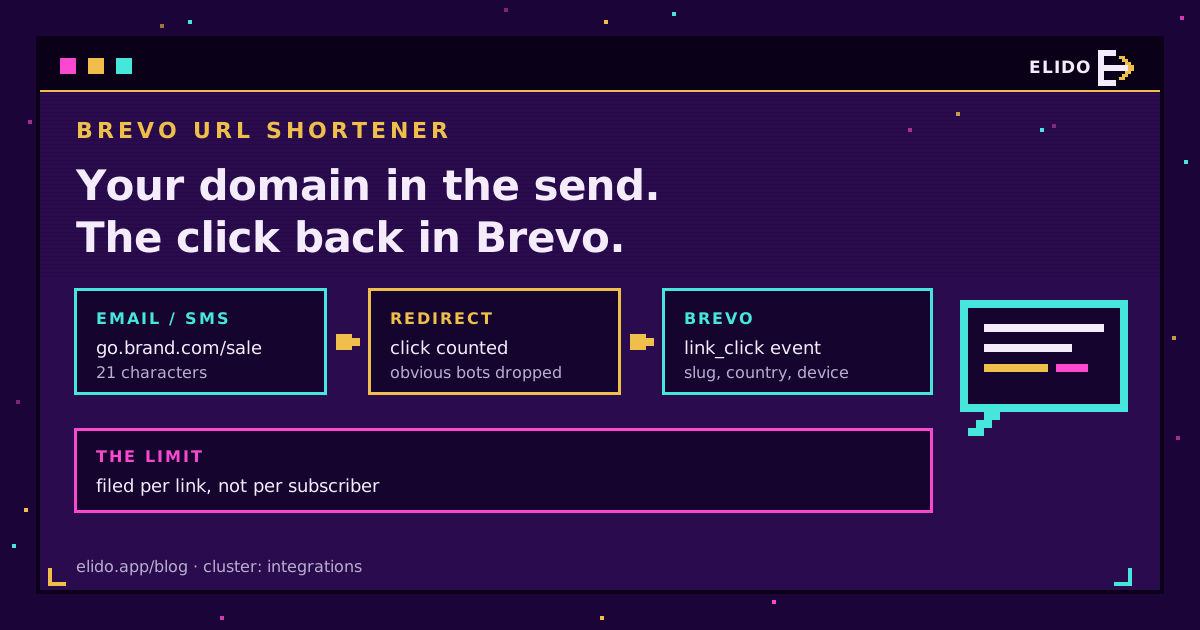
A Brevo URL shortener setup is simple to describe: you create a branded short link in Elido, paste it into your Brevo email or SMS, and every click on it is sent back to Brevo as a link_click custom event through Brevo's trackEvent endpoint. The event carries the link's slug and ID, the clicker's country and device, and the destination. It lands on a placeholder contact rather than on the person who clicked, so it's campaign-level data, not a per-subscriber trail.
That last point shapes everything else in this guide. Brevo link tracking already knows which contact clicked; Elido knows what happened at the redirect, including clicks that never came through the email at all. Used together they cover more than either one alone, and short links in Brevo campaigns also do two jobs Brevo can't: they put your own domain in the message and they save characters in SMS.
If you haven't settled how you tag campaigns yet, start with the cornerstone on tracking UTMs end to end. All Brevo ever sees is what the link carries.
What Elido Sends to Brevo on Each Click
One click produces one POST to in-automate.brevo.com/api/v2/trackEvent, the endpoint Brevo documents for tracking custom events over REST. It fires after the visitor has been redirected. A slow Brevo never slows the link.
Here's the body, with a real-looking link:
{
  "email": "[email protected]",
  "event": "link_click",
  "properties": {
    "workspace_id": 12,
    "link_id": 4711,
    "slug": "sept-sale",
    "country": "DE",
    "device": "mobile",
    "destination": "https://shop.example/sale?utm_source=brevo&utm_medium=email"
  }
}
| Field | What it holds | How to use it in Brevo |
|---|---|---|
event | Always link_click | The name you pick in automation triggers |
email | A placeholder per link, or one address you set | See the identity section before relying on it |
slug / link_id | Which short link was clicked | Tell campaigns and CTAs apart |
country, device | Resolved at the redirect | Split flows by market or by phone vs desktop |
destination | The URL the visitor was sent to | UTM tags ride inside this string only |
What's missing matters as much. There's no IP address and no user agent in the payload, which keeps the event light from a GDPR point of view. There's no timestamp either, so Brevo records the time it received the event. And there's no switch per link: once Brevo is connected, every click in the workspace is forwarded.
Why the Event Can't Find the Subscriber
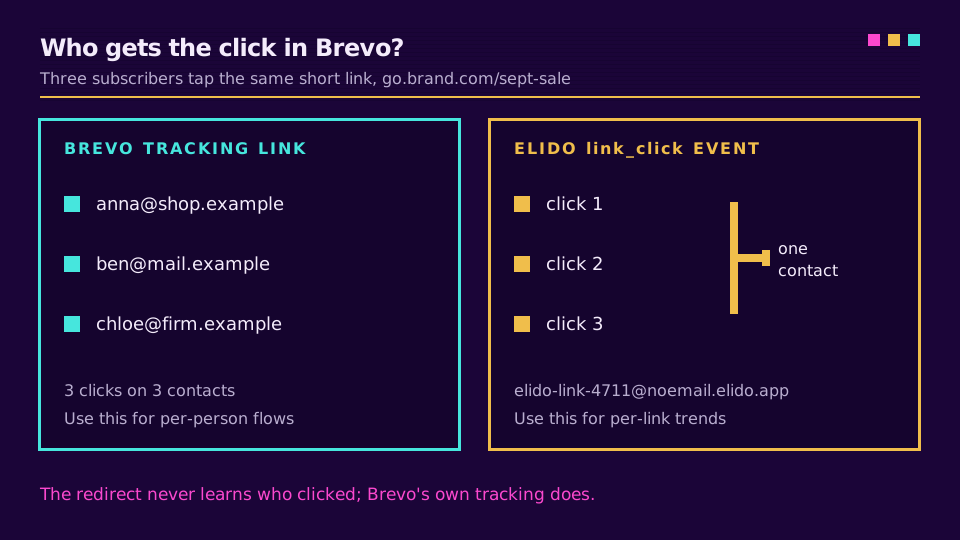
The limit is identity. When someone taps go.yourbrand.com/sept-sale, the redirect sees a phone and a country. It doesn't see a Brevo contact. No cookie either.
So the email field falls back to elido-link-<link ID>@noemail.elido.app, one address per link. Every click on sept-sale goes to the same placeholder, whoever made it. You can override that with a single fixed address for the whole workspace, but that's one address too, not the clicker's.
I think that's the right trade. It has a side effect, though. The docs don't say whether trackEvent creates a contact for an address it hasn't seen, so look in Contacts after your first test click. If placeholder contacts show up, keep the noemail.elido.app domain out of every sending list. Nothing should ever be mailed to it.
Per-subscriber attribution already exists, by the way. It's Brevo's own link tracking. Leave it on.
Setting Up Brevo Link Tracking With Elido
The setup is one credential, and it's easy to grab the wrong one. The trackEvent endpoint authenticates with an ma-key header, and Brevo's REST tracker guide sends you to your account's automation settings to find it. The xkeysib- key under SMTP & API is a different thing.
- In Brevo, copy the tracker key from the automation settings page.
- In Elido, open Integrations, pick Brevo, click Connect, paste the key and save. It's encrypted at rest and never shown back in full.
- Wait about five minutes. The forwarder caches workspace settings for that long.
- Tap one of your short links on your phone, off the office Wi-Fi.
The Test connection button helps with the key: it sends one test event (marked elido_test: true) to Brevo's tracker and shows Brevo's answer, so a REST key pasted where the tracker key belongs fails right there. It doesn't show the event on a contact, so the tap from your phone is still the check that counts.
If you want every event on one contact you own, say [email protected], set it through the API: PUT /v1/workspaces/{workspace_id}/event-integrations/brevo with Authorization: Bearer elido_... and a body holding both api_key and email. The dashboard form only has the key field, and saving it again replaces the whole config, so the email goes with it.
Delivery is best effort. A failed POST is retried once after a second, then dropped.
Short Links in Brevo SMS Campaigns
SMS is where the case for Brevo SMS links is pure arithmetic. The SMS campaign reference says the maximum per SMS is 160 characters and anything longer "will be counted as more than one SMS". Sender names are capped at 11 alphanumeric characters. The unsubscribe line eats into the same 160.
A landing page with full UTM tags is easily 110 characters. go.yourbrand.com/sept is 21. On a 40,000-recipient send, that's the difference between one billed segment per message and two.
The branded part matters as much as the length. Carriers and recipients both distrust generic shortener domains in texts, and a link on your own subdomain reads as yours. The SMS marketing shortener guide goes through consent wording and opt-out rules; for SMS the device property on the Brevo event is nearly always mobile, so split on country instead.
Branded Domains in Brevo Emails
In email, length is free. The reason to use short links in Brevo campaigns is the domain. A shared public shortener domain carries every spammer who ever used it. A custom domain carries only your sending history. The deliverability explainer covers what filters actually look at.
The other reason is control after send. A link in a sent newsletter is frozen in thousands of inboxes. A short link isn't; you can repoint sept-sale at the extended-sale page on Monday without touching the email.
Brevo Click Tracking vs Elido Click Counts
Put an Elido link in a Brevo email and you get a double-wrapped redirect. Your short link gets rewritten into Brevo's own tracking link, so a tap goes to Brevo first, then to Elido, then to the page.
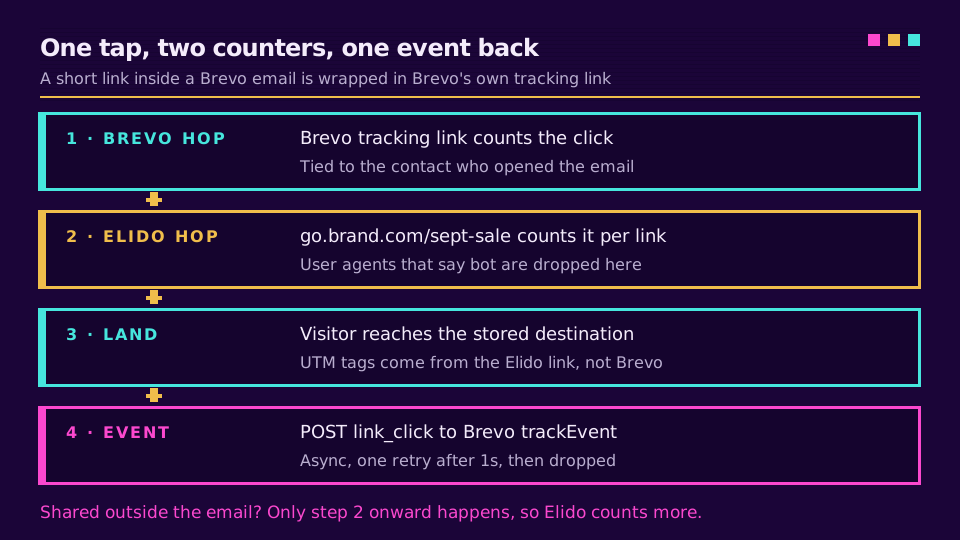
Each hop counts by its own rules, so the numbers won't match. Elido drops clicks whose user agent announces a bot, which covers crawlers, link-preview fetchers and scripts like curl. A security scanner that presents as a normal browser gets through, and clicks the redirect flags as suspicious are still forwarded to Brevo. Whatever Brevo filters at its hop, Elido never sees. Forwards and group-chat pastes? Elido only.
This one is easy to miss. Brevo can add UTM values to its outgoing tracking links, but on a short link those land on the short URL, and Elido redirects to the destination stored on the link. Tag the Elido destination instead.
Want the redirect side of your campaigns on your own domain? Pick a plan and send the next newsletter through branded links.
Using link_click Events in Brevo Automations
The events documentation lists two uses that matter here: triggering automation workflows and segmenting contacts by behaviour. link_click behaves like any other custom event there. The catch from the identity section decides what's useful.
A workflow that emails "the person who clicked" won't work off this event, because the contact is a placeholder. Use Brevo's own click conditions on the email for that. What does work is internal: set the fixed address to a team inbox contact, then trigger a Slack or email alert when a launch link gets its first click from a new country, or when a reprint of an old QR code wakes up.
For reporting, the per-link events give you a click series per slug, minus obvious bots, that includes shares outside Brevo. Compare it with the click analytics dashboard, which also has referrer and browser.
One EU note, sourced. Brevo's parent company, Sendinblue SAS, is registered in Paris per its privacy policy. The event it gets from Elido holds no IP and no subscriber email. That's fixed in the forwarder, not a setting you have to remember. The destination URL does travel, though, so keep personal data out of your UTM values.
Related on the Blog
- Track UTMs end to end - the tagging convention the destination URL should follow.
- Mixpanel link tracking with Elido - the same click forwarder, pointed at product analytics.
- URL shortener for SMS marketing - character math and carrier trust in more depth.
- Do short links hurt email deliverability? - why the domain matters more than the length.
- Track email link clicks - how ESP counts and analytics disagree, and what to do about it.
Frequently asked questions
Does Brevo have a built-in URL shortener?
Brevo wraps the links in your emails in its own tracking links, which lets it count clicks per contact, but that is tracking, not a branded short link you control. For SMS, where every character is billed, and for links you want on your own domain, you create the short link in a tool like Elido and paste it into the Brevo message.
What event does Elido send to Brevo when a short link is clicked?
One custom event called link_click, posted to Brevo's trackEvent endpoint for every click on a link in your workspace. Its properties are the workspace ID, link ID, slug, country, device and the destination URL. There is no IP address, no user agent and no separate UTM fields in it.
Can Brevo attach an Elido click to the contact who clicked?
No. The redirect doesn't know which Brevo contact tapped the link, so the event is filed under a placeholder address per link, or under one fixed address you configure for the whole workspace. Per-contact attribution comes from Brevo's own link tracking, which you should leave on for that reason.
Which Brevo key does the link click integration need?
The trackEvent endpoint authenticates with an ma-key header, and Brevo's REST tracker docs point you to the automation settings of your account to get that key. The xkeysib- API key from the SMTP and API page is a different credential and is not what this endpoint checks.
How many characters does a short link save in a Brevo SMS?
Brevo counts 160 characters per SMS and bills anything longer as more than one message. A tagged landing-page URL often runs past 100 characters on its own, while a branded short link fits in about 20, which usually keeps a promotional text inside a single segment.
Why do Brevo and Elido show different click numbers for the same campaign?
They count at two different doors. Brevo counts the hit on its tracking link and ties it to a contact; Elido counts the hit on the short link and drops visitors whose user agent says they are a bot. Clicks from links shared outside the email land only in Elido, so some gap is normal.
Try Elido
Paste a URL, get a working short link
No signup. Link lives for 30 days. Sign up to keep it forever.
Free, no signup required · 2 per day