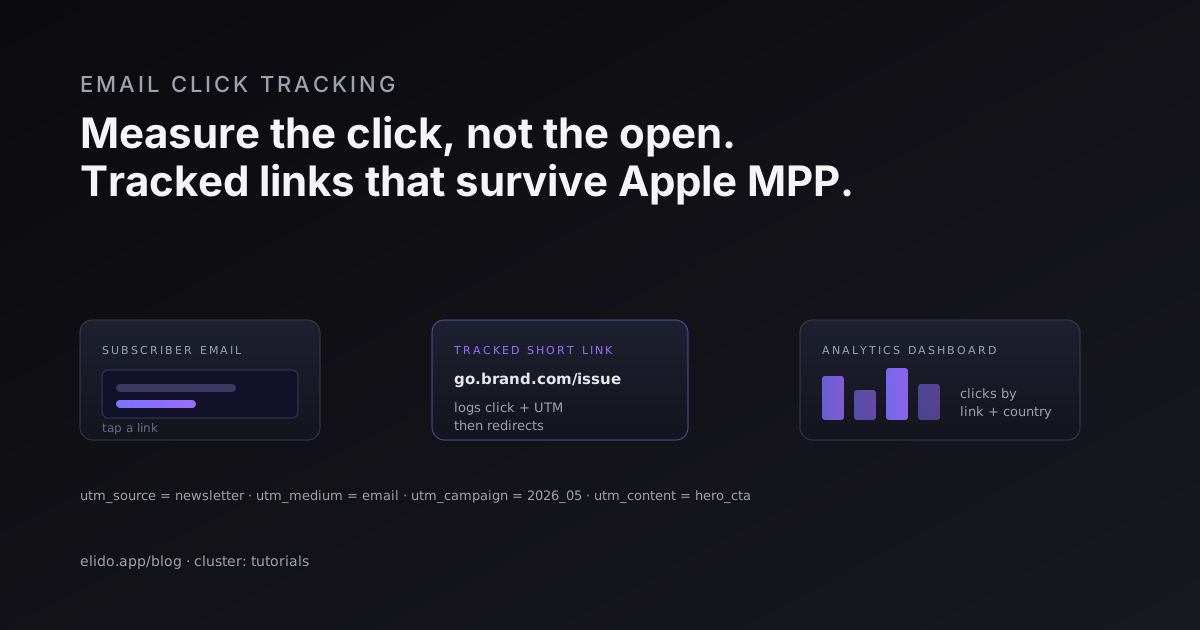
To track email link clicks, you wrap each link in your email with a tracked short link before you hit send. When a subscriber clicks, that link records the click at the moment of redirect, then forwards the person to the real destination. The record carries the click time, the country, the device, and whatever UTM tags you attached. That log lives on your own infrastructure, which makes it separate from, and more reliable than, the open and click pixels your email tool reports on its own.
That separation is the whole point, so it is worth saying plainly. Your email service provider (ESP) measures engagement by embedding a tracking pixel and rewriting your links through its own domain. A tracked short link measures the same click independently, on a redirect you control. When you wrap your own links, you get consistent UTM tags across every tool, attribution that survives moving between platforms, the ability to edit a link's destination after the email has shipped, and click data that holds up under Apple Mail Privacy Protection. This guide walks through how email click tracking works, why your numbers never quite agree, the UTM conventions that keep email data clean, and a setup you can run before your next send.
How email click tracking actually works
A click is a much simpler event than it looks. Someone opens your email, taps a link, and a request goes out. If that link points straight at your landing page, the only place the click gets recorded is your website analytics, after the browser has loaded. If the link points at a tracked short link first, the click gets logged at the redirect, before the destination ever loads.
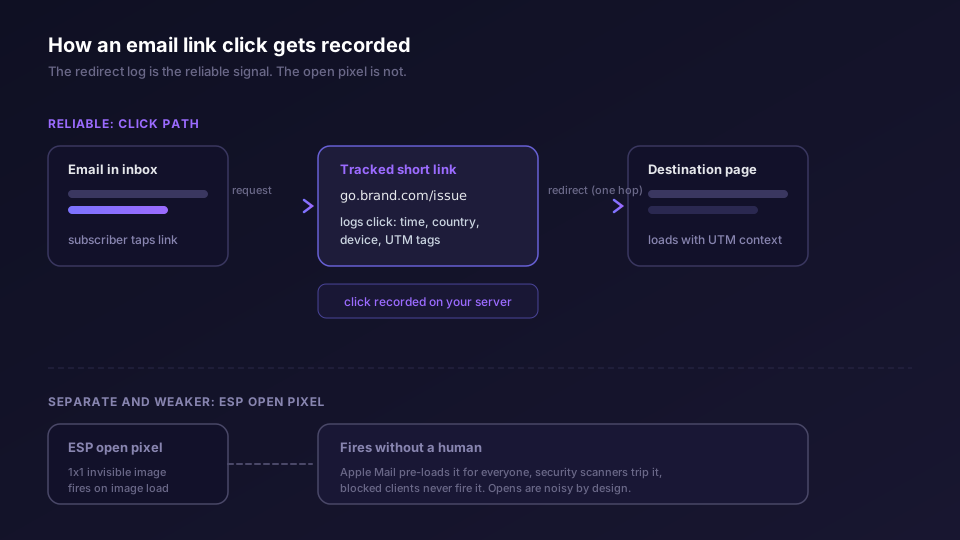
The redirect log is the trustworthy signal here. A redirect only happens when a request is made for that exact slug, and in email that request almost always means a person tapped a link. Compare that to the open pixel, the tiny invisible image your ESP embeds to count opens. The pixel fires when an email client loads images, which a machine can do without any human involved, and which Apple Mail now does automatically for everyone. So opens are noisy by design and clicks are comparatively clean.
This is also why marketers wrap their own links instead of leaning on the ESP's built-in click tracking. Four reasons. You want one UTM convention across email, social, and paid, not a different scheme per tool. You want attribution that follows the click even if you switch ESPs next quarter. You want to fix a broken destination after the send without re-mailing. And you want a click record that does not evaporate when a privacy feature changes. The short link gives you all four because it sits in the middle, under your control, on a domain you own.
Why your ESP's numbers and your analytics disagree
Pull up the same campaign in three places and you will see three different click counts. Your ESP says 1,240. Your tracked link dashboard says 1,080. GA4 says 940. Nobody is broken. They are measuring different things at different points in the chain.
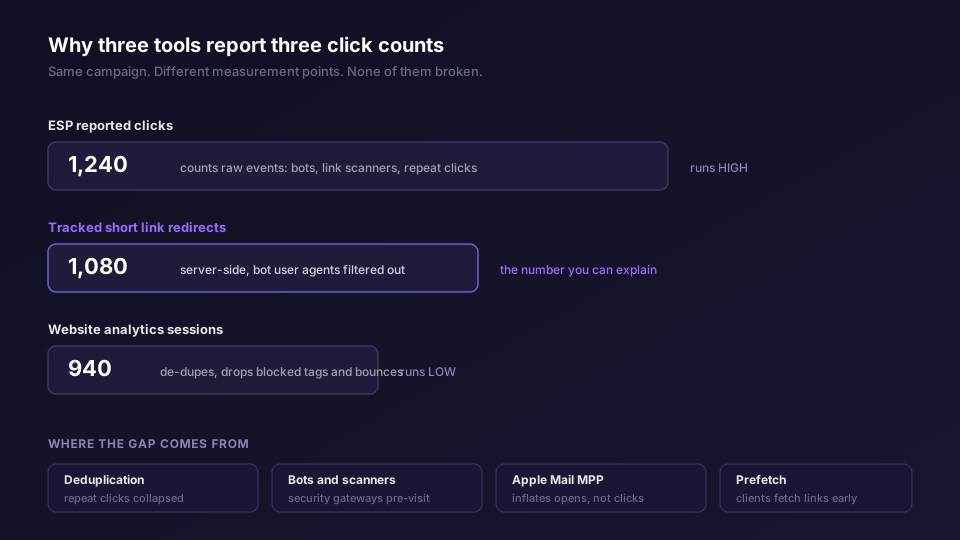
The ESP usually reports raw click events. A subscriber clicking the same link three times can be three clicks or one, depending on the number you are reading. Worse, corporate security gateways scan every URL in an inbound email for malware. Those visits look exactly like clicks to a naive counter, and they fire within seconds of delivery, before any human has read the email. So the ESP's gross number runs high.
Your website analytics runs low for the opposite reasons. GA4 counts sessions, not clicks, and de-dupes repeat visits. It drops clients that never run JavaScript, and loses people who bounce before the tag loads or block it with a content blocker or consent banner. Each filter is reasonable alone. Stacked, they carve a real chunk off the top.
The tracked short link sits between the two and gives you a number you can actually explain. Your redirect count says how many times the link was requested. You can filter known bot user agents out of it. When a sponsor or a client asks why your ESP and their GA4 disagree, you have a credible middle number and a one-sentence reason for each gap. We go deeper on which of these numbers to trust for what in short link analytics: what to measure, and the cross-channel version of the same reconciliation lives in track UTM campaigns end-to-end.
UTM conventions for email that do not rot
UTM parameters are the query-string tags that tell your analytics where a visit came from. For email, the useful set is small. GA4 reads utm_source, utm_medium, utm_campaign, utm_content, and utm_term, and the GA4 campaign URL documentation defines what each one means. For email you mostly care about four:
utm_sourceis the property that sent the click. Use a stable name for your list, likeweekly_digest, not a different spelling each week.utm_mediumis the channel. For email it is justemail, every time. Resist the urge to get creative here, because GA4 groups channels off this field.utm_campaignis the specific send. Encode the issue or date, like2026_05_newsletterorspring_launch.utm_contentdistinguishes links within one email. The header button ishero_cta, the footer text link isfooter_link. This is the field that lets you measure per-link engagement.
The thing that wrecks email UTM data is drift. One send uses utm_source=Newsletter, the next uses newsletter, a third uses news. Six months later GA4 shows your newsletter traffic split across five sources and your channel report is useless. The fix is to define the convention once and template it so a person never types the strings by hand. A link shortener with a UTM builder enforces the values at link-creation time, and you can save a reusable scheme in the UTM template guide. If you want the full naming rulebook, that is a post of its own, coming in UTM naming conventions.
Keep everything lowercase, use underscores not spaces, and never put anything personal in a UTM. These values land in shared analytics and sometimes in referrer logs downstream, so a subscriber email address in utm_term is a privacy incident waiting to happen.
Per-link versus per-campaign tracking
There are two questions a marketer asks after a send, and they need two different granularities.
Per-campaign tracking answers "did this email work." Set utm_campaign to the send, then compare total clicks, sessions, and conversions across sends. This is the number for the weekly report. It tells you the Tuesday send beat the Thursday send.
Per-link tracking answers "what did the work." A single email usually has several links: a hero button, an inline mention, a footer link. Share one short link and one utm_content across them and you cannot tell which earned the clicks. Give each destination its own short link and its own utm_content, and the dashboard tells you the hero button drove 70 percent of clicks while the footer drove almost nothing. That changes what you put above the fold next time.
The practical rule: one short link per distinct destination, never reuse a slug across two links in the same email, and keep utm_content unique per link. It is more setup, but it is the difference between knowing a send worked and knowing why.
The deliverability note nobody mentions
Redirects and deliverability interact, and the wrong setup can land you in spam. Three things matter.
Use a branded domain. A link on your own subdomain, like go.yourbrand.com, reads as trustworthy to the subscriber and the spam filter. A generic public shortener shares reputation with every other user of that domain, spammers included, and some filters flag unknown shorteners on sight. The stakes are highest in SMS marketing, where carriers block public shorteners outright. Pointing your subdomain at the redirect tier takes a CNAME; see custom domains.
Serve those links over HTTPS with a valid certificate. A redirect that throws a cert warning tanks both clicks and trust. Any serious link tier issues the cert automatically on first request.
Avoid long redirect chains. Bounce through three hops and you add latency, give security scanners more to flag, and raise the odds of a chain that breaks. One hop, short link to destination, is the target.
Apple Mail Privacy Protection and the opens-versus-clicks shift
Apple Mail Privacy Protection (MPP) changed email measurement, and if you still optimize on open rate you are optimizing on noise. When a subscriber on Apple Mail receives your email, Apple pre-fetches the tracking pixel through its own proxy, whether or not the person ever opens the message. The Apple support documentation on Mail Privacy Protection lays out the behavior. The effect is that your open rate inflates, your opens detach from real human attention, and any automation keyed off opens, like a re-engagement trigger, starts firing on people who never read a thing.
Clicks are largely immune. MPP pre-loads images; it does not click your links for you. A click still requires a person to tap. That is exactly why this guide is about clicks, not opens. After MPP, the click is the most reliable engagement signal you have in email, and a tracked short link is how you capture it cleanly. If you are rebuilding your reporting around this, the broader story of attribution after browser and platform privacy changes is in click attribution after Safari ITP.
A second-order effect: because Apple proxies the open, the IP and rough location off the open pixel are Apple's, not the subscriber's. Geographic data from clicks, captured at the redirect, stays real. One more reason the redirect log beats the pixel.
Consent and the GDPR side
Tracking a click is processing personal data when you can tie it to a known subscriber, so it sits inside GDPR's scope, and you should treat it that way. The good news is that basic measurement of links inside an email a person explicitly subscribed to usually rests on legitimate interest: the subscriber asked for the email, and counting which links they found useful is a reasonable, expected use. The line moves once you start building cross-site profiles or forwarding click data to ad platforms for retargeting, where the EDPB guidelines on the targeting of social media users push you toward needing real consent.
The defensible pattern is the one any DPO will recognize. Name the purpose in your privacy notice. Store the minimum that answers your question and set a retention window rather than keeping click logs forever. Keep the data in a region you can point to; EU-resident click storage saves you a paragraph of cross-border-transfer explanation. And do not stuff identifiers into UTM tags that leak into third-party referrer logs. This is guidance, not legal advice, so route the specifics through your own counsel.
Step by step: track the links in your next send
Here is the end-to-end setup. The first send takes maybe twenty minutes; every send after is a few minutes.
- Set up a branded short domain. Point a subdomain you own, like
go.yourbrand.com, at your redirect tier with a CNAME. Wait for the certificate to issue, then load any test link to confirm it serves over HTTPS with no warning. - Decide your UTM convention. Lock
utm_medium=email, pick a stableutm_sourcefor the list, and define theutm_campaignpattern you will use per send. Save it as a template so nobody types raw strings. - Create one short link per destination in the email. The hero CTA, the inline link, the footer link each get their own slug. Attach the shared campaign UTMs plus a unique
utm_contentper link. - Drop the short links into the email. Replace the raw destination URLs with your branded short links in the ESP editor. If your ESP also rewrites links for its own click tracking, that is fine; you now have two independent counts to reconcile.
- Send a test to yourself and click every link. Confirm each redirect lands on the right destination with the right query string attached, and that the click shows up in your link dashboard within a few seconds.
- Send the campaign, then read the data the right way. At 24 and 72 hours, pull clicks per link from the redirect log, not the open rate. Compare against your ESP and your site analytics, and write down the one-line reason for any gap so the report is self-explaining.
Want conversions on top of clicks, so you know which link drove a signup rather than a visit? The click-to-conversion mechanics live in conversion tracking, and the server-side walkthrough is in track UTM campaigns end-to-end. Newsletter operators running sponsor placements should also read URL shorteners for newsletters for per-issue, per-sponsor link strategy. New to the concept? Start with what is a URL shortener.
That is the loop. Wrap your links, tag them consistently, measure the click at the redirect, and read clicks instead of opens. Once it runs, you have email engagement data you can defend in a sponsor call and reconcile against any other tool in your stack.
One more layer sits above all of this for corporate recipients: security gateways rewrite the links before anyone clicks them, which is what Outlook Safe Links does to your campaign URLs.
Where Elido fits
Elido is an EU-first link tool, so click events land in EU-region storage by default and your privacy notice needs no cross-border carve-out for subscriber analytics. Branded subdomains cert on first hit, the redirect runs on a multi-region edge with a p95 around 15 milliseconds on a cache hit so the hop is invisible, and every redirect can attach your saved UTM template automatically. Raw click events go to our analytics store with no sampling, which is what makes the redirect count a number you can stand behind. See analytics, custom domains, the marketers' solutions page, and pricing.
Related on the blog
- Track UTM campaigns end-to-end without a CDP - the full attribution walkthrough from link to conversion
- URL shorteners for newsletters: attribution beyond the open rate - per-issue and per-sponsor link strategy
- Link shortener with a UTM builder - enforce your tagging convention at link-creation time
- Click attribution after Safari ITP - what still works as browsers and platforms tighten privacy
- A URL shortener for SMS marketing that carriers trust - the same short-link wrap where deliverability is hardest
- Do short links hurt email deliverability? - shared shortener domains, spam filters, and the branded-domain fix
- Safe Links: why Outlook rewrites your campaign URLs
Frequently asked questions
How do I track who clicked a link in my email?
Wrap the destination in a tracked short link before you send. When a subscriber clicks, the link records the click on redirect, then sends them to the destination. You get the click time, device, country, and any UTM parameters you attached. The redirect log is your source of truth, separate from whatever your email tool reports.
Why does my ESP report more clicks than Google Analytics?
They count different things. Most ESPs count every click event, including bots that pre-scan links and a subscriber who clicks twice. GA4 counts sessions and de-dupes a lot of that out. A tracked short link gives you a third number, your server-side redirect count, that you can reconcile against both.
Does Apple Mail Privacy Protection break click tracking?
It breaks open tracking, not click tracking. MPP pre-loads the open pixel for Apple Mail users, so your open rate inflates and becomes unreliable. A real click still has to come from a real person tapping a link, so click data stays trustworthy. This is the main reason to measure clicks rather than opens.
What UTM parameters should I use for email campaigns?
At minimum utm_source (your newsletter or list name), utm_medium set to email, and utm_campaign set to the specific send or issue. Add utm_content to tell two links in the same email apart. Keep the values lowercase and consistent so they do not split into variants in your reports.
Do I need consent to track email link clicks under GDPR?
Recording that a known subscriber clicked a link in an email they opted into generally rests on legitimate interest for basic measurement, but cross-site profiling and ad-platform forwarding raise the bar toward consent. The safe pattern is to document the purpose, minimize what you store, and follow your DPO's guidance. Consult the EDPB guidance, not a blog post, for your specific case.
Should I track each link separately or just the campaign?
Both. Per-campaign tracking tells you whether the send worked. Per-link tracking tells you which call to action did the work, so you can tell the header banner from the footer text link. Use one short link per distinct destination and keep utm_content unique per link.
Try Elido
Paste a URL, get a working short link
No signup. Link lives for 30 days. Sign up to keep it forever.
Free, no signup required · 2 per day