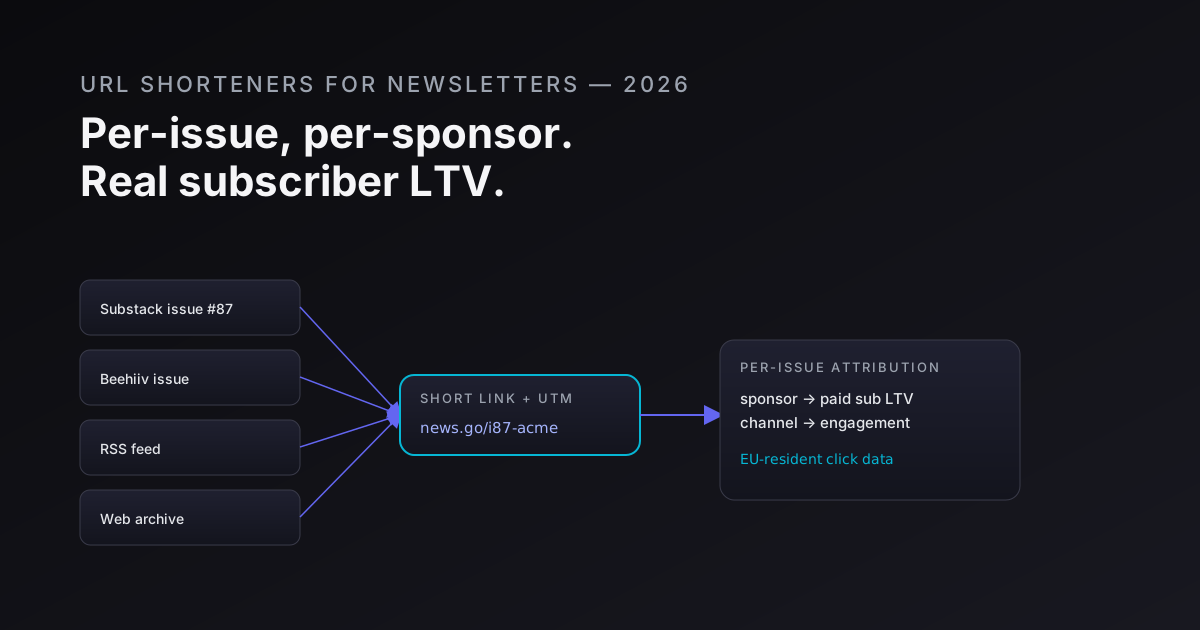
Newsletter platforms have decent open-rate tracking. Most of them now show per-link click counts inside the issue editor. What they do not tell you is who clicked, whether that click converted to a paid subscription, whether the click came from the email delivery or the web archive, or which of your sponsors drove the most revenue per click. For a casual hobby newsletter, that gap is fine. For a writer monetising paid tiers, running sponsor placements, or pitching media kits to advertisers, that gap is a credibility problem.
This post is specifically about the solo writer or 2-3-person newsletter operation - not the newsroom (that's the URL shorteners for publishers post), not the book-launch funnel (that's URL shorteners for authors). The patterns here are built around the realities of a business where one person writes, handles sponsor relationships, and reads analytics in the same afternoon.
What platform analytics actually give you
Before laying out what's missing, it's worth being clear about what platforms do give you.
Beehiiv's click analytics show total clicks per link per issue, plus a breakdown by subscriber tier (free vs. paid). That's genuinely useful. ConvertKit shows per-link click rates inside sequences. Substack's analytics tab shows clicks in aggregate but does not segment by email vs. web. Ghost's built-in analytics are thin - mostly views on the web archive.
None of them give you:
- Click-to-paid-conversion attribution scoped to a specific link in a specific issue
- Per-sponsor click data you can hand to the sponsor independently (they have to take your word that the number is real)
- Attribution for clicks that came from your RSS feed picked up by a reader app
- Cross-newsletter referral attribution (which other newsletter drove your highest-LTV subscribers)
- Click data from the web-archive version of your issue for readers who don't open email
That list is why independent short links with UTM passthrough and a click_id webhook exist. The platform's click count is a convenience metric. The short link is your source-of-truth metric.
Sponsor attribution per issue: why "N clicks" is not enough
A sponsor who runs two issues in a row wants to know which issue performed better. If you're using the platform's link tracking, you'll see total clicks on the sponsored URL, but both issues are hitting the same destination URL. You can't distinguish issue #87 from issue #88 without something in the link itself carrying that distinction.
The right structure is a per-issue, per-sponsor short link:
news.your-domain.com/acme-87- Acme, issue #87news.your-domain.com/acme-88- Acme, issue #88
Both resolve to https://acme.com/landing?utm_source=your-newsletter&utm_medium=email&utm_campaign=issue-87-acme&utm_content=cta-primary.
You get a click count per slug. The sponsor gets a number they can verify independently: they hit their own GA4 or analytics endpoint and see the UTM. Your number and their number converge. That convergence is the foundation of a sponsor relationship that renews.
If you want to close the loop further - tracking whether a click converted to a Acme signup, not just a visit - server-side conversion tracking and the click_id passthrough pattern are the mechanism. Acme drops the click_id into a cookie on landing; when the user converts, Acme's backend fires an event with the click_id back to your analytics endpoint. Now you have CPL (cost-per-lead), not just CPM.
That number is what moves a sponsor from a one-issue test to a quarterly contract.
The vendor lock-in problem: platform click counts vs. your numbers
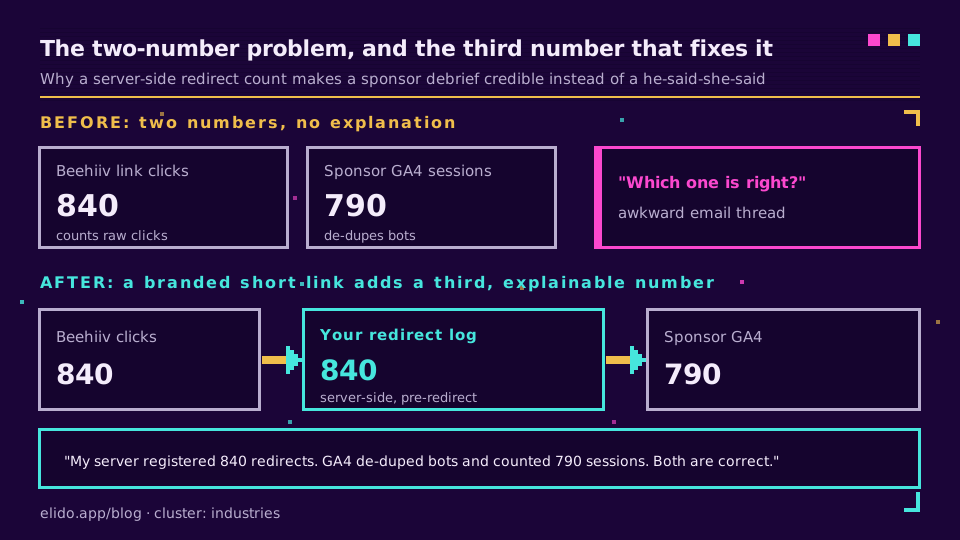
Here is a scenario that plays out regularly. A writer runs a Beehiiv newsletter. A sponsor asks for a reporting screenshot. The writer sends the Beehiiv link-click panel. The sponsor's analytics shows a different number - typically lower, because Beehiiv counts link clicks and the sponsor's GA4 counts sessions, which de-duplicates bot traffic. Two numbers, no obvious explanation, awkward email thread.
The root cause is that neither number is wrong. They measure different things. But when the discrepancy surfaces in a sponsor debrief, it looks like data inconsistency.
A branded short link in the middle resolves this structurally. The short link fires a server-side click event before the redirect. The sponsor's GA4 fires a session event on arrival. The two numbers will still differ (bots, redirect chains, GA4 sampling), but now you have a third number - your server-side redirect count - that you can explain clearly: "My server registered 840 redirects. GA4 de-duped bots and counted 790 sessions. Both are correct." That explanation is credible. "Beehiiv says 840, your GA4 says 790" without any intermediate source is not.
Referral tracking beyond signup counts
Beehiiv and Substack both have native referral programs. They count how many new subscribers a referrer brought in. What they don't track is what happens to those subscribers afterward - do they convert to paid, do they churn, do they click on sponsors?
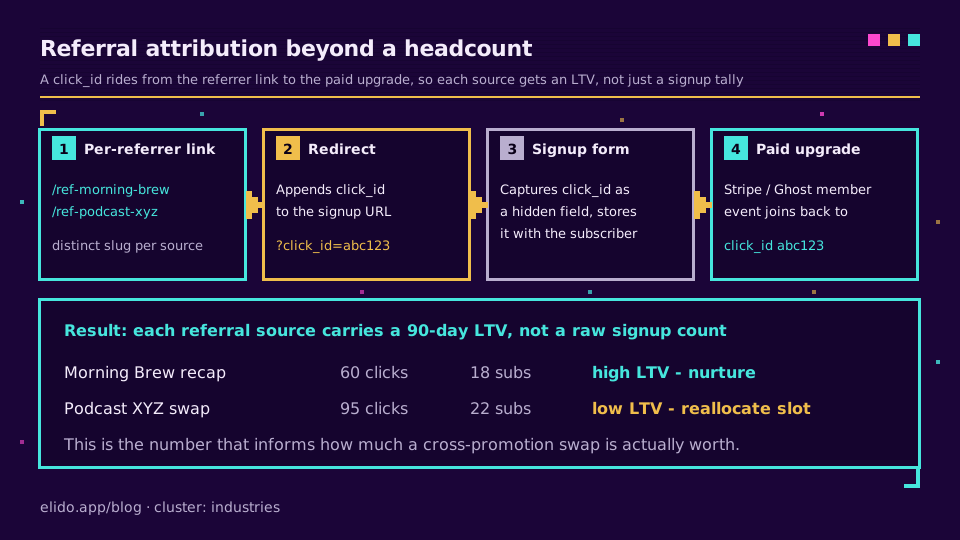
If you want to know which referral source produces your highest-LTV subscribers, you need to get the referral attribution into your CRM or billing system. The mechanism:
- Each referrer (another newsletter, a podcast, a Twitter thread) gets a distinct short link:
news.your-domain.com/ref-morning-brew,ref-podcast-xyz. - The short link appends a
click_idto the destination - your signup page. - Your signup form captures the
click_idas a hidden field and stores it alongside the subscriber record. - When the subscriber upgrades to paid (Stripe webhook, Beehiiv paid event, or Ghost member event), you join the conversion back to the originating click_id.
Now "referral from Morning Brew recap" has an LTV number attached to it, not just a headcount. That's the number that informs how much you're willing to pay for a cross-promotion swap or a newsletter ad placement.
Smart link anatomy and the click_id pattern walks through steps 2 and 3 in detail.
RSS cross-posting: the click channel you're probably not measuring
If your newsletter platform publishes an RSS feed (Ghost, Substack, and Beehiiv all do by default), some percentage of your audience is reading through an RSS reader - Feedly, NetNewsWire, Reeder, or a self-hosted instance of Miniflux. Those readers load your content from the RSS item body, not from the email delivery.
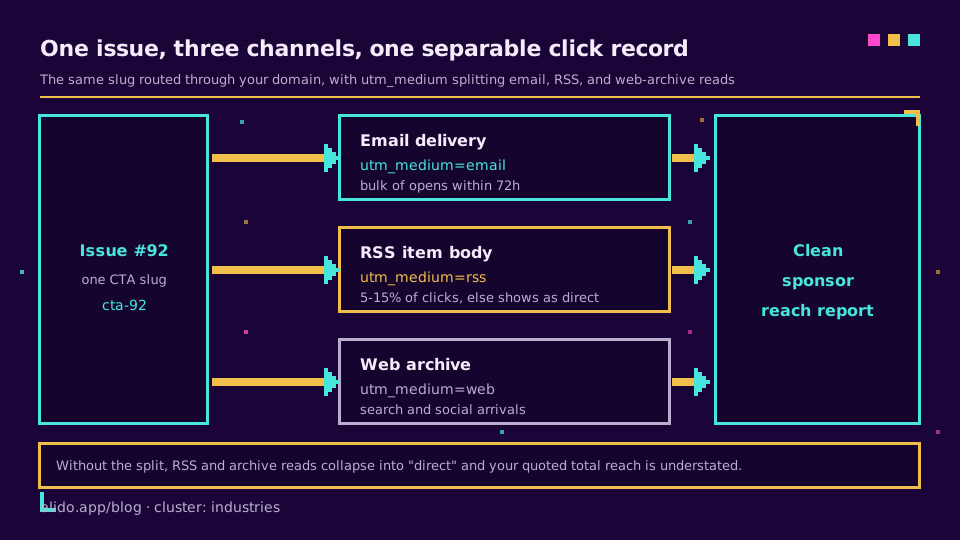
Most newsletter writers don't know what percentage of their audience is RSS-first. That's because the RSS click traffic typically appears in web analytics as direct traffic - the RSS reader doesn't send a referrer header. Links in the email carry an email click attribution; links in the RSS item carry nothing unless you instrument them separately.
The fix is not complicated: maintain two sets of short links for your primary CTAs.
news.your-domain.com/issue-92-cta-email- the link that goes in the email versionnews.your-domain.com/issue-92-cta-rss- the link that goes in the RSS<description>block
If you use a templated newsletter platform that outputs both simultaneously, you'll need to check whether it exposes separate template slots for email vs. RSS body. Ghost does; Beehiiv does not (the RSS item mirrors the email content exactly). For platforms that don't separate them, a single link with a channel=rss UTM parameter appended is the fallback - imprecise but better than nothing.
Typical RSS traffic is 5-15% of total clicks for a technical newsletter. For a newsletter whose audience skews toward developers or privacy-conscious readers, it can be higher. Knowing the number matters when you're quoting a sponsor on "total reach."
Cross-promotion swaps: calibrating which trades actually work
Cross-newsletter recommendations ("recommended by XYZ Newsletter") are one of the cheapest subscriber-acquisition channels available to independent writers. They're also one of the hardest to measure without deliberate tracking.
The typical swap: you mention Newsletter B in your issue, they mention you in theirs. You each get some new subscribers. Without tracking, you know you got new subscribers in the week of the swap, but you can't attribute them cleanly to the swap vs. your own referral program vs. organic search.
With a short link per swap partner, the attribution is clean:
- You give Newsletter B a link to your subscribe page:
news.your-domain.com/from-newsletter-b - They give you a link to their subscribe page: they handle their own tracking (or you give them a tagged link to your subscribe page and they embed it)
Clicks on from-newsletter-b convert to subscribers. You can see the conversion rate. If the swap drove 60 clicks and 18 subscribers (30%), that's a useful data point when deciding whether to run another swap with the same partner or to reallocate that recommendation slot.
Over time, a small spreadsheet of swap partners, click counts, subscriber conversion rates, and 90-day paid-conversion rates tells you which relationships are worth nurturing and which aren't. The short link analytics fundamentals post covers which of those numbers actually matter for attribution quality vs. vanity.
Web archive instrumentation
Every newsletter platform generates a web-accessible version of each issue. Substack and Ghost index these in search and many newsletters actively drive traffic to them for SEO. The problem: clicks on links inside the web archive often don't carry the email attribution that clicks in the delivered email do.
Readers who find your issue via search, via a link share on social, or via a direct URL from your website are reading the archive version. If the archive links are the same as the email links, you might see inflated email-click counts (clicks attributed to email that actually came from search or social) or you might see nothing (if the platform rewrites links inside the archive using its own tracker, which Substack does).
The clean approach: for issues where you're running a sponsor placement or an important CTA, use a short link in both contexts (email and archive) that routes through your infrastructure. The UTM medium parameter distinguishes the two:
- Email delivery:
utm_medium=email - Archive/web:
utm_medium=web
The short link is the same slug; the destination is the same URL but with a different UTM. You update the destination parameter per-render if your platform supports it, or you use separate slugs if it doesn't. Either way, you now have clean channel separation for your sponsor report.
The four anti-patterns that wreck newsletter data
1. Trusting the platform's click count for sponsor reporting. When you send the Beehiiv analytics screenshot to a sponsor, you're sending them a number they have no way to verify. If their own analytics shows a different count, you're in a he-said-she-said situation. A server-side click log on your own short-link infrastructure is your independent source-of-truth, and sponsors appreciate it.
2. Using the platform's own short domain.
link.beehiiv.com/abc123 is not your brand. A sponsor running a media kit evaluation sees that domain and has no idea who it belongs to. Switching to news.your-domain.com/acme-87 costs you 20 minutes to set up DNS and provides brand recognition every time that link surfaces in a screenshot, a shared post, or a sponsor report.
3. Attributing all issue traffic to a single UTM campaign.
Many newsletter teams use utm_campaign=newsletter everywhere. That makes their GA4 dashboard clean and their attribution completely useless. The campaign should encode the issue identifier: utm_campaign=issue-87. The source should encode the delivery channel: utm_source=email vs. utm_source=rss vs. utm_source=web. Without that granularity, the end-to-end UTM tracking the sponsor expects doesn't exist.
4. Letting the web archive run without instrumented links. Web archive views often account for a meaningful fraction of total reads, especially for newsletters with strong SEO or that get linked on social. If the archive version carries un-instrumented links, that traffic shows up in the destination site's analytics as direct or referral from the newsletter platform's domain - not attributed to your newsletter. Your "total reach" to sponsors is understated, and you're leaving attribution value on the table.
Issue-level link strategy in practice
Here is the link plan I recommend for a typical monetised issue. The setup work is about 15 minutes per issue once you have the short domain and a link-management workflow.
Before writing:
- Create the slug set for this issue number: sponsor links (
acme-{issue},xyz-{issue}), any affiliate links (aff-toolname-{issue}), the primary CTA (cta-{issue}). - Set destinations to placeholder URLs while drafting; update them before scheduling.
In the email body:
- Every sponsor placement uses the per-issue sponsor slug.
- Every affiliate link uses the per-issue affiliate slug (lets you see if the affiliate click rate varies by issue topic).
- The subscribe CTA (for forwarded-email readers who aren't subscribed) uses the
cta-{issue}slug withutm_medium=email.
In the web archive version:
- Same slugs, but if your platform allows different link text or destination params per render, update
utm_mediumtoweb. If not, use aweb-{issue}slug set. One extra column in your link spreadsheet.
After send:
- Pull click counts per slug at 24h and 72h. The 72h number is what goes in the sponsor report - most email opens happen within 72 hours.
- Log the numbers: issue number, sponsor name, clicks, downstream conversions if you have them.
- Keep a running median per sponsor so you can flag outliers ("this issue was 40% below your usual CPM - the topic was probably misaligned with their offer").
Where Elido sits
We built Elido with EU-first data residency and a redirect-latency budget that covers high-volume newsletter send events (50,000 subscribers clicking within 20 minutes of a newsletter landing is a real traffic shape). For newsletter operators specifically:
- Branded short domain in under 10 minutes. CNAME your
news.your-domain.comto Elido's edge, cert issues on first hit. No waiting, no support ticket. - Per-issue bulk link creation.
POST /v1/links/bulkaccepts a JSON array of slugs and destinations - generate all 8 links for an issue in one API call. If you prefer CSV, the dashboard import handles that too. - click_id webhook into your subscriber platform. Every redirect fires a configurable webhook payload that includes the click_id, timestamp, country, and device type. Wire it to Zapier, n8n, or a custom endpoint to join clicks into your Beehiiv or ConvertKit subscriber records without writing a data pipeline from scratch.
- EU residency for click events. All click data lives in EU-region infrastructure by default. Your GDPR privacy policy for subscriber analytics doesn't need carve-outs for US data processors.
For the conversion-forwarding piece - getting sponsor click data back from the advertiser's site into your attribution graph - forwarding conversions to Meta CAPI covers the webhook mechanics that apply equally to any conversion endpoint, not just Meta.
Related on the blog
- Track UTM campaigns end-to-end without a CDP - the full UTM attribution walkthrough from link creation to conversion
- Smart links explained: click_id, deep links, and conditional routing - the click_id passthrough pattern that connects clicks to paid conversions
- Short link analytics: what to measure and what to ignore - which metrics matter for sponsor reporting vs. which are noise
- Server-side conversion tracking without cookies - how to close the loop between a sponsor click and a signup event
- URL shorteners for publishers - the newsroom-scale version of these patterns, if you've grown past the solo operation
Try Elido
Paste a URL, get a working short link
No signup. Link lives for 30 days. Sign up to keep it forever.
Free, no signup required · 2 per day