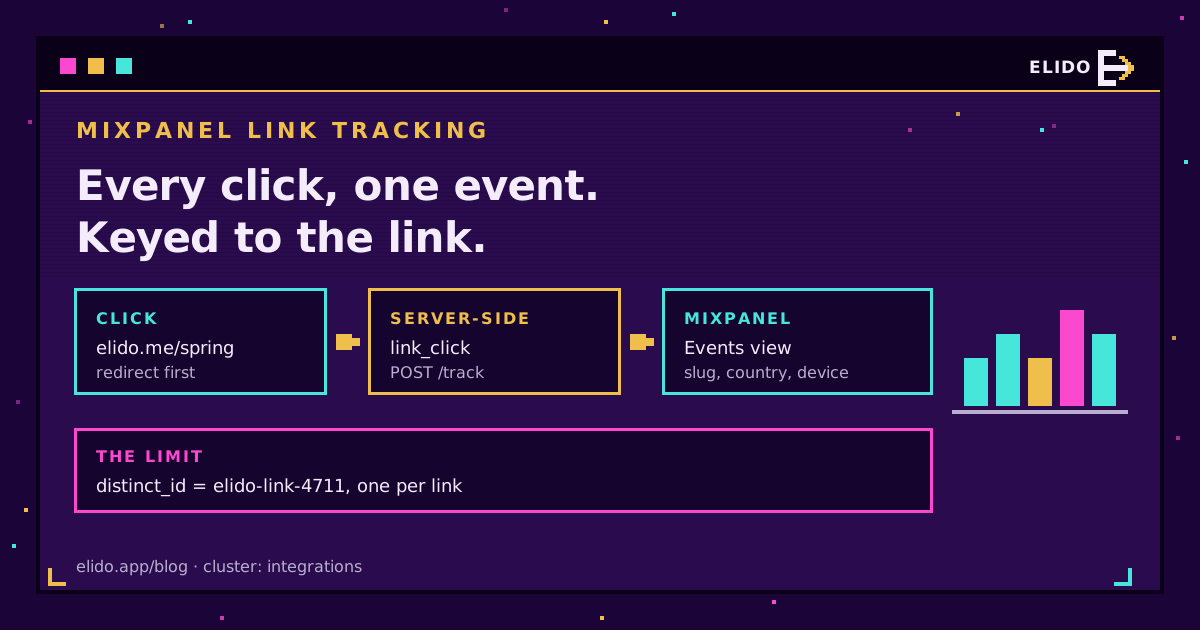
Mixpanel link tracking in Elido is server-side and one-directional: every time someone clicks one of your short links, Elido posts a link_click event to Mixpanel's track endpoint with your project token. The event carries the link slug, the link ID, the visitor's country and device, the destination they were sent to, and a timestamp. Nothing runs in the visitor's browser, so ad-blockers and consent banners don't touch it.
The catch is identity. Each event is keyed to the link, not the person, which means you can count and segment clicks in Mixpanel all day but you can't follow a clicker into your product from that event alone. I'll show you what it's good for, how to set it up, how to check it in the Events view, and the places where I'd reach for something else.
If you're still deciding what to tag before any of this, the cornerstone guide on tracking UTMs end to end is the better starting point. Mixpanel only ever sees what the link carries.
What Elido Sends to Mixpanel on Every Click
One click, one event. The forwarder builds a single-event batch and POSTs it to /track on the ingestion host that matches the integration's Data residency setting (api.mixpanel.com for US, api-eu.mixpanel.com for EU, api-in.mixpanel.com for India), authenticated by the token inside the properties, which is how Mixpanel's ingestion API expects server-side events to arrive.
Here is the full payload, trimmed only of the token value:
[
  {
    "event": "link_click",
    "properties": {
      "token": "<your project token>",
      "distinct_id": "elido-link-4711",
      "workspace_id": 12,
      "link_id": 4711,
      "slug": "spring-26",
      "country": "DE",
      "device": "mobile",
      "destination": "https://shop.example/spring?utm_source=newsletter",
      "time": 1790000000,
      "ip": "203.0.113.24"
    }
  }
]
That's everything. Short list, and deliberately so.
| Property | What it holds | What to do with it in Mixpanel |
|---|---|---|
slug / link_id | Which short link was clicked | Breakdown dimension for every report |
destination | The URL this visitor was sent to, after any routing rules | Spot which geo or device variant fired |
country, device | Resolved at the redirect | Segment without relying on Mixpanel's own guess |
ip | Visitor address | Mixpanel derives city and region, then drops it |
distinct_id | elido-link-<link_id> | Read the identity section before using Uniques |
Two details worth knowing. The destination is the resolved one, so if a smart link sends iPhones to the App Store and everyone else to your site, you'll see both URLs. And UTM tags travel only inside that destination string; there are no separate utm_source or utm_campaign properties, so if you want them as columns you'll need a derived property in Mixpanel. That's the one bit of setup I'd do on day one.
Obvious bots, the crawlers that announce themselves in their user agent, are filtered at the redirect and never reach Mixpanel.
Setting Up the Mixpanel Integration
The whole setup is two fields. To send click events to Mixpanel you need a Mixpanel project and its project token, which lives under Project Settings in Mixpanel; the token is a write key meant to be embedded, so pasting it into a vendor is normal. Don't paste the API secret, which is a different string and is not what the forwarder uses.
- In your Elido workspace, open Integrations and pick the Mixpanel card.
- Click Connect Mixpanel, paste the token into Project Token, and pick Data residency: US (the default), EU or India, matching the Data Residency value in your Mixpanel project settings. Save. Elido encrypts the token at rest and never shows it back to you in full.
- Wait a few minutes. Workspace integration settings are cached briefly on the forwarding side, so the first clicks after saving may not be sent yet.
- Click one of your own links from a phone.
There's no per-link switch. Once connected, every click in the workspace is forwarded, which suits a team that lives in Mixpanel and doesn't suit a workspace that hosts short links for twenty unrelated clients. If that's you, split the clients into separate workspaces first.
Checking the Events View Before You Trust Anything
What Mixpanel used to call Live View is now the Events view, under Data in the left navigation, and Mixpanel's debugging guide recommends it as the first stop for exactly this job. Open it, filter to link_click, then tap your short link on a phone that isn't on office Wi-Fi.
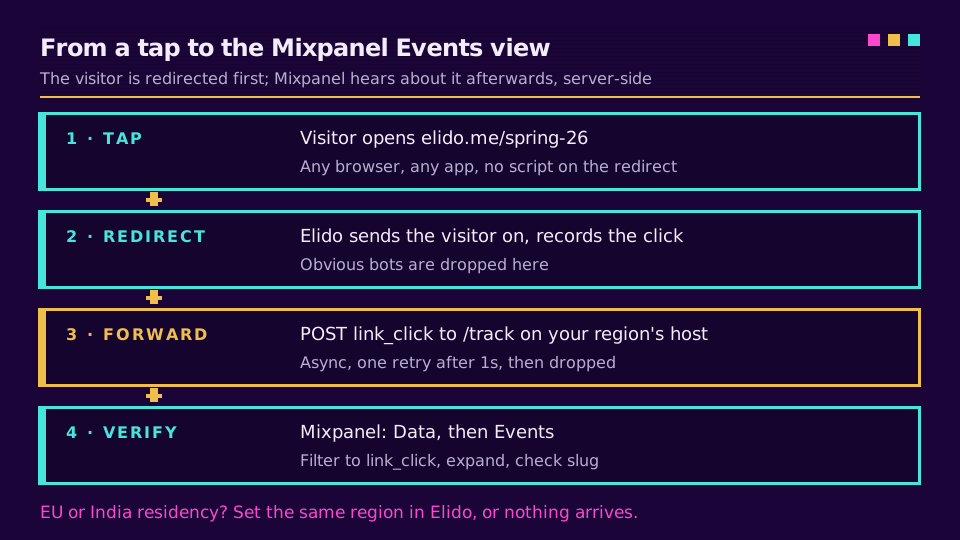
You should see the event within seconds. Expand it and check three things: slug matches the link you tapped, country is where the phone actually is, and Mixpanel's own city and region are filled in from the ip. If the city shows a data center, your test went through a VPN.
The Test connection button in the integration panel sends one link_click marked elido_test: true and shows Mixpanel's answer under the button. Useful, but not proof: Mixpanel's track endpoint accepts any token and never checks residency, so a green result with the wrong token or the wrong region still means nothing arrives in your project. The event you see arrive from a real click is the only proof I'd accept.
Why distinct_id Is Per Link, and What That Breaks
Here is the identity limit, stated plainly. distinct_id is elido-link- plus the link ID, so every click on spring-26 belongs to one synthetic Mixpanel "user".
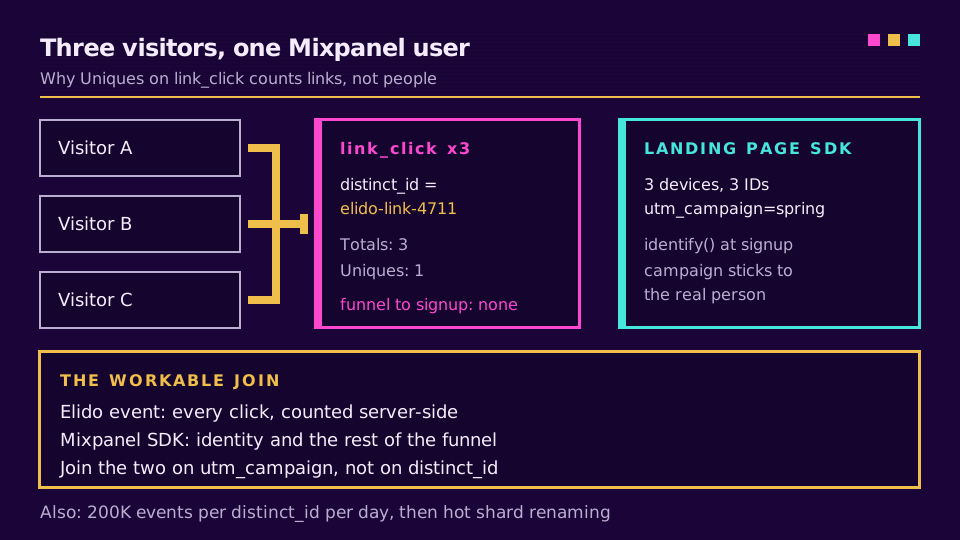
Totals work. Breakdowns by slug, country, device and destination work, and so do trends over time. Three things break:
- Uniques on link_click count links, not people. A campaign with 40,000 clicks on two links shows two unique users.
- Funnels that start at
link_clickand end at your signup event won't connect, because the signup belongs to a differentdistinct_id.
There's a third one most teams never hit. Mixpanel enforces hot shard limits of 200K events per distinct_id per day, and beyond that the events get renamed to $hotshard_events. A single link that goes properly viral can cross that line, and because the ID is per link, it's that one link that gets hit.
Why not a per-visitor ID? Because the redirect doesn't know who the visitor is, and I'd rather it didn't set a cookie on a domain the visitor never chose to visit. Honest trade-off.
Stitching Short Link Clicks to Users the Workable Way
The pattern that works uses the two halves for what each is good at. Let Elido's server-side event give you the complete click count, including clicks from people who bounce before your page loads. Let the Mixpanel SDK on your landing page handle identity.
Put UTM tags on the destination URL. Mixpanel's JavaScript library tracks UTM parameters by default and records first-touch values on the profile, so when that visitor later signs up and you call identify, the campaign sticks to a real person. The short link click and the landing page view then share a campaign value, not a user ID, and you join them on utm_campaign in a report. It's a campaign-level join, which is coarser than a user-level one, and I think it's the right level for this data anyway.
Want the click totals and the landing-page sessions side by side? Expect them to disagree; short-link clicks versus GA4 sessions explains why the same gap shows up in any analytics tool, Mixpanel included.
If this is the setup you've been missing, connect a workspace and send your next campaign through branded links.
Where It Falls Short Today
Three gaps, ranked by how likely they are to bite you.
The visitor IP travels in every event. With EU residency it goes to the EU ingestion host; on the US default it goes to a US endpoint, and the EU data residency guide covers how to weigh that. For the Mixpanel side specifically, including how to check your project's residency, see Mixpanel EU data residency.
Delivery is best effort. A failed POST gets one retry after a second, then it's dropped, and events carry no $insert_id, so a retry after a slow success can double-count.
There's no referrer or browser in the event, and clicks the redirect flags as suspicious are still forwarded. Check the click analytics dashboard when you need those.
Conversions aren't part of it. Track revenue where your user ID lives.
Related on the Blog
- Track UTMs end to end - the tagging convention the stitching pattern depends on.
- Short-link clicks vs GA4 sessions - why click counts and analytics sessions never match.
- GA4 server-side tracking via redirects - the same server-side idea, pointed at Google.
- Email click attribution for Mailchimp, Brevo and Klaviyo - forwarding clicks to the email side of the stack.
- Mixpanel vs GA4 for link analytics - which tool should hold your click data in the first place.
- Mixpanel EU data residency - the EU and India ingestion hosts and what a mismatch costs.
Frequently asked questions
How do I send click events to Mixpanel from a short link?
Paste your Mixpanel project token into the Mixpanel integration in your Elido workspace and save. From then on every click on a link in that workspace is posted server-side to Mixpanel as a link_click event, with the slug, link ID, country, device and destination as properties. No JavaScript runs on the redirect.
What event name does Elido use in Mixpanel?
The event is called link_click, and the name is fixed. Build your reports on that name. If you see older Elido pages mention a different event name, trust what arrives in your Events view, because that is the payload the forwarder actually sends.
Can Mixpanel tie a short link click to a known user?
Not from the forwarded event alone. Elido sets distinct_id to one value per link, so every click on the same link looks like the same Mixpanel user. To reach a real person, put UTM tags on the destination and let the Mixpanel SDK on your landing page pick them up, then identify the user there as you normally would.
Why are my Elido clicks not showing up in Mixpanel?
Check three things in order. The token must be the project token from the right project, not the API secret. Allow a few minutes after saving before the first click is forwarded. Finally, if your Mixpanel project uses EU or India Data Residency, set the same residency in the Elido integration: events sent to the wrong ingestion host are not ingested at all.
Does Elido forward conversions to Mixpanel too?
The Mixpanel integration covers clicks only; there is no separate conversion event in the payload today. For revenue, track the purchase from your own backend or the Mixpanel SDK with your real user ID. That is where identity lives, so the conversion lands on the right profile instead of on a per-link placeholder.
Does Mixpanel store the visitor IP address Elido sends?
According to Mixpanel's geolocation documentation, the ip property on an event is used to derive country, region and city and is then discarded before the event is stored. So you get city-level location on each click in Mixpanel, but the IP itself should not appear as a queryable property.
Try Elido
Paste a URL, get a working short link
No signup. Link lives for 30 days. Sign up to keep it forever.
Free, no signup required · 2 per day