Slack already ate your team's chat surface, so it might as well shorten your links too. The Elido Slack app does two things: it gives every member a /shorten slash command, and it routes link-event alerts into channels you pick. Install takes about 90 seconds. No webhook handler code, no Bolt SDK, no ngrok tunnel.
This post walks through the three moving parts: the slash command path, the alert routing matrix, and the HMAC signature dance that keeps random POST requests from spoofing Slack. If you want the broader webhook surface that powers these alerts, the webhooks for link events post documents every payload Elido emits. The Slack app is one of the pre-built integrations that consumes those events for you.
The /shorten slash command
A user types this in any channel:
/shorten https://blog.elido.app/post/launch-2026?utm_source=announce
Slack sends a signed POST to https://api.elido.app/integrations/slack/commands. The body is application/x-www-form-urlencoded (Slack still uses form encoding for slash commands, not JSON, which trips up everyone the first time). The relevant fields are:
team_id=T01ABCD2EF
channel_id=C01234ABCDE
user_id=U01HJKLMNOP
command=/shorten
text=https://blog.elido.app/post/launch-2026?utm_source=announce
response_url=https://hooks.slack.com/commands/T01ABCD2EF/...
Elido looks up the OAuth row by team_id, finds the workspace ID it was installed against, mints a shortlink in the workspace's default domain, and returns an ephemeral message in under 200ms at p95. The reply is ephemeral by default so the channel does not get spammed every time someone shortens a URL during a meeting.
If the caller wants a public message, they pass --public as the last token:
/shorten --public https://launch.elido.app
Three OAuth scopes are required on install: commands (so the slash command can be invoked), chat:write (so Elido can post follow-up messages with copy buttons), and incoming-webhook (so alerts can land in a channel the installer picks). Slack's Slash Commands reference lists the full set, but those three cover everything Elido does. Custom domains are honored: if your workspace has go.acme.com set up via custom domains, /shorten mints shortlinks on that host.
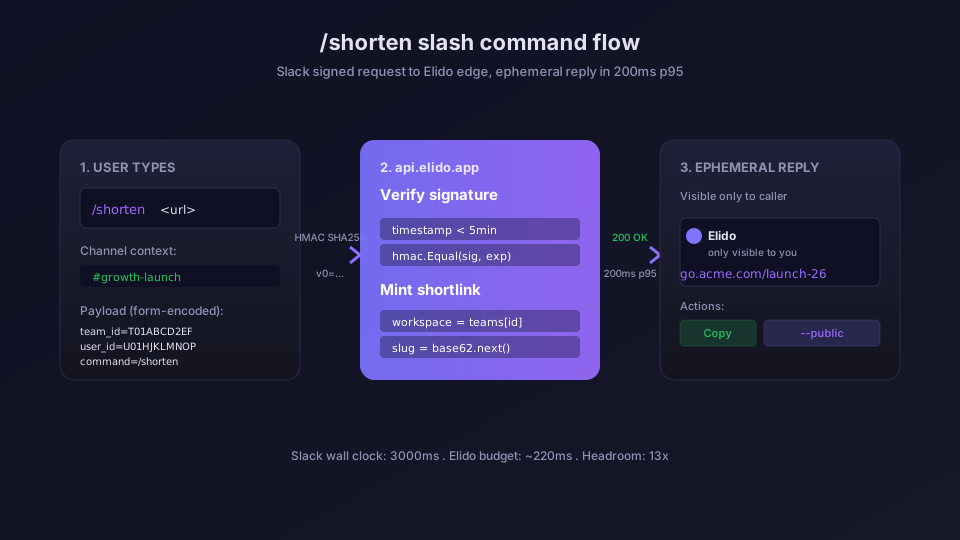
A note on latency budgets. Slack gives slash commands a 3000ms wall clock to respond. Elido answers in 180-220ms p95 across EU and US edge POPs because the slash command handler hits the same hot-path cache that the edge redirect uses. If your team is in APAC and you see anything north of 350ms, check the regional POP routing in /docs/guides/observability.
Channel alerts driven by event triggers
The other half of the Slack app is alert routing. You pick an event type, you pick a channel, you get pinged. The four event types live today:
- broken-link: target returned 4xx or 5xx the last time the link scanner crawled it
- click-threshold: clicks crossed a saved threshold (default: 100 in a rolling 5-minute window)
- scan-failure: the URL scanner flagged the target as phishing, malware, or on a public blocklist
- new-conversion: a tracked conversion fired (requires conversion tracking)
The alert payload Elido forwards into Slack uses Block Kit, because plain text in a busy channel gets ignored. Here is what a click-threshold alert looks like on the wire when Elido POSTs to the Slack incoming-webhook URL:
{
  "text": "click-threshold crossed on go.acme.com/launch",
  "blocks": [
    {
      "type": "header",
      "text": {
        "type": "plain_text",
        "text": ":chart_with_upwards_trend: Click threshold crossed"
      }
    },
    {
      "type": "section",
      "fields": [
        {
          "type": "mrkdwn",
          "text": "*Link:*\n<https://go.acme.com/launch|go.acme.com/launch>"
        },
        { "type": "mrkdwn", "text": "*Window:*\n5m" },
        { "type": "mrkdwn", "text": "*Clicks:*\n412" },
        { "type": "mrkdwn", "text": "*Threshold:*\n100" }
      ]
    },
    {
      "type": "actions",
      "elements": [
        {
          "type": "button",
          "text": { "type": "plain_text", "text": "Open dashboard" },
          "url": "https://app.elido.app/links/abc123"
        }
      ]
    }
  ]
}
A scan-failure alert looks similar but uses :rotating_light: and includes the threat category from the scanner: phishing, malware, spam, or blocklist. A broken-link alert pulls in the HTTP status code and the last-seen-good timestamp, which is the question the on-call person asks first.
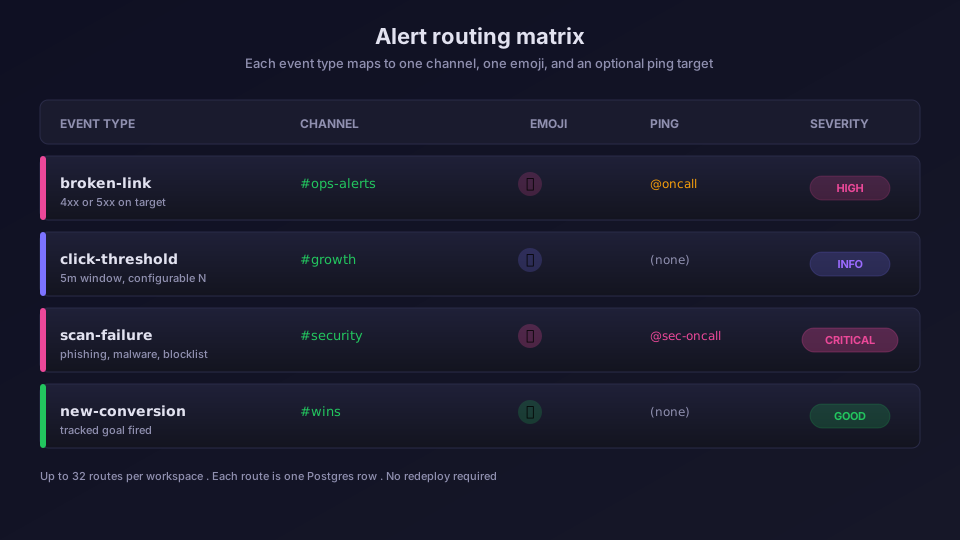
Routing is per-workspace and per-event. A typical setup for a 30-person growth team:
| Event | Channel | Emoji | Pings |
|---|---|---|---|
| broken-link | #ops-alerts | :rotating_light: | @oncall |
| click-threshold | #growth | :chart_with_upwards_trend: | (none) |
| scan-failure | #security | :rotating_light: | @sec-oncall |
| new-conversion | #wins | :tada: | (none) |
You configure these in the Slack integration settings panel. Each route is one row in Postgres - no YAML, no JSON config file, no redeploy. The same routing engine drives Linear and Pipedrive integrations, so the mental model carries over if you use both.
If you want the alerts to reach multiple destinations, mirror the same event to a generic webhook subscription and route the JSON wherever else you need it. That pattern is documented in Zapier URL shortener automation for the no-code crowd.
HMAC verification and the reinstall gotcha
Slack signs every inbound request to your slash command endpoint. The signature is HMAC SHA256 over a string Slack constructs from the version, the timestamp, and the raw request body. The recipe lives in Slack's verifying-requests guide. Elido's verifier looks roughly like this in Go:
func verifySlackSignature(secret, ts, body, sig string) error {
    // Reject anything older than 5 minutes to block replays.
    age := time.Since(parseTs(ts))
    if age > 5*time.Minute || age < -1*time.Minute {
        return errReplay
    }
    base := fmt.Sprintf("v0:%s:%s", ts, body)
    mac := hmac.New(sha256.New, []byte(secret))
    mac.Write([]byte(base))
    expected := "v0=" + hex.EncodeToString(mac.Sum(nil))
    if !hmac.Equal([]byte(expected), []byte(sig)) {
        return errBadSig
    }
    return nil
}
Three things go wrong here, in order of how often they bite:
1. Body is parsed before signing. If your HTTP framework calls r.ParseForm() before you read the raw body, the body is gone and the signature will never match. Read r.Body first, then parse. Elido's slash-command handler reads the body into a buffer and reparses, which costs one allocation and saves a week of debugging.
2. Timestamp clock skew. Slack's recommended replay window is 5 minutes. If your server clock drifts more than that (common on bare-metal without chrony), every signed request looks like a replay. Run chronyc tracking on the box and confirm Leap status: Normal.
3. Reinstall with rotated signing secret. This is the one that wakes you up. If you rotate the signing secret in the Slack app dashboard (Basic Information > Signing Secret > Regenerate), every existing OAuth install in every workspace immediately starts failing signature verification. The workspace admin must reinstall the app to get a fresh handshake. There is no silent rotation - Slack does not push the new secret to existing installs.
The blast radius depends on your distribution model. If your Slack app is single-workspace (your company's internal app), rotation is a 90-second reinstall by one admin. If your app is in the Slack public directory and 4000 workspaces installed it, you just bricked all of them. Pick rotation windows accordingly and announce in the changelog at least 48 hours ahead.
A related failure mode: installing the same Slack app into a different workspace using the same browser session. Slack will sometimes return a token tied to the wrong team if cookies are sticky. The fix is a private window or ?ignore_session=1 on the install URL. Elido's install flow at /dashboard/integrations/slack already passes that flag because we got burned in early Beta.
When the Slack bot is the wrong answer
Slack is great for human-in-the-loop alerts. It is the wrong destination for high-volume programmatic events. If you generate more than ~20 events per minute, Slack rate-limits the incoming-webhook endpoint to roughly 1 message per second per channel, and you will lose alerts. Route those to a Datadog metric or a raw webhook consumer instead, and only forward the threshold-crossing summary to Slack.
The other case where Slack is wrong: compliance audit trails. Slack messages are mutable (you can edit and delete) and the retention policy is workspace-controlled. If your auditor needs an immutable log of who shortened which link when, push the slash-command events into your warehouse via ClickHouse export and treat Slack as a notification layer only.
For growth teams routing campaign click alerts, the Slack bot covers 95% of what people ask for in /solutions/marketers. For platform teams hitting our API + SDKs, it is one of several outputs you can fan out to.
Pricing and limits
The Slack integration is available on every plan, including the free tier. There is no per-message charge - the limit is on shortlinks and clicks themselves, which you can review on the pricing page. Each workspace can wire up to 32 routing rules (event type x channel combinations), which is more than any team I've talked to has actually used.
Self-hosted Elido installs work too. You point the Slack app's request URL at your own domain, set the signing secret in the api-core env, and the rest is identical. The self-host docs cover the env vars; the observability guide covers the metric names so you can graph slash-command latency and alert delivery success rate in Grafana or Datadog.
What to do next
If you're already using Elido, open /dashboard/integrations/slack, hit Connect, pick a default channel for each event type, and ship. The install really is 90 seconds. If you're evaluating, the integrations catalog lists every connector and which tier it's available on, and the vs Bitly comparison covers how the Slack surface stacks up against incumbents (spoiler: Bitly does not ship a slash command). Branded Elido links also sidestep the security checks that block shared shorteners in Slack and Teams.
If you're building your own bot, copy the HMAC pattern above and respect the 3000ms wall clock. Slack's slash command UX punishes anything slow, and a fast-feeling bot is half of why people install one.
Frequently asked questions
How do I install the Elido Slack URL shortener bot?
Open /dashboard/integrations/slack in Elido and click Connect. You will be redirected to Slack's OAuth screen, pick the workspace, approve the scopes (commands, chat:write, incoming-webhook), and you're back in Elido in roughly 90 seconds. The install writes a token row keyed by team_id, so each workspace gets its own credentials.
Does /shorten work in private channels and DMs?
Yes. Slash commands run in whatever channel the user types them, including private channels and DMs, because Slack passes channel_id in the signed payload. Elido replies with an ephemeral message visible only to the caller, which keeps the channel quiet for one-off shortening.
How are Slack alert payloads signed?
Outbound alerts from Elido to Slack use Slack's incoming-webhook URL, which is itself a bearer-style secret tied to one channel. Inbound slash commands from Slack to Elido are verified with HMAC SHA256 over the raw request body and the X-Slack-Request-Timestamp header, following Slack's signing-secret recipe.
What happens to the Slack bot if I reinstall the OAuth app?
Reinstall mints a fresh bot token and invalidates the old one. The signing secret rotates only if you regenerate it in the Slack app dashboard, in which case every workspace that uses your distribution must reinstall. Plan rotations during low-traffic windows and announce them in #ops.
Which alert types can I route to Slack channels?
Four event types ship today: broken-link (4xx or 5xx detected on a shortlink target), click-threshold (a saved threshold crossed in a 5-minute window), scan-failure (URL scanner flagged a target as phishing or malware), and new-conversion (a tracked conversion fired). Each alert can target a different channel.
Try Elido
Paste a URL, get a working short link
No signup. Link lives for 30 days. Sign up to keep it forever.
Free, no signup required · 2 per day