A short link that will not work fails in one of four ways, and they have nothing to do with each other. Run curl -sI against it and the first line tells you which one you have:
curl -sI https://s.elido.me/ab12cd
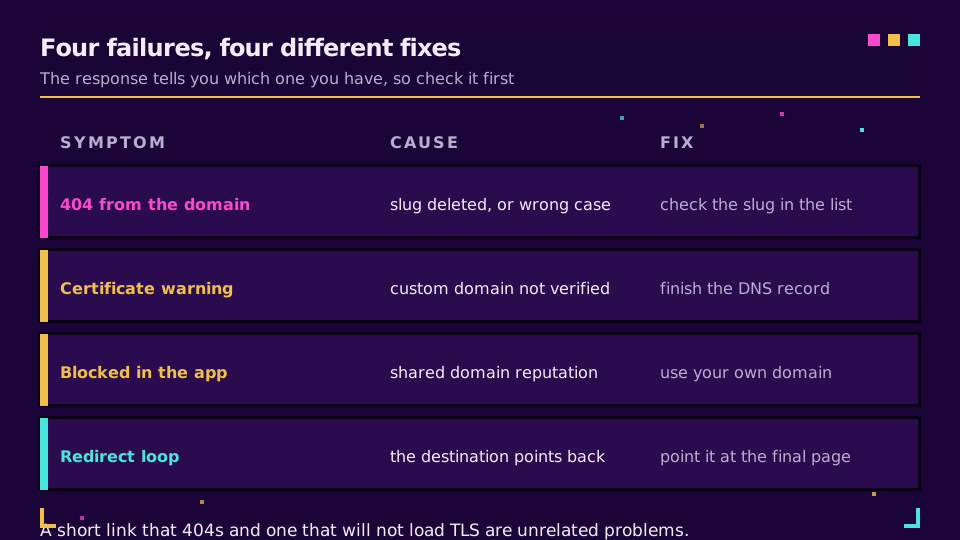
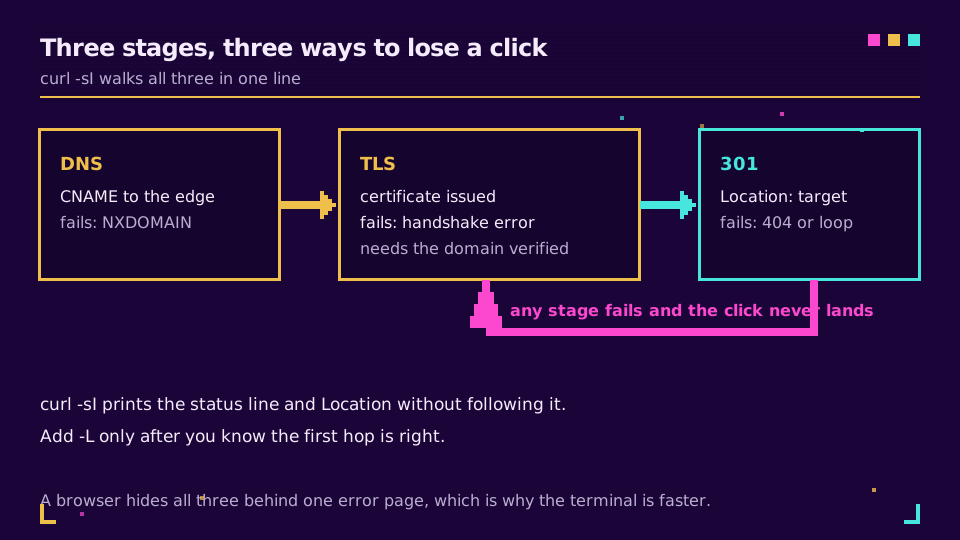
A 301 with a Location header means the link is healthy and the problem is further down. A 404 means the slug is wrong, deleted, or in the wrong case. A TLS error before any HTTP at all means the domain is not finished. And a 200 that renders a warning page means something between you and the link decided not to allow it.
Ten seconds in a terminal beats an hour of guessing, because a browser collapses all four into the same unhelpful error page. This post walks each cause and its fix.
A 404 From the Short Domain
The domain answered, so DNS and TLS are fine. The slug is the problem.
Check the case first. Most shorteners treat slugs as case-sensitive, so /Spring and /spring are two different links and only one of them exists. If the link came off a printed flyer, suspect the characters that look alike in a sans-serif font: capital I, lowercase l, and the digit 1; capital O and zero. That is the strongest argument for custom back-halves made of real words rather than random characters.
If the slug is right, check whether the link was deleted or archived, and whether it has an expiry. Link expiration and self-destructing links covers how a scheduled expiry behaves once it fires: the link stops resolving and looks exactly like a typo to whoever hit it.
One more possibility on a link that used to work: a geo or device rule that excludes the place you are testing from. Smart links route by country and device, and a rule with no fallback is a 404 for everyone outside its list.
A Certificate Warning on a Custom Domain
Nothing HTTP happened here at all. The browser refused during the TLS handshake, which means the domain is serving before its certificate exists.
Two causes cover almost every case. The DNS record was added but verification never completed, so the certificate was never issued. Or the domain was pointed with an A record when the provider asked for a CNAME, and the challenge that proves control cannot complete.
The fix is to finish the record exactly as the dashboard specifies, then wait: propagation depends on the previous TTL of whatever was there before, so a record that used to have a one-hour TTL takes up to an hour to clear. Custom domains for short links has the full DNS and TLS walkthrough, and custom domain TLS in five minutes covers the happy path.
It Works in a Browser but Not in an App
The link resolves perfectly from your terminal and gets stripped, flagged, or silently dropped in Slack, Teams, WhatsApp, or an email gateway.
That is not your link. It is the domain's reputation. Free public shortener domains are shared by everyone who uses them, including the phishing campaign that ran on one this morning, and the security vendors that feed those apps blocklist by domain rather than by slug.
There is no configuration that fixes this on a shared domain. The fix is your own domain, where the reputation is yours alone and improves rather than randomly collapsing. Why short links get blocked in Slack and Teams has the full mechanism, including what to do if your own domain does end up flagged.
Email adds a second layer: some security products rewrite every link in a message, so what the recipient clicks is the vendor's URL, not yours. Do short links hurt email deliverability covers that interaction.
If you are still on a shared domain, this is the point to move. Set up a branded domain on the free plan and re-issue the links that matter.
Redirect Loops and Long Chains
curl -sI shows one hop. Add -L and count them:
curl -sIL https://s.elido.me/ab12cd | grep -E '^HTTP|^[Ll]ocation'
Two or three lines is normal: the short link redirects, and the destination may redirect once more from http to https or from the apex to www. A wall of them means a loop, and the usual cause is a link edited to point at a page that itself redirects back to the short URL. Point the destination at the final page, not at another redirect.
Browsers stop following after a fixed number of hops and show a generic "too many redirects" page, and the site-level version of that diagnosis is in how to fix a redirect loop. The terminal is the faster route either way: curl prints every Location header on the way, so you can see exactly which two URLs are pointing at each other. The status code semantics are defined in RFC 9110, and the practical version is that a permanent redirect gets cached by the browser, so a wrong 301 keeps being wrong for that visitor even after you fix it.
Long chains are worth trimming even when they work. Every hop adds latency on a mobile connection, and each one is another place a query string can be dropped, which is how UTM parameters go missing in GA4. The 301 vs 302 explainer covers which status code belongs where, and types of redirects covers the rest of the family.
When the Destination Is the Broken Part
Sometimes the short link is fine and the page behind it is not. The redirect returns 301, the browser follows it, and the destination returns 404 because the campaign page was unpublished or its slug changed.
This is the failure mode that makes short links worth having, because the fix is a repoint rather than a reprint. Change the destination and every place the link was published starts working again, including the printed ones. Link rot prevention covers catching these before a customer does, and monitoring link redirects with Sentry and Datadog covers alerting on them at scale.
The Order to Check In
Headers first, always. curl -sI separates DNS from TLS from HTTP in one line, and each of those has its own fix that has nothing to do with the other two. Then the slug, then the destination, then the app or gateway between them.
The one check that catches most problems before anyone else sees them: open every new link once, on a phone, on mobile data rather than office wifi. It takes fifteen seconds and it catches the certificate that has not issued yet, the geo rule with no fallback, and the destination that redirects somewhere you did not expect.
Read the Cornerstone Series
This sits in the tutorials cluster. For the mechanics underneath, how do URL shorteners work covers the redirect path, and the URL shortener security checklist covers the abuse side that gets domains blocked in the first place.
Related on the Blog
Frequently asked questions
Why is my short link not working?
Run curl -sI against it and read the first line. A 404 means the slug is wrong or deleted, a TLS error means the custom domain is not finished, a 200 with a warning page means an app or gateway blocked it, and a chain of 301s means the destination points back at the link. Each has a different fix.
Why does my short link say the certificate is not valid?
The custom domain is serving the short link before its certificate exists, which happens when the DNS record was added but verification never completed, or when the domain was pointed at the redirect service by an A record instead of the CNAME the provider asked for. Finish verification and the certificate is issued automatically.
Why does my short link work in a browser but not in WhatsApp or Slack?
Because the app checks the domain against a reputation list before it lets the message through, and free shared shortener domains carry whatever reputation their worst user earned. Moving the same link to your own domain fixes it, because the reputation then belongs to you alone.
What does a redirect loop on a short link mean?
The destination eventually points back at the short link, so the browser bounces between them until it gives up. It usually happens when someone edits a link to point at a page that itself redirects to the short URL, or when two links point at each other. Set the destination to the final page.
My short link 404s but I can see it in the dashboard. What now?
Check the case and the characters: slugs are usually case-sensitive, so /Spring and /spring are different links, and a capital I next to a lowercase l is easy to mistype from print. Then check whether the link has an expiry date or a geo rule that excludes where you are testing from.
How long should a short link take to start working?
A link on a domain that is already live works immediately. A brand-new custom domain waits on DNS propagation and certificate issuance, which is usually minutes but can be up to an hour depending on the previous TTL of the record you changed.
Try Elido
Paste a URL, get a working short link
No signup. Link lives for 30 days. Sign up to keep it forever.
Free, no signup required · 2 per day