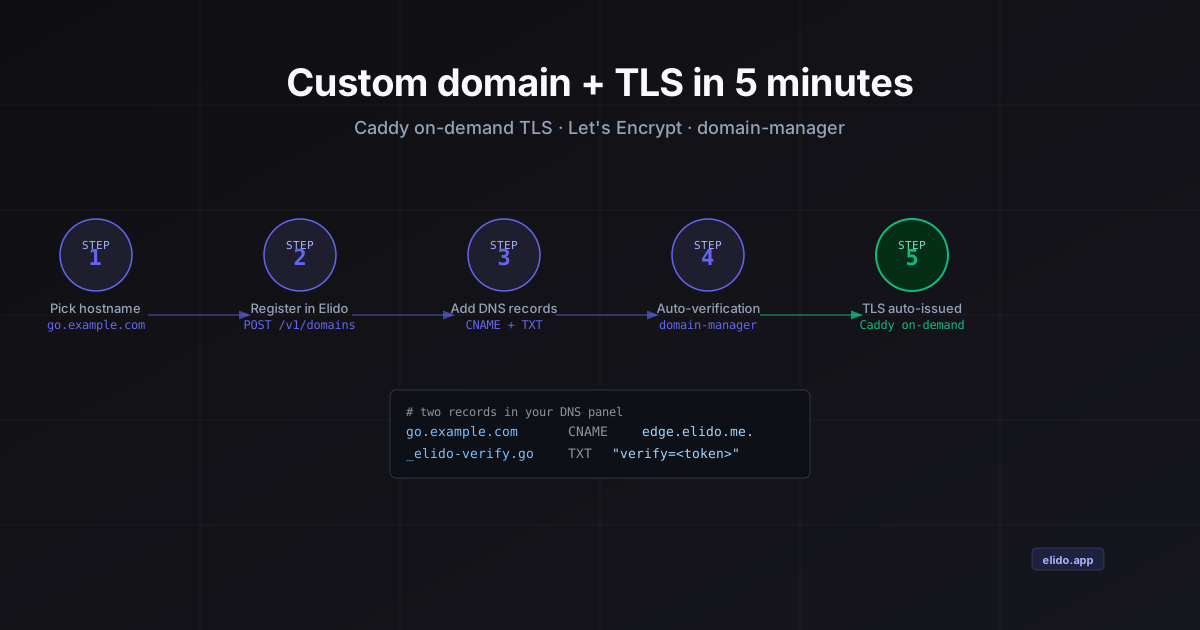
Setting up a custom domain with HTTPS takes two DNS records and about three minutes of waiting for propagation. The rest of the time is usually spent understanding what the records mean, why both are needed, and what happens after you add them. This post is the practical version: five concrete steps, the exact API call, and an explanation of the certificate machinery so you know what to do when something goes wrong.
Why TLS matters for short links specifically
A short link without HTTPS is a liability in ways that a regular URL without HTTPS is not.
The redirect response - a 301 or 302 with a Location header - is the entire payload. If the initial HTTP request travels over plain HTTP, anyone on the network path can read the destination URL before the client follows it. That means your campaign destination, your affiliate URL, or your internal tool link is visible to any network observer on the first hop. Modern browsers have started surfacing security warnings on HTTP short links precisely because of this exposure pattern.
QR codes compound the problem. A person scanning a code in a physical space has no prior relationship with the URL - the code is the entire trust signal. A browser warning on first load is the worst possible friction point: you have already paid for the print run, the event placement, or the OOH media, and a security warning on scan is the thing most likely to turn a curious person away. A valid TLS certificate under your own domain is the cheapest trust signal you can buy for a QR-based campaign.
On s.elido.me or b.elido.me, the TLS certificate belongs to Elido. The padlock is real, but the domain is not yours, which means the brand trust accrues to the platform, not to you. A custom domain under go.acme.com puts your name on the certificate.
More on the DNS and TLS fundamentals in the cornerstone post: Custom domain short links: DNS, TLS, and what runs at the edge.
Step 1: Pick the hostname
The most common choice is a short subdomain of your primary domain: go.example.com, links.example.com, or s.example.com. Short is better - the subdomain prefix appears in every link you send.
Two constraints to know before you decide:
Subdomain only, unless your DNS provider supports ALIAS records. RFC 1034 §3.6.2 prohibits CNAME records at the zone apex (example.com). If you want the bare apex to redirect, your DNS provider must support ALIAS or ANAME records (Route 53 ALIAS, Cloudflare CNAME flattening, DNSimple ALIAS). These are non-standard extensions that flatten the lookup before publishing it. Check your provider's documentation; the feature name varies and not every provider offers it.
Pick a subdomain you do not use for anything else. links.example.com redirecting through Elido must not also have an A record pointing at your web server or an existing CNAME. DNS records for the same name must be consistent.
For most teams: go.example.com or links.example.com is fine. Pick it, note it down, and move to step 2.
Step 2: Register the domain in Elido
Open Settings → Custom Domains → Add Domain in the dashboard, enter your hostname, and click Add. The response is two DNS record values: a verification token and the CNAME target. You will use both in step 3.
If you are scripting this - onboarding a new client workspace, running it as part of a deploy pipeline, or managing it with the Terraform provider - the API call is:
curl -X POST https://api.elido.app/v1/workspaces/{workspace_id}/domains \
  -H "Authorization: Bearer $ELIDO_API_TOKEN" \
  -H "Content-Type: application/json" \
  -d '{
    "hostname": "go.example.com",
    "is_wildcard": false
  }'
The response body includes a verification_token (a random hex string) and instructions containing the exact DNS record values:
{
  "domain": {
    "id": 42,
    "hostname": "go.example.com",
    "status": "pending_verification"
  },
  "instructions": {
    "txt_record": "_elido-verify.go.example.com TXT \"verify=<token>\"",
    "cname_record": "go.example.com CNAME edge.elido.me"
  }
}
Custom domains are available on paid plans. The Business plan is the entry point for custom domains; agencies managing multiple client domains under one organisation should look at the workspace model on the agency solutions page.
Step 3: Add the two DNS records
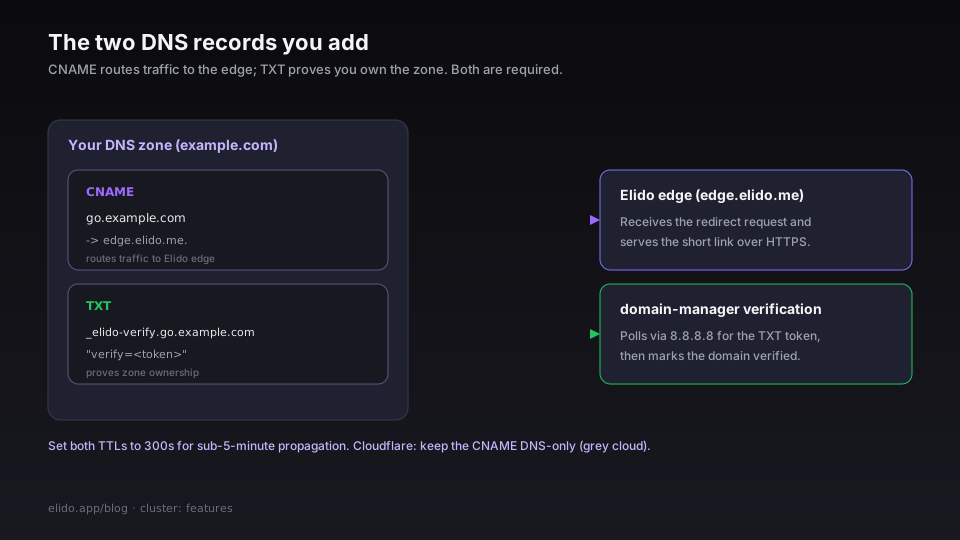
Go to your DNS provider's control panel and add both records from the instructions object. You need both - the CNAME routes traffic to Elido's edge; the TXT record proves you own the domain before Elido agrees to serve it.
For a regular subdomain:
go.example.com              CNAME  edge.elido.me.
_elido-verify.go.example.com  TXT    "verify=<your-token>"
For a wildcard domain (Business plan, covers *.go.example.com):
*.go.example.com            CNAME  edge.elido.me.
_elido-verify.go.example.com  TXT    "verify=<your-token>"
The _elido-verify prefix is a standard DNS challenge convention - it puts the ownership proof at a subdomain of the hostname being verified, so the TXT record cannot collide with the CNAME.
A few provider-specific notes:
- Cloudflare: Add both records. Leave the CNAME proxy toggle off (grey cloud, DNS-only). Cloudflare's HTTP proxy strips the original hostname before it reaches Elido's edge, which breaks the
CaddyAskauthorization check. DNS-only mode passes the request through unmodified. - AWS Route 53: Use an ALIAS record if you need the apex; for subdomains a plain CNAME is correct. Route 53 does not support CNAME at the zone apex but does support ALIAS to external targets.
- GoDaddy / Namecheap / most registrar DNS: Standard CNAME and TXT - no special configuration.
Set both records' TTL to 300 seconds (5 minutes) if your provider allows it. The default TTL for many managed zones is 3600 seconds; a shorter TTL means faster propagation confirmation and faster recovery if you need to change the records later.
Step 4: Wait for verification
Once the records are in place, domain-manager polls for them automatically using Google's public resolver (8.8.8.8) on a short interval. You do not need to click "Verify now."
The service checks two conditions before marking the domain active:
_elido-verify.go.example.comreturns a TXT record whose value isverify=<token>- this confirms you control the DNS zone.go.example.comresolves via CNAME toedge.elido.me- this confirms traffic will reach Elido's edge.
When both checks pass, status moves from pending_verification to verified. You can poll this yourself:
curl https://api.elido.app/v1/workspaces/{workspace_id}/domains/42 \
  -H "Authorization: Bearer $ELIDO_API_TOKEN"
Watch the status field. Typical propagation time for records set with a 300s TTL is under 5 minutes. Records at the default 3600s TTL can take up to an hour if you are in a part of the world where resolvers are aggressive about caching.
If verification stalls, check your records are published correctly:
dig TXT _elido-verify.go.example.com +short
dig CNAME go.example.com +short
The TXT lookup should return "verify=<your-token>". The CNAME lookup should return edge.elido.me. (trailing dot is normal).
Step 5: The first request issues the certificate automatically
Once domain-manager marks the domain verified and registers it with Caddy, you are done on your end. TLS happens without any further action.
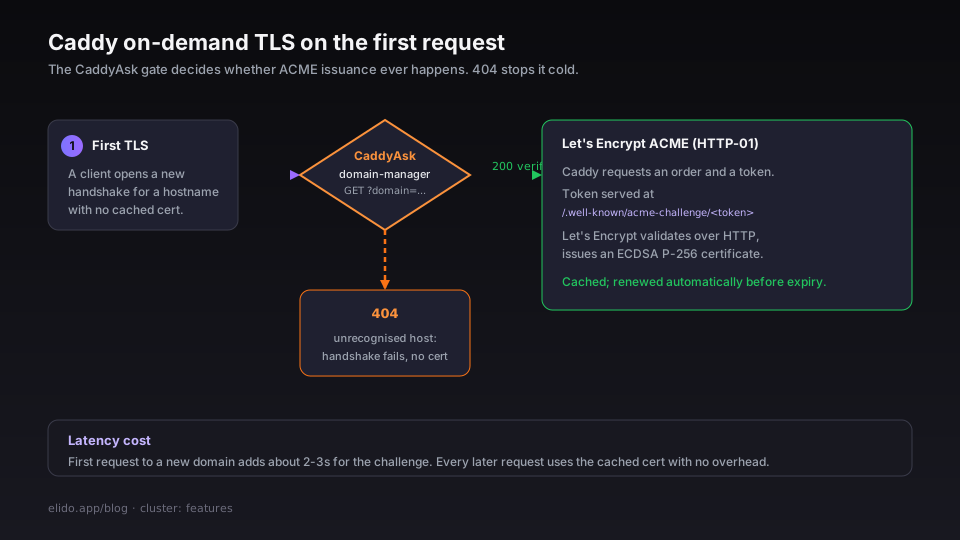
The mechanism is Caddy's on-demand TLS (ADR-0012): rather than pre-issuing certificates for every verified domain, Caddy issues the certificate on the first TLS handshake for a new hostname. Before attempting ACME issuance, Caddy calls the domain-manager CaddyAsk endpoint - a plain HTTP GET ?domain=go.example.com. If domain-manager returns 200 (the domain is in the verified or active state), Caddy proceeds. If it returns 404, the TLS handshake fails and no certificate is ever requested. This gate is the last line of defense against certificate mis-issuance for unrecognised hostnames.
When Caddy does proceed, the ACME flow (RFC 8555) runs an HTTP-01 challenge:
- Caddy requests a new order from Let's Encrypt.
- Let's Encrypt responds with a challenge token: place it at
http://go.example.com/.well-known/acme-challenge/<token>. - Caddy places the token in its in-memory HTTP handler.
- Let's Encrypt fetches the token over plain HTTP and validates it.
- The certificate is issued, stored in Caddy's certificate cache, and the original HTTPS request is served.
Steps 1-5 add roughly 2-3 seconds of latency to the very first request to a newly verified domain. Every subsequent request uses the cached certificate with no overhead. Caddy handles renewal automatically before expiry.
Elido issues ECDSA P-256 certificates for all custom domains. P-256 signatures are smaller and faster to verify than RSA-2048, which matters at the edge where TLS handshakes are in the hot path.
Common pitfalls
CAA records blocking Let's Encrypt. Certification Authority Authorization (CAA) records specify which certificate authorities are allowed to issue certificates for a domain. If your DNS zone has example.com CAA 0 issue "digicert.com", Let's Encrypt will refuse to issue a certificate for go.example.com because it inherits the apex CAA policy. The fix: add go.example.com CAA 0 issue "letsencrypt.org", or remove the apex restriction if your security policy permits it. The domain-manager status endpoint returns CAA errors in its error body.
Cloudflare proxy enabled. See step 3 - the CNAME must be DNS-only (grey cloud). Orange-cloud (proxied) mode rewrites the hostname in the request, which causes the CaddyAsk authorization to fail.
CNAME flattening at the apex. Cloudflare's CNAME flattening works for most use cases but has one subtle effect: the DNS response from Cloudflare's nameservers is an A record (the resolved IP), not a CNAME. Elido's verification check uses LookupCNAME, which succeeds when the provider's nameservers serve a synthesized CNAME response. If your DNS provider's flattening serves only the final A record and no CNAME, the CNAME check will not pass. In practice, Cloudflare's flattening includes the CNAME in the response chain for non-apex records; at the apex it depends on the provider's implementation. Test with dig CNAME go.example.com from a standard resolver before concluding there is a bug.
Wildcard TLS is HTTP-01, not DNS-01. Elido does not issue wildcard certificates (*.go.example.com) via the standard automated flow - per RFC 8555 §8.4, wildcard certificates require a DNS-01 challenge, which requires write access to the DNS zone. Elido does not control your DNS zone. The wildcard domain feature on the Business plan means one CNAME covers routing for all subdomains, but each hostname (client1.go.example.com, client2.go.example.com) gets its own certificate issued via HTTP-01 on first request - not a single wildcard cert. The operational result is the same: subdomains work automatically. The certificate store grows proportionally.
Deleting the CNAME after verification. If your DNS team removes the CNAME during a migration or cleanup, domain-manager's periodic health check will detect the missing record and move the domain to degraded status. You get a notification; there is a grace period before the domain is suspended. Restore the CNAME and the health check will move the domain back to active automatically.
How this differs from Bitly and Rebrandly
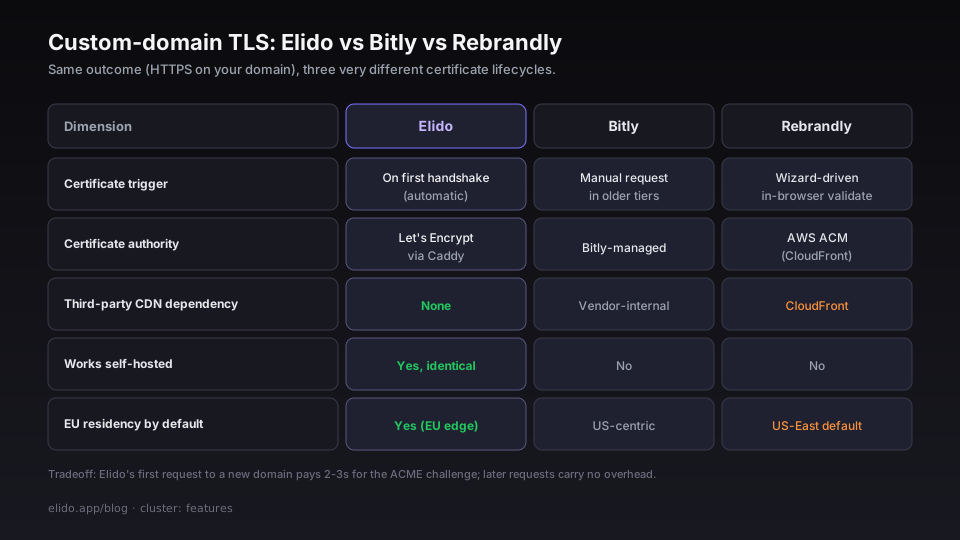
Bitly's custom domain setup requires you to upload a TLS certificate or use their managed cert flow, which involves a manual certificate request step in older plan tiers. The automation level depends on your Bitly plan; enterprise accounts get a more managed path.
Rebrandly's setup process is polished - their onboarding wizard provides provider-specific CNAME instructions and validates propagation in-browser. The underlying TLS mechanism is CloudFront-fronted: Rebrandly uses AWS CloudFront's custom domain feature, which means the certificate authority and cert lifecycle are managed by Amazon's ACM. That works well, but it means your custom domain traffic routes through AWS US-East infrastructure by default, which is relevant if you are evaluating EU data residency (see Elido vs Rebrandly for the full residency comparison).
Elido's approach - Caddy on-demand TLS with a domain-manager authorization gate - keeps the full certificate lifecycle in-house, works identically for self-hosted deployments, and does not create a dependency on any third-party CDN for certificate management. The first-request latency cost (2-3s for the ACME challenge) is the tradeoff; subsequent requests carry no overhead.
Once verification completes, create a link under your custom domain by passing domain_id in the link creation call - or select it from the domain picker in the dashboard or mobile app. The link is immediately live at https://go.example.com/<slug> with a valid certificate.
Further reading: Custom domain short links: DNS, TLS, and what runs at the edge covers the full architecture including edge cache mechanics, rate limits, and production failure modes. The full domain configuration guide including CAA recommendations and the API reference is at /docs/guides/custom-domains.
Marius Voß is DevRel + edge infra at Elido. He owns the edge-redirect and domain-manager services.
Related on the blog
Try Elido
Paste a URL, get a working short link
No signup. Link lives for 30 days. Sign up to keep it forever.
Free, no signup required · 2 per day