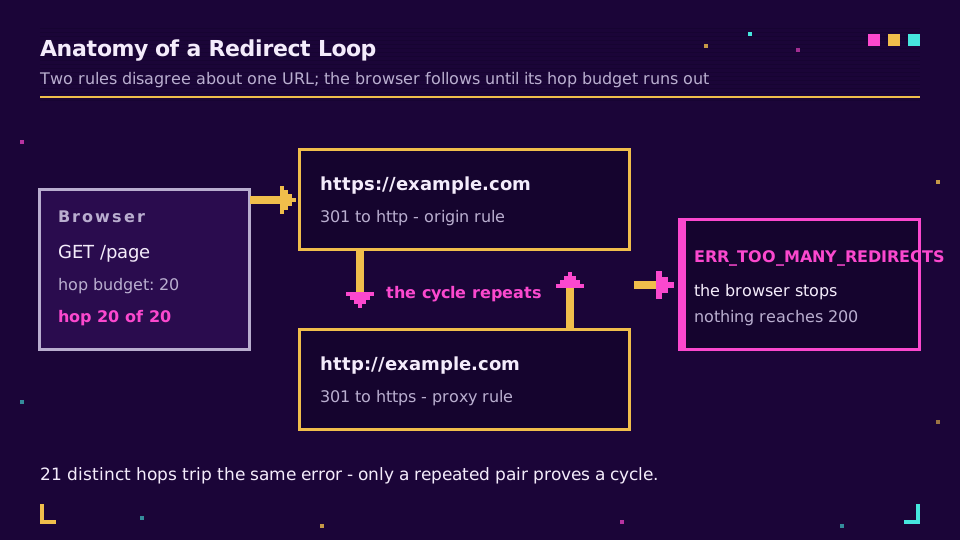
A redirect loop is a chain of HTTP redirects that never lands: URL A sends the browser to URL B, B sends it back to A, and after roughly twenty hops the browser stops trying and prints ERR_TOO_MANY_REDIRECTS. Nothing is broken on the destination page. Two rules are simply disagreeing about where the URL is supposed to live, and each one keeps undoing the other.
A looping redirect is one of the few web errors that names its own cause, as long as you look at the right thing. Not the browser, not the error page, and definitely not the cache: the redirect chain. Every hop carries a Location header, and the two addresses that keep repeating are the two rules you need to reconcile. This guide walks the diagnosis in one command, the causes behind almost every redirect cycle I've had to unpick, and the fix that doesn't quietly create a second loop somewhere else. If the redirect family itself is fuzzy, types of URL redirects is the map; this is the troubleshooting version.
What ERR_TOO_MANY_REDIRECTS Actually Means
Browsers follow redirects on your behalf, but not forever. Each client keeps a hop budget and abandons the request when it runs out: Chrome stops at 20 and doesn't let you change it, Firefox ships the same default under network.http.redirection-limit, and curl allows 50 before it complains. The standard leaves the number open. RFC 9110 says only that a client should detect and intervene in cyclical redirections, which is the spec's polite way of saying every browser needs a circuit breaker.
That distinction matters for diagnosis, because the error doesn't prove there's a cycle at all. A chain of twenty-one distinct hops with no repeats trips exactly the same message as two URLs ping-ponging forever. Both are worth fixing, but only one of them has a pair of addresses to reconcile. MDN's redirection reference covers both shapes, and the practical difference shows up the second you print the chain.
One more thing the error page hides: a permanent redirect gets cached by the browser. If the loop was built from 301 responses, visitors keep looping locally even after you fix the server, until that cache entry expires or they clear it. That single fact is why I test redirect changes with a 302 and only promote to 301 once the chain is right, a habit 301 vs 302 redirects makes the full case for.
Trace the Redirect Chain in One Command
Skip the browser. The fastest read on any redirect loop is the terminal, because curl prints each hop instead of collapsing them into one error page:
curl -sIL https://example.com | grep -E '^HTTP|^[Ll]ocation'
You get a status line and a Location header per hop, in order. Read it top to bottom and one of three patterns shows up. Two URLs alternating means a genuine cycle and the pair names both offending rules. A long march of distinct URLs means a chain someone stacked over the years, each hop legitimate on its own. And a chain that resolves fine in the terminal but still fails in a browser means the loop is cookie-driven, since curl sends no cookies by default.
That last case deserves its own check, because it's the one that makes people blame their DNS for an afternoon:
curl -sIL -c jar.txt -b jar.txt https://example.com/account | grep -E '^HTTP|^[Ll]ocation'
With a cookie jar attached, a login or consent loop reproduces on the command line, where you can actually see which endpoint keeps setting and then rejecting the session. In the browser, the equivalent view is the Network panel with "Preserve log" enabled, which keeps the earlier hops from being wiped when the page navigates. If you'd rather not open a terminal at all, our link checker traces the chain in the browser and prints the status code at every hop.
The Causes Behind Almost Every Redirect Cycle
Once you can see the chain, the cause is usually one of a small handful. The repeating pair of URLs tells you which layer to look at: the scheme flipping back and forth points at TLS termination, the hostname flipping points at a canonical-host rule, and a path that keeps gaining and losing a slash points at rewrite ordering.
https rules behind a proxy that terminates TLS
This is the most common infinite redirect on the modern web, and it appeared the moment proxies started terminating TLS in front of origins. The proxy accepts an HTTPS request from the visitor, then fetches your origin over plain HTTP. Your origin sees an insecure request, does what you told it to do, and redirects to HTTPS. The proxy serves that redirect, gets asked again, fetches the origin over HTTP again, and around it goes. Cloudflare documents this exact failure under its flexible encryption mode, and every other proxy has the same trap under a different name.
There are two clean fixes. Switch the proxy to a full encryption mode so it talks to your origin over TLS, which is the correct answer in nearly every case. Or, if the hop to the origin genuinely has to stay plain, make the origin's rule read the X-Forwarded-Proto header rather than the raw connection, so it stops redirecting requests that were already secure at the edge.
www and apex disagreeing about which host wins
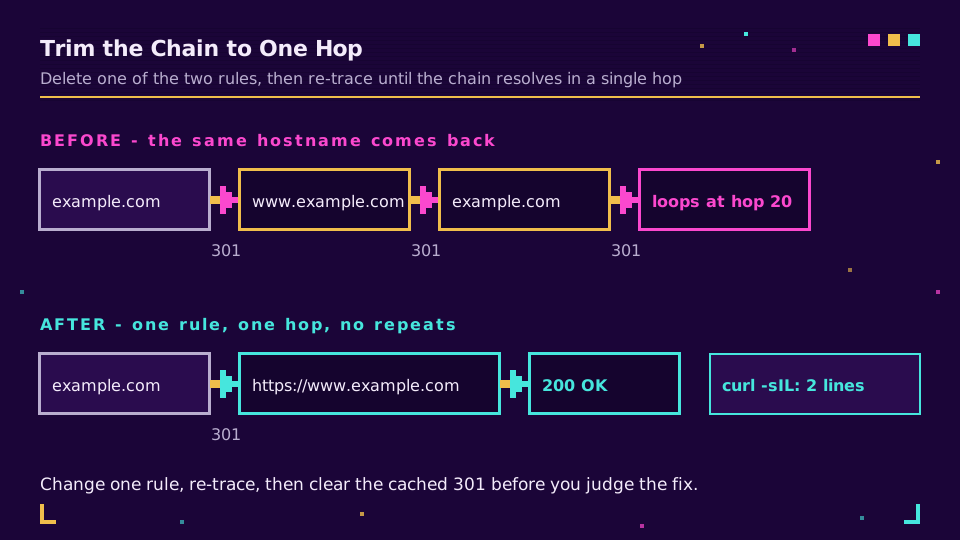
A canonical-host rule is fine. Two of them, written at different times by different people, are a loop. The classic version has a server config sending the apex to www while the application config sends www back to the apex, and both are certain they're right. You'll see it instantly in the chain: example.com to www.example.com to example.com, forever.
Pick one host, enforce it in exactly one place, and delete the other rule rather than trying to make them agree. The same applies to a trailing-slash or lowercase rewrite: when two rules normalize the same URL in opposite directions, you get a redirect cycle even though each rule is individually sane.
the CMS or app URL setting that no longer matches
Most applications store their own canonical address, and that field is a redirect rule with a friendly name. Change the domain, move to a new environment, or restore a database snapshot from another host, and the app starts redirecting every request to an address that redirects back. Because the setting lives in the database rather than in your web server config, it survives the config audit you just did, which is what makes it so annoying to find.
The signature is a chain that leaves your current hostname and never returns to it. Fix the stored address to the domain you're actually serving, then flush any application or page cache that captured the wrong one.
cookie and session loops that only affect logged-in users
Here the rules are innocent and the state is the problem. A gate redirects unauthenticated visitors to a login page, the login page redirects authenticated ones back, and a session cookie that can't be read on the target domain leaves both sides convinced the other should handle it. Consent banners cause the same shape when the redirect that sets the consent cookie is itself blocked.
The tell is the one from the previous section: a clean private window works, or curl without a cookie jar resolves normally. Check the cookie's domain and Path scope, its Secure and SameSite attributes against the scheme you're actually serving, and whether it's being set on the apex while read on www.
| What repeats in the chain | Likely cause | First thing to change |
|---|---|---|
http to https and back | Proxy terminating TLS, origin insists | Full encryption mode, or trust XFP |
Apex to www and back | Two canonical-host rules | Delete one, keep a single rule |
| A path gaining and losing a slash | Rewrite rules in the wrong order | Normalize once, before any routing |
| Leaves your hostname, never return | Stored site address is stale | Fix the app's URL setting, purge |
Redirect loops are rarely mysterious once the chain is on screen, but they do eat an afternoon when you guess instead of trace. If you'd rather own the redirect layer than argue with it, Elido's free plan gives you links whose destination is a single stored value you can repoint, with every hop logged.
Fix It Without Creating a Second Loop
The repair itself is short, and the order matters more than the syntax. Change one rule, then re-trace. Changing three and reloading tells you nothing about which one mattered, and I've watched a team spend an hour that way on a loop caused by a rule they'd already fixed on the first attempt.
- Remove or invert exactly one of the two rules the chain named, so a request can reach a
200in a single hop. - Re-run the
curl -sILtrace and confirm the chain is now one redirect at most, with no repeated hostname. - Clear the browser's cache, or test in a private window, because any
301you served earlier is still cached locally and will fake a failure that no longer exists. - Only then promote temporary redirects to permanent ones, once the shape of the chain is settled.
Two traps sit at the end of that list. HSTS is one: once a host has sent a Strict-Transport-Security header, browsers upgrade every request to HTTPS on their own, so an origin rule that also forces HTTPS is now redundant and can turn a proxy misconfiguration into a loop you can't reproduce without clearing the HSTS entry. The other is caching in front of the loop. A CDN that cached a 301 will happily keep serving it after the origin stops sending one, which is why a purge belongs in the fix rather than after it. Long chains that never loop are worth trimming in the same pass: every extra hop is another chance for a query string to be dropped, which is exactly how UTM parameters go missing in GA4, and it's part of why short links don't have to hurt SEO as long as they stay one hop deep.
When the Loop Is on a Short Link
Short links add one more place for a cycle to form, and it isn't the shortener's redirect. A short link is a single stored hop: slug in, destination out. The loop appears when the destination points back, which happens more often than it sounds. Someone edits a campaign link to point at a landing page, the landing page has an old rule redirecting to the short URL because that was the canonical share address last quarter, and now the two of them bounce. Both hops are behaving exactly as configured.
Two more variants show up in the same chain. One is a pair of short links pointing at each other after a bulk edit, usually from a spreadsheet import where the destination column held short URLs instead of final ones. The other is a custom domain still resolving to a host that redirects back to the shortener, which is a DNS leftover rather than a link problem, and custom domains for short links covers what the records should look like. In all three cases, the fix is to set the destination to the final page rather than to another redirect, which you can do without touching anything already printed or published.
Because the destination is stored rather than baked into the URL, none of this needs a reprint. That's the whole argument for managed links, and short link not working is the wider triage guide when the symptom isn't specifically a loop.
Keep the Next One From Shipping
Redirect loops are a configuration-drift bug, so the durable fixes are the boring ones. Deciding once where a redirect belongs, rather than adding one wherever you happen to have access, removes most of the drift before it starts. Keep the canonical-host decision in a single place and treat any second rule that touches scheme or hostname as a bug on sight. Trace new redirects with curl -sIL before announcing them, not after someone reports a blank page. If links matter to revenue, put a check on them: a scheduled trace that fails when the chain grows past one hop catches drift long before a customer does, and monitoring link redirects shows what that looks like wired to real alerting.
The wider habit is treating destinations as data you can audit. Link rot prevention covers the same discipline for links that quietly stop resolving, and it's the same weekly check either way. Honestly, most loops I've seen were shipped by two competent people who each fixed the same problem in a different layer, a month apart. Write the rule down once and the loop stops being possible.
Read the Cornerstone Series
This post sits in the engineering cluster. For the shape of the redirect path itself, hitting p95 under 15ms for redirects covers what a single well-behaved hop costs, and types of URL redirects covers which status code belongs where before you start stacking rules.
Related on the Blog
- Types of URL redirects: 301, 302, 307, 308, and more
- 301 vs 302 redirects: which one should short links use
- Short link not working? Diagnose it in one command
- Custom domain short links: DNS, TLS, and the edge
- Open redirect vulnerabilities and how to prevent them
- Short link monitoring with Sentry and Datadog
- How to redirect a URL: six ways, and when each is right
Frequently asked questions
What does ERR_TOO_MANY_REDIRECTS mean?
It means the browser followed one redirect after another without ever reaching a real page, hit its hop limit, and stopped. The page itself is usually fine; two redirect rules are disagreeing about where the URL belongs, so each one undoes the other. Chrome shows ERR_TOO_MANY_REDIRECTS, Firefox says the page isn't redirecting properly, and Safari reports that too many redirects occurred.
How do I fix ERR_TOO_MANY_REDIRECTS?
Trace the chain first, then remove one of the two rules fighting over the URL. Run curl -sIL on the address and read every Location header: the pair of URLs that keeps repeating tells you which rule to delete or invert. The usual culprits are an HTTPS rule running behind a proxy that terminates TLS, a www rule layered on top of another www rule, and a site-address setting that no longer matches the domain being served.
How many redirects will a browser follow before it gives up?
Around twenty, depending on the browser. Chrome stops after 20 hops and the limit is not configurable, Firefox exposes the same ceiling as network.http.redirection-limit with a default of 20, and curl follows up to 50 unless you change --max-redirs. The spec doesn't set a number: RFC 9110 only says a client should detect and intervene in cyclical redirections, so each client picks its own ceiling.
Does clearing cookies fix a redirect loop?
Sometimes, and that tells you something. If a private window loads the page fine, the loop is driven by a stale session or consent cookie, not by your server rules, and clearing it is a real fix for that visitor. If the loop happens in a fresh private window too, cookies are innocent and the problem is in a redirect rule, a proxy setting, or a CMS URL field.
Why did my site start looping after I enabled HTTPS or a CDN proxy?
Because two layers now both insist on HTTPS while one of them talks to your origin over plain HTTP. The proxy requests the origin on port 80, the origin's rule sends it back to HTTPS, the proxy answers that request the same way, and the cycle never ends. Switch the proxy's encryption mode to full so it fetches the origin over TLS, or make your rule trust the X-Forwarded-Proto header instead of the raw connection.
Can a short link cause a redirect loop?
Yes, when the destination points back at the short link, or when two links point at each other. Editing a link to a page that itself redirects to the short URL is the common version, and it survives every browser refresh because both hops are working exactly as configured. Set the destination to the final page rather than another redirect, and the loop disappears without reprinting anything.
Try Elido
Paste a URL, get a working short link
No signup. Link lives for 30 days. Sign up to keep it forever.
Free, no signup required · 2 per day