
A redirect is an HTTP response: a 301 or 302 status with a Location header telling the browser where to go instead. That is all it is on the wire, which means the question is not really how to redirect a URL, but which layer in front of your site should be the one to answer.
Six layers can do the job, and they are not interchangeable. They differ in who serves the response, whether the path and query string survive the trip, how fast you can change your mind, and how much of the setup you own. This guide walks all six, the table that picks between them, and the two checks that separate a redirect that works from one that quietly eats your campaign parameters. For the status codes themselves, types of URL redirects is the reference underneath this one.
Where a Redirect Actually Lives
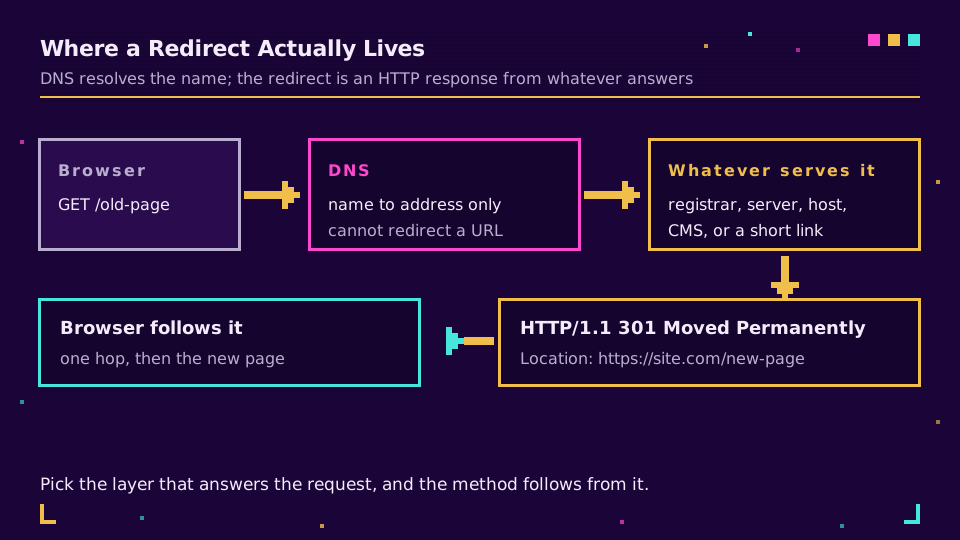
Start with the myth, because it wastes more afternoons than any other: DNS cannot redirect a URL. A DNS record maps a hostname to an address. It never sees the path, never sees the query string, and has no mechanism for saying "go somewhere else instead". An A or CNAME record points; it does not forward.
So when your registrar offers "URL forwarding", what it actually does is point the hostname at a small web server they run, which returns the HTTP redirect on your behalf. Useful, and perfectly legitimate, but it is a web server doing the work, not the DNS. Once you see it that way, the six methods below stop looking like alternatives and start looking like a single question: which machine in the request path do you want answering?
Six Places You Can Put a Redirect
Each of these ends with the same response on the wire. What differs is the setup cost, who controls it, and what happens to everything after the domain name.
domain forwarding at the registrar
The fastest option, and the bluntest. In your registrar's control panel you point the domain at a destination and pick permanent or temporary. Good for a domain you bought defensively, a rebrand where the old name should simply hand over, or a short campaign domain.
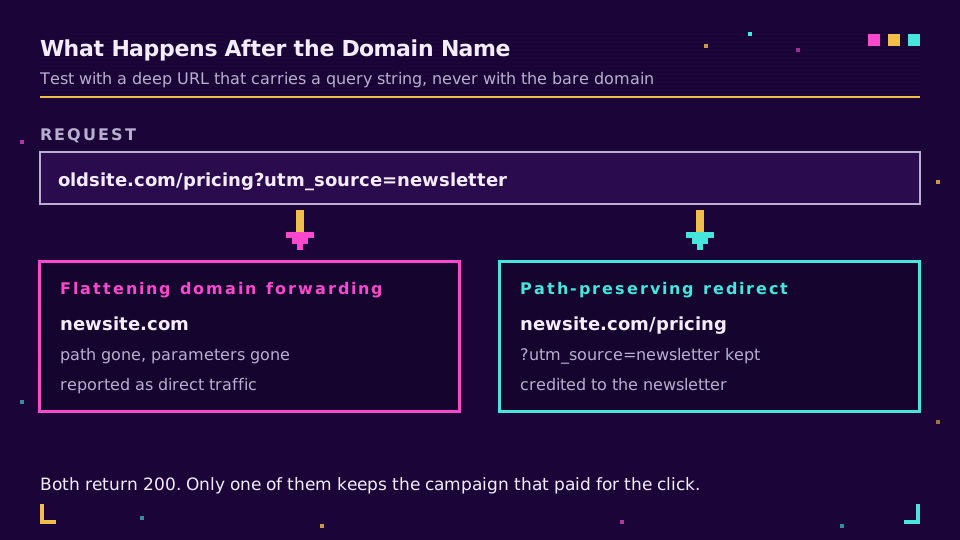
The catch is what it does to the rest of the URL: most registrar forwarding flattens every request to the single destination you configured, so a deep link arrives at the homepage. Some offer a path-preserving mode; check before you rely on it.
a rule in your web server
If you run nginx or Apache, the redirect belongs here, because you get exact control over matching and preservation. Apache's documentation on remapping URLs with rewrite rules covers the patterns, and nginx's rewrite module reference covers return 301 and rewrite ... permanent, which is the fast path for a simple move.
Server rules are the right tool for canonical-host and HTTPS enforcement, path rewrites after a restructure, and anything conditional. They are also where redirect rules quietly accumulate over the years, so treat the file as something to prune rather than only append to.
a rule at your hosting platform
Most modern hosts sit in front of the origin and offer their own redirect layer: a _redirects file, a config block, a rules UI in the dashboard. These evaluate before your application runs, which makes them fast and safe, and they are usually the best place for bulk redirects after a site migration because they live in version control with the rest of the project.
a plugin or setting in your CMS
Every serious CMS has a redirect manager, and for a content team it is the right answer: no deploy, no server access, an audit trail, and a person who understands the content making the mapping decision. The tradeoff is that the request has to reach the application before the redirect is issued, so it is slower than the layers above and it stops working if the application is down.
meta refresh or JavaScript on the page
A last resort for when you cannot touch anything server-side. The page loads, then sends the visitor onward with a <meta http-equiv="refresh"> tag or a script. It works, but it costs a full page load, it depends on the client executing it, and search engines treat it as a weaker signal than a server response. Use it when the alternative is nothing.
a managed short link
When the thing being redirected is a link you published rather than a page you own, the redirect belongs in a link manager. The destination is a stored value you can change without touching DNS, servers, or a deploy pipeline, every hop is logged, and the link keeps working after it has been printed or shared. This is the entire mechanic behind what a URL shortener is, and it is why a printed campaign link should never point straight at a landing page.
Picking One in Thirty Seconds
Most of the decision comes down to two columns: who has access, and what has to survive.
| Method | Who serves it | Path and query preserved | Best for |
|---|---|---|---|
| Registrar forwarding | Registrar's server | Often not, check first | Whole-domain handover |
| Web server rule | Your origin | Yes, if written that way | Canonical host, restructure |
| Platform rule | Host in front | Yes | Bulk migration redirects |
| CMS plugin | Your application | Yes | Content team, no deploys |
| Meta refresh or JS | The browser | Yes, but slowly | No server access at all |
| Managed short link | The link service | Yes, from the stored URL | Published and printed links |
Preserving the Path and the Query String
This is the failure that survives testing, because everybody tests the domain root and the root always works.
Point oldsite.com at newsite.com with plain domain forwarding and then follow a real inbound link, oldsite.com/pricing?utm_source=newsletter. With a flattening redirect, that visitor lands on the new homepage, the path is gone, and the campaign parameters went with it. Nothing errors. Your analytics simply show direct traffic to the homepage, and the newsletter looks like it did nothing.
Two habits prevent it. Test with a deep URL that carries a query string, never with the bare domain. And when the two sites have different structures, map the important paths explicitly instead of sending everything to the root, which is also what keeps the SEO value of the old URLs attached to the closest matching new page. The same discipline applies when you inherit somebody else's links, which is why migrating short links without breaking them is a mapping exercise before it is a technical one.
If the links in question are ones you published, keeping the destination editable is worth more than any of this: put your links on your own domain and the mapping becomes a field you change rather than a config file you deploy.
Verify It Before You Announce It
One command settles it:
curl -sIL "https://oldsite.com/pricing?utm_source=newsletter" | grep -E '^HTTP|^[Ll]ocation'
Read three things in the output. The status code should be the one you meant, 301 for permanent and 302 while things are still moving, and 301 vs 302 covers why that choice matters more than it looks. The Location header should carry the full path and the query string, not a bare domain. And there should be exactly one redirect: a chain of three or four still resolves, but each hop is latency and another chance to drop parameters, and a repeated hostname means you have built a redirect loop rather than a redirect.
If you would rather not open a terminal, our link checker traces the chain and shows the status at every hop.
What Search Engines Do With It
A redirect done properly is not an SEO risk, and the guidance is unusually clear on this. Google's documentation on redirects and Search treats a permanent server-side redirect as the strongest signal for consolidating a URL onto its replacement, ranks client-side redirects below it, and asks you to keep chains short.
The two mistakes that do cost you are collapsing many old URLs onto the homepage, which throws away the specific relevance each of them had, and leaving a chain of historical hops in place after several migrations. Neither is a reason to avoid redirects; both are reasons to audit them. That audit is the same weekly habit as link rot prevention, and if the redirect is on a custom short domain, custom domains for short links covers the DNS and certificate half of the setup.
Pick the layer that matches who owns the change, preserve the path, keep it to one hop, and a redirect stops being something you worry about.
Read the Cornerstone Series
This post sits in the tutorials cluster. For the status codes and their semantics, types of URL redirects is the map, and how URL shorteners work covers what happens when the redirect is a link rather than a page.
Related on the Blog
- Types of URL redirects: 301, 302, 307, 308, and more
- 301 vs 302 redirects: which one should short links use
- Redirect loop: how to find and fix ERR_TOO_MANY_REDIRECTS
- Custom domain short links: DNS, TLS, and the edge
- Migrate from Bitly without breaking your links
- Do URL shorteners hurt SEO? The mechanics that matter
Frequently asked questions
How do I redirect a URL to another URL?
Have whatever serves the request return a 301 or 302 with a Location header pointing at the new address. In practice that means picking a layer: domain forwarding at your registrar, a rule in your web server or hosting platform, a plugin in your CMS, or a managed short link. The method changes who serves the response and whether the path and query string survive, not what the browser receives.
Can I redirect a URL with DNS?
No, and this is the most common misunderstanding in the whole topic. DNS resolves a hostname to an address; it has no idea what path was requested and cannot return a redirect. When a registrar offers URL forwarding, it is pointing the hostname at a small web server of theirs that issues the HTTP redirect for you.
Does a redirect keep the path and the query string?
It depends entirely on which method you chose. Registrar domain forwarding often flattens everything to one destination, so /pricing?utm_source=email lands on the homepage with the parameters gone. A server or platform rule can preserve both if you write it that way, and a managed short link forwards the stored destination including its query string. Test with a deep URL, not just the domain root.
Should I use a 301 or a 302 redirect?
Use a 301 when the move is permanent and you want search engines to consolidate signals on the new URL, and a 302 while anything is still in flux. The practical trap is that browsers cache a 301 hard, so a permanent redirect you later regret keeps firing for returning visitors long after you change the server. Test with a 302, promote to 301 once the destination is settled.
How do I check that my redirect works?
Run curl -sIL against the URL and read the status lines and Location headers. You want one redirect, the right status code, and the destination you expected, with the path and query intact. A chain of several hops still works but wastes latency, and a repeated hostname means you have built a loop rather than a redirect.
Do redirects hurt SEO?
A correctly implemented redirect does not. Google treats a 301 as a strong signal to consolidate ranking on the destination, and long chains, not redirects themselves, are what cause problems. Keep it to a single hop, point old URLs at the closest matching new page rather than dumping everything on the homepage, and avoid client-side redirects when a server-side one is possible.
Try Elido
Paste a URL, get a working short link
No signup. Link lives for 30 days. Sign up to keep it forever.
Free, no signup required · 2 per day