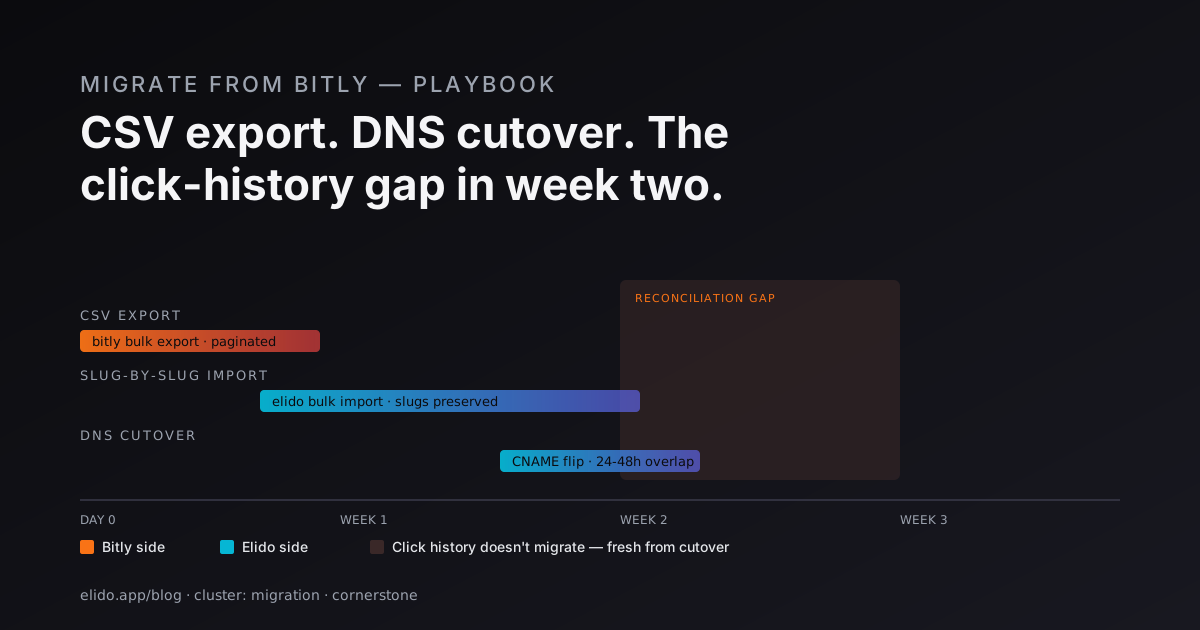
Migrating link infrastructure is high-stakes. Every short link you've ever printed, embedded in an email footer, or stamped on a QR code is now a dependency. Move clumsily and you 404 a meaningful slice of inbound traffic for weeks before anyone notices.
This guide covers moving from Bitly to Elido. It assumes you've already decided to switch - usually for EU data residency, a cleaner free-tier experience, white-label resale, or API access that doesn't require the Premium tier ($199/month annual or $300/month monthly as of May 2026). If you're still evaluating, the comparison page at /compare/vs-bitly is the better starting point.
What you actually have to migrate
Three things move; nothing else matters at the wire level.
- Active short links. The slug, the destination, optional tags and folders, and the custom domain (if any).
- Custom domain DNS. The CNAME record pointing at Bitly's edge needs to point at Elido's.
- Click history. Bitly's aggregated counters - not raw events (those aren't exportable).
Everything else - Bitly Sights dashboards, branded QR codes, deep-link configurations - is greenfield setup on Elido, not migration. Don't try to port them; rebuild once on the new stack.
Step 1: Inventory
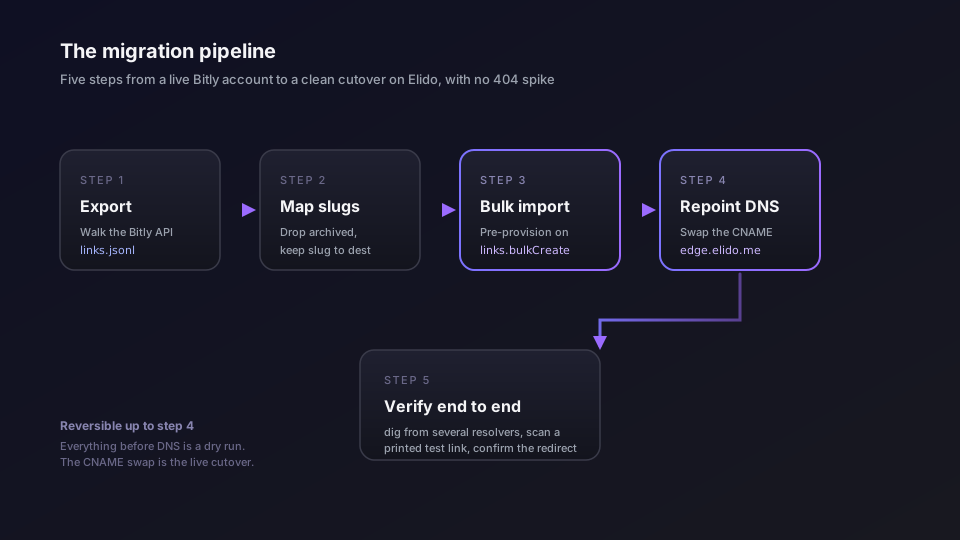
Bitly limits historical data export by tier. The dashboard CSV export works up to about 10K links; past that it times out or paginates poorly. For larger inventories, walk the API directly:
curl -H "Authorization: Bearer $BITLY_TOKEN" \
  "https://api-ssl.bitly.com/v4/groups/$GROUP_GUID/bitlinks?size=100"
Paginate via the pagination.next URL in each response. Page size 100 is the maximum. Persist results as JSONL - one link per line - so you can resume if the export stalls.
What you want from each row:
link- the full short URL (https://bit.ly/abcorhttps://yourdomain.com/abc)long_url- the destinationtags,archived,created_atlink_clicks(lifetime total) - the only click history you'll get out of Bitly
Filter out archived links unless you have a reason to keep them. Most teams find 30–50% of their inventory is dead - old campaigns, one-off shares - and the migration is the right time to drop the cruft.
Step 2: Pre-provision on Elido
Before touching DNS, get every link reserved on Elido under the same custom domain and slug.
For large inventories, use links.bulkCreate rather than per-link creates. You'll need your Elido workspace ID and the numeric domain ID (look up the domain first with workspaceDomains.list(workspaceId)):
import { ElidoApi } from "@elido/sdk";

const api = new ElidoApi({ apiKey: process.env.ELIDO_API_KEY! });

// Resolve your custom domain's numeric ID once, before the import loop
const { items: domains } = await api.workspaceDomains.list(WORKSPACE_ID);
const domain = domains.find((d) => d.hostname === "links.yourbrand.com");
if (!domain) throw new Error("Domain not registered in workspace");

// Batch the JSONL into chunks of 100 (the bulk endpoint maximum)
async function migrateChunk(rows: BitlyRow[]) {
  return api.links.bulkCreate(
    WORKSPACE_ID,
    {
      domain_id: domain.id,
      links: rows.map((row) => ({
        slug: row.slug,
        destination_url: row.long_url,
        tags: [
          ...row.tags,
          `bitly-migrated`, // tag for filtering in analytics
        ],
        title: row.title ?? undefined,
      })),
    },
    { idempotencyKey: `mig-batch-${rows[0].slug}` },
  );
}
The links.bulkCreate endpoint (POST /v1/workspaces/{workspace_id}/links/bulk) accepts up to 100 links per call and returns per-item success/failure status, so a partial failure doesn't abort the batch. For single-link imports, links.create(workspaceId, input, { idempotencyKey }) accepts the same domain_id / slug / destination_url / tags fields and an optional idempotency key so a partial script can safely resume.
A few things to know before you run the script:
- Domain registration first. The
domain_idin the request body must refer to a domain already registered in your workspace. Register and verify the domain via the custom domains flow before starting the import. The domain does not need to be live yet - you can register it under Elido before cutting over DNS. - Tier limits. Elido enforces workspace-level link limits by tier. Pre-provisioning a 100K-link inventory requires a Business plan.
- Rate limits. Bulk create is subject to the same workspace-level rate limits as individual creates. A 50K-link migration takes roughly 10 minutes if you batch at 100 links per call with modest parallelism. Keep it serial or lightly concurrent from one runner so the audit log shows a clean import block.
Step 3: Repoint the custom domain
This is the cutover. Everything before this is reversible; everything after is live.
Lower the TTL on the existing Bitly CNAME at least 24 hours before the cutover window:
links.yourbrand.com. 300 IN CNAME cname.bitly.com.
If your TTL has been 86400 for years, "lower the TTL" is a 24-hour wait, not a five-minute task. Plan around it.
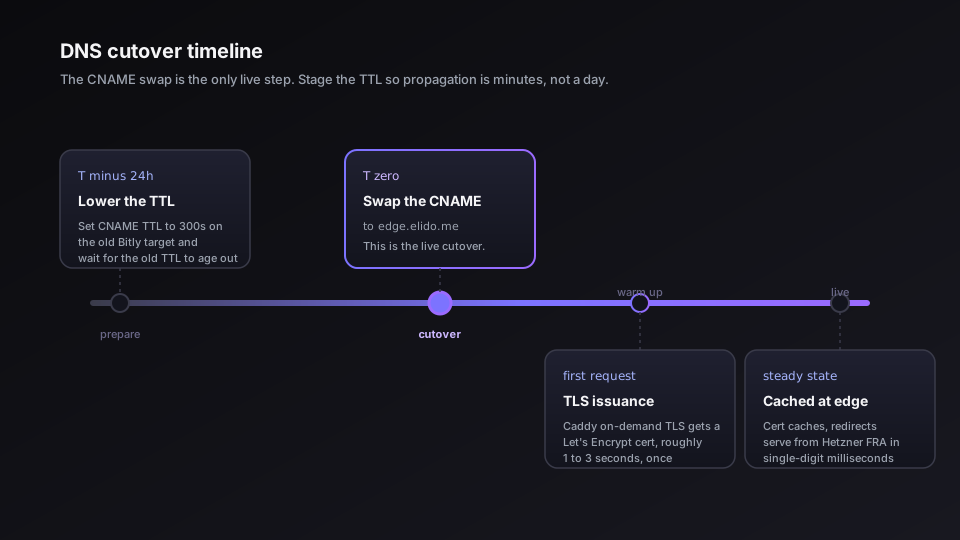
When the change window opens, swap the target:
links.yourbrand.com. 300 IN CNAME edge.elido.me.
Elido's edge uses automatic on-demand TLS. The first request after DNS propagates triggers a Let's Encrypt issuance - typically 1–3 seconds latency on that single request, then the certificate caches and subsequent requests serve from the EU-region edge in single-digit milliseconds. The cert is provisioned automatically; there is no manual cert-request step.
Verify with dig from a few networks before declaring cutover done. DNS propagation is uneven; checking only from your laptop means you've checked one resolver.
Step 4: Reconcile click history
Bitly does not export raw click events. Don't budget time for "importing your history" - it isn't possible, and any tool that promises it is reading aggregates and calling them events.
What you get is the per-link link_clicks counter from the Bitly API export. Store it somewhere you can join against your Elido link inventory - a separate column in a Metabase dataset, a tag if you want it inline. Elido starts counting from zero on cutover.
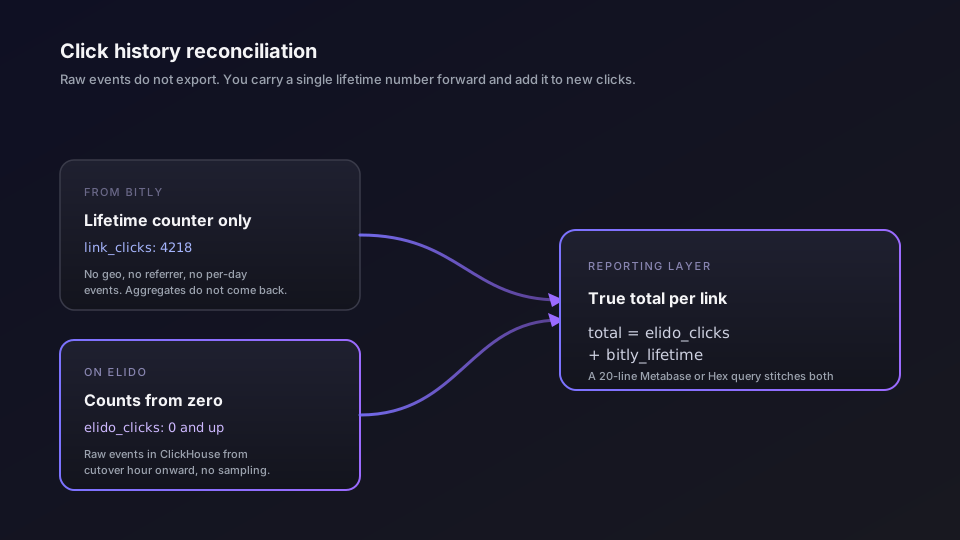
For the reporting layer, the formula is: total_clicks = elido_clicks + bitly_lifetime_clicks. The analytics API exposes Elido's click data at /v1/analytics/workspaces/{workspace_id}/timeseries; a 20-line Metabase or Hex query stitches the two numbers if you've stored the Bitly baseline.
If you need granular historical analytics - geo breakdown by month, referrer trends - they're not coming back. Rebuild the questions on Elido's raw event log going forward; the migration is the hard cutoff.
Five traps that bite in week two
1. Hardcoded bit.ly links in static assets. PDFs, printed material, embed snippets in welcome emails. These point at Bitly's domain, not your custom one. They keep working as long as you keep the Bitly account; they break the moment you cancel. Either keep a free Bitly account alive as a redirect-only graveyard, or accept the loss and don't cancel for at least a year.
2. CDN double-redirect. If you front your domain with Cloudflare in proxy mode (orange cloud), the SSL handshake to Elido may conflict with Cloudflare's Universal SSL. Set Cloudflare SSL to "Full (Strict)" and remove any Page Rules that referenced the old Bitly target. Or grey-cloud the record temporarily for the cutover window.
3. UTM truncation in the export. Bitly sometimes shows a shortened destination URL in the dashboard but stores the canonical full URL. The CSV export usually has the full URL; the dashboard view may not. If you scrape the dashboard rather than call the API, you'll lose UTMs. Always go via the API.
4. Bitly's API rate limits on the read side. The Bitly API throttles aggressively on GET /bitlinks for high-volume accounts. Naively reading 1M links sequentially can take days. Page in parallel (4–8 concurrent paginators) but watch for 429s; back off when they fire.
5. Bitly account-level vs. group-level scoping. Bitly groups are not workspaces. A single Bitly account can own multiple groups, each with its own custom domain configuration. If your team has added domains under different groups over the years, the export needs to enumerate all groups, not just the default one. Miss a group and that domain doesn't migrate.
Compliance: why most teams actually move
The migration is usually compliance-driven, not feature-driven. The pattern:
- DPO flags Bitly as a US-based sub-processor; the Data Privacy Framework reliance gets pushback in an audit.
- Procurement asks for the sub-processor list; Bitly's runs to 20+ vendors.
- BAA on the Premium plan ($300/month billed monthly, or $199/month on an annual commitment, as of May 2026 - verify the current pricing) becomes a requirement for healthcare-adjacent customers, and the tier jump is the trigger.
Elido is EU-hosted by default - click events route through the EU region, with US East and Asia-Pacific available as opt-in Business+ regions. The sub-processor list is five vendors, published at /legal/subprocessors. ISO 27001 is current; SOC 2 Type II is in audit. BAA is available on Business+. Schrems II is not a concern on the default configuration because data doesn't leave the EEA unless a workspace explicitly pins to a non-EU region.
If compliance is the driver, the migration plan should include a side-by-side data-flow diagram: where click events lived before, where they live now. That diagram is what your auditor wants at the next assessment.
Self-host as the alternative
For teams whose security posture rules out any SaaS shortener - financial services, government, healthcare - Elido ships an Apache 2.0 Helm chart. Same binaries that run in our EU region, deployed in your VPC, BYO KMS for encryption, no third-party sub-processors. The migration looks identical except step 3 (DNS) points at your in-cluster ingress instead of edge.elido.me.
The self-host runbook covers Helm install, secret bootstrapping, and auth-layer wiring; budget half a day for a fresh deploy on an existing k8s cluster.
Developer workflow after migration
Once on Elido, the API is the primary surface for any team creating more than a few links a week. The OpenAPI 3.1 spec lives at /help; the @elido/sdk package covers the API in TypeScript, and a Go SDK ships in packages/sdk-go.
For agent-driven workflows, the open-source MCP server connects Elido to Claude, Cursor, or any MCP-aware client:
{
  "mcpServers": {
    "elido": {
      "command": "npx",
      "args": ["-y", "@elido/mcp-server"],
      "env": { "ELIDO_API_KEY": "elido_pk_..." }
    }
  }
}
Read-only by default - agents can query analytics and search links without writes. Granting write scope is a deliberate per-workspace setting.
Final checklist before cutover
- Bitly API token has access to all groups, not just the default
- Inventory exported as JSONL, archived links filtered out, count cross-checked against the Bitly dashboard
- All slugs pre-provisioned on Elido under the right custom domain; script returned 100% success on a dry-run
- Custom domain registered and verified in Elido workspace before touching DNS
- DNS TTL on the existing Bitly CNAME lowered to 300s, at least 24 hours before cutover
- Cloudflare proxy mode and SSL setting verified compatible with Elido's edge
- Bitly lifetime click counts captured at cutover hour and stored for reporting
- At least one reverse-test link printed and scanned to confirm end-to-end
- Bitly account scheduled to stay active for 90 days post-cutover as insurance for hardcoded
bit.lylinks
Done right, the user-facing change is invisible. Done wrong, you spend two weeks fielding "why is bit.ly broken?" tickets from someone who doesn't realise it isn't their fault.
The technical work is straightforward. The discipline is in the staging.
Related on the blog
- Migrate from Bitly without breaking links: a failure-modes playbook
- Migrate from Rebrandly: branded domain handover without slug loss
- EU data residency for marketing tools: what your DPO actually asks
- Set up branded short links: pick a domain, ship in an afternoon
- Bitly ads on links: why they appear and how to remove them
Try Elido
Paste a URL, get a working short link
No signup. Link lives for 30 days. Sign up to keep it forever.
Free, no signup required · 2 per day