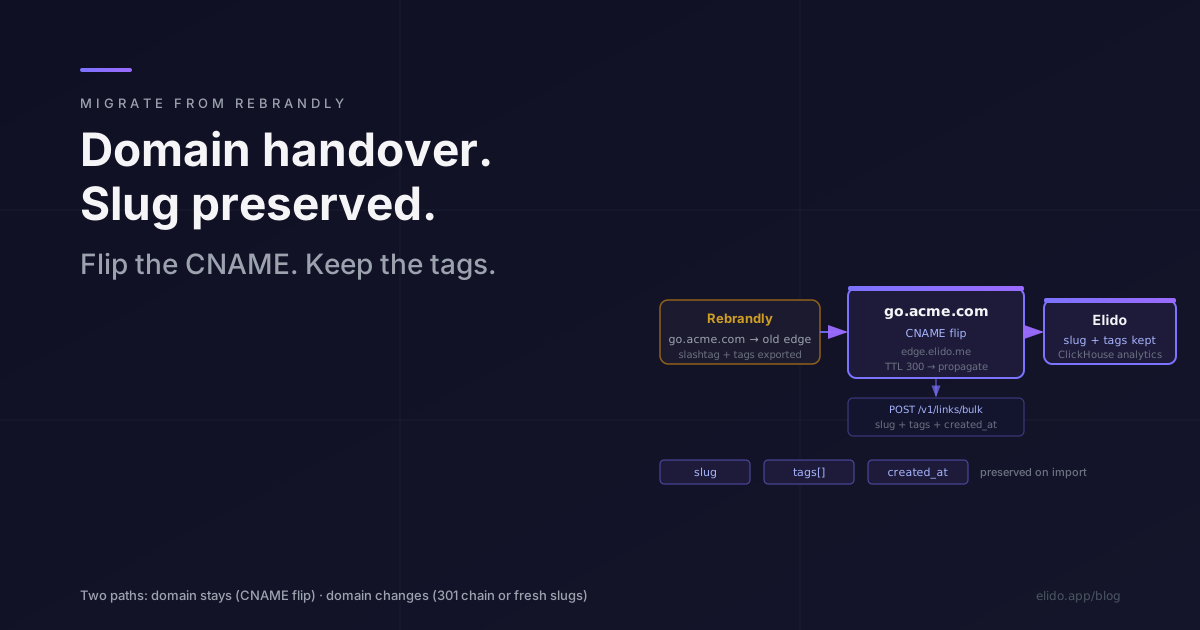
Rebrandly is built around a single central abstraction: the branded domain. Slashtags, tag taxonomies, and Traffic Routing rules all hang beneath it. That design choice is what makes Rebrandly a coherent product, and it is also what makes migrating from it different from any other shortener move.
When you leave Rebrandly, you are not primarily migrating links. You are migrating a domain. The links come along for the ride, and the details of how you preserve them depend almost entirely on what you decide to do with the domain.
This post covers the two realistic paths, the export shape from Rebrandly's API, the bulk import call to Elido, and the validation process before you announce the cutover.
TL;DR#
- Rebrandly's core abstraction is the branded domain. The migration is a DNS handover first, link preservation second.
- Path A: domain stays the same, only the shortener changes. Pre-provision slugs on Elido, flip the CNAME, done.
- Path B: domain changes too. You need either a 301 chain from the old domain (Rebrandly Pro tier) or you accept a slug change on the new domain.
- Rebrandly tags map cleanly to Elido tags. Rebrandly categories need manual mapping — they have no direct equivalent.
What you have to inventory first#
Before committing to either path, take stock of four things.
Branded domain or domains. Rebrandly's workspace model allows multiple custom domains per account. On an agency or multi-brand workspace, each domain is a separate migration unit. Enumerate them before planning cutover windows — one domain per night is a safer schedule than all of them at once.
Active links. Use the Rebrandly REST API (accessed 2026-05-12) rather than the CSV export for large inventories. The /v1/links endpoint paginates with last and limit query parameters and returns the full link object including slashtag, destination, domain name, tag set, and createdAt. The CSV export from the workspace settings panel is fine for under a few hundred links but truncates fields inconsistently on larger exports.
Integrations. If your team creates links through Zapier, Make, or Workato workflows, those connectors point at Rebrandly's API. Each needs to be repointed. That is a separate task from the link migration with its own grace window. Cover it after the DNS flip, not before.
Tag and category taxonomy. Rebrandly supports both free-form tags and structured categories. Tags map one-to-one to Elido tags. Categories do not have a direct equivalent in Elido — the closest mapping is a reserved tag prefix (cat:campaign, cat:region) that you apply during import. Agree on the mapping before you run the script, not after.
Path A: domain stays, shortener changes#
This is the cleaner migration. You keep go.acme.com (or whatever your branded short domain is). You pre-provision every slug on Elido under that same domain, then flip the CNAME. From the link-click perspective, nothing changes — the slug resolves to the same destination URL, just via a different edge.
Step 1: export from Rebrandly#
Walk the Rebrandly /v1/links API paginated. The response objects include slashtag, destination, domain.fullName, tags[], category.name, and createdAt. Persist as JSONL.
Two things to handle carefully. First, domain.fullName — if your workspace has more than one domain, filter to the one you're migrating in this pass. Second, Rebrandly pricing tiers (accessed 2026-05-12) gate how many links and how many custom domains are active per account. The API returns all links regardless; your inventory may include links on domains you've already retired. Filter those out before import.
Step 2: pre-provision on Elido#
Register the domain in your Elido workspace via the custom domains flow before touching DNS. The domain does not need to be live yet. Elido validates domain ownership through a DNS TXT record; you can complete that without disrupting the existing CNAME pointing at Rebrandly.
Once the domain is registered, bulk-import the links. The POST /v1/links/bulk endpoint accepts up to 100 links per call and returns per-item success/failure so a slug conflict on one row does not abort the batch. Pass slug explicitly to preserve the Rebrandly slashtag. Map Rebrandly tags[] directly to Elido tags[]. Pass created_at to preserve the original creation timestamp for historical sorting.
curl -X POST "https://api.elido.app/v1/links/bulk" \
  -H "Authorization: Bearer $ELIDO_API_KEY" \
  -H "Content-Type: application/json" \
  -H "Idempotency-Key: rebrandly-migration-batch-001" \
  -d '{
    "workspace_id": "ws_xxxxxxxxxxxx",
    "domain_id": "dom_xxxxxxxxxxxx",
    "links": [
      {
        "slug": "summer-promo",
        "destination_url": "https://acme.example/summer",
        "tags": ["campaign", "q3", "rebrandly-migrated"],
        "created_at": "2025-07-01T09:00:00Z"
      },
      {
        "slug": "hero-cta",
        "destination_url": "https://acme.example/hero",
        "tags": ["homepage", "rebrandly-migrated"],
        "created_at": "2025-03-15T14:30:00Z"
      }
    ]
  }'
The rebrandly-migrated tag is useful for analytics filtering after cutover — you can segment pre-migration links from links created natively on Elido and compare click trends over the first 30 days.
For the category taxonomy mapping: if summer-promo lived in a Rebrandly category named Campaigns, add cat:campaigns to the tags array. It is not semantically equivalent, but it gives you a filter in Elido's analytics and dashboard views. Document the mapping in your migration notes.
Do a dry-run first. Most teams run the bulk import against a staging workspace or with a small sample (10-20 links) before sending the full inventory. The per-item response surface in the bulk endpoint will show any slug conflicts or destination validation errors cleanly before you're committing the whole export.
Step 3: DNS cutover#
This is the moment. Before you get here, verify the following:
- All slugs in the bulk import returned success status. No failures outstanding.
- The domain is registered and TLS is provisioned in your Elido workspace. Test one slug directly against the Elido edge by temporarily adding the CNAME to a test subdomain, not your production one.
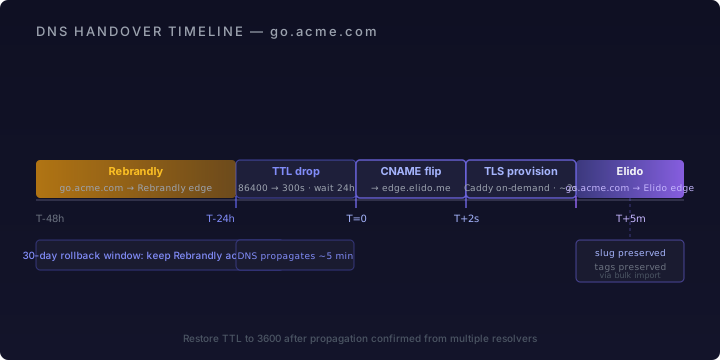
- The existing Rebrandly CNAME TTL has been lowered. Rebrandly's pricing page (accessed 2026-05-12) shows that DNS configuration is available from the Free tier up — you can lower TTL without upgrading. Lower it to 300 seconds at least 24 hours before the cutover window.
When the window opens, swap the CNAME target:
go.acme.com. 300 IN CNAME edge.elido.me.
Elido's edge runs Caddy with on-demand TLS. If TLS was already provisioned during pre-validation (recommended), the first request after DNS propagates is fast. If not, the cert provisions on first request — typically 1-3 seconds, then the certificate caches and subsequent requests serve at sub-15ms p95 from the Frankfurt edge.
Verify from multiple resolvers before closing the change window. A propagation check from your desk only confirms your resolver. Tools like dig @8.8.8.8 go.acme.com CNAME and dig @1.1.1.1 go.acme.com CNAME catch the common divergence.
Path B: domain changes too#
Some teams take the migration as an opportunity to rename the branded domain — from brand.ly (a Rebrandly-assigned subdomain) to something they fully own, or from one brand domain to another after a rebrand. Others were on Rebrandly's subdomain (yourname.rebrandly.com) and never set up a custom domain at all.
In both cases, the slug space changes. The question is whether you can install a 301 chain from the old domain to minimise link breakage.
Option B1: 301 chain from the old Rebrandly domain#
Rebrandly's Traffic Routing feature — available on Pro tier — allows you to redirect an entire domain to a new base URL. If you own the old domain and want to forward traffic, you can set up a wildcard redirect in Rebrandly that forwards all go.old-domain.com/* requests to go.new-domain.com/* with slug-matching.
RFC 7231 §6.4.2 defines 301 Moved Permanently semantics: clients that receive a 301 should update any stored URL to the new location. In practice, this means existing QR codes, printed materials, and published links will redirect correctly during the overlap period. This is the closest you can get to a transparent migration when the domain changes.
The mechanics: keep the old domain live on Rebrandly during the overlap period, configured as a pass-through redirector. Run the new domain on Elido from day one of the migration. After 30-90 days (depending on how long your published materials stay in circulation), decommission the old domain on Rebrandly.
Option B2: accept the slug change#
If the old domain was a Rebrandly-assigned subdomain (yourname.rebrandly.com) or a domain you no longer have DNS control over, there is no 301 chain available. The links on the old domain will continue to work as long as Rebrandly runs and you keep the account active. Traffic on those old links does not route through Elido; you lose analytics coverage on it.
The practical approach: migrate the link list to Elido on a new domain, create new slugs for the highest-traffic links and update the published surfaces that matter, and let the long tail of low-traffic old links decay on Rebrandly. The migrate-from-bitly-playbook covers the same decision framework for Bitly migrations — the reasoning applies here.
For teams deciding between option B1 and B2, the calculation is: how many published surfaces contain the old links, how difficult are they to update, and how long will traffic continue to arrive on those surfaces. High-traffic email archive links and printed materials argue for B1. A few internal documents argue for B2.
Rebrandly export: what you get and what you don't#
The Rebrandly API (accessed 2026-05-12) exports the following per-link fields via /v1/links:
id— Rebrandly's internal link ID (not needed on import but useful as an idempotency key)slashtag— the slug to preservedestination— the full destination URL including UTM parametersdomain.fullName— the custom domain hostnametags[]— free-form tags; map directly to Elido tagscategory.name— category label; map to a tag prefix manuallycreatedAt,updatedAt— timestamps; passcreatedAtto Elido'screated_atfieldclicks.total— lifetime click count; not importable into Elido's analytics, but worth storing in a tag (clicks-baseline-1234) or in your own data layer
What the API does not export:
- Raw click events. Rebrandly does not expose per-click records — you get aggregated counts only. The analytics clock starts fresh on Elido from cutover day.
- Traffic Routing rules. If you've configured conditional redirects on any links (device or geo routing), those rules need to be recreated manually in Elido's smart link editor after import. There is no bulk routing-rule import.
- Team member permissions. Workspace access needs to be re-invited on Elido.
The absence of raw click events is the same constraint you hit migrating from Bitly without breaking links. The pattern for handling it is the same: store the Rebrandly lifetime counter, track Elido clicks from cutover forward, and combine them when reporting historical totals.
Webhook re-wiring: Zapier, Make, Workato#
If any of your automation workflows create Rebrandly links, those need to be repointed: a CRM trigger that mints a tracking link per prospect, a Zap that shortens links from a spreadsheet, a Make scenario that generates QR codes for events.
The mechanism differs by platform. On Zapier, find every Zap that uses the Rebrandly app and replace the action step with either the Elido Zapier app (check availability at launch) or a Webhook action that calls POST /v1/links directly. On Make and Workato, the same substitution applies.
Two things to sequence correctly here. First, do not repoint the automations until after the DNS cutover and bulk import are confirmed. Running automations against Elido before pre-provisioning is complete creates duplicate slug conflicts. Second, add the Elido API key to every automation platform's credential store before the switch — do that in advance, not during the cutover window.
The grace window: for any automation that creates links at low frequency (a few per week), leaving it on Rebrandly for 1-2 weeks after the DNS cutover is low risk. The links it creates will be on the old platform but the DNS is already flipped, so those links will resolve via Elido. For high-frequency automation creating dozens of links per day, migrate it on cutover day.
For Elido's API and available SDKs, the pricing page covers plan limits, and the full API reference is at /help. TypeScript, Python, and Go SDKs are available.
Validation before announcing the cutover#
Do not announce migration completion until you've done a structured spot-check. Two things break silently: destination URLs that had encoding issues in the export, and slugs that collided during bulk import and got skipped.
Top-100 slug check#
Sort your exported link list by clicks.total descending. Take the top 100. For each one, issue a HEAD request against the Elido-hosted URL and verify the Location header matches the expected destination:
curl -s -o /dev/null -w "%{http_code} %{redirect_url}" \
  "https://go.acme.com/summer-promo"
A 301 response with the correct destination URL confirms the slug is working. A 404 means either the slug was not pre-provisioned (check the bulk import response log) or there was a case-sensitivity mismatch. Rebrandly slashtags are case-insensitive on resolution; Elido slugs are case-sensitive on creation. If your export has mixed-case slashtags, normalise to lowercase before import.
30-day rollback plan#
Keep the Rebrandly account active for 30 days after DNS cutover. The DNS change is fully reversible at any point during that window — point the CNAME back at Rebrandly's edge and the old links work again. After 30 days, if analytics show zero anomaly in redirect success rate and the slug check has passed, the Rebrandly account is safe to downgrade or cancel.
For the domain: do not transfer the domain registrar away from wherever it currently sits during the migration window. The CNAME change is the only DNS surgery required. A registrar transfer adds propagation risk that is unnecessary during cutover.
Internal migration context#
The mechanics of this migration parallel the Bitly playbook. The DNS patterns, the TTL timing, and the slug-preservation approach are the same. If you're evaluating the move at the feature level before committing to migration work, the elido-vs-rebrandly comparison covers pricing model differences and the EU residency gap in detail. The custom domains setup documentation at /features/custom-domains covers the Elido side of DNS verification and TLS provisioning. And /pricing has current tier limits — pre-provisioning a large Rebrandly inventory requires the right plan before you start importing.
Citations: Rebrandly API documentation accessed 2026-05-12. Rebrandly pricing page accessed 2026-05-12. RFC 7231 §6.4.2 — HTTP 301 Moved Permanently.