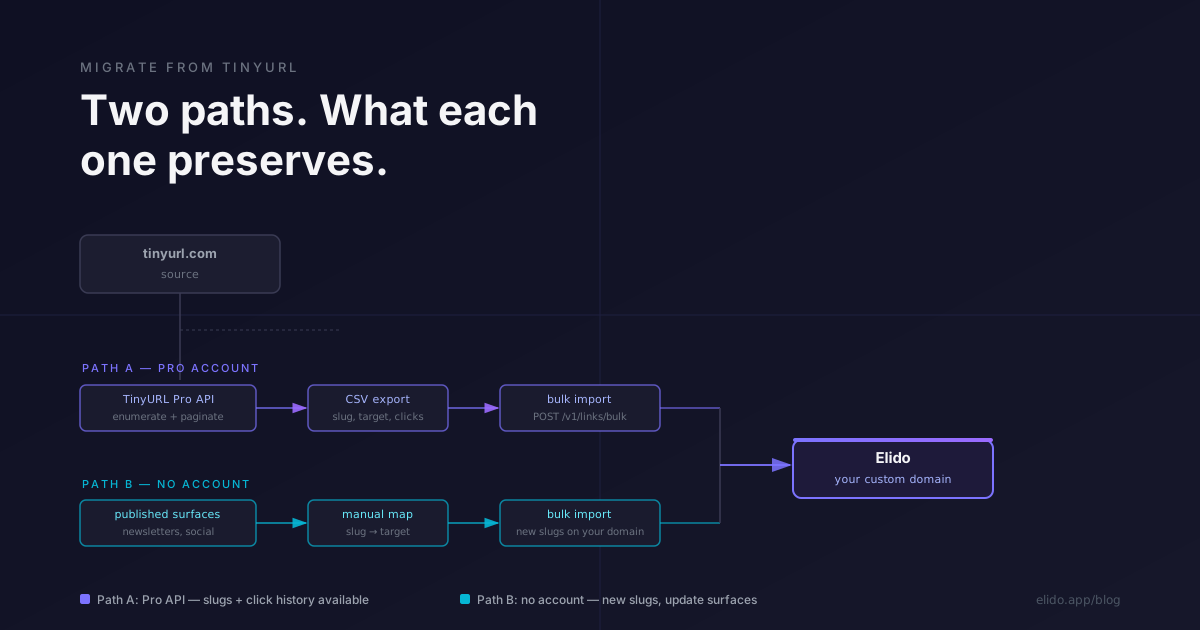
Migrating from Bitly has a well-worn playbook: API export, CSV, bulk import, DNS cutover. The Bitly migration guide covers every step. TinyURL is different - not harder, but different in a way that changes how you plan. The distinction that matters most is whether you have a TinyURL Pro account. That single variable forks the migration into two almost unrelated procedures.
This post walks both paths and is honest about what doesn't survive the move.
TL;DR
- If you have a TinyURL Pro account, the TinyURL API lets you enumerate and export your links. The CSV includes slug, destination, and 30-day click counts. You can import to Elido cleanly.
- If you do not have an account - you've just been publishing
tinyurl.com/<slug>links over the years - there is no export. You rebuild the map by scraping your own published surfaces. - In neither case can you preserve the original
tinyurl.comslugs on your Elido workspace. TinyURL owns the domain. You'll generate new slugs on your own branded short domain. - The realist's note: most TinyURL users are on the free tier. For them, the migration is less about data portability and more about updating every place a TinyURL link appears.
What makes TinyURL migration different from Bitly
The key structural difference is the domain. Bitly users on paid plans are often on a custom branded domain - links.yourbrand.com - which they own. When they migrate, the DNS record for that domain moves to point at Elido's edge, and every existing slug continues to work. The slug space is theirs.
TinyURL free-tier users are on tinyurl.com. They do not own that domain, and they cannot install a 301 redirect on it. When they leave TinyURL, the old links do not follow. They stay alive at tinyurl.com for as long as TinyURL runs, but the migrating team has no control over them, no ability to intercept clicks, and no 301 chain to put in place.
TinyURL Pro offers custom branded domains for $9.99/month (accessed 2026-05-12). If you've been on Pro and using your own domain, the migration path is much closer to the Bitly scenario: verify the domain in Elido, pre-provision the slugs, then flip the DNS CNAME. The custom domains documentation covers the Elido side of that cutover.
The other structural difference is the audit log. TinyURL has limited historical data visibility even on Pro. The elido-vs-tinyurl comparison covers the full feature gap. For migration planning, the practical implication is that you will not be able to reconstruct a complete click history. Do not budget for it.
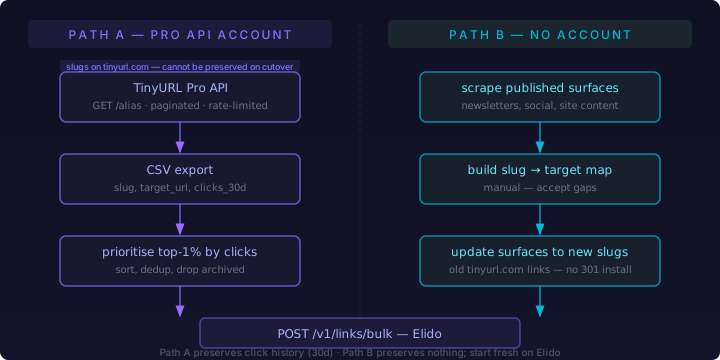
Path A: you have a TinyURL Pro account
TinyURL Pro exposes an API at https://tinyurl.com/app/dev (accessed 2026-05-12). The API supports alias creation and retrieval. Enumeration works through paginated GET calls that return your links in batches.
The steps:
- Generate your API token from the TinyURL app settings.
- Enumerate all aliases, paginating to completion. TinyURL applies rate limits; the API documentation specifies the per-minute request ceiling. Build in a backoff handler before you start - a 429 mid-export is annoying but not data-destructive if you've been writing results to disk incrementally.
- For each alias, collect the slug, the destination URL, and the 30-day click count. TinyURL's API does not expose raw click events or historical timeseries. You get an aggregate.
- Write a flat CSV: one row per link, columns
slug,target_url,clicks_30d. - Sort by
clicks_30ddescending. The top 1% of links by click volume is typically the fraction that actually matters for ongoing campaigns or published content. Prioritise those for validation and surface updates. The long tail of zero-click links can be imported but rarely needs human attention.
Once you have the CSV, the import to Elido follows the same shape as any other bulk migration. The detailed bulk import mechanics are in the Bitly migration playbook - the API shape and the TypeScript SDK call are identical; only the source data differs.
The 301 chain for branded domains on Pro
If your TinyURL Pro account used a custom branded domain, you can carry that domain to Elido. Register it in your Elido workspace via the custom domains flow, pre-provision all slugs, then change the CNAME:
short.yourbrand.com. 300 IN CNAME edge.elido.me.
HTTP 301 semantics apply here: once the CNAME resolves to Elido's edge, browsers and bots that follow the old links will receive a 301 Moved Permanently response from Elido pointing at the destination URL. No redirect hop through TinyURL is required because the slug space was on your domain, not on tinyurl.com. That is the clean path.
The relevant standard is RFC 7231 §6.4.2, which defines 301 Moved Permanently semantics. The client receiving a 301 should update any stored URL to the new location. In practice, email clients and social platforms vary in how aggressively they follow this - but the redirect itself is reliable for web browsers and for bots that respect HTTP spec.
Path B: no account, just published links
This is the more common scenario. You have a free TinyURL account or no account, and you have a collection of tinyurl.com/<slug> links published across your newsletter archive, social posts, printed materials, or documentation. You have no API access and no export mechanism. The links exist; you don't have a list of them.
The only way to build the inventory is to search your own published surfaces.
Finding the links
Work through each surface systematically:
- Email/newsletter archive: search your email platform's archive for
tinyurl.com. Most platforms let you search across sent campaigns. Export the matches. - Social media: search your Twitter/X, LinkedIn, and Facebook posts for
tinyurl.comlinks. Most platforms have an account-level content export. Download it and grep. - Website and documentation: run a site search or crawl.
grep -r "tinyurl.com" ./contenton a static site repo takes seconds. - Ad platform tracking links: check UTM-tagged links in Google Ads, Meta Ads Manager, or wherever you ran paid campaigns.
Once you have the list of tinyurl.com/<slug> values, you need the destination URLs. If you created the links yourself and can recall the destination, great. If not: follow each link manually or with a script that issues a HEAD request and reads the Location header. The TinyURL redirect itself is publicly accessible - you don't need an account to resolve where a tinyurl.com link goes.
# Bulk-resolve TinyURL destinations from a file of slugs (one per line)
while IFS= read -r slug; do
  dest=$(curl -s -o /dev/null -w "%{redirect_url}" \
    -L --max-redirs 0 "https://tinyurl.com/${slug}" 2>/dev/null || echo "FAILED")
  echo "${slug},${dest}"
done < tinyurl-slugs.txt > slug-target-map.csv
This gives you the slug,target_url CSV you need for import. Note that you'll import with new slugs on your own domain - more on that below.
Accept what you cannot recover
For links published in contexts you no longer have access to - a job's social account you left, a community post on a platform you deleted - there is no recovery path. Those old tinyurl.com links will continue to work as long as TinyURL remains operational, but you have no ability to update them, redirect them through Elido, or observe who clicks them. Accept this and move on. Migrating what you can find is the right call; perfection is not achievable here.
Importing to Elido
Regardless of which path generated your CSV, the import call is the same. The key distinction is what you put in the slug field.
If you have a custom branded domain: you can attempt to preserve slugs from Path A. Register your domain in Elido first, then pass slug explicitly in the bulk import body. The call shape:
curl -X POST "https://api.elido.app/v1/links/bulk" \
  -H "Authorization: Bearer $ELIDO_API_KEY" \
  -H "Content-Type: application/json" \
  -H "Idempotency-Key: tinyurl-migration-batch-001" \
  -d '{
    "workspace_id": "ws_xxxxxxxxxxxx",
    "domain_id": "dom_xxxxxxxxxxxx",
    "links": [
      {
        "slug": "original-slug",
        "destination_url": "https://your-long-destination.com/path",
        "tags": ["tinyurl-migrated"]
      }
    ]
  }'
The domain_id must refer to a domain already registered and verified in your workspace. The endpoint accepts up to 100 links per call and returns per-item success/failure status - a slug conflict on one row doesn't abort the batch.
If you were on tinyurl.com/ with no custom domain: omit the slug field or pass null. Elido will generate a slug for each link. Accept the slug change. The old tinyurl.com links don't redirect to your new Elido links - there is no 301 chain you can install because you don't own tinyurl.com. The only way to reconnect traffic is to update every published surface that contains the old link. That is the work.
The 301 chain limitation for unbranded links
This deserves a direct statement. The migrate-from-bitly-without-breaking-links guide covers the 301 bridge pattern in detail for Bitly migrations. That pattern assumes you control the originating domain. For tinyurl.com links, you don't.
There is no mechanism TinyURL exposes to install a redirect from an existing tinyurl.com/<slug> to a new destination. The link continues to resolve wherever it was pointed when you created it. If you want traffic that was going to tinyurl.com/abc123 to instead land on your new Elido link, you have two options:
- Update every published surface to use the new Elido link. This is the correct approach.
- Leave the TinyURL link pointing at the destination and let Elido handle only future links. Acceptable if the old links are infrequently used and not business-critical.
Option 2 is not really "migration" - it's co-existence. For most teams, the combination of both makes sense: migrate new link creation to Elido fully, update the highest-traffic old surfaces, and let the long tail of zero-click old TinyURL links decay without effort.
Validation
After import, check that what matters is actually working.
Take your sorted CSV and pull the top 50 rows by click volume (from Path A) or by publication date and audience size (from Path B, where you're estimating importance). For each of those links:
- If you were on a custom branded domain and preserved slugs: test that
https://short.yourbrand.com/<slug>resolves to the right destination. Elido's dashboard shows 200 vs. error status. Alternatively, run a curl check:
curl -s -o /dev/null -w "%{http_code} %{redirect_url}" \
  "https://short.yourbrand.com/your-slug"
-
If you generated new slugs: verify that the destination URLs in the Elido dashboard match your source CSV. The import response includes per-item success/failure; review the failures log before closing the migration.
-
Check your most recent high-open newsletter sends and recent social posts. If they contain TinyURL links and you've updated them to Elido links, verify the updated links work. If you haven't updated them - note them explicitly. Those are the links most likely to have active click traffic that you're leaving outside your analytics.
For any surface you've updated, confirm the update actually reached the published version. A newsletter rescheduled with old links, a tweet edited, a help article cached by a CDN - these are the places where the update doesn't land immediately.
The realist's note on slugs you can't keep
The blunt version: if you were on TinyURL's free tier and publishing tinyurl.com/<slug> links, you are not migrating a slug space. You are migrating a list of destination URLs and starting fresh on Elido with new slugs on your own domain. The old tinyurl.com links exist in perpetuity on TinyURL's infrastructure. You cannot update them, redirect them, or pull analytics from them after you stop using the account.
This is not a failure of the migration process. It is the correct expectation. TinyURL's free tier was never a link management platform - it was a shortening utility. Leaving it means accepting that the work you put into it is largely irretrievable from a slug-portability standpoint.
What you gain is what comes after: branded short links on a domain you own, click analytics that don't stop at a 30-day window, and a pricing model that scales without surprising you. The migration work is a one-time cost. The improved tooling is ongoing.
If you're evaluating whether Elido is the right destination before committing to the migration work, the elido-vs-tinyurl comparison covers the feature and compliance gap in detail.
Citations: TinyURL developer API documentation accessed 2026-05-12. TinyURL pricing page accessed 2026-05-12. RFC 7231 §6.4.2 - HTTP 301 Moved Permanently.
Try Elido
Paste a URL, get a working short link
No signup. Link lives for 30 days. Sign up to keep it forever.
Free, no signup required · 2 per day