
To migrate from Rebrandly you do three things: pull your links out through the Rebrandly API, recreate each slashtag on a domain you control in Elido, and then point that domain's DNS at Elido. Elido's built-in Rebrandly importer handles the first two for the fields it supports (slashtag, destination, title, tags). The DNS switch, click history and routing rules are on you.
The part that surprises people is the domain. Links on your own hostname keep their exact URLs, so the redirect a visitor gets on Monday is the same one they got on Friday. Links on rebrand.ly cannot move, because you do not own that host. This guide walks the whole journey in order: export, mapping, import, DNS cutover, keeping 301s intact, verification, rollback and what to expect from analytics. Everything about Elido below was checked against the importer source and the dashboard; everything about Rebrandly comes from its own help center and developer docs, accessed 2026-10-02.
If you are still deciding whether to leave at all, start with Elido versus Rebrandly. If you have decided, read on.
Rebrandly Migration at a Glance
The short version, for anyone who wants the plan before the detail:
- Dump every link through
GET /v1/linksinto a JSONL file you keep as an audit trail. - Decide per domain: your own hostname moves with a CNAME change, rebrand.ly links get new URLs.
- Add the target domain in Elido and publish its TXT verification record.
- Run the importer (or the bulk API) with a conflict strategy that cannot silently change slugs.
- Flip the CNAME, check from public resolvers, test your top links.
- Leave Rebrandly running for 30 days as your rollback.

For a few thousand links the import takes minutes. The calendar time goes into DNS TTLs, testing and the 30-day overlap.
Step 1: Export Your Links From Rebrandly
Rebrandly exposes links through its REST API, and that is the export path every migration tool uses, Elido's included. GET /v1/links returns up to 25 links per page, orders by createdAt and can filter by domain.id or domain.fullName. Pagination is cursor-style: pass the id of the last link you received as last, as the pagination docs describe.
Files are harder. Rebrandly's article on moving links to a new domain says there is no built-in switch; the workaround is to export through the API to CSV, edit the domain column and re-import. Its import guide covers the other direction (CSV up to 400,000 links per file, custom domain required). So use the API and keep your own copy:
# Dump every link to links.jsonl (25 per page, cursor = id of last link)
last=""
while :; do
  page=$(curl -s -H "apikey: $REBRANDLY_KEY" \
    "https://api.rebrandly.com/v1/links?limit=25&orderBy=createdAt&orderDir=asc${last:+&last=$last}")
  [ "$(echo "$page" | jq 'length')" -eq 0 ] && break
  echo "$page" | jq -c '.[]' >> links.jsonl
  last=$(echo "$page" | jq -r '.[-1].id')
done
wc -l links.jsonl
The file is your count baseline, your source of original creation dates and the input for any script-based fix-up. One trap: a Rebrandly API key sees every link in every workspace the user belongs to. An agency with five client workspaces usually wants to move one client at a time, and the list call and Elido's importer both accept a workspace filter.
I could not confirm from the public docs which click fields each plan returns, so open one real record from your own account before you promise anyone historical analytics.
Step 2: Decide What Moves - rebrand.ly Versus Your Own Domain
The path moves; the host moves only if it is yours. A link such as go.acme.com/summer can keep working unchanged after cutover. rebrand.ly/summer cannot, because that hostname belongs to Rebrandly and keeps resolving through their service for as long as your account does. Three cases cover most accounts.
- Your own domain, DNS under your control. Best case. Recreate every slashtag on the same hostname in Elido, then repoint DNS. Printed QR codes, email archives and bios keep working.
- A domain you bought through Rebrandly. Rebrandly's help article says to use Transfer out and request a code by email, and notes that most domains carry a 60-day lock after registration. Start that clock early, and treat the CNAME change as the safer first move.
- The free rebrand.ly domain. Slashtags carry over to a new host, but the old URLs stay with Rebrandly. If they are in print, keep the account active as long as those materials circulate.
For a fresh hostname, see custom domains for short links.
Step 3: Map Rebrandly Fields, Tags and Workspaces to Elido
The importer is deliberately narrow. It reads four things per Rebrandly link (slashtag, destination, title, tags), writes them to an Elido link on the domain you picked and adds one tag. Anything else needs your own script or a manual step.
| Rebrandly | Elido | Carried by importer? |
|---|---|---|
slashtag | Link slug | Yes, with your conflict strategy |
destination | Destination URL | Yes |
title | Link title (cut at 200 characters) | Yes |
| Tags | Tags | Yes, plus an added imported:rebrandly tag |
createdAt, updatedAt | Created date | No, links are dated at import time |
| Click totals and history | Analytics | No, analytics start at cutover |
| Workspaces | No equivalent mapping | Optional source filter by id, API only |
| Folders, routing rules, UTM templates | Folders, smart rules, campaigns | No, rebuild by hand |
Creation dates deserve a second look: the bulk endpoint (POST /v1/workspaces/{id}/links/bulk, 100 links per request) takes only slug, destination, title and tags, so imported links sort by import date. Dub's importer preserves them, so if original dates matter for reporting, keep the JSONL file. The dashboard form shows only the key, the target domain and the conflict strategy; the workspace filter works through the API today and a dashboard field is planned.
Elido has folders, but the importer does not create them. Carry structure over as tags in your own pre-processing (client:acme, campaign:summer), or filter on imported:rebrandly afterwards and use bulk tag edits. Rebrandly UTM templates have no clean export, so rebuild them as campaign rules and fix loose naming with a UTM naming convention. Imported links get a default Elido QR code; custom QR designs must be re-applied.
Step 4: Run the Elido Rebrandly Importer
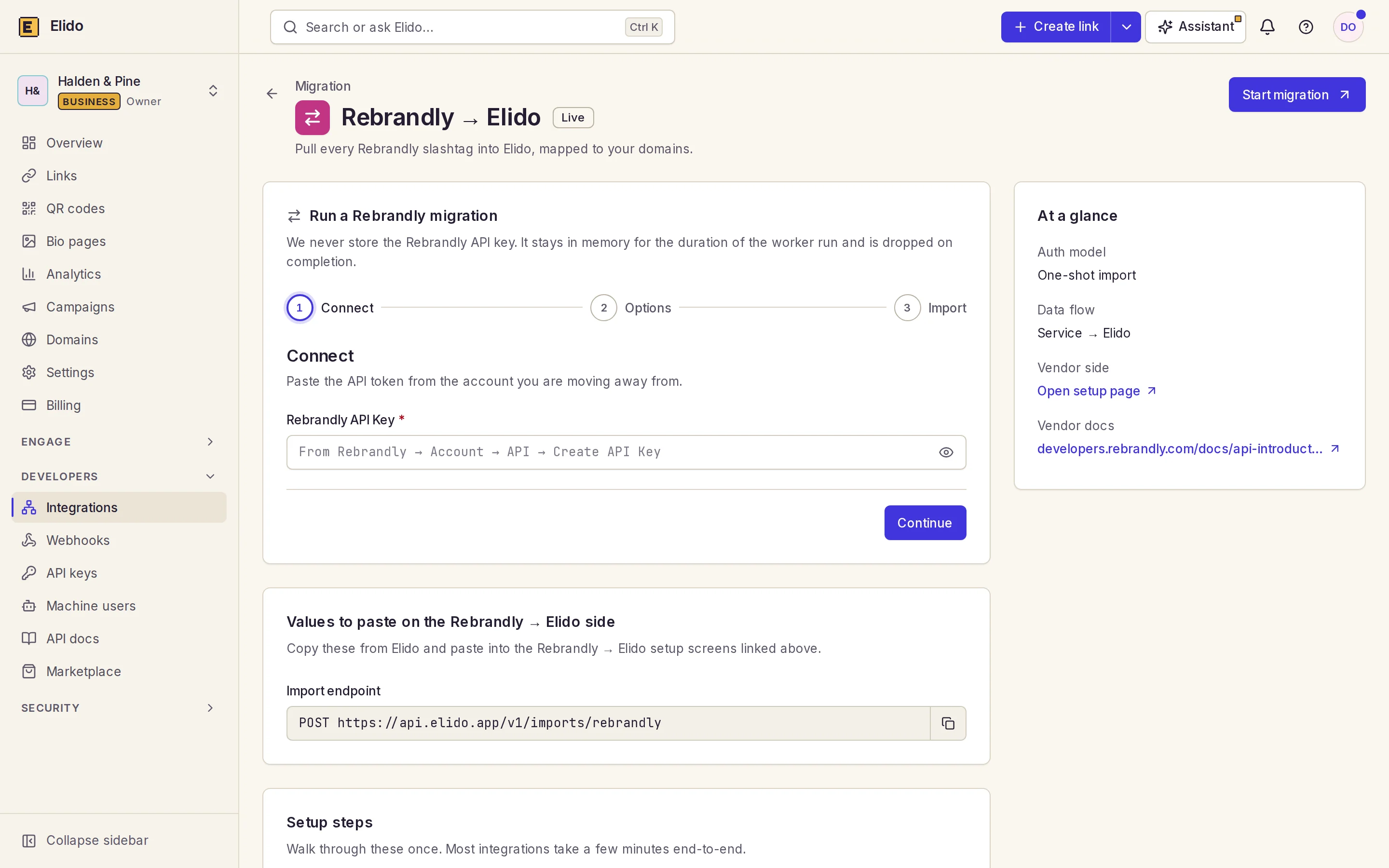
The importer lives at Integrations, then Rebrandly to Elido (also POST /v1/workspaces/{id}/imports/rebrandly). Add the target domain to your workspace first so it shows in the picker.
- Create a key in Rebrandly under Account, then API. Read access is all the job needs.
- Paste the key into the form. Elido keeps it in process memory for the run and drops it afterwards; it is not written to the job record.
- Choose the target domain. Every link the key can see lands on this one domain, with no per-domain filter, so an account with several Rebrandly domains and overlapping slashtags will collide.
- Choose a conflict strategy, then start the job. The page polls every two seconds and you can close it.
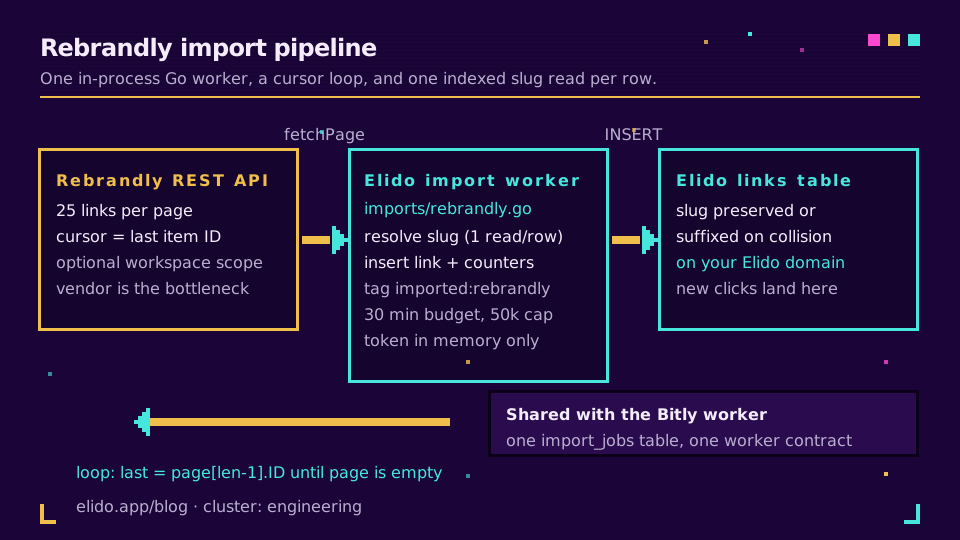
Rebrandly caps a page at 25 links where Bitly returns 100, so the same account takes longer from Rebrandly and the bottleneck is the vendor. Our engineering estimate for 5,000 links is 6 to 10 minutes. The worker follows the last cursor until a page comes back empty, caps a job at 50,000 links and gives up after 30 minutes. Skipped and failed rows go to the job's error log (first 1,000 entries).
Three conflict strategies are picked at start. suffix (default) tries mylink-2, mylink-3 and so on up to 50 candidates, then reports an error. skip leaves the existing Elido link alone and logs the row. fail aborts the job at the first conflict. A suffixed slug is not logged as a problem, yet it is a changed URL, so for a same-domain handover use skip or fail on an empty target domain and treat any non-zero skipped or failed count as work to do.
For finer control, feed your JSONL to the bulk endpoint, which reports success or error per row; the Elido API and SDKs take the same slug and destination pair. Want to test first? Create an Elido workspace and point the importer at a spare domain; the Rebrandly migration page lists the same carry-over and left-behind items.
Step 5: DNS Cutover and Keeping 301s Intact
Order matters, because Elido verifies a domain through two DNS records and live traffic changes only when the second one changes: a TXT record at _elido-verify.<hostname> with the value verify=<token>, and a CNAME from the hostname to the Elido edge target (edge.elido.me by default). See the custom domains feature page.
- Two days out, lower the TTL on the current CNAME to 300 seconds, add the domain in Elido and publish the TXT record. Live traffic is untouched.
- Run the importer onto that domain and compare the imported count with
wc -l links.jsonl. - In the cutover window, change the CNAME to the Elido edge target. Elido polls both records and issues the certificate, as covered in custom domain TLS in five minutes.
- Query at least two public resolvers (
dig @8.8.8.8 go.acme.com CNAME, then@1.1.1.1), since your own machine proves only your own cache. - Leave Rebrandly alone: do not delete the domain or the account yet.
Repoint Zapier, Make or scripts that mint Rebrandly links only after the import is confirmed.
On your own domain the hostname and path are identical, so the same URL now answers from Elido. What you protect is the redirect type: if your Rebrandly links were permanent, keep them permanent, because switching a long-lived link to temporary changes how search engines and caches treat it (301 vs 302 redirects). When the host itself changes, a 301 from old to new carries users across and RFC 9110 section 15.4.2 tells clients they may update stored references, but that needs the old hostname, which you do not control on rebrand.ly.
Step 6: Verify the Migration
Do not announce the move on the basis of a green job screen. Check that imported plus skipped plus failed equals the line count in your JSONL (minus domains you left behind), that skipped and failed are zero or each log entry is explained, and that no slug ended in a -2 suffix that Rebrandly did not have. Filter Links by imported:rebrandly and scan. Then compare the Location header of your top 100 links with the destination in your JSONL:
while read -r slug dest; do
  got=$(curl -s -o /dev/null -w "%{redirect_url}" "https://go.acme.com/$slug")
  [ "$got" = "$dest" ] || echo "MISMATCH $slug -> $got (expected $dest)"
done < top100.tsv
Spot-check mixed-case slashtags and special characters by hand, since I did not test every edge-case slug. Scan one printed QR code on a phone over mobile data. Migrating from Bitly without breaking links has a stricter failure-mode list, and the TinyURL migration guide shows the pattern for another source.
Step 7: Rollback, Analytics and When Not to Switch
Your real rollback is the old setup, still running. While Rebrandly holds the domain and links, reverting is a one-line CNAME change back to the previous target, and with a 300-second TTL most visitors follow within minutes. Inside Elido, the imported:rebrandly tag is the undo handle: filter the batch and retag, move or delete it, then re-import. Re-running is safe under skip; under suffix it creates -2 copies, so prefer skip for a second pass.
The worker runs inside the Elido application, so a deploy or crash mid-import stops it. A sweep every five minutes flips any job with no progress for 30 minutes to failed with a reason. There's no saved cursor today. You restart the job. Resuming from the last Rebrandly cursor is planned and will matter most above roughly 10,000 links.
Click history stays in Rebrandly, so export the reports you need before you downgrade and note the cutover time. New clicks land in Elido from the moment the CNAME resolves to it, with a short overlap where both dashboards count, because resolvers drop cached records at different speeds. If a busy link shows nothing after an hour, run the curl loop before suspecting the dashboard. To keep campaign series continuous, see tracking UTMs end to end. After 30 quiet days, downgrade or close Rebrandly.
The importer doesn't rebuild device or geo routing rules, UTM templates or QR styling. Team membership doesn't come across either. Dub's Rebrandly importer likewise skips device and geo targeting, so this is typical rather than unique to Elido. If your setup leans on routing rules or QR branding, run both products in parallel for a month first. The Rebrandly comparison page and Rebrandly alternatives compare pricing and features.
Related on the Blog
Frequently asked questions
Can I export my links from Rebrandly?
Yes, through the REST API. GET /v1/links returns up to 25 links per page and uses the id of the last link as a cursor. Rebrandly's help center also describes an API-to-CSV route for moving links to a new domain, so a one-click CSV export button should not be assumed.
How do I migrate from Rebrandly to Elido?
Create a Rebrandly API key, add your target domain in Elido, then open Integrations, Rebrandly to Elido, paste the key, pick the domain and a conflict strategy, and start the job. Elido pages through your links and creates one link per slashtag.
Do my rebrand.ly links move with me?
No. rebrand.ly is Rebrandly's own domain, so those short URLs stay on Rebrandly. The importer copies the slashtag and destination to the Elido domain you choose, which gives you the same path on a different host, not the same URL.
Does the Elido importer keep click history?
No. It copies the slashtag, destination, title and tags. Click history is not imported, so keep your Rebrandly reports or exports for the period before cutover and read Elido analytics from the cutover date forward.
Can I keep my own domain when I leave Rebrandly?
Yes, if you control its DNS. Import the links onto the same hostname in Elido, publish the TXT verification record, then change the CNAME to the Elido edge target. A domain bought through Rebrandly needs a transfer-out code first, and Rebrandly notes a 60-day lock on most new domains.
Can I undo a Rebrandly import in Elido?
Every imported link carries an imported:rebrandly tag, so you can filter the batch and bulk-mutate it, including deleting it. Keep your Rebrandly account active until you have verified the result, because that is your real rollback.
Try Elido
Paste a URL, get a working short link
No signup. Link lives for 30 days. Sign up to keep it forever.
No signup needed. Sign up free for 50 links a month.