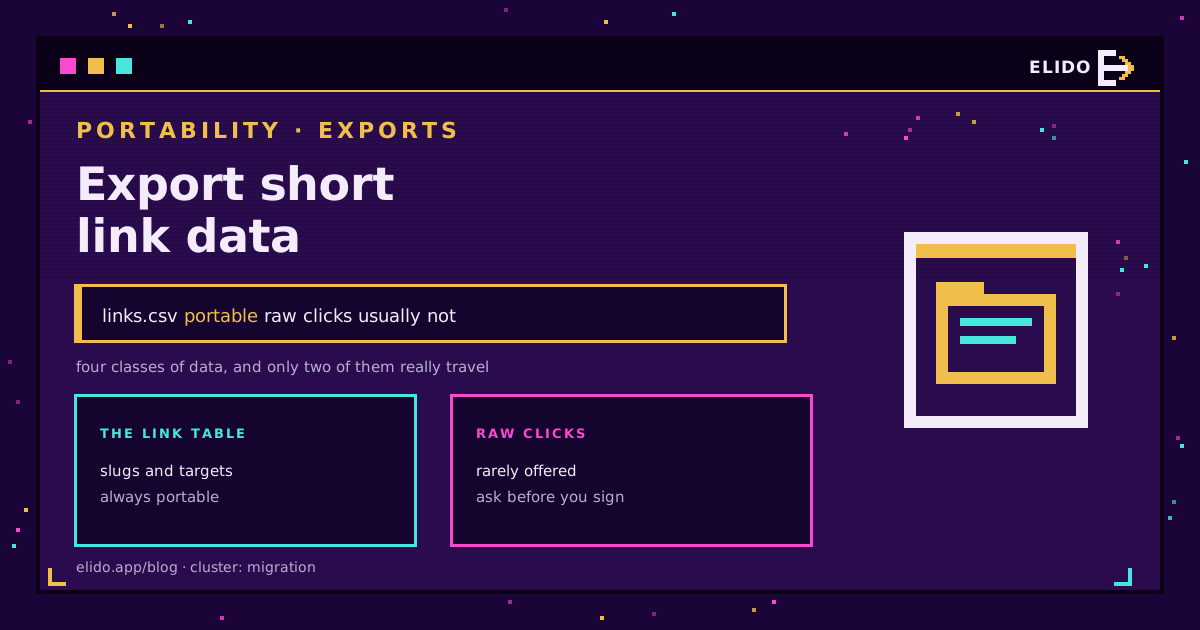
A URL shortener holds four kinds of data, and only one travels cleanly when you leave. The link table - slugs, destinations, tags, and the domains they sit on - is what every serious vendor lets you export short link data for, usually as CSV or through an API, because the schema is simple and every platform needs a basic importer to win new customers. Aggregate click counts are usually available too, though the granularity varies. Raw click events - the row-per-click record with timestamp, referrer, device, and IP - are the exception: most vendors never expose them, because the export surface was never built for full-history retrieval. Account metadata - tags, domains, users - sits in between, exportable in pieces rather than one clean pull.
Treat the link table as the only class you can count on moving, budget for losing raw click history entirely, and get a written answer on aggregate counts before you sign anything. This isn't another migration story - the Bitly migration playbook covers that cutover already. This is the standing habit of getting your own data out, migrating or not.
What a Short Link Platform Actually Holds
Every shortener is built around the same four data classes. Knowing which is which before you need an export decides whether a migration or an audit takes an afternoon or a quarter.
- Link table: slug, destination URL, creation date, tags, folder, and the custom domain a link is assigned to.
- Aggregate click counts: a lifetime total per link, sometimes a daily breakdown, occasionally split by country or referrer.
- Raw click events: one row per click, carrying the timestamp, IP, user agent, and referrer that produced it.
- Account metadata: workspace settings, custom domain records, the team member list, API keys, tag taxonomy.
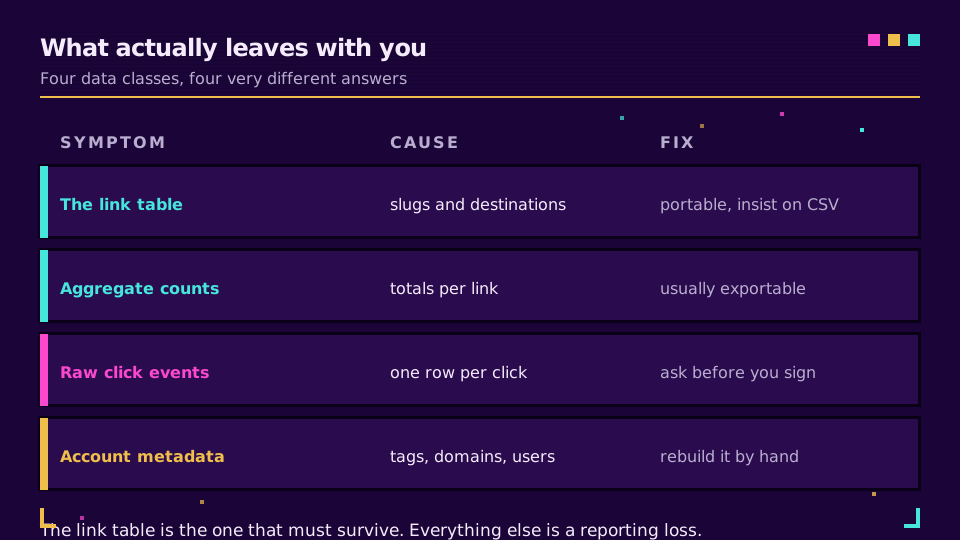
The four classes are not exposed equally, and the gap between them is the whole subject of this post.
Why the Link Table Travels and Click History Usually Does Not
The link table is portable because its schema is boring on purpose. A slug, a destination, a handful of optional fields - every vendor supports a CSV import to win new customers, which means every vendor also has some form of CSV export, if only so a competitor's marketing page can promise "switch in an afternoon." The Bitly failure-modes playbook covers what actually breaks when you move that table across - slug case, trailing slashes, deeplink path collisions. This post is about a different moment: the routine pull you take whether or not a migration is on the calendar.
Click history is a different animal. An aggregate export, when a vendor offers one, gives you a lifetime counter or a coarse daily total - useful for a headline number, useless once you need day-by-day or referrer-level detail. Bitly's own export is a clean example: it hands you the lifetime counter per link and nothing at the event level, a pattern that holds across most of the category, not one specific to Bitly. Once an export drops that granularity, it's gone for good.
Where Raw Click Events Disappear
Raw click events go missing for a structural reason, not a stingy one. Click event stores are built for querying inside the vendor's own dashboard, not for bulk retrieval. The API surface that would let a customer page through millions of individual click rows is a different engineering commitment than a dashboard chart, and most vendors never build it, because most customers never ask before they need it.
The consequence is blunt: once your account ages past the raw-event retention window, or a plan downgrade cuts off the API tier that exposed it, that data is gone for good. The link table usually survives an account change; the click history underneath it does not. Even where a raw-event API exists, pulling a full history runs into the same mechanics that govern every large call against a shortener API - see rate limits, retries, and idempotency on a shortener API for how to pace a multi-day pull without tripping the limiter. If click history is something your team keeps querying rather than just archiving, Elido's link analytics is built so most of that querying happens without an export in the first place.
Questions to Ask a Vendor Before You Sign
Ask these before signing, not after the downgrade notice arrives. A vendor that answers all six in writing on the sales call is one you can trust to still answer them a year later.
| Question | Why it matters | Red flag answer |
|---|---|---|
| What format does the export use? | CSV/JSON versus proprietary decides your reimport work | "Export is available on request" |
| Are raw click events available at all? | Decides if click history export is real or just a dashboard chart | "You can see that in the dashboard" |
| What are the rate limits on a full pull? | A full-history pull at a low rate can take days on a large account | No published limit, or too low to finish |
| What's the retention window on click data? | An export can't recover a raw event that already aged out | No stated retention policy in the docs |
| Does the export include deleted or archived links? | An audit needs the full inventory, not just what's live | Export silently drops anything inactive |
| Is export access tied to an active paid plan? | Decides if you can pull the last export before losing access | Export requires the tier you're about to leave |
If none of this is written down anywhere in your vendor's docs, that silence is the answer to question one. Elido's API and SDKs publish the export endpoints, rate limits, and retention window in the same reference docs as everything else - getting your own data back should never need a support ticket.
A Scheduled Export Routine That Keeps You Independent
The fix is a habit, not a one-time project. Take a full export on a schedule, before a downgrade or a billing dispute forces the question, and you stop being hostage to whatever your vendor decides your plan tier is worth this quarter.
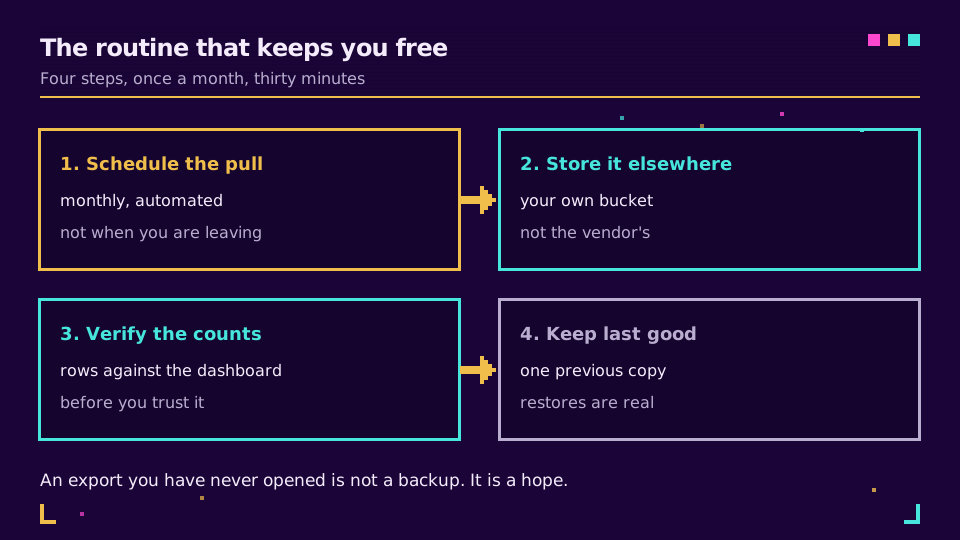
Schedule the pull. Weekly for an active workspace, monthly for a quiet one. A scheduled task hitting the link-table and aggregate-count endpoints is a few lines of script; the point is that it runs unattended.
Store it outside the vendor. A destination you control, not a folder inside the product you're exporting from - your own storage, a shared drive, a repository. If the shortener disappears tomorrow, the export has to survive that. The same spreadsheet shape used for bulk-importing campaign links from a sheet works just as well in reverse, one row per link.
Verify the row counts. Compare the fresh export's row count against the link count your dashboard reports. A gap under a percent or two is normal - archived links you dropped on purpose. A bigger gap means the export missed something.
Keep the last known-good copy. Retain the last two or three pulls, not only the newest. A corrupted export overwriting your only copy defeats the point of downloading link analytics on a schedule.
This habit also covers a quieter threat: ordinary link rot. The destinations behind your slugs decay on their own timeline regardless of what your shortener does - see link rot prevention for short URL campaigns for the detection side of that problem. A standing export gives you the inventory to run that detection against, independent of whichever dashboard you're paying for this year.
What GDPR Article 20 Actually Covers Here
Link data portability comes up constantly in procurement conversations, and being precise about what the article actually reaches changes the negotiation.
Article 20 of the GDPR gives a data subject the right to receive personal data they provided to a controller, in a structured, machine-readable format, and to have it moved to another controller - but only for processing on consent or contract, and only by automated means. The WP29 guidelines on data portability narrow it further: the right covers data provided directly or generated through the subject's own use of a service, not data inferred about them.
Two consequences follow. First, this is an individual's right against a controller, not a business's right to its own aggregate analytics - no GDPR entitlement hands your marketing team its click history back on request. Second, most campaign-level click tracking runs on legitimate interest rather than consent or contract, as the GDPR cornerstone for URL shorteners covers in detail, and Article 20 does not apply to processing on that basis, regardless of whose data it is. Getting your click history out of a vendor is a procurement question, settled by the contract and the export API above, not a data-protection article. Whether the underlying IP or device data is personal data at all, and how long you're entitled to hold it, is covered separately in click data retention.
Verifying an Export Before You Trust It
An export you haven't checked is a rumor, not a record. Run three checks before you file it anywhere or delete the source.
Count the rows and compare against the dashboard's link total; investigate any gap past a percent or two. Open the file in the tool you actually intend to use - a csv export that looks fine in a text editor can still have a broken delimiter or an encoding issue a spreadsheet only surfaces on parse, which is why RFC 4180 is worth checking a sample against rather than assuming. Spot-check a handful of known links, deliberately including one you archived or deleted, since quietly excluding inactive links is the single most common way an export looks complete and isn't.
I've seen a compliance review stall for a week over an export missing every link created before a plan upgrade eighteen months earlier - nobody had told the tool those links existed under a different internal ID. Thirty minutes of row-count checking would have caught it before the review started.
Related on the Blog
Frequently asked questions
What data can I actually export from a URL shortener?
In most cases four classes exist, and only two travel reliably: the link table (slugs, destinations, tags, domains) and aggregate click counts (lifetime or daily totals per link). Raw click events - the row-per-click record with timestamp, referrer, and device - are rarely exportable at all, and account metadata like team members and domain configuration usually comes out in pieces rather than one clean pull.
Can I export raw click-level data, not just totals?
Usually not. Most shortener platforms build their dashboard on the raw event store but never expose a bulk export path for it, so what you get is an aggregate count rather than individual click rows. If click-level export matters to your use case, confirm it exists and ask to see a sample file before you rely on it - a dashboard chart is not evidence of an export API.
Does GDPR give me a right to export my link analytics?
Not in the way procurement conversations usually assume. Article 20 is a right belonging to the data subject - the individual - over data they provided under consent or contract, not a business's right to its own aggregate analytics. Getting your click history out of a vendor is a contract and product-feature question, not a GDPR entitlement, even though the article gets cited as if it settled the matter.
What happens to my link data if I downgrade or cancel my plan?
It depends entirely on what the vendor's terms say, and most terms say nothing specific. A downgrade can cut off API access to historical click data immediately even while the link table stays intact, and a cancellation can start a deletion clock you never agreed to watch. The fix is a standing export taken before you need one, not a request filed after the notice arrives.
What format should a link data export be in?
Structured and machine-readable - CSV or JSON, not a PDF report or a screenshot of a dashboard. A csv export that opens cleanly with one row per link and consistent columns is the practical bar, and RFC 4180 is the closest thing to a standard for what a well-formed CSV file looks like.
How do I know if a link export is complete?
Compare the row count in the file against the link count your dashboard reports, and treat any gap bigger than a percent or two as unexplained until you can account for it. Then spot-check a handful of known links, including at least one you archived or deleted, because a quiet default to excluding inactive links is the most common way an export looks complete and isn't.
Try Elido
Paste a URL, get a working short link
No signup. Link lives for 30 days. Sign up to keep it forever.
Free, no signup required · 2 per day