
A 301 redirect in .htaccess is one line:
Redirect 301 /old-page https://example.com/new-page
Save that in the .htaccess file at your document root and it's live immediately. Apache reads the file on every request, so there's no restart and no deploy. The directive comes from mod_alias, which is present on essentially every Apache install, and it sends a 301 Moved Permanently with a Location header. That's the whole job.
Almost everything that goes wrong with Apache redirects happens after this point: reaching for RewriteRule when Redirect would do, mixing the two modules in one file and getting an order nobody expected, or losing the query string on the way through. This post covers the four rules worth memorising, the execution-order trap that makes correct-looking files misbehave, and how to test a redirect without your browser lying to you. For the wider picture of where redirects can live, see how to redirect a URL.
The One Line That Covers Most Redirects
Redirect takes a status, a path to match, and a target. The target can be a full URL or a path on the same host:
Redirect 301 /old-page /new-page
Redirect 301 /shop https://shop.example.com/
RedirectMatch 301 ^/blog/([0-9]{4})/(.*)$ /articles/$2
Two behaviours are worth knowing before you use it. First, Apache's own guidance is explicit that this is the right tool: "This kind of simple redirection of one URL, or a class of URLs, to somewhere else, should be accomplished using these directives rather than RewriteRule."
Second, and this one surprises people: "Remember that Redirect preserves path information. That is to say, a redirect for a URL /one will also redirect all URLs under that, such as /one/two.html and /one/three/four.html." If you only want the exact path, RedirectMatch 301 ^/one$ anchors it. Otherwise you have just redirected an entire subtree, which is sometimes precisely what you wanted and sometimes a very confusing morning.
RedirectMatch is the regex version, and it covers most of what people open mod_rewrite for. Captured groups land in $1, $2, and so on, so a directory rename or a date-based URL scheme change is a one-liner.
When You Actually Need RewriteRule
Reach for mod_rewrite when the decision depends on something other than the path. Host, query string, request method, cookies, and user agent are all visible to RewriteCond and invisible to Redirect:
RewriteEngine On
RewriteCond %{QUERY_STRING} (^|&)ref=oldpartner(&|$)
RewriteRule ^landing$ /partners/oldpartner? [R=301,L]
There's one gotcha in per-directory context that accounts for a huge share of copy-pasted rules doing nothing at all. Apache strips the directory prefix before matching, so the pattern never sees a leading slash: "The removed prefix always ends with a slash, meaning the matching occurs against a string which never has a leading slash. Therefore, a Pattern with ^/ never matches in per-directory context."
That's why RewriteRule ^/old$ /new [R=301] works when someone pastes it into a virtual host and silently fails in .htaccess. Drop the slash: ^old$. When your substitution is a relative path and the rewrite lives in a subdirectory, you may also need RewriteBase to tell Apache what the paths are relative to.
The Execution Order Trap
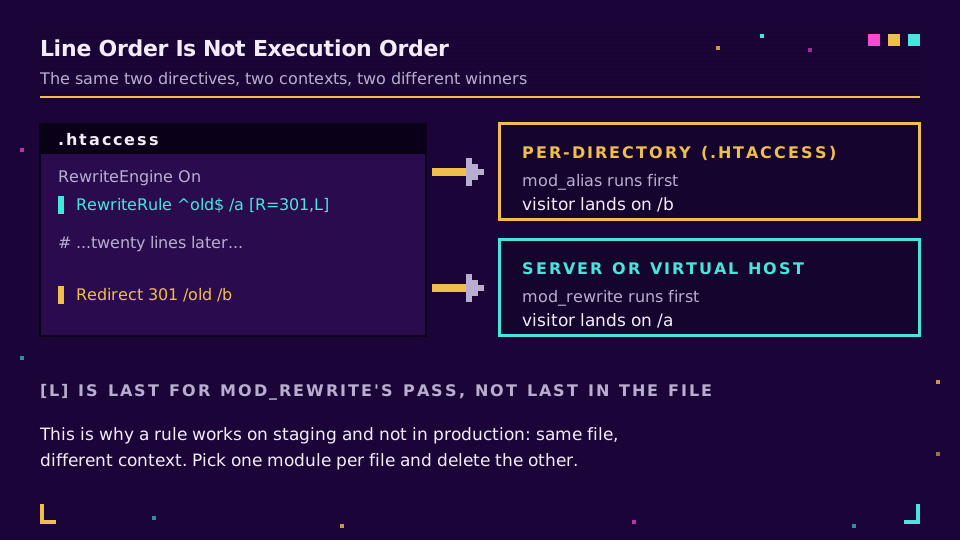
This is the one that costs people an afternoon. Line position in the file does not decide which module runs first.
Apache documents it plainly: "If you do mix Redirect and RewriteRule in the same context, be aware that their execution order depends on where they appear. In server/virtual-host context, mod_rewrite runs first; in per-directory context (.htaccess), mod_alias runs first."
Read that twice, because the consequence is counterintuitive. In an .htaccess file, a Redirect at the bottom of the file beats a RewriteRule at the top. Move the identical rules into a virtual host and the winner flips. The [L] flag doesn't save you either: it means last rule in this pass of mod_rewrite, not last rule in the file, and it has no authority over another module.
The practical rule I follow: one module per file. If a project needs conditions anywhere, do all of its redirects with mod_rewrite and delete the Redirect lines. Mixed files are where the bug reports that read "the redirect works on staging but not production" come from, because the two environments put the rules in different contexts.
Query Strings: Kept, Replaced, or Erased
Marketing links live and die by their query strings, so this table is worth pinning up. All of it is documented behaviour rather than folklore.
| What you write | Original query string | Notes |
|---|---|---|
Redirect 301 /a /b | Carried across | mod_alias appends it for you |
RedirectMatch 301 ^/a$ /b | Carried across | Same module, same behaviour |
RewriteRule ^a$ /b [R=301] | Passed through unchanged | The documented default |
RewriteRule ^a$ /b?src=x [R=301] | Replaced by yours | Your parameters win |
RewriteRule ^a$ /b?src=x [R=301,QSA] | Combined with yours | QSA appends the original |
RewriteRule ^a$ /b? [R=301] | Erased | A bare ? clears it |
Apache's wording on the default: "By default, the query string is passed through unchanged." And on the flags, [QSA] "appends any query string from the original request URL to any query string created in the rewrite target", while [QSD] discards the incoming one. If you redirect to an absolute URI, the query string comes along unless you ask for [QSD].
The failure this prevents is quiet and expensive. A rule that replaces the query string strips utm_source and utm_campaign on the way through, your analytics attributes the session to direct traffic, and nothing errors. Nobody notices until someone asks why the spring campaign got no credit. UTM parameters not showing in GA4 covers the diagnosis from the analytics end.
If you find yourself maintaining dozens of campaign redirects in a server config file, that is a signal rather than a chore. Server rules need a deploy, an Apache config review, and someone with shell access. Move campaign links onto short links you can edit yourself and keep .htaccess for the structural redirects it's good at.
HTTPS and www in One Hop, Not Two
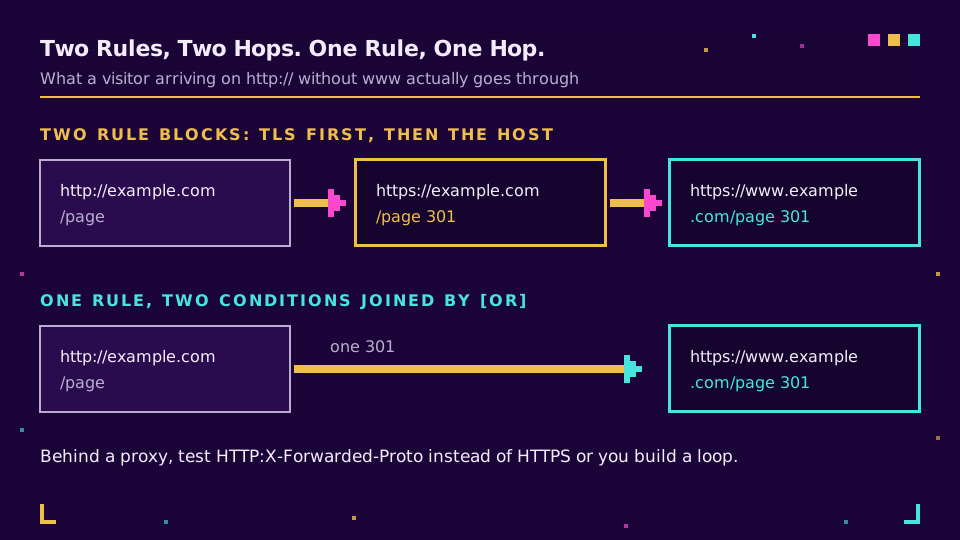
The most copied snippet on the internet does this in two rule blocks, which means a visitor arriving at http://example.com/page gets redirected twice: once to add TLS, once to add www. Two hops, two round trips, and a slightly weaker signal at each one.
One rule, two conditions, one hop:
RewriteEngine On
RewriteCond %{HTTPS} !=on [OR]
RewriteCond %{HTTP_HOST} !^www\.example\.com$ [NC]
RewriteRule ^ https://www.example.com%{REQUEST_URI} [R=301,L]
Behind a CDN or a load balancer, %{HTTPS} is usually off at the origin even when the visitor is on HTTPS, because TLS terminated upstream. Test %{HTTP:X-Forwarded-Proto} instead:
RewriteCond %{HTTP:X-Forwarded-Proto} !https
Get this wrong and you build an infinite redirect loop: the proxy sends HTTPS, the origin thinks it's HTTP, redirects to HTTPS, and round it goes until the browser gives up. How to fix a redirect loop walks through diagnosing that from the response headers.
Why It Isn't Working
In the order I check them:
AllowOverrideisNone. Apache's documentation states the default: "This means.htaccessfiles are completely ignored unless you explicitly enable them for a directory." Test it by putting deliberate garbage on the first line. No 500 error means your file isn't being read at all, and every rule in it is decoration.- The file is misplaced or misnamed. It must be
.htaccess, with the leading dot, in the directory the request maps to. Editors that helpfully savehtaccess.txtare a recurring cause. - mod_rewrite isn't loaded.
Redirectworks,RewriteRulesilently doesn't, which sends people looking at their regex for an hour. - Your browser cached the old 301. Chrome and Firefox both cache permanent redirects aggressively, per browser profile, so the fix you just deployed is invisible to you and working fine for everyone else. During development, use
R=302and switch toR=301once the rule is right. - The rule matches its own target.
RewriteRule ^(.*)$ /index.php/$1without a guard is the classic. Add a condition that exempts the destination.
Test With curl, Not the Browser
One command tells you the status, the target, and how many hops it took:
curl -sIL https://example.com/old-page | grep -iE '^HTTP|^location'
Read the output as a sequence. Two HTTP/2 301 lines before the 200 means two hops, and each hop is a real round trip for a real visitor on a mobile network. Google's documentation on redirects treats a permanent redirect as the strongest signal for consolidating a URL, and getting there in one step is strictly better than getting there in three. Our link checker prints the same chain in a browser, and 301 vs 302 redirects covers which status to send when you're unsure.
Test the paths that matter rather than the one you just wrote: the root, a deep path, a path with a query string, and the target itself. That last one catches loops before your visitors do.
When Not to Use .htaccess At All
Apache's own position is unambiguous. "If you have access to the main server configuration file, you should put all of your configuration there instead of in .htaccess files," because per-request parsing costs real work: "permitting .htaccess files causes a performance hit, whether or not you actually even use them." On shared hosting you have no choice. On a server you control, the main configuration is the better home for anything structural.
There's a second case for keeping rules out of the file entirely, and it has nothing to do with performance. Redirects that appear in print, in a QR code, or on someone else's slide deck need to outlive your web server, your CMS migration, and possibly your hosting provider. A rule in .htaccess is one careless deploy away from disappearing, and nobody reports a dead printed link until the campaign is over. Structural redirects belong in the server; campaign and print links belong somewhere you can edit in seconds and measure without grepping access logs.
Read the Cornerstone Series
This post sits in the tutorials cluster. For the full map, types of redirects covers every status code and client-side method, and how to redirect a URL covers the six places a redirect can live.
Related on the Blog
Frequently asked questions
How do I create a 301 redirect in .htaccess?
Put one line in the .htaccess file at your document root: Redirect 301 /old-page https://example.com/new-page. Apache reads .htaccess on every request, so the redirect is live the moment you save the file. No restart, no deploy. That directive comes from mod_alias, which is enabled on effectively every Apache install.
What is the difference between Redirect and RewriteRule?
Redirect and RedirectMatch come from mod_alias and do one thing: send a status code and a Location header. RewriteRule comes from mod_rewrite and can inspect the host, the query string, cookies, or the user agent before deciding. Apache's own documentation says simple redirection should use mod_alias rather than RewriteRule, and treats mod_rewrite as a last resort.
Why is my .htaccess redirect not working?
Five causes cover almost all of it: AllowOverride is None so the file is ignored entirely, the file is not at the document root or is misnamed, mod_rewrite is not loaded, your browser cached an earlier 301 and never asks the server again, or the rule matches its own target and loops. Test with curl rather than a browser, because a cached 301 makes a fixed rule look broken.
Does the query string survive a 301 redirect in .htaccess?
With Redirect and RedirectMatch, yes, it is carried across automatically. With RewriteRule the answer depends on the substitution: no question mark in it and the original query string passes through, a question mark and your own parameters replace it, a bare question mark at the end erases it, and the QSA flag combines both. Getting this wrong silently drops UTM parameters.
How do I redirect HTTP to HTTPS and non-www to www in one hop?
Use one rule with two conditions joined by OR, rewriting to the canonical scheme and host in a single step. Two separate rule blocks produce two redirects for anyone arriving on http:// without www, and each extra hop costs latency and dilutes the signal. Behind a proxy or CDN, test %{HTTP:X-Forwarded-Proto} instead of %{HTTPS} or you will build a loop.
Does .htaccess slow down a site?
Slightly, and unavoidably. Apache's documentation is blunt about it: permitting .htaccess files causes a performance hit whether or not you use them, because httpd looks for the file in every directory on every request. If you have access to the main server configuration, the same rules belong there instead, loaded once at startup.
Try Elido
Paste a URL, get a working short link
No signup. Link lives for 30 days. Sign up to keep it forever.
Free, no signup required · 2 per day