No. The printed pattern doesn't expire, and it can't. A QR code is a fixed grid of light and dark modules that decodes to exactly the same string in twenty years as it does this afternoon. Nothing in it counts down.
What expires is one of the two things behind the pattern: the page it points at, or, for a dynamic code, the redirect service that resolves its short link. That is why the same question gets a confident yes from one person and a confident no from another - they're describing different layers. If you're about to print a code on 5,000 flyers, the layer you care about is the one you don't own. The full print-to-scan workflow lives in a QR code campaign from scratch; this post is about what happens to that campaign eighteen months later.
Three Layers, and Only Two of Them Can Fail
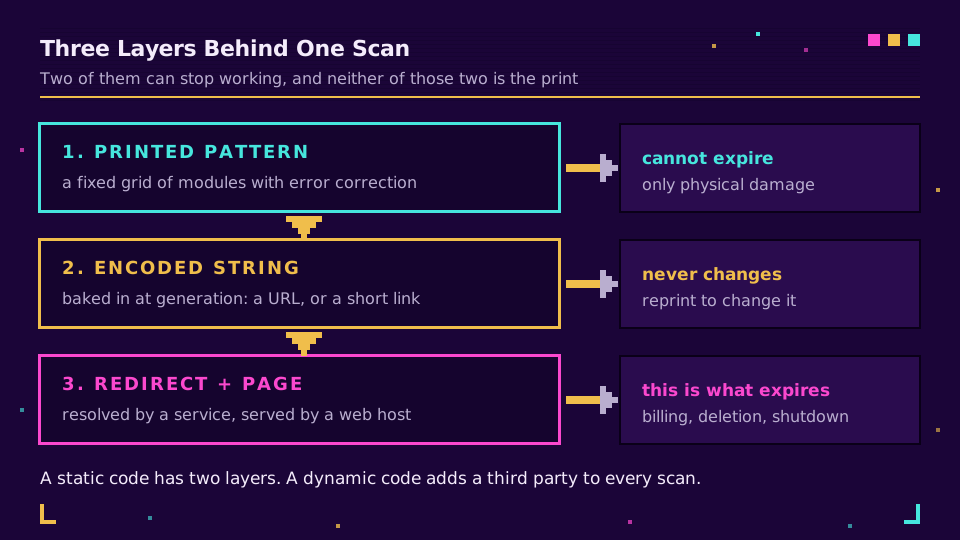
Every scan traverses three layers, and they fail at completely different rates.
The pattern is data at rest. Encoding is defined by the QR standard and the module grid carries its own error correction, which is why a code survives a coffee ring or a crease; Denso Wave, which invented the format, documents the correction levels that make that possible. A pattern can be destroyed physically. It cannot expire.
The encoded string is whatever was baked in at generation time. For a static code that's the final URL. For a dynamic code it's a short link, and the destination lives in a database somewhere else.
The destination is a page on a web server, with all the mortality that implies. Sites get restructured, products get discontinued, agencies lose the account and let the domain lapse.
A static code has two of these layers and no service in the middle, so it fails only when the destination does. A dynamic code adds a third party who has to keep resolving your link every single time somebody scans it. That extra hop buys you editable destinations and scan analytics. It also introduces the only failure mode in this whole article that people call expiry.
The Five Ways a Dynamic QR Code Dies
In rough order of how often I've seen each one actually happen:
| What happened | What the scan does | Fixable without reprinting? |
|---|---|---|
| Free trial ended | Provider error page, or a redirect to the provider's own site | Yes, by subscribing |
| Monthly scan allowance used up | Scans stop resolving until the counter resets or the plan is upgraded | Yes, by upgrading |
| Card expired, invoice unpaid | Codes go dark after the grace period | Yes, until the account is purged |
| Code, campaign, or account deleted | 404 from the provider's domain | Rarely, and never if the slug got recycled |
| Provider shut down or was acquired and sunset | Domain stops resolving entirely | No |
Notice that four of the five have nothing to do with QR codes as a technology. They're billing events. The pattern on the poster is fine; the invoice isn't.
Trials are the sharpest edge here because the timeline is so short relative to print. QR Code Generator's pricing page promises "your first 14 days are on us" and caps its entry tier at 10,000 scans (checked August 2026). Neither page I read said what happens to a code after the window closes, which is exactly the information a print buyer needs and rarely gets. Fourteen days is less than the turnaround on a decent print job. It is entirely possible to design a code, approve a proof, and have the code die before the boxes arrive.
The scan cap deserves its own warning. It's the one failure mode that hits hardest when things are going well: a campaign outperforms, blows through its allowance mid-month, and the codes go quiet during the peak you were hoping for. Free tiers are where this bites, with allowances sometimes in the low hundreds.
How to Tell If the Code in Your Hand Is Dynamic
You cannot tell by looking. Density is not a signal, and neither is a logo in the middle. There's no visual difference between a static code and a dynamic one, and no expiry date printed anywhere.
So decode it instead of following it. Most scanner apps show the decoded string and ask before opening it, and any desktop decoder will dump the raw text. Then read what you got:
- A full destination URL on your own site means static. There's no service in the middle and nothing to lapse.
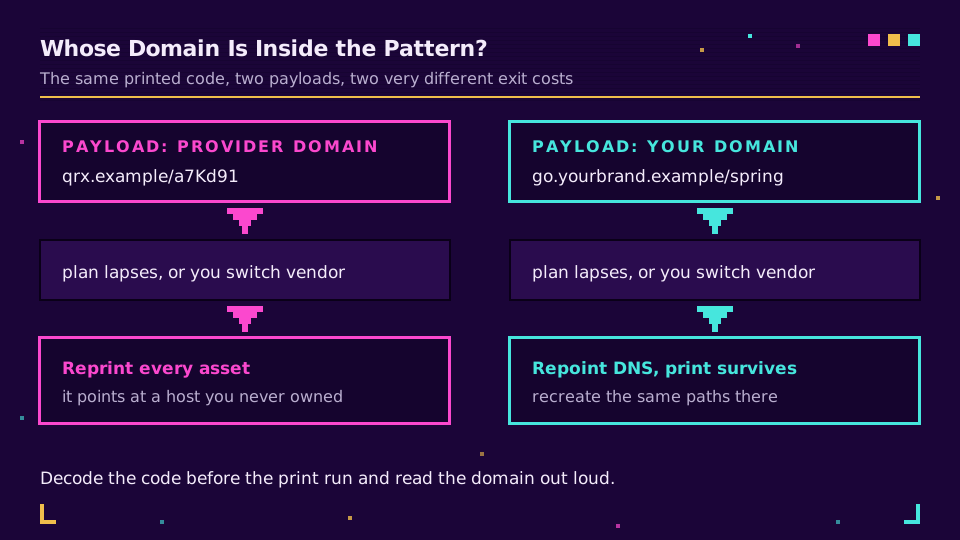
- A short link on a domain you recognise as yours means dynamic and portable. Good position to be in.
- A short link on a provider's shared domain means dynamic and dependent. The code works as long as that company keeps resolving it.
For the last two you can go one step further and check the redirect itself with a single request:
curl -sI https://s.elido.me/spring26 | grep -i '^location\|^HTTP'
A 301 or 302 with a Location header proves the code is dynamic and shows you where it currently points. Our link checker does the same thing in a browser if you'd rather not open a terminal, and expand a short URL covers what else you can learn from the response. This is also the cheapest audit you can run across an inherited estate of printed material: decode every code, list the domains, and you have your dependency map in an afternoon.
The Portability Test Nobody Runs Before the Print Run
One question decides whether an expiry event is an inconvenience or a reprint: whose domain is inside the pattern?
The stock answer from QR vendors is that codes cannot be moved between providers, so switching means a reprint. Uniqode's own guide to QR expiry says exactly that, checked in August 2026. It's true for their codes, because their codes encode their domain. It isn't a property of QR codes. If the payload is go.yourbrand.example/spring26, the pattern is pointing at a hostname on a domain you own. Change providers and you repoint the domain, recreate the paths, and every printed code keeps working. The print outlives the vendor relationship, which is the entire point of putting your own domain on physical assets.
Two conditions have to hold, and both are worth checking before you commit:
- The domain must be yours in the registrar sense, not a subdomain of the provider's domain that merely contains your brand name.
- The new provider must let you recreate the exact paths, ideally by bulk import, so
/spring26still means what it meant.
That second one is a real question to ask in a sales call rather than an afterthought. Custom domains for short links walks through the DNS side, and our custom domain setup takes about five minutes end to end. If you print QR codes on anything with a lifespan measured in years - menus, plaques, machinery, packaging - this single decision matters more than every design choice you'll argue about.
Put your codes on a domain you own and the worst case stops being a reprint and starts being a DNS change.
What Happens to the Scan History
The codes going dark is the loud problem. Losing the numbers is the quiet one.
Scan history usually lives with whoever resolves the link, under whatever retention the plan specifies, and a lapsed account is not a good time to discover the export options. If you're moving, export the raw scan data before you cancel anything, not after. Aggregate charts are pleasant to look at and useless to reconcile against a new provider's numbers later.
Where that data physically sits is a separate question worth asking in the EU, since scan logs carry IP-derived location and device details. Ours stay in an EU region and export as CSV whenever you ask; what to measure in short link analytics covers which of those fields actually earn their keep, and tracking QR code scans covers the mechanics.
A Ten-Minute Pre-Print Checklist
Run this before the file goes to the printer, not after the boxes land:
- Decode the code and read the payload out loud. If the domain isn't one you own, decide consciously that you're fine with that.
- Check the plan behind it: scan allowance, trial end date, what the provider does to codes when billing stops. Get that last answer in writing if the asset is expensive.
- Confirm you can edit the destination and that editing it doesn't mint a new short link. Dynamic versus static QR codes explains why some tools quietly do the latter.
- Print a proof and scan it with a cheap phone in bad light, at the distance a real person will stand. How big should a QR code be has the distance rules.
- Diary a re-scan for six months out. Codes die silently, and nobody reports a dead poster.
The last one is the habit that separates teams who get surprised from teams who don't. A dead redirect generates no complaint and no alert; it just quietly stops converting. If your codes matter, put a recurring calendar entry against them and scan a few by hand, or wire an uptime check against the destinations.
Read the Cornerstone Series
This post sits in the features cluster. For the full build, a QR code campaign from scratch covers planning through measurement, and what is a QR code covers what the squares actually are.
Related on the Blog
Frequently asked questions
Do QR codes expire?
The printed pattern does not. It is a fixed grid of modules that decodes to the same string forever. What can expire is what that string points at: a destination page that gets taken down, or, for a dynamic code, the redirect service that resolves its short link. So a static QR code has nothing to expire, and a dynamic one lasts exactly as long as somebody keeps answering for its link.
How long does a QR code last?
Indefinitely as a pattern. A static code printed in 1998 still decodes today. In practice the lifespan of the code is the lifespan of the weakest thing behind it, which is usually a subscription rather than a page. Codes on physical assets that outlive campaigns - signage, packaging, plaques - are the ones where this matters most.
Do free QR codes expire?
Free static codes never expire, because the data lives in the pattern and no service is involved. Free dynamic codes usually do, either when a trial window closes or when a monthly scan allowance runs out. QR Code Generator, for instance, gives 14 days on its trial and caps its entry plan at 10,000 scans, per its pricing page in August 2026. Read the plan before the print run, not after.
Can an expired QR code be reactivated?
Sometimes, and it depends entirely on the provider. If the account still exists and the short link was never reassigned, paying again typically brings the same link back to life with its scan history intact. If the account was deleted, or the provider recycled the slug to another customer, the printed code is dead and no amount of paying fixes it.
How can I tell whether a printed QR code is static or dynamic?
Decode it and read the raw text instead of following it. Most scanner apps will show you the decoded string before opening it. If you see the final destination URL, the code is static. If you see a short link on somebody's shortening domain, it is dynamic, and that domain is now a dependency of your printed asset.
Can I move a printed QR code to a different provider without reprinting?
Only if the code encodes a domain you control. A dynamic code pointing at your own short domain is portable: you repoint the domain at a new provider, recreate the same paths, and the print keeps working. A code pointing at a provider's shared domain cannot be moved at all, which is the real reason vendors say switching means reprinting.
Try Elido
Paste a URL, get a working short link
No signup. Link lives for 30 days. Sign up to keep it forever.
Free, no signup required · 2 per day