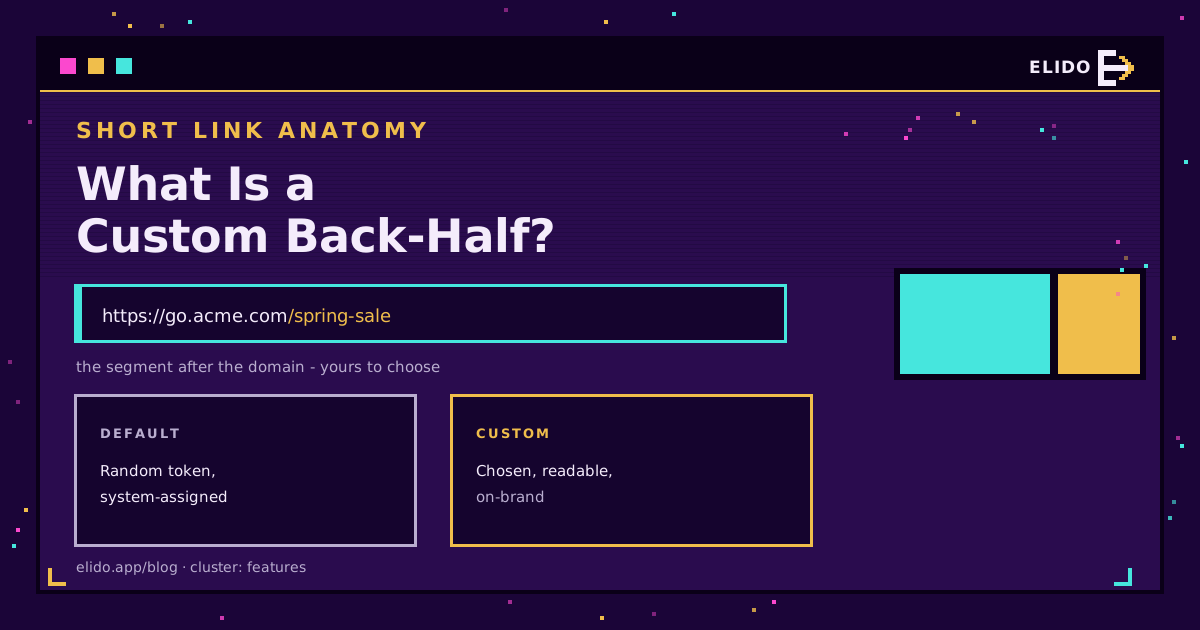
A custom back-half is the part of a short link you get to choose - the readable keyword right after the slash. In go.acme.com/spring-sale, the spring-sale is the custom back-half. Instead of the random string a shortener assigns by default, like /a1B2c9, you set text that tells a person and a search crawler what sits on the other side of the click.
It is the smaller of the two things that make a link look "branded", and the one people mix up most. The domain (go.acme.com) is the brand; the back-half (/spring-sale) is the label. This piece explains what the back-half is, how it differs from the domain, why it moves click-through rate, and how to set one that helps rather than clutters.
For the wider picture of how links, domains, and campaigns fit together, the what is link management cornerstone is the map this sits inside.
What a Custom Back-Half Is
Every short link has two editable parts and one fixed one. Read https://go.acme.com/spring-sale left to right:
https://- the protocol, fixed.go.acme.com- the domain, the branded front of the link.spring-sale- the back-half, the slug you choose.
By default a shortener fills that last slot with a short random token so the link is unique. A custom back-half replaces that token with words you pick. The term comes from Bitly, whose developer docs cover customizing the back-half - the "half" after the slash - but the concept is universal to link shorteners, sometimes labelled the slug, alias, keyword, or vanity path.
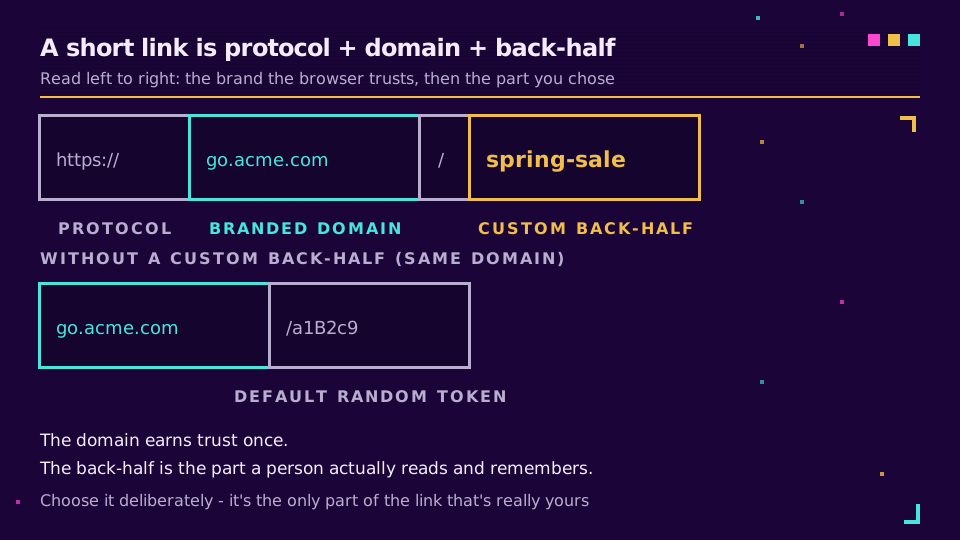
That is the whole idea: swap an opaque token for a word. The interesting part is what changes when you do.
Custom Back-Half vs Custom Domain
These two get used interchangeably, and they are not the same. A branded link is the sum of both.
The custom domain is the front - your own hostname (go.acme.com) instead of a shared shortener domain. The custom back-half is the tail - your keyword instead of a random slug. You can set a custom back-half on a shared domain and get bit.ly/spring-sale, which is readable but still points at someone else's brand. You can pair a custom domain with an auto-generated back-half and get go.acme.com/a1B2c9, which is on-brand but says nothing. The link only reads as fully yours when both halves are - go.acme.com/spring-sale.
If it is the front you are missing, custom domains is the feature that owns that half; setting the back-half is usually a field on the link itself. The guide to setting up branded short links walks both halves end to end.
Why the Back-Half Matters
A back-half is small, and its effect is mostly psychological, which is exactly why it works. People decide whether to click in the moment they read the link, and a readable back-half answers "where does this go?" before the click instead of after.
- Trust.
go.acme.com/invoice-aprillooks like something Acme meant to send.go.acme.com/x7Kp9qlooks like something that ended up in your spam folder. Readability reads as legitimacy. - Click-through rate. A descriptive slug sets an accurate expectation, and links that keep their promise get clicked more. Jakob Nielsen's classic point that the URL is part of the interface applies to short links too - the path is UI, not plumbing.
- Campaign clarity.
/webinar-q3and/webinar-q4are self-documenting in a report. Two random tokens are not, and you will be cross-referencing a spreadsheet to tell them apart.
What a back-half does not do is rank your page. Search engines rank the destination URL, not the redirect slug. The back-half is a click-through and trust lever, not an SEO one - a distinction the best URL shorteners comparison keeps coming back to.
How to Set a Custom Back-Half
Setting one is a single field when you create the link: type your keyword into the back-half slot instead of letting the shortener auto-fill it. The mechanics are easy. The rules around it are where people get caught.
- Uniqueness. A back-half is unique per domain. Once
go.acme.com/spring-saleexists, nothing else on that domain can usespring-sale. - Permanence. On many services the back-half is permanent once created - it stays bound to that link and cannot be freed up or reassigned. Treat it as a decision, not a draft.
- Characters. Stick to lowercase letters, numbers, and hyphens. Hyphens, not underscores or spaces.
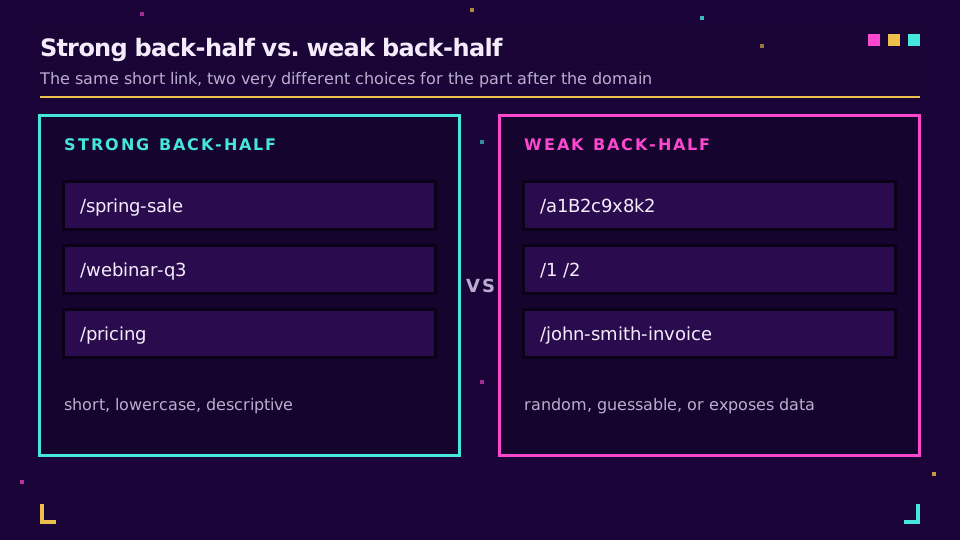
- No sensitive data. A back-half is public and often guessable. Never put a name, email, order ID, or anything private in it.
If you generate links from code, the same field is just a back_half (or equivalent) parameter on the create call, so campaign naming stays consistent whether a marketer types it or a script sets it. When you want the slug to change behaviour rather than just read well - route by country or device behind one back-half - that is where smart links take over. Start branding your links once the naming scheme is settled.
Best Practices for Custom Back-Halves
A good back-half is short, honest, and predictable. A scheme beats one-off cleverness because you and your team will create hundreds of these.
- Keep it short and lowercase - two or three words max, hyphen-separated.
- Describe the destination, do not editorialise:
/pricing, not/best-deal-ever. - Use a consistent pattern for series:
/webinar-q1,/webinar-q2. - Avoid sequential numbers alone (
/1,/2) - they are trivially guessable, which lets people walk your links. - Do not stuff keywords. The back-half is for humans reading the link, and a crawler reads the destination, not the slug.
One more, since it trips teams up: a readable back-half makes a link easier to guess, so do not rely on an obscure slug as a security control. If a link must stay private, gate it - a slug is a label, not a lock. The same applies to generated codes: how short codes are generated shows how guessable sequential codes are, and how custom slugs share a namespace with random ones. The link cloaking and URL masking piece covers what redirects can and cannot hide.
Read the Cornerstone Series
This sits in the features cluster. The cornerstone is what is link management - the overview of domains, back-halves, routing, and analytics as one system. From there, setting up branded short links is the practical next step.
Related on the Blog
Frequently asked questions
What is a custom back-half?
A custom back-half is the part of a short link you choose yourself, right after the slash. In go.acme.com/spring-sale, the 'spring-sale' is the custom back-half. Instead of a random string like /a1B2c9, you set a readable keyword that tells people and search engines what the link points to.
What is the difference between a custom back-half and a custom domain?
They are the two halves of a branded link. The custom domain is the branded part before the slash (go.acme.com instead of bit.ly), and the custom back-half is the readable keyword after it (/spring-sale instead of /a1B2c9). You can set the back-half on a shared domain, but the link only looks fully branded when both parts are yours.
Can two links have the same custom back-half?
Not on the same domain. A back-half is unique per domain, so once go.acme.com/spring-sale is taken, no other link on that domain can use spring-sale. On many services the back-half is also permanent once created - it stays tied to that link and cannot be recycled - so pick it deliberately.
Does a custom back-half help SEO or click-through rate?
It mainly helps click-through rate and trust, not rankings directly. A descriptive, human-readable back-half tells people where the link goes before they click, which lifts clicks on the short link itself. The destination page's own URL is what search engines rank.
What characters can a custom back-half contain?
Typically letters, numbers, and hyphens. Keep it lowercase to avoid case-sensitivity surprises, use hyphens rather than spaces or underscores, and keep it short and descriptive. Avoid anything sensitive - a back-half is public, so never put a name, email, or ID in it.
Try Elido
Paste a URL, get a working short link
No signup. Link lives for 30 days. Sign up to keep it forever.
Free, no signup required · 2 per day